Naturally there is no answer to this question, but I was just curious among you folks, who here prefers WHS or Linux for their media storage servers. I'm comfortable with both, and tend towards linux as its free, but anyone have some serious pros or cons they'd want to bring up?
![[H]ard|Forum](/styles/hardforum/xenforo/logo_dark.png)
Navigation
Install the app
How to install the app on iOS
Follow along with the video below to see how to install our site as a web app on your home screen.
Note: This feature may not be available in some browsers.
More options
You are using an out of date browser. It may not display this or other websites correctly.
You should upgrade or use an alternative browser.
You should upgrade or use an alternative browser.
WHS or Linux
- Thread starter wizang
- Start date
WHS all the way. So easy to use, and the included backup is worth the price alone.
This.
Wouldn't even dream of a Linux machine for my home.
Cryptic1911
Limp Gawd
- Joined
- Jul 6, 2004
- Messages
- 226
WHS for sure.. Linux is awesome and all, but its just more of a pain in the ass to deal with on a small scale. WHS is super easy to setup and manage, and it does EVERYTHING.. and does it well.
Old Hippie
Supreme [H]ardness
- Joined
- Oct 31, 2005
- Messages
- 6,013
I'm one of those who've had a much less than steller experience with WHS....current problem being that the search doesn't update without a hard reboot.
That being said it's my lazy ass behaviour that keeps me from learning/moving to an alternate server OS.
If my BIL and two friends didn't use it soo much, I'd probably get rid of the server altogether.
I'd still need a secondary backup for my music collection but I think a NAS would be a little easier.
That being said it's my lazy ass behaviour that keeps me from learning/moving to an alternate server OS.
If my BIL and two friends didn't use it soo much, I'd probably get rid of the server altogether.
I'd still need a secondary backup for my music collection but I think a NAS would be a little easier.

InvisiBill
2[H]4U
- Joined
- Jan 2, 2003
- Messages
- 2,608
I've been using a single drive FreeNAS for backup and file sharing for a few years. IdleBackup runs on my PC and backs up designated files to the FreeNAS anytime I'm not using the PC.
I've messed around with adding some things into FreeNAS, but the actual NAS stuff itself has all been PnP for me.
I've messed around with adding some things into FreeNAS, but the actual NAS stuff itself has all been PnP for me.
Silhouette
Limp Gawd
- Joined
- Dec 14, 2006
- Messages
- 205
I guess it depends on what you know and what you need. Currently all my servers use linux. I've used WHS on a couple of systems but I've switched everything back to linux now. Setting up another box exactly the way I want it is a 5 minute job + a script to install and configure all the services that I use.
WHS is quite good, especially if you're not comfortable with linux or you don't want to spend time editing configuration files.
WHS is quite good, especially if you're not comfortable with linux or you don't want to spend time editing configuration files.
I use Linux(Gentoo) on my home one. I'm using hardware RAID.
I also use it for my web/mail/torrent server. I have it sitting in my closet, don't even have a monitor hooked up to it.
For the torrent program I'm using deluge, it comes with a nice web interface.
I also use it for my web/mail/torrent server. I have it sitting in my closet, don't even have a monitor hooked up to it.
For the torrent program I'm using deluge, it comes with a nice web interface.
- Joined
- Apr 7, 2006
- Messages
- 10,477
You choose:
This

Or this

This
Or this
- Joined
- Apr 7, 2006
- Messages
- 10,477
I use ubuntu server + webmin as a backup server. You can configure pretty much anything from webmin's web interface, so you don't need to know much command line.
with WHS you need to know how to turn on your computer.
WHS is probably simpler, but setting up Linux as a storage server is quite easy too. In fact, if you install a desktop distribution instead of a server, all you have to do is right click on the folder you want to share and share it. Now all your Windows machines will be able to see it as a network drive.
And once more, I'm not arguing that Linux is simpler than Windows. It's not. But it's free, and at least for this task, it really is quite simple. And you can set up a software RAID array from the GUI too.
And once more, I'm not arguing that Linux is simpler than Windows. It's not. But it's free, and at least for this task, it really is quite simple. And you can set up a software RAID array from the GUI too.
Adidas4275
Supreme [H]ardness
- Joined
- Mar 11, 2006
- Messages
- 5,986
the imagebased backup of WHS, drive pool and available addins make it the clear winner for most scenarios.
I use WHS and love it for the addins.... lightsout, autoexit, gridjunction, utorrent, soon to be homeseer or mControl, Webguide, advancedadmin, are all great addins that take much more time to setup in a linux distro....
when something isnt correct on my WHS i get very detailed emails or texts to my iphone about the issue, where i then RDP into it and change what ever needs to be changed.... like removing a failing drive or adding a new user to the system..... WHS Health is another great one.
Honeslty unRAID, ZRaid or other versions of non-windows based servers have their place and definately do somethings better than WHS, but none do everything better than WHS.
grab a Norco 4220 case, 2 8 port PCIe $100 Supermicro cards with SAS --> SATA breakout cables, a AM2 65w or lower CPU and a Matx motherboard with 2 PCIe 16/8x slots and you have a highly expandable, low cost, media server that has endless potential..... throw WHS on it and it will be complete
I use WHS and love it for the addins.... lightsout, autoexit, gridjunction, utorrent, soon to be homeseer or mControl, Webguide, advancedadmin, are all great addins that take much more time to setup in a linux distro....
when something isnt correct on my WHS i get very detailed emails or texts to my iphone about the issue, where i then RDP into it and change what ever needs to be changed.... like removing a failing drive or adding a new user to the system..... WHS Health is another great one.
Honeslty unRAID, ZRaid or other versions of non-windows based servers have their place and definately do somethings better than WHS, but none do everything better than WHS.
grab a Norco 4220 case, 2 8 port PCIe $100 Supermicro cards with SAS --> SATA breakout cables, a AM2 65w or lower CPU and a Matx motherboard with 2 PCIe 16/8x slots and you have a highly expandable, low cost, media server that has endless potential..... throw WHS on it and it will be complete

/dev/null
[H]F Junkie
- Joined
- Mar 31, 2001
- Messages
- 15,181
If the OP is already are familiar with Linux (as he says), he probably has his own quick way to set boxes up (I know I do...). Why w(sh)ould he spend the extra $100('ish) on a WHS License?
Now if he is unfamiliar with Linux and have no interest in learning it and grew up on Windows, well then the choice is obvious, right?
I'd never dream of setting up a WHS as Linux is pretty much my job.
Now if he is unfamiliar with Linux and have no interest in learning it and grew up on Windows, well then the choice is obvious, right?
I'd never dream of setting up a WHS as Linux is pretty much my job.
Last edited:
InvisiBill
2[H]4U
- Joined
- Jan 2, 2003
- Messages
- 2,608
You choose:
This
(snip)
Or this
(snip)
Or this.
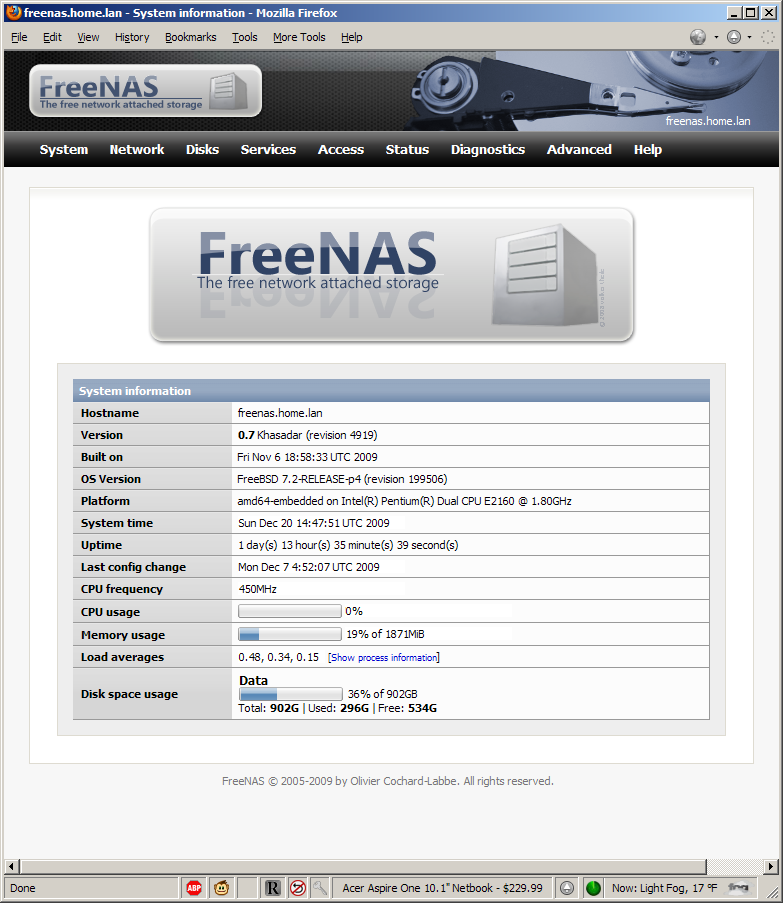
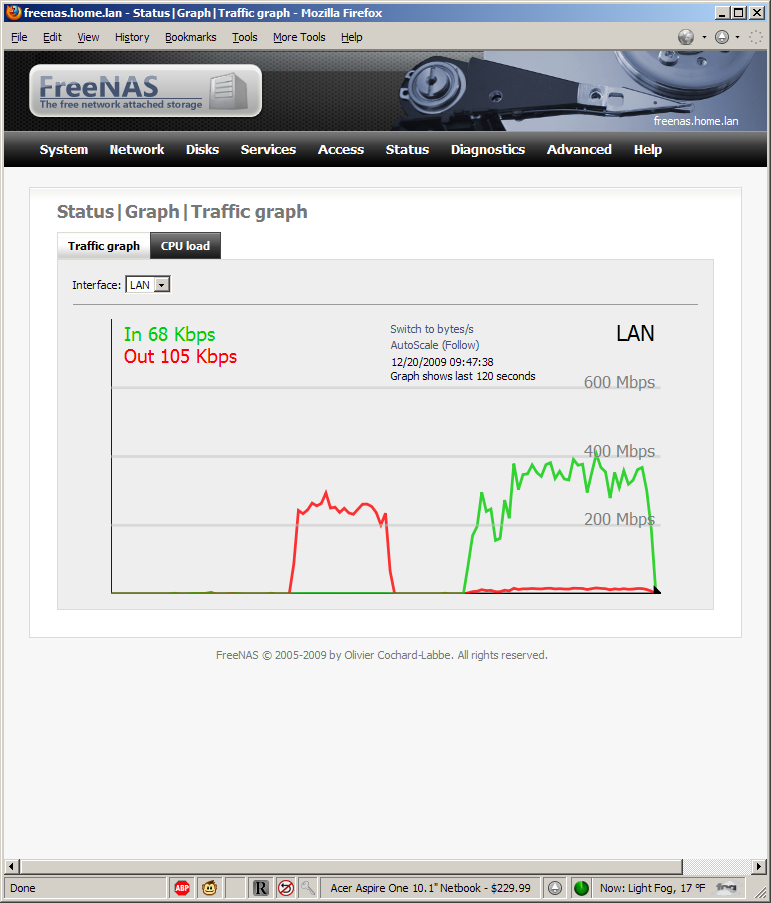
For the first step of the install, or if there's some problem with the WebGUI, here's what the console looks like.
Code:
Console setup
*********************
1) Assign Interface
2) Set LAN IP address
3) Reset WebGUI password
4) Reset to factory defaults
5) Ping host
6) Shell
7) Shutdown system
8) PowerOff systemMy previous experience level with FreeBSD? I think I downloaded an ISO once and tried installing it...

longblock454
2[H]4U
- Joined
- Nov 28, 2004
- Messages
- 2,906
Because of this:
Code:
[andy@localhost ~]$ uptime
 12:15:07 up 412 days, 19:38,  3 users,  load average: 0.00, 0.03, 0.07
[andy@localhost ~]$- Joined
- Sep 27, 2005
- Messages
- 3,126
Paying for an OS for a fileserver? No thanks.
FreeNAS or a minimal linux install will do nicely.
FreeNAS or a minimal linux install will do nicely.
Paying for an OS for a fileserver? No thanks.
FreeNAS or a minimal linux install will do nicely.
When you can add a drive without any configuration and have it just show up as part of the storage pool, AND enable duplication of only certain shares, THEN Linux will be worth it for the home. Until then, WHS still wins.
grab a Norco 4220 case, 2 8 port PCIe $100 Supermicro cards with SAS --> SATA breakout cables, a AM2 65w or lower CPU and a Matx motherboard with 2 PCIe 16/8x slots and you have a highly expandable, low cost, media server that has endless potential..... throw WHS on it and it will be complete
You'll want to stick with the norco 4020 if you want to use breakout cables.
WHS is for noobs who just want to install and go. Except for the storage pool it doesn't really do anything new, it's just all consolidated and noob friendly.
WHS is for noobs who just want to install and go. Except for the storage pool it doesn't really do anything new, it's just all consolidated and noob friendly.
It also works exceptionally well for non-n00bs.
It also works exceptionally well for non-n00bs.
If the tombstone information was handled better I might agree.
Paying for an OS for a fileserver? No thanks.
FreeNAS or a minimal linux install will do nicely.
God forbid you'd have to pay for something someone else made. I digress.
OP: If you have Windows desktops WHS is the better choice. If you want a fancy shmancy raid setup, get either a mobo that supports it, or get an el cheapo sata raid card. There are a lot of enhancements, such as the ability to easily stream media and the ease of installing plugins that makes WHS far and away the better choice.
longblock454
2[H]4U
- Joined
- Nov 28, 2004
- Messages
- 2,906
When you can add a drive without any configuration and have it just show up as part of the storage pool, AND enable duplication of only certain shares, THEN Linux will be worth it for the home. Until then, WHS still wins.
But it only mirrors, what a waste.
My Linux/Highpoint setup only requires a couple mouse clicks of the nice GUI to add drives to the array.
- Joined
- Apr 7, 2006
- Messages
- 10,477
But it only mirrors, what a waste.
My Linux/Highpoint setup only requires a couple mouse clicks of the nice GUI to add drives to the array.
And several hours
And praying that you dont have a drive failure, power outage, or URE during an OCE or a rebuild.
Linux.
It is absolutely stupid to have a GUI for a storage box.
Your ignorance is astounding.
longblock454
2[H]4U
- Joined
- Nov 28, 2004
- Messages
- 2,906
And several hours
And praying that you dont have a drive failure, power outage, or URE during an OCE or a rebuild.
Several hours I don't have to wait for, on a UPS with RAID6 pretty much covers me. Not to mention a complete offline backup.
I don't know WHS too well, but I'm gonna guess bad stuff can happen there also when adding drives.
- Joined
- Apr 7, 2006
- Messages
- 10,477
I don't know WHS too well, but I'm gonna guess bad stuff can happen there also when adding drives.
No because when you add a drive it doesnt alter any files or move anything.
It just uses NTFS junctions to create a pool.
Its actually amazing they havent incorporated the technology to the other Windows OSs because the concept is so simple.
Both are somewhat imperfect solutions. WHS certainly has ease of use down, but the lack of tombstone backup or management and pretty crappy distribution of storage across spindles (I have nine spindles, four are near 90% and five are empty?????) does make me long for something better. Also, the fact that so few people use it (make no mistake - its proliferation here does not mean most people are even aware of it) means support tends to be weak - if you have a problem, you basically have two or three forums to ask in, and that's that.
My last experience with FreeNAS was a few years ago and driver support was what took it off the radar for me. At the end of the day, the achilles heel of open source remains driver support. Your chances of having WHS work with all your hardware is dramatically greater than it would be for any other solution, simply by virtue of it being Windows.
My last experience with FreeNAS was a few years ago and driver support was what took it off the radar for me. At the end of the day, the achilles heel of open source remains driver support. Your chances of having WHS work with all your hardware is dramatically greater than it would be for any other solution, simply by virtue of it being Windows.
And several hours
And praying that you dont have a drive failure, power outage, or URE during an OCE or a rebuild.
You act like tombstones never fuck up for some inexplicable reason, something we hear about far more often than RAID's exploding.
- Joined
- Sep 27, 2005
- Messages
- 3,126
God forbid you'd have to pay for something someone else made. I digress.
I have no problem paying for something someone else made when it's practical.
When you can add a drive without any configuration and have it just show up as part of the storage pool, AND enable duplication of only certain shares, THEN Linux will be worth it for the home. Until then, WHS still wins.
Because it's so hard to hot add a new drive, open <your RAID management utility>, and expand an array.
- Joined
- Apr 7, 2006
- Messages
- 10,477
You act like tombstones never fuck up for some inexplicable reason, something we hear about far more often than RAID's exploding.
I never said WHS doesnt fuck up.
I will say my WHS fucks up alot less than my RAID5 array did before i moved to WHS.
- Joined
- Apr 7, 2006
- Messages
- 10,477
One thing that has been left out in this conversation is that WHS is not an enterprise or even an enthusiasts product, and it was never intended to be.
It was designed so *MOST* people can use it without needing to know anything about a computer.
If I gave my parents a WHS and a box with a Linux software raid5 and told them to add a drive to each one, which do you think would work the next day?
My bets are the linux array would be hosed, and the WHS would be just fine.
Linux is great system, and its robust and you can make it do just about anything you want.
Windows is easier for people to use.
It was designed so *MOST* people can use it without needing to know anything about a computer.
If I gave my parents a WHS and a box with a Linux software raid5 and told them to add a drive to each one, which do you think would work the next day?
My bets are the linux array would be hosed, and the WHS would be just fine.
Linux is great system, and its robust and you can make it do just about anything you want.
Windows is easier for people to use.