• Some users have recently had their accounts hijacked. It seems that the now defunct EVGA forums might have compromised your password there and seems many are using the same PW here. We would suggest you UPDATE YOUR PASSWORD and TURN ON 2FA for your account here to further secure it. None of the compromised accounts had 2FA turned on.
    Once you have enabled 2FA, your account will be updated soon to show a badge, letting other members know that you use 2FA to protect your account. This should be beneficial for everyone that uses FSFT.

What specs to prioritize?

Jeff G

Limp Gawd
2FA
Joined
Nov 2, 2017
Messages
245
Currently running a 27" 2560x1440 @ 110hz with 5ms response time. While the monitor still works like new, the stand is super flimsy to the point where I have to brace it (no vesa mounting) and the only way to hit 110hz is with a super thick dvi cable that wont let me put the top on my Tower 900 case. It's getting to the point where I'm ready to replace it with something newer. I dont want to "downgrade" anything, I'd rather "upgrade" if I'm replacing it.
It seems that it's not possible to get everything I want in a monitor under $1k, so what specs do you think are most important?

Screen size?
Resolution?
Refresh Rate?
Response time?
Features like g-sync?

I really like the look of the 34" ultrawides, but it's next to impossible to find one with 120hz+ refresh in a 3440x1440 resolution. Add in g-sync and price soars.
So, stick with a standard 27" screen size? Deal with sub-120hz refresh? Or drop down to 2560x1080?

If anyone has recommendations on monitors that hit all the marks, please let me know!
 
34" ultrawide 3440x1440 with gsync - $800
http://www.microcenter.com/product/476971/AG352UCG_35_Agon_LED_Gaming_Monitor_w-_NVIDIA_G-Sync

38" ultrawide 3880x1600 with freesync - $744 refurb or $1000 new
http://www.microcenter.com/product/487694/XR382CQK_bmijqphuzx_375_Curved_IPS_LCD_Monitor
https://www.ebay.com/itm/Acer-XR382...729795?hash=item48a38f6803:g:IGMAAOSwC6pZ5QMU

Those are the two I'd be considering if I had to buy right now -- but I'm waiting till Q2, 2018 for HDR, Gsync, and hopefully 38" or even 43" ultrawide.


I'm also very pleased with my HP Omen 32" monitors -- but they are freesync, and I don't like Vega's current driver state.
https://www.ebay.com/sch/Monitors/80053/i.html?_from=R40&_nkw=hp+omen+32&_sop=15


If you are looking at a 970, (from discussion in your other thread), I don't think it'll easily drive those ultrawides on current games with high detail levels. You might consider looking for a 2560x1080 ultrawide to better match the performance level of the 970. You can buy that resolution 34" for $300 to $600 used/refurb with freesync or gsync.
 
As an eBay Associate, HardForum may earn from qualifying purchases.
34" ultrawide 3440x1440 with gsync - $800
http://www.microcenter.com/product/476971/AG352UCG_35_Agon_LED_Gaming_Monitor_w-_NVIDIA_G-Sync

38" ultrawide 3880x1600 with freesync - $744 refurb or $1000 new
http://www.microcenter.com/product/487694/XR382CQK_bmijqphuzx_375_Curved_IPS_LCD_Monitor
https://www.ebay.com/itm/Acer-XR382...729795?hash=item48a38f6803:g:IGMAAOSwC6pZ5QMU

Those are the two I'd be considering if I had to buy right now -- but I'm waiting till Q2, 2018 for HDR, Gsync, and hopefully 38" or even 43" ultrawide.


I'm also very pleased with my HP Omen 32" monitors -- but they are freesync, and I don't like Vega's current driver state.
https://www.ebay.com/sch/Monitors/80053/i.html?_from=R40&_nkw=hp+omen+32&_sop=15


If you are looking at a 970, (from discussion in your other thread), I don't think it'll easily drive those ultrawides on current games with high detail levels. You might consider looking for a 2560x1080 ultrawide to better match the performance level of the 970. You can buy that resolution 34" for $300 to $600 used/refurb with freesync or gsync.

The 970 (from other thread) is for a build for a buddy who is gaming on a standard 27" 1080p monitor.
I have a 1080 ti under water and overclocked. I'm looking sor something that will finally give it a workout! I'll check those two out you linked though, thanks!
 
As an eBay Associate, HardForum may earn from qualifying purchases.
What I look for in a "Gaming" monitor

1. Refresh Rate. 240, 160, 120, 90, 60..? Definitely between 240 & 120.
2. Screen size. 1080p vs 1440p vs 4k? 1080p will allow you to achieve higher frame rates with lower tier graphics cards.
3. Lag. I don't take marketing numbers seriously and they definitely never tell the entire story.
- Display Lag
- Response Time
- Processing Lag
4. Features. GSync, definitely. ULMB (Ultra Low Motion Blur) technology, etc.
5. Panel Type. TN, IPS, or VA? Definitely a TN Panel for Gaming.
6. Connections. Not so much a concern. Most will do with Display Port. But it's nice to have an HDMI port, DVI or VGA for legacy projects. For a gaming monitor - I'm not too concerned with ports.

Because I'm such a fickle buyer, I only even look at monitors that have been reviewed more than skin deep. Even if they're not the newest generation, I prefer tried and tested hardware over maybes.


What I look for in a professional monitor.

1. Screen size.
2. Panel type.
3. Features (Landscape/Protrait Mode)
4. Connections
5. Cost
 
Last edited:
.I have made a priority list months ago, that should be updated after Vega release:

1- Screen real state. You should aim for the highest readable resolution your money can buy. 4k 40", 38x16 38" and 34x14 35" are the largest available.
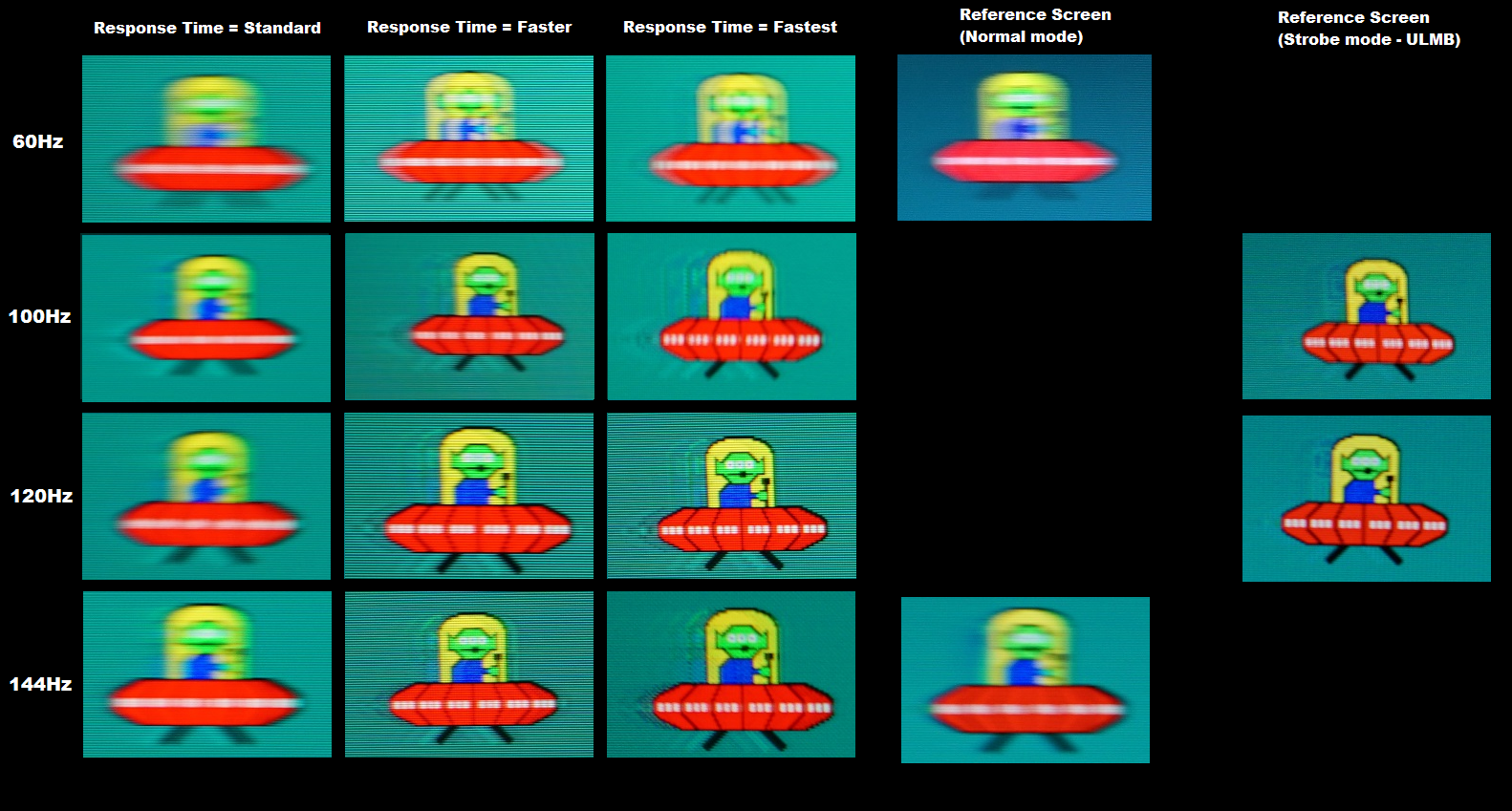
2-ULMB, strobing , scanning, etc. A display with LMB at 100Hz has less motion blur than a non-strobing display at 240Hz .
3- Contrast- More contrast usually means better movies to watch and less brightness is required to read.
4-If you followed 1, 1080ti will not handle everything maxed at 4k, so if your budget can fit it, look for gsync at 4k or 38x16 resolutions. at 34x14 a 1080ti is pretty much all you need for gaming without worrying about *sync.

My comments on the suggested displays so far:

Agon 35": no ULMB
XR382CQK: low refresh rate, no Gsync.

What i do not care when buying monitors:

Response times: they are always overrated by the manufacturer, and it is impossible to get a feeling of how good a monitor is when gaming with a single number. Instead Look for pursuit camera images, they are the golden standard to measure how well a display handles overdrive, higher refresh rates and ULMB.

Panel type: after ULMB, discussions about TN / IPS / VA lost its appeal. Properly done, a ULMB VA can beat a ULMB TN :

C24FG70-blur.png

left: Samsung C24FG70, VA + scanning backlight ; right: Dell S2716DG TN + strobing.

As i said, pursuit camera images are gold when looking for a new monitor.

My suggestion: upgrade to ULMB.

C32HG70 .
32" 25x14, 144Hz, scanning backlight. At this resolution you do not need gsync. Bigger, much faster and much higher contrast than your monitor.

49" ultramega F wide CHG90
Just imagine 2 C27FG70s side by side and you get this 49" beast. This is the highest resolution with ULMB available on commercial monitors. Only Zisworks has 4k 120hz ULMB on pre-order.
 
As an Amazon Associate, HardForum may earn from qualifying purchases.
Currently running a 27" 2560x1440 @ 110hz with 5ms response time. While the monitor still works like new, the stand is super flimsy to the point where I have to brace it (no vesa mounting) and the only way to hit 110hz is with a super thick dvi cable that wont let me put the top on my Tower 900 case. It's getting to the point where I'm ready to replace it with something newer. I dont want to "downgrade" anything, I'd rather "upgrade" if I'm replacing it.
It seems that it's not possible to get everything I want in a monitor under $1k, so what specs do you think are most important?

Screen size?
Resolution?
Refresh Rate?
Response time?
Features like g-sync?

I really like the look of the 34" ultrawides, but it's next to impossible to find one with 120hz+ refresh in a 3440x1440 resolution. Add in g-sync and price soars.
So, stick with a standard 27" screen size? Deal with sub-120hz refresh? Or drop down to 2560x1080?

If anyone has recommendations on monitors that hit all the marks, please let me know!
Depends on your budget. Black Friday and Cyber Monday deals should drop things into lower budget brackets here in the next few weeks. That said, if you're running a 1080 ti, you could vsync a 34" 3440x1440 95hz Crossover in most games today and for the next few years.

Size - 34"
Resolution - 3440x1440
Refresh - 95hz one click OC in display options
Response Time - 5 ms
Features - [Panel] AHIPS, Freesync, DP.

https://www.ebay.com/itm/US-Perfect...e=STRK:MEBIDX:IT&_trksid=p2060353.m1438.l2649

THanks.
 
As an eBay Associate, HardForum may earn from qualifying purchases.
Lots of great info here, thanks guys!
I learned a lot more about monitors today than I thought I would. ULMB was not a term I even knew about. So much changed over the last 6-7 years!
 
ULMB is nice, I have it on my monitor, but it also dims the image somewhat. I'm sure some people could live with that (especially competitive gamers) but I found leaving it off gave a more vibrant image.

I would probably recommend around at least 32", 1440p, and 100Hz. G-Sync is really nice too and you should look to get that (this alone makes the biggest difference in experience).

4K is cool, but is a struggle to drive it (even with a 1080 Ti) and you won't find many (or any) high-refresh 4K sets, so you might be better off at 1440p or ultra-wide so you can take advantage of the higher refresh.

My monitor is 144Hz, but honestly above 100 it is hard to tell (especially with G-Sync). I haven't tried 240Hz, and I'm sure it's better, but 144Hz seems more than enough (especially considering that you likely won't be getting much more FPS than that except in older games). Maybe if you play eSports titles, then 240Hz is viable.

Hope that helps.
 
Back
Top