Westinghouse TX-42 Problem

fellows

Limp Gawd
Joined
Sep 18, 2006
Messages
180
Hi.

I trolled around the AVS forum and google etc for answers to this question. But it seemed not many people had this televison hooked up to their computer with an ATI Card.

I currently have an ati x1800xt, and am trying to connect the Westinghouse TX 42 to it. Unfortunately I cannot get the image to cover the entire screen.
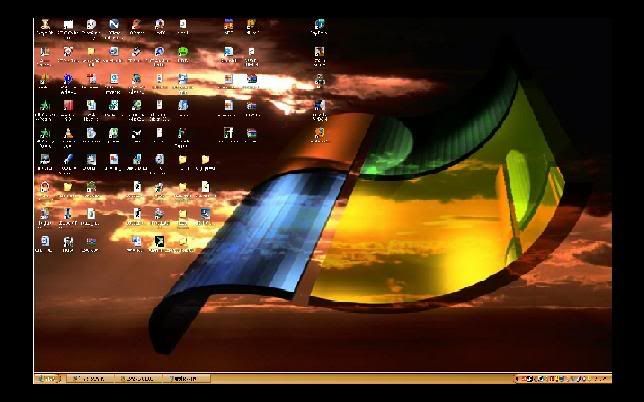
problem.jpg


It is hooked up with a DVI-HDMI adapter/cable. My display settings resolution is in fact at 1920x1080 so I'm not sure what the exact problem is here.

It is possible that I am dealing with 1:1 Pixel mapping issue?

Right now Yellow text is completely illegible. I have to highlight the yellow text to see it.

I noticed that when using Catalyst Control Center, if I select 30hz interlaced then it completely covers the full screen size.

However, I'm almost certain that this unit supports full 1920x1080 @ 60HZ.

Any suggestions would be greatly appreciated
 
Mine is running fine but I did have to go through and set alot of different things to make it look good but it looks great now. Mine was kind of grainy like yours at first but I kept going over all my settings in my control panel and on the tuner it self and got it adjusted right, i have been running this now for about 4 months without and problems at all.

I have mine hooked up to a 8800 GTS so I'm not sure what settings or drivers you mite need for ATI and it does support 1920 x 1080 60 HZ, Make sure it reads out that it is 1080P if I remember right the min I got mine to say it was set at 1080 P it then looked great, just keep looking for the settings and set it from your remote control too on the tv it self.
 
Mine does that. I just went into ATI Catalyst Control Panel and set the Overscan to 0%.
 
Thanks for all the answers.

Branana where in the Control Panel is the option for Overscan. I see Display Manager, and then the DTV(DVI) option for TV's

I can't find any mention of overscan.

The TV displays that my signal is in fact HDMI 1080p, and all my settings are set to 1080p as well. I shall continue to tinker.

In the meantime could one of you TX-42 owners post what settings you have for your TV. I just noticed that this thing will probably become straining on my eyes, but that could be due to contrast, brightness, backlight or any of the other settings.

Check this link out to get an idea of what my trouble is with yellow text

http://www.avsforum.com/avs-vb/showthread.php?p=10626956#post10626956

Anyone notice that the word "VIDEO" under the words "The Menu" is basically illegible unless you highlight it.

Thanks again everyone I hope I can get these issue resolved because HD content looks quite nice on this set.
 
If you have an ATI card, you need to open Catalyst Control Center. If you don't have that, you might need to download it.

Open up CCC in advanced mode and you should see an option for overscan. This is the only way I could get my 42tx to fill the entire screen at 1920 res and 60hz.

Ultimately I could never get the image to look good though. Had ghosting and just looked like crap anywhere closer than 4 feet to the screen. I ended up returning it.

Good luck.
 
I'm glad I run an NVidia 8800GTS because it looks great and I play BF 2, BF 2142, COD 4 looks incredible and I don't get much ghosting either very little and don't even notice it if it does ghost. I love it for everything I do.
 
I have a TX42 on my Nvidia 7900GTX. I'm not having the overscan problem at all, but my image quality is for crap on this, my second TX42. Text is a little "blurry" there are serious image persistence problems, blockiness, and the colors are off as well.

I'm pretty sure this is simply a defective unit, and I'll be taking it back for exchange today or tomorrow. My first TX42 looked wonderful, right up until the HDMI ports died :(

Nvidia users, what are your color/contrast/digital vibrance etc settings?
 
sorry to rob the thread, but im considering this tv as a tv and monitor. my question is from 7 feet away, what res would you need to set it at to be able to read fon t size 12 in a word document without straining your eyes?
 
I use my tx-42 with a 8800gtx dvi to HDMI and the image is flawless at any resolution, even text is fine. The only problem I ran into was outputting sound from my audigy2 to the minijack. I simply cannot get it to work. My solution, throw more money at it. I know have a set of Klipsch 2.1 setting at my TV. The sound now works like a charm when gaming
 
Back
Top