watercooled 290x throttling

Castor Troy

Weaksauce
Joined
Jul 2, 2004
Messages
77
I'm trying to figure out why I'm having throttling issues with my R9 290x. Furmark will randomly dump from full (1030mhz/1250mhz) down to 300/150 for a half second, and then return to full. I see the same behavior in video games. With default settings, I am also getting what appear to be frequency drops, as I'll be getting 40-60fps, and it will suddenly drop to 15-25 for a moment. I don't think the problem is my temps(VRM max 67, GPU 54 according to HWiNFO). I also have the power limit turned up in msi afterburner, as with it at default I was rarely getting over 1000mhz on the GPU. I am running the latest drivers as well(15.4 beta).

ETA: Playing 1080p

Second ETA: Switched back to my 4.4ghz OC from stock clock on my FX-8350, didn't seem to make a difference. Dropped settings from very high to high, and it didn't seem to make much of a difference either.

System specs:

FX-8350 w/EK waterblock
Asus Sabertooth 990FX R2.0
16gb ram
Powercolor R9-290X w/EK waterblock
Silverstone ST1000-G Evolution
Win7 Ultimate x64
 
Last edited:
Cards can throttle from exceeding the power target as well as from temps.
 
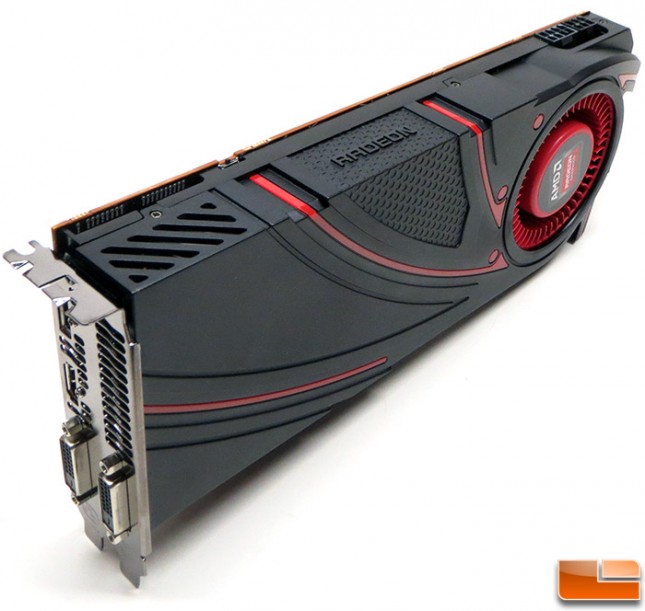
First, do you have a reference card with the Normal/Uber dip switch on the board itself? Make sure the card is set to Uber if you haven't already.

Next, what do you have the target temp set to in AMD Overdrive? Make sure it's set to 95C. If you've lowered it, the card will throttle sooner, and since you're on water you don't need to worry about overheating or anything like that.
 
Where would the DIP switch be? I have a reference powercolor, but I have a backplate on it currently.
 
It's a black dip switch on the outer edge of the PCB, about 2 inches in from the back plate.

amd-radeon-290x-angle-645x611.jpg
 
Alright, yeah I have that and it's to the left right now(toward the display ports). I assume it needs to be the other way?
 
Assuming it isnt caused by the quiet profile switch position...

I'm running a Powercolor 290 with 290x bios and Arctic cooling Xtreme III cooler which performs like water.
Temps are about the same while hard gaming.

I dont get your issue but I am using an Asus 290x BIOS which might be why.
It could be worth getting a newer Powercolor bios or trying another mfr bios.
http://www.techpowerup.com/vgabios/...r=&model=R9+290X&interface=&memType=&memSize=

ATI flash util
http://www.techpowerup.com/downloads/2306/atiflash-4-17/mirrors

To flash:
Copy the rom fle to usb pen (or wherever it will be used) and rename it to say asus.rom and flash.
Atiflash -p -f 0 asus.rom
0 = first PCI-E slot, 1 = second ...


Before flashing note that it will flash only one of the 2 BIOS on the card, the one the switch is set to.
You can boot into Windows and change the switch position if you wish to flash the other BIOS.
**Take care to note which switch position you have flashed so you can always use the other if there is a problem.**

I did my flashing "in Windows" on a fresh boot, from a DOS prompt with admin rights.
I have done this many times without any problem.
Others recommend doing it from DOS.

If it goes wrong, you can flick the BIOS switch to the other position and boot into windows.
Then change the position back while in Windows and flash again.
Or use another gfx card to boot, with the 290x in the system still.
 
Last edited:
boy do i feel dumb. after flipping the switch, and 5 minutes of furmark so far, min 127 max 135 average 133. before i was getting drops down into the teens after about 30 seconds of running furmark.

and a solid 60fps in gta v. huge thanks to you rizen!
 
Last edited:
so, update. everything was running fine for a couple days, and i started getting throttling again today. i updated the bios on my 290x to a different one that has a default clock of 1060/1350.


after the update, i was running furmark and everything was fine. i opened up hwinfo64 to check vrm temperatures, and the gpu immediately started throttling again. i closed hwinfo, and the throttling went away. so, it appears that the cause of my issue is hwinfo??? anyone else run into that before?
 
I don't leave anything running in the background except MSI Afterburner.
 
You could also just disable all the gpu monitoring in HWinFO since afterburner does most of that anyway
 
Back
Top