very specific advice wanted! free beer!

Shepler

n00b
Joined
Apr 22, 2009
Messages
19
Hello, gents. I haven't needed to log in for so long, I guess my old account got deleted. So I made a new one :). Let me take the time to thank you for your advice- it truly is appreciated. I'm at my legs end with Googling questions, I just can't seem to find some specific answers.


As well as with this post, I offer a challenge to all whom will take the time to lend help to a friend in need: if you can offer money-saving advice or show me that my choice of components is in error ("I have a Phenom II X3 and It sucks") I will take all the extra money I save and buy / ship beer to you.

Soda if you're a youngster!

This will be a very detailed post, and I applaud you if you take the time to read and answer. :D

It's been six years since I last built my computer, and I've been doing heavy research for the past week since I recently got out of college for the semester. There are a few things I cannot seem to find the answer too, though... in relation to all of our favorite pastime: gaming.

My PC has served me well, but since my 9800 pro is on its last legs... its time to upgrade. I really want to play Bioshock above 10 FPS as well! I will be making my PC in LATE MAY. I have around a $1000 budget I'd like to spend, and I live in Pennsylvania. If the Overclocking is easy, I'll do it. But I WILL NOT sacrifice stability for speed.

OLD COMPONENTS WHICH IM CONTEMPLATING KEEPING:
--------------------------------------------------------------------------------------------------------------------------------

HARD DRIVES: WD1600JS 160gb x 2
I still own two rock solid drives. They're first generation SATA 1.0. How much would the extra memory bandwidth affect real world games? I've seen plenty of benchmark tests for applications I don't even use, but I'm 100% concerned about games. 99.9% My work involves Microsoft Word; I don't need horsepower for anything buy play :)

SOUND CARD: Sound Blaster Audigy 2
I have a Sound Blaster Audigy 2 which still runs just fine. Is this old clunker going to add or subtract power from my new build? This is one of those questions which I simply cannot find an answer.

FLOPPY DRIVE: Big Piece floppy Toshiba S***
a Floppy is required to run my two hard drives. I've heard in Motherboard reviews about installing SATA drivers with Flash drives or other things, but my drives don't allow this. Is the Floppy worth keeping?

CRITIQUE MY CHOICE OF NEW PARTS
---------------------------------------------------------------------------------------------------------------------------------

VIDEO CARD: MSI R4890-T2D1G OC Radeon HD 4890 ($250)
(http://www.newegg.com/Product/Product.aspx?Item=N82E16814127427)
HardOCP convinced me to buy / pick it. Well, they picked an Asus, but it was 20 bucks more. I've also been using an MSI RX9800 Pro for six years and it is unbelievably solid.

CPU: AMD Phenom II X3 720 2.8 ($140)
http://www.newegg.com/Product/Product.aspx?Item=N82E16819103649
I've heard that quad-core CPU's are not prime for gaming- that rarely over 2 cores are ever used. I've seen people in the comments section of websites say this over and over. I figured I'd compromise and get three cores- one more for the future if ever I need it. Smart or dumb choice?

CPU COOLER: Scythe SCKTN-3000 ($27)
http://www.newegg.com/Product/Product.aspx?Item=N82E16835185096
besides the size of this massive hunk of metal, I'm not sure there should be any problems with this one :)

MOTHERBOARD: MSI 790GX-G65 AM3 ($130)
http://www.newegg.com/Product/Product.aspx?Item=N82E16813130224
has anyone experienced any issues with this board? I've been using an ASUS A7N8X-E Deluxe board for (the last six years), and its had its share of problems, ESPECIALLY with SATA which is a massive headache.

RAM: OCZ Reaper HPC 8GB (2x4 sticks) ($150)
http://www.newegg.com/Product/Product.aspx?Item=N82E16820227320
I saw in other "help me build my PC" threads where people were reccommending going against expensive memory in favor of the ultra cheap flavor. I'm looking for stability, and I travel to LAN parties a lot where its frequently 90+ degrees; it's also usually over 90 degrees where I live... I figured this would help that stability.

As well, what's the performance increase in having 8 gigs versus 4? could any of you lend advice as to how useful this will be in the future? let me tell you, my 1 gig, which was badass at the time, feels like a fossil. If I had upgraded to 2 gigs at the time... it might not be so bad. Does my logic make sense, or am I wasting money?

CASE: XCLIO Godspeed One Advanced ($50)
(http://www.newegg.com/Product/Product.aspx?Item=N82E16811103024)
this is simply asthetics. I'm going to build a plastic shield redirecting the side fans directly over and on top of the GPU.

OS: Windows Vista x64 Home Basic ($90)
(http://www.newegg.com/Product/Product.aspx?Item=N82E16832116483)
I've spent a SIGNIFICANT amount of time as to find out whether Windows XP pro x64 is superior to Vista for GAMING- I do not care about worthless features or noob-friendly networking. I simply care about which is superior for gaming. I have consistently read that Windows Basic uses less RAM, but I've read from other places that Vista Premium "scales" ram use back when in applications. Could someone please point me in the right direction?

POWER SUPPLY: Silverstone ST70F 700W OR Antec TP-650 650W - (priced $130 and $140 respectively)
http://www.newegg.com/Product/Product.aspx?Item=N82E16817256045 / http://www.newegg.com/Product/Product.aspx?Item=N82E16817371021
I used a Silverstone 400W for about 1 year before the damn thing died on me. I switched over to an Antec... and it's been working for the last five years. I really can't argue with experience, but I'm also sort-of convinced that my Silverstone was just a fluke. I know its a good company.


TOTAL: $1001 shipped!


THANK YOU AGAIN FOR YOUR TIME! I APPRECIATE IT!
 
Last edited:
Skip Vista Home Basic as it does not have the Aero interface - w/ your GPU listed, you might as well get the nice look.

I'd step up the CPU to a Phenom II Quad core - why not? The 940 is a killer deal on newegg right now. I think it's only about $40 more or so, you could probably find a way to make that fit your budget.

Rest looks OK to me.
 
I've read around in the AMD motherboard subforum that a new chipset will be out in June or so that better supports AM3.
 
Well, I have a different idea about what I would do... but to answer a couple of your questions-

Your hard drives... ditch them. They are not big enough to deal with the hassle and the older they are, the better the chance of failure. You can always keep them as a back-up drive but get something faster and bigger. Second 8 gigs is overkill. Yes, I know that sometime in the future that will change but its a long time off with this system. Your next build after this one might will most likely need 8+ but not his one.

On-board sound is going to be as good (or almost as good) as your aging Sound Blaster, unless your an audiophile. And if you are... the Sound Blaster isn't going to be good enough anyway. Also dual core is fine for almost everything right now, but having the option to upgrade to quad core later when things start tasking your system is nice.

So... what about your power supply unit and your monitor? Your going to need a decent PSU to keep that video card etc happy. And if your monitor ain't pumping a minimum of 1680 x 1050 that video card is spinning its wheels.

Here is my suggestion... (and this is a general guideline because the combos will change by the time you order most likely)

Intel c2d 7400 with vista ultimate 64 combo...
GIGABYTE GA-EP45-UD3P mobo...
G.SKILL 4GB (2 x 2GB)...
XFX 4890 - (best warranty of any ATI card)...Western Digital 750 Gig...
Xigmatek Dark Knight (comes with back plate)...
Cheap Sata DVD drive...
Western Digital 750 Gig hard drive...

And there are lots of options with cases and power supplies, here is one that would work well with your system if you like the looks of it.

Total Cost- 991.87 (999.79 shipped to my Zip)
The thing about this system is you will have plenty of power for gaming right now... and if your needs increase you can just upgrade your 7400 to a q9550 in the future. You can also upgrade your video card or add another one for x-fire, so you have one more potential upgrade before you do another full build someday in the future. You can also add another 4 gigs of ram in the future if you find the need for it.

I didn't save you any money but I did get you a Hard drive, DVD player, a PSU and a killer gaming rig that will overclock like a bandit and can be upgraded easily if needed.
 
HARD DRIVES: WD1600JS 160gb x 2
I still own two rock solid drives. They're first generation SATA 1.0. How much would the extra memory bandwidth affect real world games? I've seen plenty of benchmark tests for applications I don't even use, but I'm 100% concerned about games. 99.9% My work involves Microsoft Word; I don't need horsepower for anything buy play :)
Most of today's current hard drives will just decrease the load times when it comes to games and such. It won't actually increase the FPS your game gets. For MS word, those old drives are enough. For gaming on the other hand, those old drives might make load times a bit excruciating for you. I recommend going with the WD 750GB Black drive Direfox recommended

SOUND CARD: Sound Blaster Audigy 2
I have a Sound Blaster Audigy 2 which still runs just fine. Is this old clunker going to add or subtract power from my new build? This is one of those questions which I simply cannot find an answer.
It certainly won't hurt your system in anyway. The Sound Blaster Audigy 2 is still a good quality sound card still usable for today's apps and games.

I've heard in Motherboard reviews about installing SATA drivers with Flash drives or other things, but my drives don't allow this. Is the Floppy worth keeping?
What do you mean your drives won't allow for loading SATA drivers via Flash drives?

IMO, the floppy is worth keeping around. But I would not hook it up. Just keep it in a box somewhere until there's a time you actually need it.

VIDEO CARD: MSI R4890-T2D1G OC Radeon HD 4890 ($250)
(http://www.newegg.com/Product/Product.aspx?Item=N82E16814127427)
HardOCP convinced me to buy pick it. Well, they picked an Asus, but it was 20 bucks more. I've also been using an MSI RX9800 Pro for six years and it is unbelievably solid.

Good card choice BUT I recommend getting this card instead:
$250 - XFX HD-489A-ZDFC Radeon HD 4890 1GB PCI-E Video Card

XFX offers a lifetime warranty once you register the card. IMO, XFX's customer support is better than that of MSI's customer support. So for the same price, I highly recommend switching to XFX.

CPU: AMD Phenom II X3 720 2.8
Smart or dumb choice?
Good choice in terms of performance but might not be a good choice for the money depending on your answer to the next question (the motherboard)

MOTHERBOARD: MSI 790GX-G65 AM3
What exact features do you need in a motherboard? RAID? Crossfire? large number of SATA ports? etc.

I ask because for $50 less, you can get a Quad-core Phenom II CPU + mobo:
$222 - AMD Phenom II X4 920 + Gigabyte GA-MA770-UD3 AMD 770 ATX Motherboard Combo

If the Gigabyte mobo fits your needs, I highly highly recommend getting the above setup rather than your current setup. And yes the Phenoom II does outperform the E7400 CPU that Direfox chose

CPU COOLER: Scythe SCKTN-3000 ($27)
http://www.newegg.com/Product/Product.aspx?Item=N82E16835185096
besides the size of this massive hunk of metal, I'm not sure there should be any problems with this one :)

Very odd design to say the least. Despite what you may think, that design could still be a very ineffective cooling design. My google-fu hasn't turned up a review of that HSF. So for now, I'd put this is "ehhh" category.

RAM: OCZ Reaper HPC 8GB (2x4 sticks) ($150)
http://www.newegg.com/Product/Product.aspx?Item=N82E16820227320
I saw in other "help me build my PC" threads where people were reccommending going against expensive memory in favor of the ultra cheap flavor. I'm looking for stability, and I travel to LAN parties a lot where its frequently 90+ degrees; it's also usually over 90 degrees where I live... I figured this would help that stability.

Trust me, those heatsinks will not help any better than the heatsinks from these RAM sets:
$43 - G.Skill F2-6400CL5D-4GBPQ 2 x 2GB DDR2 800 RAM
$58 - A-DATA 2 x 2GB DDR3 1333 RAM

And no, there isn't a noticeable improvement AFAIK with DDR3 RAM (regardless of speed) with AMD Phenom CPUs.

As well, what's the performance increase in having 8 gigs versus 4? could any of you lend advice as to how useful this will be in the future? let me tell you, my 1 gig, which was badass at the time, feels like a fossil. If I had upgraded to 2 gigs at the time... it might not be so bad. Does my logic make sense, or am I wasting money?
For gaming, 8GB of RAM will not provide any performance increase over 4GB of RAM. However what 8GB of RAM will allow you to do is run multiple background apps while your gaming. I personally have 6GB of RAM in my own system. I rarely close any web browser (4 x Firefox windows w/ 8-9 tabs each, 2 x Chrome windows w/ 9-10 tabs each), music player, or instant messaging system I have open while I'm playing a game.

So in other words, 8GB of RAM will allow you to multi-task heavily but won't provide a performance increase in games. For video editing and Photoshop, yes 8GB of RAM will help out.

CASE: XCLIO Godspeed One Advanced
(http://www.newegg.com/Product/Product.aspx?Item=N82E16811103024)
this is simply asthetics. I'm going to build a plastic shield redirecting the side fans directly over and on top of the GPU.

Looks like a heavily modded version of the Coolermaster RC-335 case. Got no problems here.

OS: Windows Vista x64 Home Basic
I've spent a SIGNIFICANT amount of time as to find out whether Windows XP pro x64 is superior to Vista for GAMING- I do not care about worthless features or noob-friendly networking. I simply care about which is superior for gaming. I have consistently read that Windows Basic uses less RAM, but I've read from other places that Vista Premium "scales" ram use back when in applications. Could someone please point me in the right direction?
There's little or no performance difference whatsoever between any version of Vista or XP when it comes to current games (later 2006-early 2007 and newer). Yes what you have read is correct: Vista will scale back the RAM when an application actually needs it. In other words, don't worry about the RAM usage when it comes to Vista. I would recommend ditching Vista Home basic since it's essentially just XP Home. Not worthy of the Vista name IMO. I highly recommend getting Vista Home Premium 64bit.

One thing I noticied missing from your build, in fact one of the most important part in a PC, is a power supply. What power supply will you be using? If reusing a PSU, what's the exact make and model of that PSU?
 
THANK YOU for your Windows advice, Danny Bui. I've been talking to a few of my buddies over vent this evening, and all of them are convinced Vista Premium gives you better performance in-game. As well, nobody ever seems to want to tackle that question via google.

I need no bells and whistles! I use my Laptop for work; this rig is a pleasure cruise boat :)

For my PSU,
I had picked out a Silverstone 700W beforehand, but stupidly forgot to include it in my post! I updated my OP. :D What's your experience with Silverstone as a company? as I mentioned above, I had a Silverstone PSU, but it died without warning one day at the drop of a hat. My Antec on the other hand is a tank; it's endured 90 degree summers five times running.

For my Motherboard, I require two things, in all reality:
1) 2 PCIe 16x slots for when (and if) double GPUs ever becomes viable in a year or two, gameplay wise.
2) 2 SATA ports and 2 SATA II ports: this one has five SATA II, and if I'm not mistaken SATA I and II are backwards compatable.
3) TRUTH IN ADVERTISING: I'd like a chipset functions as advertised: what I meant by Flash drives not working on my current Asus A7N8X-E Del was just that! they don't work to install SATA drivers when installing windows! It's a mega pain in the ass!
4) Longevity: I'm still using a socket A Athlon 3000+. It sucks, but it's six years old. I'm hoping that this computer will last for 3 to 4 years. That being said, I don't want to invest in old tech; if the AM3's are superior to AM2's, that's the one I want. The price isn't that dissimilar, either!

For my Ram;
I am extremely pleased you brought that up. Frequently, it's not uncommon for my apartment to get ~90 degrees. I chose those specific sticks for two reasons:

1) because my current RAM gets hot to the touch (GEiL 2x512mb DDR1 400); they worry the hell out of me that I can burn my hands on them. I don't want any problems, ever. I'm willing to pay extra in this case! However, there's always the possibility that these heatsink / pipe coolers might be a gimmick... I've no Idea how they run in a 4x configuration, people only seem to review 2x2gb, and then they usually give arbitrary ambient and load temperatures without telling you everything you should know.
2) another case of Longevity. If I were to have bought 2 gigs of Ram in 2003, I wouldn't be so bad off! similarly, I'm thinking that if I invest in identical ram NOW, it wont be a problem later.

THANK YOU GENTS FOR YOUR REPLIES! keep them coming; My beer offer is still on the table!
 
Which Antec has lasted for 5yrs? If you've got a TP2.0 or SP2.0 thats lasted 5yrs, you're a very lucky person. The ST70F is a great PSU, fully modular (including the main ATX cable).

1) What size monitor do you have? If you only have a 1900x1200 LCD, you most likely won't ever need a dual GPU setup.
2) Why buy a board with SATAI ports these days?!?! Are they even offered??? If so, I'm guessing its only 2 ports, probably for optical drive usage.
3) Thats a MS problem if you're talking about XP. XP only supports SATA drivers via FDD. If you're talking about vista, its because that board was built before booting off of flash drives was the norm. I don't ever recall them advertising such a feature, but then again, I don't pay much attn to such advertising.
4) I get more performance out of building a system every 2 yrs for less money than you'd normally spend on a system to last 4.

1) Still not worth it.
2) DDR2 uses less voltage, so it'll last longer.

My goodness this is too intimadating for me to reply.

Did you just say "my goodness" ?!?!?!? :confused::eek::p
 
Last edited:
PSU:
Never dealt with Silverstone before. Generally stick with Corsair and Antec for my PSU needs. But from what I've heard, they have pretty good PSUs. Out of the two you chose, I'd go with the Antec since it has 4A more on the +12V rail, which means a little bit more upgrade room and headroom for future usage.

Monitor:
7) What size monitor do you have or plan to have?

Motherboard:
I definitely recommend this combo then:
$260 - AMD Phenom II X4 920 CPU + Gigabyte GA-MA790X-UD4P AMD 790X AMD Motherboard Combo

Still $10 cheaper than what you chose but still get that faster CPU and better motherboard IMO. The motherboard is a socket AM3 and backed by a good company.

RAM:
1) Those heatsinks are a gimmick IMO. Since those heatsinks would be touching one another in a 4x configuration, that kind of defeats the purpose of those heatsinks in the first place.

2) DDR3 RAM will get cheaper. So it really doesn't pay to get a lot of DDR3 RAM now since it will get cheaper. DDR2 RAM will not get any cheaper. In fact, the prices are starting to go back up a bit. So it would be a good idea to stock up on DDR2 RAM.
 
Thank you for your reply Enginurd!
Which Antec has lasted for 5yrs? If you've got a TP2.0 or SP2.0 thats lasted 5yrs, you're a very lucky person. The ST70F is a great PSU, fully modular (including the main ATX cable).
I apologize for my non-specificness; I'm trying to make this as easy to digest as possible :) It's an Antec TP3-430 (Truepower Trio). I guess after a quick googling that'd make it a TP1.0.

What size monitor do you have? If you only have a 1900x1200 LCD, you most likely won't ever need a dual GPU setup.
I have a 17 inch CRT. It's a big piece of shit. But I'd rather spend money on power then on aesthetics; I'm considering dropping the case from my list and buying Danny Bui's recommended CPU instead. What are your thoughts?

Why buy a board with SATAI ports these days?!?! Are they even offered??? If so, I'm guessing its only 2 ports, probably for optical drive usage.
because I already have 2 SATA 150 drives :) I was curious to know if SATA 150 drives would work on a SATA 300 bus, I know vice-versa works, but I am unsure if 150 drives can connect to 300 ports. Based on Danny Bui's response, it seems they will function correctly!

Thats a MS problem if you're talking about XP. XP only supports SATA drivers via FDD. If you're talking about vista, its because that board was built before booting off of flash drives was the norm. I don't ever recall them advertising such a feature, but then again, I don't pay much attn to such advertising.
If this is the case, I admit my misgiving information. I have the most awful time getting my Asus board to even recognize my drives... it's a horrible experience every time I re-install windows. When I can recognize my drives, half the time Windows wont accept my drivers. I was given advice a long time ago to use a flash drive, which didnt work, and I assumed it was the board's fault (it didn't even cross my mind that it was XP's fault), but thank you for the clarification!


I get more performance out of building a system every 2 yrs for less money than you'd normally spend on a system to last 4.
you stand to make a large net gain of Heineken if you can prove to me this is more efficient :D


CHEERS!
 
Last edited:
You're buying a HD4890 for a 17" monitor? Stop drinking up all of the beer -- save some for the rest of us.

You could get a decent 22" LCD for gaming for under $200 nowadays. If you can add a few more dollars into your budget, I recommend that you instead go for one of the $150 to $200 video cards so you could spend some money on a larger screen.

Your SATA/150 hard drives would work on a SATA/300 bus, but you're really depriving yourself in that department. One of today's WD Caviar models would outperform a last-gen Raptor (and would only be about 10% slower than a VelociRaptor).

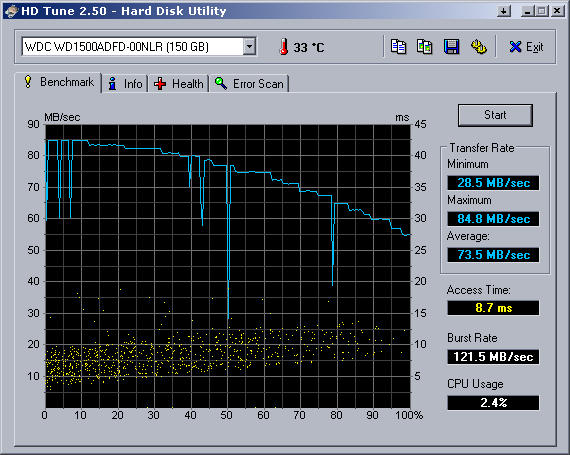
Take a look at these HD Tune charts:

WD6400AAKS for $60 is the best value (best performance for your money). New VRaptor, then WD6400AAKS, and then the old 2nd gen Raptor...

New VRaptor...
HDTune_Benchmark_WDC%20WD3000GLFS-01F8U.png


New WD6400AAKS...
HDTune_Benchmark_WDC%20WD6400AAKS-65A7B.png


Old 2nd Gen Raptor...
HDTune_Benchmark_WDC%20WD1500ADFD-00NLR.png

And I'll give you a personal anecdote about spending your cash over the long run. Take a look at the specs of the rig that I've built for my aunt over a year ago and compare them to the upgrades that I made for (my brother's "new") computer this past weekend. The long story short is that I've spent about the same amount of cash (around $700) each time to upgrade both systems. And the system that I'm giving to my brother is the same one that I was using when I built my aunt's... and those upgrades were the ones that I was planning last year, originally, for myself.
 
you stand to make a large net gain of Heineken if you can prove to me this is more efficient :D
Not as accurate or as higher priced as I would like it but close enough:
$1100 build circa January 2007 (in 2007 Costs):
Intel Core 2 Duo E6400 - $222.00
GIGABYTE GA-965P-DS3 Socket T (LGA 775) Intel P965 Express - $132.99
Buffalo Firestix 2 x 1GB 240-Pin DDR2 800 RAM - $244.99
eVGA GeForce 8800GTS 640MB PCI-E Video Card - $399.99
CORSAIR CMPSU-520HX 520W ATX Power Supply - $119.99
-----
Total: $1,1120.94 without tax and shipping.

$575 build circa January 2007 (in 2007 Costs)
Intel Core 2 Duo E6300 - $184.00
BIOSTAR TForce965PT Socket T (LGA 775) Intel P965 Express - $104.99
WINTEC AMPO 1GB (2 x 512MB) 240-Pin DDR2 800 RAM - $99.99
eVGA 256-P2-N615-TX GeForce 7600GT 256MB PCI-Express - $129.99
XCLIO GOODPOWER 500W ATX 500W Power Supply - $49.99
----
Total: $568.96

$370 build circa April 2009:
$60 - AMD Athlon 64 X2 7750 CPU
$75 - GA-MA770-UD3 AMD 770 Motherboard
$43 - A-Data ADQVE1B16K 2 x 2GB DDR2 800 RAM
$140 - XFX HD-485X-YDFC Radeon HD 4850 512MB PCi-E Video Card
$50 - Corsair 400CX 400W PSU
----
Total: $370 plus tax and shipping.

The 2009 $370 outperforms the 2007 $570 and $1100 by a significantly large margin. However the $1100 build does have a better PSU.
 
Ahh... Trio is the 3rd gen of the Truepower series, so TP3.0. Either the Silverstone or Antec would suffice your needs. If you want completely modular, then the Silverstone is it. The TP-650 is made by Seasonic, and the ST70F is made by Enhance... both of which are very good.

If the board fits your needs, yes, I agree with Danny's cpu/mobo suggestion.

BTW, I agree with tiraides, too.
 
Thank you for the information and links, Tiraides. I wish you wouldn't have suggested that... I would have been happy with my 65 pound (literally- SyncMaster 955DF) piece of shit if nobody said anything :D after a quick googling, I guess it's 16 inch viewable CRT. a 22 inch flat screen is going to be such a tremendous upgrade, I can't wait.

I'm looking to cut corners in order to make room for an enormous monitor, so you'd suggest Videocard being the first to get cut?

SAPPHIRE 100259-1GL Radeon HD 4870 ($190)
http://www.newegg.com/Product/Product.aspx?Item=N82E16814102801


ASUS VW224U Black 22"
($170)
http://www.newegg.com/Product/Product.aspx?Item=N82E16824236050

REVISED BUILD: $1153 (NOT SHOWN: Thermal grease ($8), Logitech MX518 Mouse ($39), Thermaltake 5 1/2in HDD drive converter ($17)

-------------------------------------------------------------------------------------------------------------------------

as well Danny Bui, could you repost the link to your $260 combo? it's not working for me :(
(AMD Phenom II X4 920 CPU + Gigabyte GA-MA790X-UD4P AMD 790X AMD Motherboard Combo)
 
Last edited:
Please stop using this blue color... it hurts the eyes on a very dark grey/near black background.
 
I'm looking to cut corners in order to make room for an enormous monitor, so you'd suggest Videocard being the first to get cut?

SAPPHIRE 100259-1GL Radeon HD 4870 ($190)
http://www.newegg.com/Product/Product.aspx?Item=N82E16814102801


ASUS VW224U Black 22"
($170)
http://www.newegg.com/Product/Product.aspx?Item=N82E16824236050
....
as well Danny Bui, could you repost the link to your $260 combo? it's not working for me :(
(AMD Phenom II X4 920 CPU + Gigabyte GA-MA790X-UD4P AMD 790X AMD Motherboard Combo)

Here's the combo link again:
http://www.newegg.com/Product/ComboDealDetails.aspx?ItemList=Combo.182490

Yes cut down the video card to make room for a monitor. I would not recommend getting the Sapphire HD4870 1GB since it only has a two year warranty. I highly recommend getting the XFX GTX 260 instead since A) it comes with a lifetime warranty, B) it performs about the same as the HD4870 1GB and C) it's $10 cheaper:
$180 - XFX GX260XADJF GeForce GTX 260 Core Edition Core 216 896MB PCI-E Video Card
 
Since now OP is in the market for a new LCD I guess I'll chime in.

Slickdeals FTW

Seems like Dell is having another deal. It would be better to buy your LCD elsewhere OP than newegg. Newegg is great and all except they have a pretty lame pixel policy (I think you need to have at least 7 dead/stuck pixels to be consider a defect).

Also that ASUS monitor is 1680 x 1050 resolution while the Dell LCD is 1920x1080 (good for those 1080p movies). If the Dell LCD ever has a problem you will be able to ship it back for free.

P.S. Don't forget my beer ;)
 
Last edited:
The E8400 + Gigabyte UD3P is a poor choice from a price to performance perspective. The Phenom II 920 + Gigabyte 790X mobo combo offers comparable performance for less. In addition, Intel's socket 775 is pretty much a dead end at this point. AMD's socket AM3 will probably have more longevity than that of the 775.

The GTX 275 is slower than the HD4890 and costs $20 more. Not a good choice either from a price to performance perspective.

At $95, the Corsair 550VX is way to expensive considering that there are cheaper but equal quality 550W PSUs out there and better priced 650W PSUs out there.

The OP probably does not have the budget to fit that Benq Monitor
 
Since now OP is in the market for a new LCD I guess I'll chime in.

Slickdeals FTW

Seems like Dell is having another deal. It would be better to buy your LCD elsewhere OP than newegg. Newegg is great and all except they have a pretty lame pixel policy (I think you need to have at least 7 dead/stuck pixels to be consider a defect).

Also that ASUS monitor is 1680 x 1050 resolution while the Dell LCD is 1920x1080 (good for those 1080p movies). If the Dell LCD ever has a problem you will be able to ship it back for free.

P.S. Don't forget my beer ;)

thank you for your link, DTN107 :)

that's quite the monitor. It's certainly prettier then the Asus VW224U, and has a higher native resolution. However, the response time is 5ms while the asus' is 2ms. Have you dealt with response times on LCD panels before? I've never owned one!

@Danny bui
I need to read a bit more before I comment on quad vs. triple / DDR2 vs. DDR3 performance (your board doesn't support DDR3!). But thanks for the link :)
 
Why is people recommending LGA 775 builds? AM2+/AM3 is basically the new LGA 775 with future overhead at cheaper prices.

Upgrading an LGA 775 is fine but building one isn't as worth it as last year.

I'm a causal gamer Shelper so 2ms vs 5ms I'm not sure how it is when it comes to gaming. Watching movies however will be a bliss.

As of now DDR3 hasn't really shown any significant improvement over DDR2. Nothing wrong going with DDR2. It is still fast and cheaper.

The mobo+cpu combo Danny recommended is a very nice combo.
 
Last edited:
alright gents, I'm still pretty rock solid on what I'm going to buy, although I greatly appreciated the discussion :)


I'll post links / picks of my finished build in 3 weeks!


take care!
 
alright gents, I'm still pretty rock solid on what I'm going to buy, although I greatly appreciated the discussion :)


I'll post links / picks of my finished build in 3 weeks!


take care!

Mind posting a final build list? Never know if there's a problem with your build that we can spot.
 
I wrote a pretty intensive post, which almost all of you read and understood. That being said, I didn't feel it necessary to offend anyone with my choice of parts. It's not that I wasn't convinced by some of your choices, I just have my reasons for choosing what I did, but I'll get to that later.

SAPPHIRE 100259-1GL Radeon HD 4870 1GB ($190)
I am very uncomfortable using an AMD / MSI board with an XFX nVidia GPU. It sounds noobish, but the last I heard of XFX they we're being bankrolled by euro banks to prevent bankruptcy, and the last experience I had with mix n' match ended in disaster. I admit to being a brand loyalist; sometimes it works in my favor (with my choice if CPU... this time) and other times it may not.
http://www.newegg.com/Product/Product.aspx?Item=N82E16814102801

SILVERSTONE ST70F 700W ATX12V / EPS12V ($130 - $20 MIR = $110)
I want modular, and you can't fuck around with PSU's. This is the cheapest Modular PSU with future-proof wattage / stability I could find. The only way I'd second guess myself is with this (http://www.newegg.com/Product/Product.aspx?Item=N82E16817371021), but it's $10 more and non-modular.
http://www.newegg.com/Product/Product.aspx?Item=N82E16817256045

Microsoft Windows Vista Home Basic x64 ($89)
I'm a gamer. The cheaper the OS, the better :)
http://www.newegg.com/Product/Product.aspx?Item=N82E16832116483

AMD Phenom II X4 810 2.6GHz ($170)
Future proofing myself if / when quad cores are a viable-efficient way to play games with. Also, I took great consideration from Danny Bui's suggestion of buying a Gigabyte AM2+ board to go with the CPU combo-wise; and at the end of the day, I think $40 is worth it psychologically just in case new drivers for this, that or another in the end makes AM3 a superior choice.
http://www.newegg.com/Product/Product.aspx?Item=N82E16819103650

Scythe SCKTN-3000 ($27)
Danny Bui, there are very few SCKTN-3000 reviews in English. This is the only 92mm AM3 cooler I could find on Newegg, I can't show you at the moment but I have a mid-tower case which is not going to play nice with giant 120mm coolers. I refuse to listen to a 2500-4500 RPM AMD stock cooler, so I need something.
http://www.newegg.com/Product/Product.aspx?Item=N82E16835185096

MSI 790GX-G65 AM3 AMD 790GX ($130)
Mobo with 4 SATA ports to match the GPU. Got decent reviews! supports DDR3!

On a side note, did anyone ever use an nVidia nForce2 based Motherboard? Good god almighty... never again.
http://www.newegg.com/Product/Product.aspx?Item=N82E16813130224

OCZ Reaper HPC DDR3 1333 ($120)
I know virtually everyone on this forum thinks they're gimmicky, but I want some protection for my memory sticks, and at $60 bucks a pair they're at a VERY or IDENTICLE price point to non-heatsinked sticks or minimal heatsinked sticks.
http://www.newegg.com/Product/Product.aspx?Item=N82E16820227293

Thermaltake A2309 iCage 5.25 (17$)
to match one I already have in my case. I don't have any 3 1/2" drive bays.
http://www.newegg.com/Product/Product.aspx?Item=N82E16811999141

Western Digital Caviar SE WD800AAJS x 2 RAID 0 ($68)
At the suggestion of Tiraides :) (he didn't suggest these drives, he just suggested anything above SATA 1.0 drives)
http://www.newegg.com/Product/Product.aspx?Item=N82E16822136195

Logitech MX518 ($40)
I'm currently using a Dynex DX-WMSE ($20 from BestBuy) after my Razer AND G5 both died on me. I need to replace it... and this is the most economical but still good mouse I've found.
http://www.newegg.com/Product/Product.aspx?Item=N82E16826104178

2 x 120mm fan (Doing some handi-dremel work for the new vid card) ($12)
http://www.newegg.com/Product/Product.aspx?Item=N82E16835199014

Dell S2309W 23in. Flat screen ($168- shipped! it's $228 as of this morning!!! DTN107, I believe I owe you a case of beer! I'll need your address and your choice of beer.)
http://accessories.us.dell.com/sna/...etail.aspx?c=us&l=en&s=dhs&cs=19&sku=320-7339

RE-USING an old solid steel case. ($~20 in paints + lacquer paints I already own) (the model number is underneath a foam vibration reducer on the case floor :D, sorry gents you'll just have to wait to see it). re-spray painting a new color and using paints to draw in texture / graphics is slightly cheaper then buying a new case and nylon appliques.

TOTAL: $1181
 
Good thing I asked you to post an updated list:

SAPPHIRE 100259-1GL Radeon HD 4870 1GB ($190)
I am very uncomfortable using an AMD / MSI board with an XFX nVidia GPU. It sounds noobish, but the last I heard of XFX they we're being bankrolled by euro banks to prevent bankruptcy, and the last experience I had with mix n' match ended in disaster. I admit to being a brand loyalist; sometimes it works in my favor (with my choice if CPU... this time) and other times it may not.
http://www.newegg.com/Product/Product.aspx?Item=N82E16814102801
Eh, if you can deal with the fact that Sapphire only has a two year warranty and that XFX is still a better company than Sapphire in every way (not a fanboy statement but one rooted in facts), go for the HD 4870 1GB.
AMD Phenom II X4 810 2.6GHz ($170)
Future proofing myself if / when quad cores are a viable-efficient way to play games with. Also, I took great consideration from Danny Bui's suggestion of buying a Gigabyte AM2+ board to go with the CPU combo-wise; and at the end of the day, I think $40 is worth it psychologically just in case new drivers for this, that or another in the end makes AM3 a superior choice.
http://www.newegg.com/Product/Product.aspx?Item=N82E16819103650

MSI 790GX-G65 AM3 AMD 790GX ($130)
Mobo with 4 SATA ports to match the GPU. Got decent reviews! supports DDR3!

OCZ Reaper HPC DDR3 1333 ($120)
I know virtually everyone on this forum thinks they're gimmicky, but I want some protection for my memory sticks, and at $60 bucks a pair they're at a VERY or IDENTICLE price point to non-heatsinked sticks or minimal heatsinked sticks.
http://www.newegg.com/Product/Product.aspx?Item=N82E16820227293

Well if you're gonna do it that way, then I highly recommend spending the extra $10 for a slightly better quality motherboard:
$140 - Gigabyte GA-MA790XT-UD4P AM3 AMD 790X ATX Motherboard

Scythe SCKTN-3000 ($27)
Danny Bui, there are very few SCKTN-3000 reviews in English. This is the only 92mm AM3 cooler I could find on Newegg, I can't show you at the moment but I have a mid-tower case which is not going to play nice with giant 120mm coolers. I refuse to listen to a 2500-4500 RPM AMD stock cooler, so I need something.
http://www.newegg.com/Product/Product.aspx?Item=N82E16835185096

You do know that AM3 = AM2 HSF wise right?

Thermaltake A2309 iCage 5.25 (17$)
to match one I already have in my case. I don't have any 3 1/2" drive bays.
http://www.newegg.com/Product/Product.aspx?Item=N82E16811999141

For the money, these cages are better:
$10 - Coolermaster 621013210-GP 4in3 Device Module
Lian-Li EX-23B 3in2 Internal HDD Kit w/80mm fan - $23
$22 - Cooler Master STB-3T4-E3-GP 4 in 3 Device Module w/ 120mm Fan

Western Digital Caviar SE WD800AAJS x 2 RAID 0 ($68)
At the suggestion of Tiraides :) (he didn't suggest these drives, he just suggested anything above SATA 1.0 drives)
http://www.newegg.com/Product/Product.aspx?Item=N82E16822136195

This is the main reason why I'm glad you posted your revised build list: Even with these two drives in RAID0, the Western Digital 640AAKS/641AALS 640GB SATA HDDs is still faster and offers significantly more storage. So I highly recommend ditching those 80GB drives.
 
AMD Phenom II X4 810 2.6GHz ($170)
Future proofing myself if / when quad cores are a viable-efficient way to play games with. Also, I took great consideration from Danny Bui's suggestion of buying a Gigabyte AM2+ board to go with the CPU combo-wise; and at the end of the day, I think $40 is worth it psychologically just in case new drivers for this, that or another in the end makes AM3 a superior choice.
http://www.newegg.com/Product/Product.aspx?Item=N82E16819103650

Save yourself $30 and get the X3 black instead.

Your first decision about getting a triple core was the better one because it is console gaming that drives overall gaming development rather than pc gaming. The Xbox of the 2 hd platforms uses a smaller number of cores at 3 compared to the ps3s seven so I'm guessing developers design their games with that limitation in mind.

I've suspected this was the case for awhile and Tom's Hardware reinforces that idea. In their review of multiple cores pc games scale up in performance improvements with 3 cores but the fourth core is either not utilized, scales poorly or in one game caused a regression in performance.
 
I finally read more of the OP, looking to see if you do anything else besides gaming... it was still too long of a read and didn't find the answer. So, if all you do is game, go for the triple core. If you do anything else (eg. a lot of multitasking), then stick with your quad choice.

Get the youngsters some non-alcoholic beer. :p O'dooles was it? something like that.

We don't recommend uber cheap RAM, nor expensive RAM, in GenHard. We typically recommend something inbetween, whatever has the most bang for your buck, which is rarely the expensive sets. Just because something is more expensive doesn't make it more stable.

It seems like you somehow got an idea that many of the recommendations in GenHard don't consider stability. Most, if not all, of our recommendations don't compromise on stability... period -- even OC'ing. OC'ing, done properly, simply gives you a bit more bang for your buck. What good is high clock speeds if you can't use them? :p

... and thats about all I read so far, hehe. Oh, and of course, I agree with Danny. Get XFX and ditch any drives that use under 320GB/platters. WD should have a single-side 320GB platter, but I don't know if its out yet.
 
Your first decision about getting a triple core was the better one because it is console gaming that drives overall gaming development rather than pc gaming. The Xbox of the 2 hd platforms uses a smaller number of cores at 3 compared to the ps3s seven so I'm guessing developers design their games with that limitation in mind.

thank you, Mutantmagnet :) I had read this before on other forums and in product reviews, but I always figured it was self-pandering or buy-validation. Guess not!

danny
This is the main reason why I'm glad you posted your revised build list: Even with these two drives in RAID0, the Western Digital 640AAKS/641AALS 640GB SATA HDDs is still faster and offers significantly more storage. So I highly recommend ditching those 80GB drives.

could you show me why it's faster? The only difference I can tell between the two is cache size, and I've read that after 8 mb it's negligible :(
 
I'm feeling a bit ignored... as I mentioned in my previous post...

could you show me why it's faster? The only difference I can tell between the two is cache size, and I've read that after 8 mb it's negligible :(

...Platter density. The 320GB/platter is what makes the WD6400AAKS, and other recent drives (IIRC, Samsungs are 333GB/platter), so fast. The cache size doesn't matter much at these current capacities, but maybe it will once we get into the 4TB range. I know WD was planning on releasing a 160GB drive using a single side of a single 320GB-platter, but I'm not sure which revision/model these are/will be.

If those 80GB drives are using older, lower density platters, then they won't be nearly as fast. If they are using the newer platters, then they'll be fast. Using Caviar SE drives in RAID may cause problems. You may need to DL and run the WD TLER tool, since these drives weren't optimized for RAID, and therefore may take a while for error recovery, in which case the RAID contoller may drop it from the array.

In addition to the screenshots quoted by tiraides above, you can find other screenshots here:
http://www.hardforum.com/showthread.php?p=1032282618
http://www.alphaq.org/enginurd/hdd/main.html - my personal tests... not all, but the more recent ones I've run.
 
Last edited:
http://www.newegg.com/Product/Product.aspx?Item=N82E16832116488 I am not sure why you would go for basic over premium to save 10 bucks. I am all for saving money where you can, but I really think you will like premium a lot better since the basic cuts out a lot of what is supposed to set vista apart from XP.

Also about XP64 (seems you have decided not to use it...which is a great call) it has a whole lot of problems and is really pretty poorly done, especially for gaming it's so much of a headache.
 
Back
Top