• Some users have recently had their accounts hijacked. It seems that the now defunct EVGA forums might have compromised your password there and seems many are using the same PW here. We would suggest you UPDATE YOUR PASSWORD and TURN ON 2FA for your account here to further secure it. None of the compromised accounts had 2FA turned on.
    Once you have enabled 2FA, your account will be updated soon to show a badge, letting other members know that you use 2FA to protect your account. This should be beneficial for everyone that uses FSFT.

Upgrading to Eyefinity Help

Joined
Jun 18, 2009
Messages
536
Hi! I'm moving from a 4850x2 to either a 5850 or 5870 and I need help. I will be gaming on 2 2343bwx (Which are 2048x1152) and a Dell w2409. I'm assuming I should replace the Dell?

Also, I'm wondering:
Is it worth it to spend an extra $100 for the 5870 for games like GTA IV and SC:C and BFBC2?
Is it worth it to spend the extra $60-100 for a 2Gb version of the card?
Is it worth it spend the extra $50 for a non-reference, heatpiped-up-the-ass, overclocked version, like the Vapor-X?
Should I restrict my search to cards that have PCI-e 2.1?

It'll be used with the setup below.

Thanks alot
 
Hi! I'm moving from a 4850x2 to either a 5850 or 5870 and I need help. I will be gaming on 2 2343bwx (Which are 2048x1152) and a Dell w2409. I'm assuming I should replace the Dell?

Also, I'm wondering:
Is it worth it to spend an extra $100 for the 5870 for games like GTA IV and SC:C and BFBC2?
Is it worth it to spend the extra $60-100 for a 2Gb version of the card?
Is it worth it spend the extra $50 for a non-reference, heatpiped-up-the-ass, overclocked version, like the Vapor-X?

It'll be used with the setup below.

Thanks alot

Forget the 2gb version and the Vapor-X - just get a 5870 and OC it.

Better yet, a 5970.
 
Forget the 2gb version and the Vapor-X - just get a 5870 and OC it.

Better yet, a 5970.

The 2GB SEEMS to come into play with the extreme resolutions Eyefinity brings. I own a 5970, but if I were buying today, I'd do a 5870 2GB (or 2 :D ).
 
5870 is worth the extra $ over 5850 in eyefinity for sure.

"tricked out" versions probably not worth it.

2gb versions are not worth it unless you planning crossfiring two of them down the road. see the [H]'s review on the 5870 6 for details.
 
5870 is worth the extra $ over 5850 in eyefinity for sure.

"tricked out" versions probably not worth it.

2gb versions are not worth it unless you planning crossfiring two of them down the road. see the [H]'s review on the 5870 6 for details.

Ahhh... somehow missed that. So stock 5870- or 2 5870 2GBs ;)
 
The 2GB SEEMS to come into play with the extreme resolutions Eyefinity brings. I own a 5970, but if I were buying today, I'd do a 5870 2GB (or 2 :D ).

If I'm not mistaken it was only a few fps gain using the 2gb version.
 
very fun card to own if you have the extra jack. just don't expect it to wildly outclass your typical 399.99 1gb version of the card. the 2gb buffer comes in handy when you xfire two 5870 chips, otherwise it does almost nothing even at eyefinity rez. fun to oc that card though i'm sure. not to mention the build quality appears to be very nice.
 
Also what will happen with my 2x 2048x1152 and one 1920x1080? I mean I can have the 2048s display at 1920 but I am assuming I can't mix resolutions with eyefinity
 
very fun card to own if you have the extra jack. just don't expect it to wildly outclass your typical 399.99 1gb version of the card. the 2gb buffer comes in handy when you xfire two 5870 chips, otherwise it does almost nothing even at eyefinity rez. fun to oc that card though i'm sure. not to mention the build quality appears to be very nice.

Yeah a few others said that. Why only in xfire? a 2x 2Gb VGA setup provides something or takes advantage of something a 1x 2Gb VGA setup doesn't? Yes I have the extra jack no problem, but still once I Xfire someday I think I'll have to change from the HX650 I'm getting to something even bigger, or make do with 2x Molex to 8 Pin PCI-e. Will my x8 x8 config cripple that though? I assume not as the 2Gb frame buffer is sufficient to not have to store extra textures in system RAM
 
Tl:DR

buy a 5870 1GB reference if possible is my understanding. Don't pay extra for silly cooling solutions. If you buy an XFX they look the other way when it comes after market coolers as long as you put the stock back on when you send the card in for RMA

Reference XFX 5870 1GB. nuff said. + the $40 accelero or whatever that new aftermarket cooler is.
 
your monitors can all be used, but they will all run at the lowest common supported rez, meaning all three will run at 1920*1080.

i don't know the specific reason for the difference only being in xfire. but if you read the 5870 eyefinity six edition review on [H], they show specific examples of how/when it benefits. in fact, outside of that review showing a benefit with two of them in xfire, all other sites show no gain in 1gb vs 2gb
 
Tl:DR

buy a 5870 1GB reference if possible is my understanding. Don't pay extra for silly cooling solutions. If you buy an XFX they look the other way when it comes after market coolers as long as you put the stock back on when you send the card in for RMA

Reference XFX 5870 1GB. nuff said. + the $40 accelero or whatever that new aftermarket cooler is.

Yeah I saw the Zalman aftermarket cooler, which looks sick. But I'm big on quiet computing, so I think that the upgraded (and integrated) cooler might be worth it if only for quieter fans.

your monitors can all be used, but they will all run at the lowest common supported rez, meaning all three will run at 1920*1080.

Just turned my 2 2048x1152s down to 1920x1080 and it looks doodoo. Like when you change the Hz setting almost but a little blurrier. I am having trouble finding my 2343bwx new as well now, this may turn into a problem. Also will Passive DVI -> VGA -> (vga to dvi connector) -> DVI cable work or have to go with straight VGA cable if you take the poor mans eyefinity route?
 
Yeah I saw the Zalman aftermarket cooler, which looks sick. But I'm big on quiet computing, so I think that the upgraded (and integrated) cooler might be worth it if only for quieter fans.

My only comment is that Kyle's reviews overall for the 5xxx with integrated non-reference coolers have been pretty meh. Additionally you have to buy from companies I don't like such as Sapphire or PowerColor. I spose if you go with a suped up Asus that'd be ok except I hope Asus chokes and dies for personal reasons.
 
Yeah I saw the Zalman aftermarket cooler, which looks sick. But I'm big on quiet computing, so I think that the upgraded (and integrated) cooler might be worth it if only for quieter fans.


Just turned my 2 2048x1152s down to 1920x1080 and it looks doodoo. Like when you change the Hz setting almost but a little blurrier. I am having trouble finding my 2343bwx new as well now, this may turn into a problem. Also will Passive DVI -> VGA -> (vga to dvi connector) -> DVI cable work or have to go with straight VGA cable if you take the poor mans eyefinity route?

I assume you meant DP -> VGA -> DVI and not DVI -> VGA -> DVI :)

Yes, it would work, but there is no actual use in doing so. VGA -> DVI is just a passthrough adapter that carries the analog VGA signal over the DVI wires. If your monitor accepts VGA there's no reason in using VGA -> DVI because it's still using the same analog signal. In fact every connection you have to make on an analog signal reduces its quality so if you convert to VGA you shouldn't add in more adapters.
 
Last edited:
make sure you get this guy: http://www.amazon.com/Hewlett-Packard-AS615AA-Displayport-VGA-Adapter/dp/B0025ZUF8K

it's the only passive adapter no one seems to have problems with. others work for some, but are spotty for others.

also know that if you ever go above that *1080 rez, passive adapter is really rolling the dice.

Just an FYI, but that isn't passive. There is no such thing as a passive DP->VGA adapter. There aren't any VGA pins on the DisplayPort connection to be passed through. The only DP passive adapters are DP->DVI and DP->HDMI - and those don't work for Eyefinity. All DP->VGA adapters are active.
 
As an Amazon Associate, HardForum may earn from qualifying purchases.
Just an FYI, but that isn't passive. There is no such thing as a passive DP->VGA adapter. There aren't any VGA pins on the DisplayPort connection to be passed through. The only DP passive adapters are DP->DVI and DP->HDMI - and those don't work for Eyefinity. All DP->VGA adapters are active.

if that's the case, isn't an active adapter for 30 bucks a crazy hot deal? i only ask because both here and on widescreengamingforum, everyone refers to this as a passive adapter.
 
if that's the case, isn't an active adapter for 30 bucks a crazy hot deal? i only ask because both here and on widescreengamingforum, everyone refers to this as a passive adapter.

They do and it's incorrect. All DP->VGA adapters are truly active adapters. It's impossible to get VGA through the DP port. The port will only send a digital signal and the only way to convert it is with a chip to do active conversion.

Passive adapters will only act as passthroughs for the video card but it's the video card that has to send the proper signal. Active adapters take one signal and convert it to the other.

It's just commonly called a passive one cuz it's only $20 which is as cheap as the passive ones, but it's not :)
 
The 2GB SEEMS to come into play with the extreme resolutions Eyefinity brings. I own a 5970, but if I were buying today, I'd do a 5870 2GB (or 2 :D ).

I cant find anything that verifies that...

http://www.rage3d.com/reviews/video/ati_hd5870_eyefinity6/index.php?p=10
(eyefinity 6 has 2GB, vapor has 1GB, res is 5760x1080 = 3X1920X1080)

Pixel data doesnt take space, texture data does. Even when your caching a rasterized image multiple times (as you are for AA), the vast majority of memory is still in textures. So Crank the AA and you might see a difference, start getting huge density textures and AA involved and you'll almost certainly see a difference, but thats not in todays game. The 1GB is definitely a better buy. Although by some quick math the 5850 is a better buy over the 5870 (where the 5830 is not a better buy over the 5850).
 
I cant find anything that verifies that...

http://www.rage3d.com/reviews/video/ati_hd5870_eyefinity6/index.php?p=10
(eyefinity 6 has 2GB, vapor has 1GB, res is 5760x1080 = 3X1920X1080)

Pixel data doesnt take space, texture data does. Even when your caching a rasterized image multiple times (as you are for AA), the vast majority of memory is still in textures. So Crank the AA and you might see a difference, start getting huge density textures and AA involved and you'll almost certainly see a difference, but thats not in todays game. The 1GB is definitely a better buy. Although by some quick math the 5850 is a better buy over the 5870 (where the 5830 is not a better buy over the 5850).

What's the math you are using? And could you apply said math to my 6144x1152 display group (assuming I'm able to find a third 2343BWX)?

Another thing, if I am able to get the third 2048x1152 would it work with the active DP -> VGA adapter or would 1920x1080 be as high as I'd likely manage? BTW Thanks for such an informative reply.
 
if that's the case, isn't an active adapter for 30 bucks a crazy hot deal? i only ask because both here and on widescreengamingforum, everyone refers to this as a passive adapter.

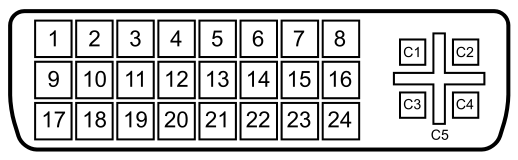
Just to expand on what noquarter said, look at a DVI pinout:

518px-DVI_Connector_Pinout.svg.png


See the pins labeled C1, C2, C3, C4, and C5? Those pins are what allow for the passive DVI->VGA adapters. Specifically:

C1 Analog red
C2 Analog green
C3 Analog blue
C4 Analog horizontal sync
C5 Analog ground Return for R, G and B signals

DisplayPort, however, has *no* analog pins whatsoever. There simply isn't an analog signal for a passive adapter to tap into. Here is DisplayPort's pinout:

Pin 1 ML_Lane 0 (p) Lane 0 (positive)
Pin 2 GND Ground
Pin 3 ML_Lane 0 (n) Lane 0 (negative)
Pin 4 ML_Lane 1 (p) Lane 1 (positive)
Pin 5 GND Ground
Pin 6 ML_Lane 1 (n) Lane 1 (negative)
Pin 7 ML_Lane 2 (p) Lane 2 (positive)
Pin 8 GND Ground
Pin 9 ML_Lane 2 (n) Lane 2 (negative)
Pin 10 ML_Lane 3 (p) Lane 3 (positive)
Pin 11 GND Ground
Pin 12 ML_Lane 3 (n) Lane 3 (negative)
Pin 13 CONFIG1 connected to Ground1)
Pin 14 CONFIG2 connected to Ground1)
Pin 15 AUX CH (p) Auxiliary Channel (positive)
Pin 16 GND Ground
Pin 17 AUX CH (n) Auxiliary Channel (negative)
Pin 18 Hot Plug Hot Plug Detect
Pin 19 Return Return for Power
Pin 20 DP_PWR Power for connector

No analog pins means no passive VGA is possible.

Pixel data doesnt take space

Sure it does. Not as much space as texture and vertex data, sure, but with some AA and triplebuffering, the framebuffers can still take up a good chunk of VRAM. I haven't seen anything supporting that at 5760x1200 1gb vs. 2gb matters yet (especially with one card), so personally I would go with the cheaper 1gb 5870.
 
Back
Top