![[H]ard|Forum](/styles/hardforum/xenforo/logo_dark.png)
Navigation
Install the app
How to install the app on iOS
Follow along with the video below to see how to install our site as a web app on your home screen.
Note: This feature may not be available in some browsers.
More options
-
Some users have recently had their accounts hijacked. It seems that the now defunct EVGA forums might have compromised your password there and seems many are using the same PW here. We would suggest you UPDATE YOUR PASSWORD and TURN ON 2FA for your account here to further secure it. None of the compromised accounts had 2FA turned on.
Once you have enabled 2FA, your account will be updated soon to show a badge, letting other members know that you use 2FA to protect your account. This should be beneficial for everyone that uses FSFT.
You are using an out of date browser. It may not display this or other websites correctly.
You should upgrade or use an alternative browser.
You should upgrade or use an alternative browser.
two windows 11
- Thread starter man00
- Start date
It's possible to dual boot different installs obviously (I do) but not sure if you'd run into issues with any identical ID conflicts since the installs would be identical and any references to the drive it was installed on would be from the other drive.
With my setup each install is distinguished in the boot manager (bcdedit) differently but if each were a literal clone it may get confused.
Is this setup meant as as a backup or something?
With my setup each install is distinguished in the boot manager (bcdedit) differently but if each were a literal clone it may get confused.
Is this setup meant as as a backup or something?

- Joined
- Nov 16, 2005
- Messages
- 21,535
Any reason you can't make a backup image and boot it as a virtual machine instead? Or do you need to do something specific on the hardware? I guess what's the purpose?

- Joined
- Oct 7, 2000
- Messages
- 78,996
yeah the ids will probably be an issue.

- Joined
- Jul 11, 2001
- Messages
- 12,830
If you really want to do this, I'd suggest not trying to setup any kind of built-in dual-boot and just keep everything totally separate. If/when you need to boot to the 2nd drive, go into your bios and change the boot order or hit a hotkey during boot (usually F12) that allows you to select a temporary boot device. At that point, just select the drive that you want to boot from.
Also, you referenced drive A and B. These drive letters are usually not used for hard drives. A legacy of the MS-DOS era when Drive A and B were reserved for Floppy Drives. That is why you almost always still see the main boot drive as drive C. I'd still avoid drive letters A and B just to make sure you're not introducing any unnecessary issues into the equation.
Also, you referenced drive A and B. These drive letters are usually not used for hard drives. A legacy of the MS-DOS era when Drive A and B were reserved for Floppy Drives. That is why you almost always still see the main boot drive as drive C. I'd still avoid drive letters A and B just to make sure you're not introducing any unnecessary issues into the equation.
I wanted to do something since Windows 10 is about the croak soon. I guess if all else fails I could do in place upgrade to 11
Maybe use the Windows 10 macrium backup of the partitions other than the data partition restore those , both drives are the same size
Right now the Samsung 870 is the Win 10 drive
the sn850 is the 11 drive
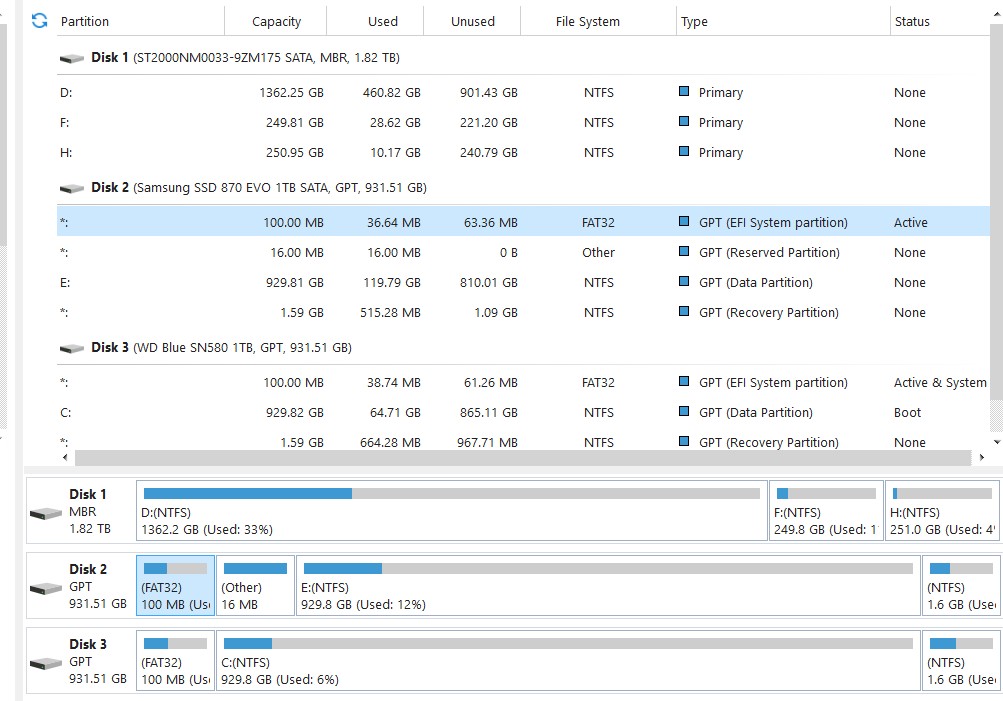
Maybe use the Windows 10 macrium backup of the partitions other than the data partition restore those , both drives are the same size
Right now the Samsung 870 is the Win 10 drive
the sn850 is the 11 drive
those would be separate. the drive A & B were use as examples only..I have that setup now but want both windows 11If you really want to do this, I'd suggest not trying to setup any kind of built-in dual-boot and just keep everything totally separate. If/when you need to boot to the 2nd drive, go into your bios and change the boot order or hit a hotkey during boot (usually F12) that allows you to select a temporary boot device. At that point, just select the drive that you want to boot from.
Also, you referenced drive A and B. These drive letters are usually not used for hard drives. A legacy of the MS-DOS era when Drive A and B were reserved for Floppy Drives. That is why you almost always still see the main boot drive as drive C. I'd still avoid drive letters A and B just to make sure you're not introducing any unnecessary issues into the equation.

- Joined
- Jul 9, 2002
- Messages
- 10,425
Setup raid in the MB bios and pull one drive out ?

StevenJamesBorchard
Limp Gawd
- Joined
- Feb 22, 2025
- Messages
- 318
May just do a Window 10 upgrade to 11 and take my chances on how many programs that won't work afterwards.
That is if I can use my same win 11 key...bet I can not
Just spend the money on Newegg or amazon and Buy a Windows 11 Pro disk OEM and then after backing up all data do a full format of all drives and install. After updates and security you can make install images after that. type 1 image: pre data as in only operating system, updates and security programs. image type II; After all on image type A and then critical data or programs if you want to.,
But also yes as someone else said before do RAID setup in BIOS. 2 drives i rec RAID 1. 3 or more RAID 5 if Mobo supports it.
Why would I need to format all drives?Just spend the money on Newegg or amazon and Buy a Windows 11 Pro disk OEM and then after backing up all data do a full format of all drives and install. After updates and security you can make install images after that. type 1 image: pre data as in only operating system, updates and security programs. image type II; After all on image type A and then critical data or programs if you want to.,
But also yes as someone else said before do RAID setup in BIOS. 2 drives i rec RAID 1. 3 or more RAID 5 if Mobo supports it.
StevenJamesBorchard
Limp Gawd
- Joined
- Feb 22, 2025
- Messages
- 318
Well, sorry I just reformat the Drive/Partition the Operating system is on. It may be a old habit that's no longer needed, but I picked it up in 2001.
- Joined
- Jul 9, 2002
- Messages
- 10,425
Just remember, once you have multiple drives, and multiple installs on the boot loader, your bound for trouble

- Joined
- Aug 3, 2004
- Messages
- 24,323
AHCI allows hot swap usually, more mobo dependant.Setup raid in the MB bios and pull one drive out ?
Wouldn't I still have to reboot to start Windows from the hot swap drive?AHCI allows hot swap usually, more mobo dependant.
So recently I wanted to do this.... I have windows 11 installed on a 2TB NVMe Samsung 980 Pro drive... Because of gaming I decided to install a 2nd copy Windows 11 on another 1TB NVMe drive... in order to not have various bs anticheat / game launchers ..etc on my machine while trying to work..
went to install it and the installer absolutely would not work... would fail every time.. Eventually I got so sick of the whole deal I made a virtual machine and mounted the VHDX image in the orig windows 11 and then edited bcdboot to add the Windows 11 VHDX to the boot-loader...
I can now boot my orig windows 11 or from the VHDX (formally? Virtual machine) to a 2nd copy of Windows 11... worked fine in my case windows detected all the actual physical hardware vs. the virtual before and I installed drivers as normal..
Interesting that if I want to boot the VHDX (orig NVMe win 11 is default) the boot loader will basically totally load that and then give the prompt about which one you want to boot... if you select the VHDX the machine reboots and you have to wait for it to restart the VHDX image) .... however if you go with the orig Windows 11 NVMe install it goes straight to the logon page without any delay... oh well..
this thread is what I followed to do this after getting tired of bashing my head on keyboard trying to install Windows 11 to the 2nd NVMe drive and I didn't want to mess about with disconnecting drives to just install it to the 1TB drive as I have had surgery in may and it would have been too much trouble..(lol?? because this was a fair bit of trouble)
https://www.elevenforum.com/t/native-boot-windows-11-virtual-hard-disk-vhdx.611/
In my case trying to install the 2nd copy to a mounted VHDX, using the bootable win11 media also failed, which is why I eventually said **** it and created the hyper-v vm and then mount the VHDX from that... which worked fine~ in my case.
went to install it and the installer absolutely would not work... would fail every time.. Eventually I got so sick of the whole deal I made a virtual machine and mounted the VHDX image in the orig windows 11 and then edited bcdboot to add the Windows 11 VHDX to the boot-loader...
I can now boot my orig windows 11 or from the VHDX (formally? Virtual machine) to a 2nd copy of Windows 11... worked fine in my case windows detected all the actual physical hardware vs. the virtual before and I installed drivers as normal..
Interesting that if I want to boot the VHDX (orig NVMe win 11 is default) the boot loader will basically totally load that and then give the prompt about which one you want to boot... if you select the VHDX the machine reboots and you have to wait for it to restart the VHDX image) .... however if you go with the orig Windows 11 NVMe install it goes straight to the logon page without any delay... oh well..
this thread is what I followed to do this after getting tired of bashing my head on keyboard trying to install Windows 11 to the 2nd NVMe drive and I didn't want to mess about with disconnecting drives to just install it to the 1TB drive as I have had surgery in may and it would have been too much trouble..(lol?? because this was a fair bit of trouble)
https://www.elevenforum.com/t/native-boot-windows-11-virtual-hard-disk-vhdx.611/
In my case trying to install the 2nd copy to a mounted VHDX, using the bootable win11 media also failed, which is why I eventually said **** it and created the hyper-v vm and then mount the VHDX from that... which worked fine~ in my case.
- Joined
- Jul 9, 2002
- Messages
- 10,425
Yes, but if anything happens to the boot loader, or the physical drive, both boot options are kaput?
absolutely the VHDX install is very much dependent on the bootloader and install on the physical drive not getting ****ed...Yes, but if anything happens to the boot loader, or the physical drive, both boot options are kaput?
In this case it really doesn't matter as the whole reason for the 2nd (VHDX) install to exist is to be able to play games with "annoying" anticheat software...etc to be isolated from the install I do work with.
Should something happen to the physical disk's install /disk itself.. the solution would be to repair /reinstall and then readd the VHDX to the bootloader... and everything would be "fine" however.. in the interim the pc would be down.