![[H]ard|Forum](/styles/hardforum/xenforo/logo_dark.png)
- Joined
- Aug 9, 2009
- Messages
- 406
Running into an error message when trying to install ESXi 4.1 to a USB key on a new server build. I am using the VMware-VMvisor-Installer-4.1.0-260247.x86_64.iso image. After some googling it seems it might be a hardware compatibility issue? I tried disabling AHCI, unplugging the WD drive, disabling both NICs. None of those changed anything. I have a feeling it might be a compatibility issue of the mobo/cpu, but I'm not really sure.
Here is the hardware spec:
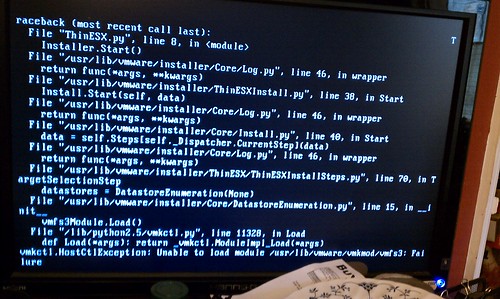
Here is a screenshot of the error message: This message occurs after accepting the VMware EULA but before selecting the storage device to install ESXi onto.
Here is the hardware spec:
- ASUS P6T6 WS Revolution
- Intel Xeon W3550
- Kingston ValueRAM 6GB (3 x 2GB) ECC Unbuffered DDR3 1333 KVR1333D3E9SK3/6G
- Nvidia GTX260 (Just temporary until i get a cheapo card)
- Sandisk Cruzer 2GB USB Flash Drive
- Western Digital WD5000ABYS 500GB (To be dedicated to a VM)
- LG DVD Burner GH20NS15
Here is a screenshot of the error message: This message occurs after accepting the VMware EULA but before selecting the storage device to install ESXi onto.
Last edited: