Time to wait or time to SSD?

Stormlifter

2[H]4U
Joined
Oct 19, 2002
Messages
2,968
Do I wait for the 4QT release from the giants or do I buy now.

My situation
  • Money is an option.
  • I have around 200GB of games and OS. Figure I could OS on 80 and then when I have more money get another 80 or two to put games on there.

Will the next generation of SSD replace the current price of SSDs or will they end up taking a higher price bracket above the current offerings?

At the moment I'm thinking of a single 80GB Intel X25-M used somewhere from someone getting rid of it. Then the new generation will come out and people will sell the X25-M 80GB for cheaper and I'll pick up 1-2 and RAID 0? Issue I see there is that TRIM and RAID 0 aren't ready that I know of. Will they release a firmware to the current generation or keep that as features of the next generation?

Thanks for your thoughts and opinions.
 
I installed Windows 7 Pro on a 64 GB A-Data SSD just a couple of months ago and I've got 30GB to spare. All of my big installed (Games, Office, CS5, etc.) go on larger drives (2x 500GB SATA), but the OS and supporting smaller programs stay on the SSD. It only cost about $129 on sale at Microcenter a few months ago.

So worth the cash.
 
Do I wait for the 4QT release from the giants or do I buy now.

My situation
  • Money is an option.
  • I have around 200GB of games and OS. Figure I could OS on 80 and then when I have more money get another 80 or two to put games on there.

Will the next generation of SSD replace the current price of SSDs or will they end up taking a higher price bracket above the current offerings?

SSD cost is primarily determined by the cost of Flash. The controller is certainly part of the price but a new controller probably doesn't increase the manufacturing cost by much at all.
20/22 nm Flash is ramping up this year so as long as demand remains the same prices should go down. That's obviously not guaranteed.
Furthermore, as well as SSDs are doing right now, many consumers feel that they are too expensive so there's certainly motivation for companies like OCZ, Corsair, Intel, etc to sell for as little as is feasible for them. There are lots of companies making/rebadging SSDs so there's plenty of competition to keep prices down.

If I were in your shoes I would definitely consider waiting. I've already got a 3x30GB vertex RAID 0 so I'm comfortable for now but I'm also excited to see new products that could match the speed of my array in a single drive.

At the moment I'm thinking of a single 80GB Intel X25-M used somewhere from someone getting rid of it. Then the new generation will come out and people will sell the X25-M 80GB for cheaper and I'll pick up 1-2 and RAID 0? Issue I see there is that TRIM and RAID 0 aren't ready that I know of.

TRIM working through RAID requires
1) SSDs that support trim
2) RAID controller that supports trim

Intel has released an update for their integrated RAID solution to support TRIM. If you're using discrete RAID you might have to do some research.
 
I installed Windows 7 Pro on a 64 GB A-Data SSD just a couple of months ago and I've got 30GB to spare. All of my big installed (Games, Office, CS5, etc.) go on larger drives (2x 500GB SATA), but the OS and supporting smaller programs stay on the SSD. It only cost about $129 on sale at Microcenter a few months ago.

So worth the cash.

IMHO you're losing part of the appeal of SSDs by keeping your programs on slow drives.
 
Waiting it is. That'll give me time to save up to switch from my AMD setup to a i7 setup.
 
IMHO you're losing part of the appeal of SSDs by keeping your programs on slow drives.
Not really.

1) Your operating system is running on the fast drive, as are all of your day-to-day applications such as your browsers, mail client, etc.

2) The applications that are on your storage drive are getting 100% read and write time dedicated to them. Dedicated drives are always faster than they would be if the OS was also running on it.

40-64GB SSD + 2TB platter drive seems to be the winning combination right now. =)
 
I put the programs I use most frequently on my SSD, and the others such as photoshop on my 750 black. SSD is so worth the money.
 
OCZ 100Gb is on sale at the egg.

Get 2 of them for Raid 0. :)

Or get one now, then one later for Raid
 
Intel has released an update for their integrated RAID solution to support TRIM

Only if the drive is outside of the RAID array.

No TRIM for drives in the array.
 
Check out Next generation of SSDs to have a shorter lifespan? too. While I expect the controllers to compensate for this sort of thing, they will have larger pages and the electronics will simply have a shorter life. It may or may not become an issue for end users, but it may be something keep an eye on, especially if you're thinking of getting one of the new SSDs as soon as they come out.
 
put os and apps on SSD, put the games on a raptor or a new gen 7200.
 
Why not games on the SSD? Do they not benefit from that?

They can benefit, though it depends on the game. Its only an issue if you like to keep a lot of them installed all at once, since games can be so much larger than regular apps. If you only keep installed the one or two that you're actively playing, then it shouldn't be a problem.
 
Do I wait for the 4QT release from the giants or do I buy now.

My situation
  • Money is an option.
  • I have around 200GB of games and OS. Figure I could OS on 80 and then when I have more money get another 80 or two to put games on there.

Will the next generation of SSD replace the current price of SSDs or will they end up taking a higher price bracket above the current offerings?

At the moment I'm thinking of a single 80GB Intel X25-M used somewhere from someone getting rid of it. Then the new generation will come out and people will sell the X25-M 80GB for cheaper and I'll pick up 1-2 and RAID 0? Issue I see there is that TRIM and RAID 0 aren't ready that I know of. Will they release a firmware to the current generation or keep that as features of the next generation?

Thanks for your thoughts and opinions.

Honestly a 30GB drive is more than enough for a windows 7 install. After you move or disable your page file, disable hibernation and system restore the install is less than 10GB large. That gives you more than enough space for all of the little apps that you really want on a ssd.
 
Honestly a 30GB drive is more than enough for a windows 7 install. After you move or disable your page file, disable hibernation and system restore the install is less than 10GB large. That gives you more than enough space for all of the little apps that you really want on a ssd.
can't find any fast 30GB, even the 40GB by Intel is way slower than the 25-M
 
I dont see much point in going SSD if you don't have room for the games you are currently playing. Minimum frame rate gets such a nice boost from using a SSD and let us not forget load times.

You can get a sandforce based SSD such as the OCZ Agility 2 240Gb for $649, Vertex 2 200Gb for $695, Agility 2 120gb $349 or Intel X25-M 160gb for $399. Still far from cheap but a slow improvement in the capacity/cost departments. Sandforce and Intel controller based SSDs are the only ones I'd touch personally. The X25-M seems like the most reasonable cost per GB be it for a single drive or some arrangement of RAID.
 
I dont see much point in going SSD if you don't have room for the games you are currently playing. Minimum frame rate gets such a nice boost from using a SSD and let us not forget load times.

You can get a sandforce based SSD such as the OCZ Agility 2 240Gb for $649, Vertex 2 200Gb for $695, Agility 2 120gb $349 or Intel X25-M 160gb for $399. Still far from cheap but a slow improvement in the capacity/cost departments. Sandforce and Intel controller based SSDs are the only ones I'd touch personally. The X25-M seems like the most reasonable cost per GB be it for a single drive or some arrangement of RAID.

Not many games really benefit from an SSD. Oblivion with a ton of mods yes but beyond that not much and once you factor in cost the extra performance (or lack of) in games looks even less impressive. The performance of my OS now that is night and day.
 
The next big price drop will come from smaller-process flash, which is close to production for a couple of companies (mainly Intel / Micron). This should be the next major price drop, just as the 34nm X25-M G2 line caused an across the board price drops when intel introduced it. In the meanwhile there still has been a very gradual lowering of prices in the last year.
 
If you're going for a big drive, I would raid0 a few smaller ones. TRIM is great but it's not essential. As long as you start with Sandforce or Intel and you'll be good to go. It's been shown that as long as we leave 25% free space performance maintains itself.

Besides, somehow, someway, someday, TRIM or a similar function will eventually be supported with raid.

There will be people that say but why do this, you don't need it blah blah. Do most of us on this forum really need half of the things we do to our rigs for practical day to day usage (professionals excluded of course), nah probably not. The real question is, for the same cost, why not do this? Backup your array onto an HDD, use software like Acronis or Cobian to automatically do this for you every few nights for a quick few while you sleep. ;)

Apps load buckwild fast with just one. But, I would love games like slow ass loading games like NFS Shift, etc to be on a maxed out ICH10R SSD array loading with the quickness. :D
 
Last edited:
What about the issue of data corruption? Many SSD drives that were released even as recent as last year had data corruption issues. If one can afford an SSD and one does not want data corruption issues, is now the time to buy?
 
Many SSD drives that were released even as recent as last year had data corruption issues

I didn't know there was corruption issues.

All mine have just died.
 
Honestly a 30GB drive is more than enough for a windows 7 install. After you move or disable your page file, disable hibernation and system restore the install is less than 10GB large. That gives you more than enough space for all of the little apps that you really want on a ssd.

I don't understand how people come up with these numbers. I disabled page file and the size on my HD increased 2GB? My windows 7 install + office, drivers deamon tools and a couple other small programs is using 42GB. I don't understand where people come up with the 10GB size for Windows 7.

edit: N/M I found the problem. Using about 25GB of 74.5 GBwith the above installed
 
Last edited:
I didn't know there was corruption issues.

All mine have just died.

Jesus! Breaking down your last sentence is scary.
Yeah, everyone tells me just to jump in and buy one. They have not been around that long for my peace of mind to have ONE just "die" let alone when you say "ALL mine just died"...
Thank you though for being honest. I'm not a spendthrift I am a family man with 3 kids and honestly I can't afford to fuck around with money to watch $300+ HDDs just "die".
Yeah, step right up folks and piss away your money, the speed is safe temporarily......
 
Jesus! Breaking down your last sentence is scary.

:D

What I meant was there was no chance of data recovery...it was an unexpected, sudden death. (Rose)

They've all be replaced under warranty.

Like any other HD, if you're not prepared with a back-up you have a chance of data loss.

Not all my SSD drives have failed but the ones that did just died immediately.
 
Last edited:
IMHO you're losing part of the appeal of SSDs by keeping your programs on slow drives.

Not at all. I've got the 64GB as the primary drive with the OS and supporting programs.

I've got 2 x 500GB 7200 rpm drives in Raid 0 with 5 partitions

30 GB webroot
200 GB programs
300 GB games
100 GB users - backed up via DropBox
rest is storage.

The read/write speed on the Raid drives is more than enough. L4D2 loads up in under 4 seconds. I can't see it being much faster on the SSD. Even if it shaves off a second, I think I can wait that long. :)

Spending $120 on the 64GB SSD got me more bang for the buck than spending $400 on a larger SSD would have. I've a good friend that spent a lot more on a larger Intel SSD and is now regretting that he didn't get the smaller drive and spend the excess on a larger monitor.
 
Not many games really benefit from an SSD. Oblivion with a ton of mods yes but beyond that not much and once you factor in cost the extra performance (or lack of) in games looks even less impressive. The performance of my OS now that is night and day.

Not much of a benefit? I'll point out the minimum frame rate improvements here in Crysis: http://www.anandtech.com/show/2614/14

A 2.1x increase in the minimum frame rate is pretty impressive. Being able to remove the stuttery moments of streaming textures and the like is a pretty big deal in my books.
 
Not much of a benefit? I'll point out the minimum frame rate improvements here in Crysis: http://www.anandtech.com/show/2614/14

A 2.1x increase in the minimum frame rate is pretty impressive. Being able to remove the stuttery moments of streaming textures and the like is a pretty big deal in my books.

A single momentary frame means nothing to me. If this had used a graph like [H] uses I would find it useful but really WTF does one single frame mean to me?

What can we conclude here? SSDs can be good for gaming, but they aren't guaranteed to offer more performance than a good HDD.

What about the issue of data corruption? Many SSD drives that were released even as recent as last year had data corruption issues. If one can afford an SSD and one does not want data corruption issues, is now the time to buy?

Like my shitty Vertex. That thing has corrupted on me twice in the past month. It's not at all reliable which I find to be pretty ridiculous. I have a 500GB spinpoint on the way to replace it.
 
TRIM is great but it's not essential. As long as you start with Sandforce or Intel and you'll be good to go. It's been shown that as long as we leave 25% free space performance maintains itself.

Free space is useless; its not even actually free, the SSD thinks its in use because it has been written to before at least once; making it allocated until you do a Secure Erase.

What is useful, is unallocated space; space that never has been or can be written to, because its not part of a partition. And windows does not support writing to devices without a partition.

Aside from extra spare space, you would also want to not fill up your filesystem completely, to prevent heavy file fragmentation causing high write amplification on the SSD. If you keep a filesystem that is 90%+ full, then write amplification on your SSD will suffer as well.
 
Free space is useless; its not even actually free, the SSD thinks its in use because it has been written to before at least once; making it allocated until you do a Secure Erase.

What is useful, is unallocated space; space that never has been or can be written to, because its not part of a partition. And windows does not support writing to devices without a partition.

I definately believe and implement this on my own system but have never seen anything substantiating it.
 
What exactly do you mean by 'substantiating'? There are lots of threads about people with degraded Intel performance, some of those people did not have TRIM support for some reason, others kept their filesystems too full and the SSD mapping tables become heavily fragmented. You want to avoid both situations, and keep the SSD fast over time.

The fact that it's not easily reproducible, comes from the fact that simple sequential writes can never cause fragmentation by itself; thus to test the effects of fragmentation due to too few spare area is very hard to realistically analyze.
 
What exactly do you mean by 'substantiating'?
I mean in print graphs or charts, for all to see the differences between making the partition after the drive has been formatted and making the partition after a secure erase.

The other slowdown factors you mentioned have nothing to do with the information I'd like to see.

I feel that many are more comfortable with a regular reformat/partition than using a DOS disk (HDDErase) and I'd like to see the differences between those two methods.

Maybe there's not much or maybe there is but that's what I'd like to see substantiated.
 
Not much of a benefit? I'll point out the minimum frame rate improvements here in Crysis: http://www.anandtech.com/show/2614/14

A 2.1x increase in the minimum frame rate is pretty impressive. Being able to remove the stuttery moments of streaming textures and the like is a pretty big deal in my books.

I agree with you Ankle but you're not going to convince them. I wouldn't have bought a 40GB or 80GB hard drive even 5 years ago so it drives me nuts when I see drives of that size recommended here. It's like a netbook mentality on a desktop and it's crazy.
 
I mean in print graphs or charts, for all to see the differences between making the partition after the drive has been formatted and making the partition after a secure erase.
Formatting is a poorly understood concept, and it depends on the OS what actually happens:
Windows pre windows 7: writes zeroes to first 20MB, write new partition table, read entire disk contents for bad sectors but not write to them
Windows 7: writes zeroes to entire disk/partition.

Writing to all visible locations will cause 100% of all visible space on your SSD to become allocated; thus the SSD cannot use it for itself. Intel SSDs still have 6.8% spare space internally, and Sandforce up to 28% spare space. This space is invisible and can never be 'claimed' by the operating system.

Now, because formatting under windows 7 writes sequentially, that means that it will be very similar to a secure erase. By writing sequentially the SSD does not have to remap those writes and effectively this 'defragments' the SSD as it were; because with each sequential (contiguous) write, the SSD will remove any existing write remaps for that location and any 'dynamic' data becomes 'static' again; which is the fastest.

But this still means you do not have more than 6.8% spare space. The degradation will be quicker than if you would:
1. secure erase
2. install windows 7 fresh, and create a smaller partition. i.e. 60GB on a 80GB SSD

In this case, the SSD will have 6.8% internal spare + 20GB extra spare space. This should significantly reduce performance degradation after a large amount of random writes happened.

Performance degradation does not occur when writing sequentially; only the random writes 'hurt' because the SSD will be remapping those to other locations; causing erase block fragmentation in the long run.

As for articles that explain this, not a direct comparison of what you say, that i'm aware of. But reading the articles on Anandtech should give you a better understanding of how SSDs work internally, specifically regarding performance degradation.

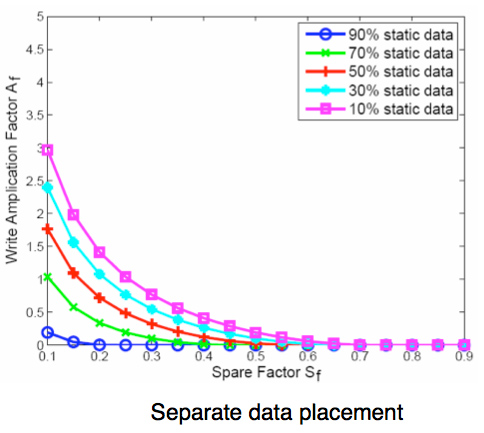
But you might like this graph, which relates to spare space. A spare factor of 0.10 means 10% spare space; thus the default is 0.068; less than the graph visually shows you). Write amplification does not directly translate to performance degradation, but it virtually goes hand-in-hand. Keeping it 1.0 (or 0.0 in the graph) should be your goal.

separatedataplacement.jpg


than using a DOS disk (HDDErase)
On linux you can use newer versions of smartmontools, so you can do this straight from the OS. I'm sure you can also use a bootable ISO like Ultimate Boot CD, that also has HDDErase.
 
I agree with you Ankle but you're not going to convince them. I wouldn't have bought a 40GB or 80GB hard drive even 5 years ago so it drives me nuts when I see drives of that size recommended here. It's like a netbook mentality on a desktop and it's crazy.

Apparently. This is looking like a mighty fine upgrade capable of housing all my 'currently playing' games and the OS: http://www.anandtech.com/show/3788/oczs-revodrive-pcie-ssd-preview-an-affordable-pcie-ssd
 
I agree with you Ankle but you're not going to convince them. I wouldn't have bought a 40GB or 80GB hard drive even 5 years ago so it drives me nuts when I see drives of that size recommended here. It's like a netbook mentality on a desktop and it's crazy.

If you can provide any real evidence on how a SSD helps with the vast majority of games that would help. We all have something called ram which helps a lot in games too. ;) It's also faster than a ssd.

I don't see why you need a ssd for storage. A 30 or 40 GB drive is fine for the OS and most small apps that most people here use. I find it crazy that people recommend a drive 3-4 times more expensive than a 30GB drive can be found for without solid evidence that it helps in most games. Oblivion modded or even Saints Row 2 yes but Crysis no.

My situation
  • Money is an option.
  • I have around 200GB of games and OS. Figure I could OS on 80 and then when I have more money get another 80 or two to put games on there.
 
If you can provide any real evidence on how a SSD helps with the vast majority of games that would help. We all have something called ram which helps a lot in games too. ;) It's also faster than a ssd.

I don't see why you need a ssd for storage. A 30 or 40 GB drive is fine for the OS and most small apps that most people here use. I find it crazy that people recommend a drive 3-4 times more expensive than a 30GB drive can be found for without solid evidence that it helps in most games. Oblivion modded or even Saints Row 2 yes but Crysis no.

If you had unlimited funds, would you choose a 30GB or 40GB SSD? If you say you aren't compromising, you're delusional. It's just nonsense. Everything basically goes in cycles. It was the same thing when the 36GB Raptors came out.
 
Back
Top