• Some users have recently had their accounts hijacked. It seems that the now defunct EVGA forums might have compromised your password there and seems many are using the same PW here. We would suggest you UPDATE YOUR PASSWORD and TURN ON 2FA for your account here to further secure it. None of the compromised accounts had 2FA turned on.
    Once you have enabled 2FA, your account will be updated soon to show a badge, letting other members know that you use 2FA to protect your account. This should be beneficial for everyone that uses FSFT.

The AMD Driver Bug Thread

Amazing... this time AMD has not confined itself to screw up drivers builds.

See here:
http://sites.amd.com/us/game/downloads/Pages/downloads.aspx

Today there is no more direct link to the individual OS drivers in the download page.

Just in case, I'll report here missing links:

32-bit OS Drivers
http://sites.amd.com/us/game/downloads/Pages/radeon_win7-32.aspx
http://sites.amd.com/us/game/downloads/Pages/radeon_xp-32.aspx
64 bit OS Drivers
http://sites.amd.com/us/game/downloads/Pages/radeon_win7-64.aspx
http://sites.amd.com/us/game/downloads/Pages/radeon_xp-64.aspx
 
Nothing has gone missing, they've just restructured the website a bit. Direct links are still available on this page (the entire second column is direct links, the ones you're complaining have gone missing). There's also a nice guided hardware/OS picker on the far-right of the page, if that's more your speed.

a51pZ.jpg
 
Last edited:
@Unknown-one: I've got some reports for your attention.

Bug report to address

1) "Microsoft Visual C++ 2010 Redistributable" returns a failure message during installation, because the user has already a new version than the old version included in catalyst 11.9.
http://hardforum.com/showthread.php?p=1037811079#post1037811079
This error is apparently harmless, but Visual C++ 2010 should be updated as expected from AMD AND it would be appropriate to improve Visual C++ 2010 detection in a way that a lower version should be automatically skipped (without warnings) in a PC with a newer version.


2) WLM 2011 looks blurred if if you have MLAA enabled (confirmed in 11.9)
http://forums.guru3d.com/showpost.php?p=4081125&postcount=241
http://forums.guru3d.com/showpost.php?p=4109912&postcount=41
Workaround: disabling MLAA in CCC.

Ti3Kob said:
In last versions, WLM is using Direct2D to render the interface. Direct2D is probably hooked by the driver as it's a GPU accelerated API, and MLAA is applied to it for some reason.

3) AMD HD3D broken in crossfire:
http://www.rage3d.com/board/showthread.php?t=33981236
Youtube video about this behavior:
http://www.youtube.com/watch?v=eaCZDmXcGVc

4) OpenGL is not supported by crossfire mgpu.
Workaround: try some tweaks as renaming to SeriousSam.exe.
http://forums.guru3d.com/showthread.php?t=350251

5) Catalyst A.I. is enabled by default in latest releases, without the possibility to disable it in CCC.
The problem is that some games such as Sims3 and Dead Space runs well only with this setting off.
Workarounds:
- Use RadeonPro utility (this applies the 3D settings when you start a game, then restores the settings right after the game is finished.)
- Edit profile.xml in this way: http://forums.guru3d.com/showthread.php?t=343165.

It would be better a future integration in CCC of an automated profile managment per game settings (like does RadeonPro).
 
Last edited:
I like that new little app (AMD Driver Downloader/Installer) they have that you can DL that when you open, auto checks your driver to see if its the newest, and if not it will update to the newest for you. Anyone else like it?
Btw is 11.8 worth upgrading to? I have 11.7.
Where is the page that shows all the improvements listed that the new driver has?
 
I was unable to modify the BIOS on my own using the RBE (the system just blue screens when I play a youtube with the 3D clocks in the UVD section). Could you help me modify the bios?
It's a XFX 5870 model#: HD-587X-ZNFC

And I'm using the official bios update from them from this link:
http://www.xfxsupport.com/download/download.asp?supid=1237&cusid=F1683779

Thanks,

Stan

Here there is a link with the solution in the last post:
http://www.techpowerup.com/forums/showthread.php?t=146833
 
Here there is a link with the solution in the last post:
http://www.techpowerup.com/forums/showthread.php?t=146833

I'm not getting any crashes with my card with the unmodified xfx bios. I just want to be able to run the card at the full speed when UVD kicks in. Thus far this card causes most youtube videos at 720p and 1080p to be unwatchable because of the lower 400/900 clock speeds that UVD clocks into. I'm thinking at this point the real answer is to get another card that that doesn't have a power savings mode forced onto you. From what I read the green camp doesn't do this to you.
 
I'm not getting any crashes with my card with the unmodified xfx bios. I just want to be able to run the card at the full speed when UVD kicks in. Thus far this card causes most youtube videos at 720p and 1080p to be unwatchable because of the lower 400/900 clock speeds that UVD clocks into. I'm thinking at this point the real answer is to get another card that that doesn't have a power savings mode forced onto you. From what I read the green camp doesn't do this to you.

The last post in that topic suggests to underclock the memory to 1150 if you've experienced any previous problem with original 3d clocks.
But reading your post, your problem is only the UVD mode with 400/900 clock speed.

I modified your bios here (according to your 3d clock/voltage default settings):
http://www.mediafire.com/?5d2ptm9u5q2h2za

Try and let me know if it works for you. Don't forget to rename the file, if you want overwrite it.
 
Last edited:
The last post in that topic suggests to underclock the memory to 1150 if you've experienced any previous problem with original 3d clocks.
But reading your post, your problem is only the UVD mode with 400/900 clock speed.

I modified your bios here (according to your 3d clock/voltage default settings):
http://www.mediafire.com/?5d2ptm9u5q2h2za

Try and let me know if it works for you. Don't forget to rename the file, if you want overwrite it.

Flashed with this and system blue screened as soon as I went to youtube.com. It seems the voltage is locked to 1.063 on this card for uvd mode and it's impossible to have a different voltage (and it's too low to run 850/1200).

It does seem to run stable in uvd mode with 600/900 @ 1.063 which is a 200 mhz over defaults. I'm sure I might be able to slowly overclock it to seem how much an improvement I can get in that mode. 850/900@1.063 is definitely unstable.
 
Approximately you could increase manually UVD/3d voltages to 1.163 with RBE, maintaining 850/1200 on both...but in this case you should also uninstall catalyst drivers before to flash a card. After flashing your card, re-install catalyst drivers to apply new clocks.

However, I don't know your 3d clock voltage setting, because in your bios this value is not directly reported by RBE. If you want match perfectly 3d clock with UVD mode you should check the real voltage of your 3d clock, for example running latest gpu-z tool and logging temps to file (before to play a game):
http://www.techpowerup.com/forums/attachment.php?attachmentid=39906&d=1293879363
 
Last edited:
Well...my new HD 6970 arrived a couple days ago, had to order a Mini-DisplayPort-to-DisplayPort adapter to hook everything up, so I only just got it installed.

It's ridiculously fast, but the fan is LOUD and it TICKS at low speed. It's louder than the stock fan on my old HD 5850 and far louder than the aftermarket fan I was using on the HD 5850 after the stock fan died...

It's just one problem after another with these cards, it seems :(
 
Well...my new HD 6970 arrived a couple days ago, had to order a Mini-DisplayPort-to-DisplayPort adapter to hook everything up, so I only just got it installed.

It's ridiculously fast, but the fan is LOUD and it TICKS at low speed. It's louder than the stock fan on my old HD 5850 and far louder than the aftermarket fan I was using on the HD 5850 after the stock fan died...

It's just one problem after another with these cards, it seems :(

What are your temps?
 
72 Celsius at 33% load? I run two 6970s in crossfire quite close together, and even with the side case fans off, they idle in the 40s Celsius, at 24% fan speed. Something is seriously amiss there.
 
72 Celsius at 33% load? I run two 6970s in crossfire quite close together, and even with the side case fans off, they idle in the 40s Celsius, at 24% fan speed. Something is seriously amiss there.

+1 Mine are in eyefinity and run a little hotter but not THAT hot. Re apply TIM Unknown one
 
Before you do that, I'd say manually force the fan to different speeds in catalyst? If it makes an undue amount of noise at most speeds, then the fan is already faulty. You don't really want to void your warranty changing the TIM if you're only going to end up RMAing the card anyway.
 
You know those old school film projectors, and the stereotypical fast-ticking noise they make? The fan sounds like THAT when you run it at low speed.

This was a "gift" directly from AMD, with no markings and no OEM stickers...I'm not sure it even has a warranty. I guess I'll have to call in on Monday and tell them they've sent me yet another broken card...

72 Celsius at 33% load?
No, 72c at 0% load (the fan is running at 33% to keep it there). It's obviously not working very well.

I was unable to modify the BIOS on my own using the RBE (the system just blue screens when I play a youtube with the 3D clocks in the UVD section). Could you help me modify the bios?
It's a XFX 5870 model#: HD-587X-ZNFC

And I'm using the official bios update from them from this link:
http://www.xfxsupport.com/download/download.asp?supid=1237&cusid=F1683779

Thanks,

Stan
Sorry i took so long to get back to you, I was on vacation for a while there. I'll get that BIOS modded for you.
 
Last edited:
Sorry, I meant fan speed, not load. D'oh!
Is your card permanently running at 880mhz? There might be a driver issue that's causing it to get stuck there, and thus run warm, and if you don't have much cooling or space in your case, it's possible that the card could reach that sort of heat output. Things like GPU-accelerated flash, for example. Try manually forcing the speed up and down in catalyst to different levels and see how the noise changes. Oh, and don't forget to check if anything is caught in the fan, because more often than that, that's the cause of fans ticking (as opposed to making other noises).
 
Sorry, I meant fan speed, not load. D'oh!
Is your card permanently running at 880mhz?
No...look at the GPU-Z screenshot I posted. The card is idling at 500MHz, which is normal.

if you don't have much cooling or space in your case, it's possible that the card could reach that sort of heat output.
The case is very well cooled and there's plenty of room around the card; it had no trouble keeping my 5850 cool (and the heatsink on that 5850 dumped all the heat into the case to be recirculated, where as the 6970 jets it out the back). The rest of my system is actually running slightly cooler with the 6970 installed, due to its heatsink design...but I'd rather have the HD 6970 not cook itself.

Oh, and don't forget to check if anything is caught in the fan, because more often than that, that's the cause of fans ticking (as opposed to making other noises).
First thing I checked. There's nothing in the fan, the motor hub is simply ticking maddeningly.
 
The rpm sensor indicates the fan speed is correct for 33% duty cycle, so I'm not really sure why the temperature is so high. 72°C isn't going to cause any problems for longevity, the older HD4 series cards were designed to idle at 80°C without incident, but it is a strange issue. What are the load temps and fan speed? Load is more of an issue for cooling than idle.
If the fan is just making that noise with no obstructions it could be that it's warped slightly and doesn't fit securely. You could potentially have a go at sorting that, change the cooler for an aftermarket one, or RMA the card for a replacement.
 
No, 72c at 0% load (the fan is running at 33% to keep it there). It's obviously not working very well..

Yes this is also what I understood when Sam morris posted that. I also though that it was 33% fan speed. That card should idle around 40 unless your airflow in the case is that horrific. Something is definitely wrong there.


This was a "gift" directly from AMD, with no markings and no OEM stickers...I'm not sure it even has a warranty. I guess I'll have to call in on Monday and tell them they've sent me yet another broken card...

This part I was aware of, since I've been following your thread from the beginning, This was a sample they probably had laying around, they may have removed and reapplied the cooler as they needed and the last time they may have done a shitty job of getting it back on there. Instead of asking for an exchange for a card they gave you as a gift I'd reapply tim myself, and see if everything is as tight as it should and making proper contact, but that's just me.
 
This was a sample they probably had laying around, they may have removed and reapplied the cooler as they needed and the last time they may have done a shitty job of getting it back on there. Instead of asking for an exchange for a card they gave you as a gift I'd reapply tim myself, and see if everything is as tight as it should and making proper contact, but that's just me.
I'm going to call them and ask how they recommend I proceed given the situation. Who knows, they might just send out a replacement aftermarket heatsink to fix the problem.

The problem with aftermarket coolers is their size. I really don't want to get a brand new heatsink here, only to find it wont fit back in my case because it's too long...

What are the load temps and fan speed? Load is more of an issue for cooling than idle.
Load temp is 90c. The card will not allow itself to go higher than that, instead preferring to ramp up the fan speed to maintain itself at 90c.
 
I went ahead and took the heatsink apart to see if there was anything I could do... all I can say is that AMD has some explaining to do.

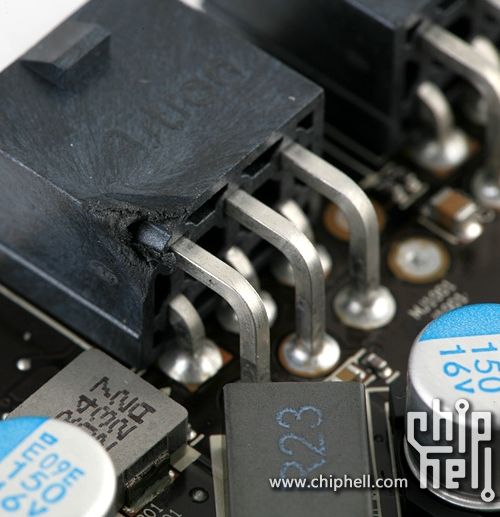
The first thing I noticed was that every single screw on the card was loose, no more than finger-tight. The card has obviously been disassembled once before, and then put back together in exceedingly poor fashion. Many of the thermal pads for the memory were put on in odd directions, twisted, or torn. There was also far too much thermal paste on the GPU core, gobs of it everywhere. The card itself was obviously man-handled at some point. The 8-pin power connector had a large chip taken out of its inside corner, which could only have happened with the heatsink off.

There's nothing I can do about the ticking noise that the fan is still making, and even though I gave everything a good cleaning and applied AS5, temperatures are entirely unchanged, The card is better put together than when I received it, but there's obviously still something very wrong.

Basically seems like they sent me a very poorly refurbished card... not what I would have expected as a "gift." I'll call up in the morning and see what they have to say for themselves...
 
I went ahead and took the heatsink apart to see if there was anything I could do... all I can say is that AMD has some explaining to do.

The first thing I noticed was that every single screw on the card was loose, no more than finger-tight. The card has obviously been disassembled once before, and then put back together in exceedingly poor fashion. Many of the thermal pads for the memory were put on in odd directions, twisted, or torn. There was also far too much thermal paste on the GPU core, gobs of it everywhere. The card itself was obviously man-handled at some point. The 8-pin power connector had a large chip taken out of its inside corner, which could only have happened with the heatsink off.

There's nothing I can do about the ticking noise that the fan is still making, and even though I gave everything a good cleaning and applied AS5, temperatures are entirely unchanged, The card is better put together than when I received it, but there's obviously still something very wrong.

Basically seems like they sent me a very poorly refurbished card... not what I would have expected as a "gift." I'll call up in the morning and see what they have to say for themselves...

I remember the launch was delayed on the 6970 because they had to shave a corner of the 8 pin power connector. That could have been a very early model. Definitely from the first batch.

Here is the story http://www.geeks3d.com/20110124/the...-hd-69706950-delay-each-card-is-hand-crafted/

Here is a pic

amd_hd6970_hand_crafted.jpg
 
DCOM error seems fixed in 11.10 preview, but I'm waiting to try 11.9 final drivers for a definitive sentence.

Thank you Unknown-one. I admire constantly your efforts, providing us a direct channel with AMD.

I'd suggest to all followers of this thread to help in the research of any relevant bug report (like this) in every latest final release.
 
Last edited:
@Unknown-One: Please update your OP to reflect these info.

1) Existent bugs to update:
wglCreateContext Exception = NOT FIXED in 11.9 (as stated here)
DCOM Error = FIXED in 11.9, as stated in release notes.
I haven't verified other bugs in the OP, because I don't use CCC. Any other help would be appreciated, in general, from some follower of this thread.

2) New bugs /suggestions to introduce
http://hardforum.com/showpost.php?p=1037691563&postcount=363

If some reports are misinterpreted then it's my fault, because I have a basic english knowledge.
 
Last edited:
First post has been partially updated for Catalyst 11.9. I'm testing the other issues now.
 
First post has been partially updated for Catalyst 11.9. I'm testing the other issues now.

Wonderful, I just note that AMD fixed many bugs in this version (not noted in official release notes).

I'm almost sorry to report you other bugs to evaluate/add... take your time. ;)
 
Last edited:
I'm just glad we finally have all the critical bugs off the tracker. That's a major improvement.
 
This thread is an excellent source of info. I wish AMD would sponsor the OP or something for the effort he is putting into this.
 
An exception is thrown when an wglCreateContext is called when OPENGL32.DLL is dynamically loaded (using dynamic DLL linking). AIDA64 corrected this issue in latest beta using static linking of OPENGL32.DLL. Probably we should send this thread to AMD, because the reference in OP doesn't clarify the situation at all.
 
Whats a good workaround for CCC not opening up?
That situation is usually caused by the installation wizard screwing up. In all honesty, the AMD installation wizard needs a driver bug thread of its own, it's terrible.

The two times this has happened to me, I had to uninstall the driver, boot to safe mode, and run Driver Sweeper. I was then able to boot back into normal mode and install the latest driver without a problem.

It sucks, I know... aug, I'm going to have to start tracking installation wizard bugs...
 
You cant install the drivers in safe mode can you? Seems like every time I try the installer freezes up.

I tried fixing the CCC for several hours yesterday using various guides on the net. Most are irrelevant now days. I was able to get the CCC working to a degree. I booted up to safe mode, went to device manager and selected my (VGA) video card and look for drivers in a folder on the desktop that I extracted the drivers too. The drivers installed, but I believe only partially. I was then able to install the CCC as the card way now detected. Both CCC and the drivers would not install when the video card was detected as (VGA), only when the video card was detected as a ATI 5800 would either install. But Since I didn't run the full installer and GPUZ and driver cleaner .net both didn't recognize the driver version. So I reinstalled the full driver on top of the installation. Gpuz and driver cleaner was then able to detect the driver version, but CCC failed to launch.

Now with Driver Sweeper out of business I just recently went to using DriverCleaner.NET. I', thinking that they might be a LITTLE too thorough. As with sometimes I use them, I am not able to boot into windows without first booting into safe mode and having the VGA video in the device manager be detected as a ATI card via pointing to an extracted drivers folder.
 
Back
Top