• Some users have recently had their accounts hijacked. It seems that the now defunct EVGA forums might have compromised your password there and seems many are using the same PW here. We would suggest you UPDATE YOUR PASSWORD and TURN ON 2FA for your account here to further secure it. None of the compromised accounts had 2FA turned on.
    Once you have enabled 2FA, your account will be updated soon to show a badge, letting other members know that you use 2FA to protect your account. This should be beneficial for everyone that uses FSFT.

Text Problem with 193P and MS Word

chargedmr2

Weaksauce
Joined
Jan 7, 2005
Messages
67
Hi guys. I need some help here. I have a 193P that has only been on my desk for a few days now and I am noticing some strange issues with text appearance in MS Word. When I am typing it usually looks fine, but when I stop typing and scroll to a different page the text often ends up looking like crap! Then I click around the page and it will go back to normal. What's the deal? Here is a screen shot of good and bad text for comparison. The top text is screwed up and the bottom text is after it cleared up again:
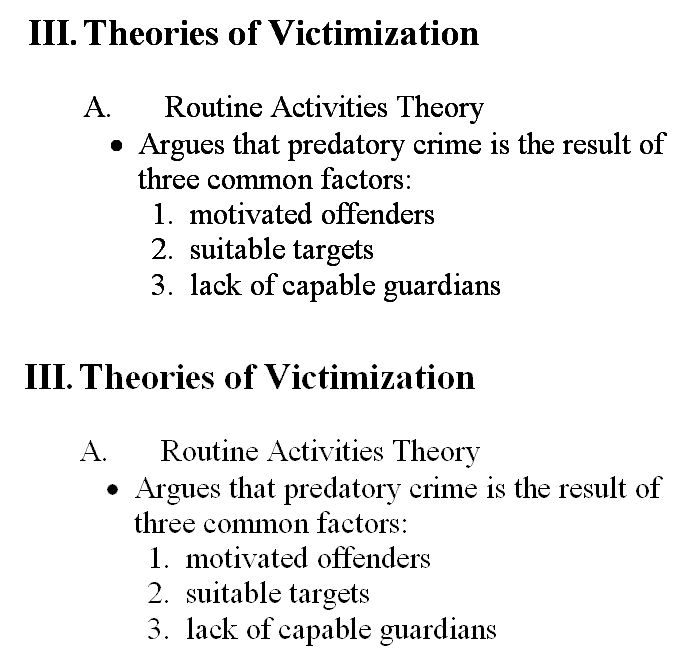
TextQuality1.bmp
 
i had to look twice to see that the two texts were different. at first i thought the upper one was slightly bolded - almost looks like a slightly different font. anyways i'm probably one of the few that actually does have a 193P and unfortunately or fortunately however you want to look at it i don't experience that problem. i just did what you did to (clicking around/opening multiple windows/scrolling). maybe you can describe in detail what you do to get that effect and i can try it out? but i just can't see it at the moment -
 
That sounds like a problem with your video card or its drivers. There is nothing like that on my 193P and I doubt it's a monitor issue.
 
Back
Top