![[H]ard|Forum](/styles/hardforum/xenforo/logo_dark.png)
i would not be to worried about it (its when you get spare area gets low it can be a problem or you get actual (in toshiba ssd case) SMART "Media and Data Intectiery Errors" has errors logged or Available Spare % is dropping closer to 0% (its % on that one)
also the % left is based on the what the drive is actually reporting (samsung pro ssd post) its a MLC the drive will probably last longer than 10-30 years (baring an actual fault with the SSD) you can write over 2-5PB of data on to them and they still be happy
in diskinfo click on function > adv function > raw > 10 [DEC] (first time open its set to hex, witch does not give you numbers just hex that you have to convert) once it's set to Decimal it will remember until diskinfo is installed again
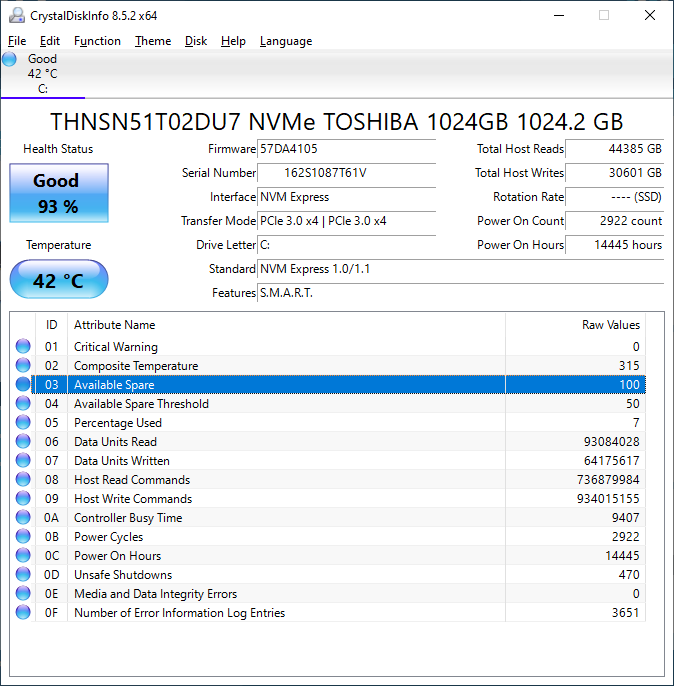
my "Number of Error Information Log Entries" is due to high heat and probably the unsafe shutdowns (but no Critical warnings or Data Errors)
some say the numbers are pointless (seagate mostly i agree as some fields change up and down, but important boxes like relocation events are increments of 1s) but in "HDD Sentinel" these numbers match up (right click "show decimal fields" with diskinfo (i have always used Decimal)
mine above is dell branded (i made sure it was as XG3 is a OEM only so i wont get any firmware if its a stock XG3) i think the DU7 part is what makes it dell branded in my case (don't expect any firmware updates from HP if it is branded by them)
also the % left is based on the what the drive is actually reporting (samsung pro ssd post) its a MLC the drive will probably last longer than 10-30 years (baring an actual fault with the SSD) you can write over 2-5PB of data on to them and they still be happy
in diskinfo click on function > adv function > raw > 10 [DEC] (first time open its set to hex, witch does not give you numbers just hex that you have to convert) once it's set to Decimal it will remember until diskinfo is installed again
my "Number of Error Information Log Entries" is due to high heat and probably the unsafe shutdowns (but no Critical warnings or Data Errors)
some say the numbers are pointless (seagate mostly i agree as some fields change up and down, but important boxes like relocation events are increments of 1s) but in "HDD Sentinel" these numbers match up (right click "show decimal fields" with diskinfo (i have always used Decimal)
mine above is dell branded (i made sure it was as XG3 is a OEM only so i wont get any firmware if its a stock XG3) i think the DU7 part is what makes it dell branded in my case (don't expect any firmware updates from HP if it is branded by them)
Last edited:

