• Some users have recently had their accounts hijacked. It seems that the now defunct EVGA forums might have compromised your password there and seems many are using the same PW here. We would suggest you UPDATE YOUR PASSWORD and TURN ON 2FA for your account here to further secure it. None of the compromised accounts had 2FA turned on.
    Once you have enabled 2FA, your account will be updated soon to show a badge, letting other members know that you use 2FA to protect your account. This should be beneficial for everyone that uses FSFT.

SR-2 Optimization Thread

I have Corsair XMS3 and I can't disable NUMA either.

I think everybody that did disable NUMA has other brands of RAM.

I noticed in my x58 mobo that my E5640 didn't want to boot with the Corsair RAM. I think I might try a different brand.

After being inspired and tutored by you chaps on this thread, I couldn't resist building a couple of SR-2 rigs.

I don't think it's a brand issue as both are running with Corsair RAM and NUMA disabled. One has bog standard XMS 1600 and the other XMS Classic 2000MHz.
 
anybody running dual 5620 at 211 bclk.

i am running mine stable for last couple of months at 211 bclk 4ghz at 1.33 vcore/vtt . i use 24gb Kingston ram at 8 8 8 24 settings.

what i want to know if anyone is able to disable NUMA with these settings which i am still not able to do so.
 
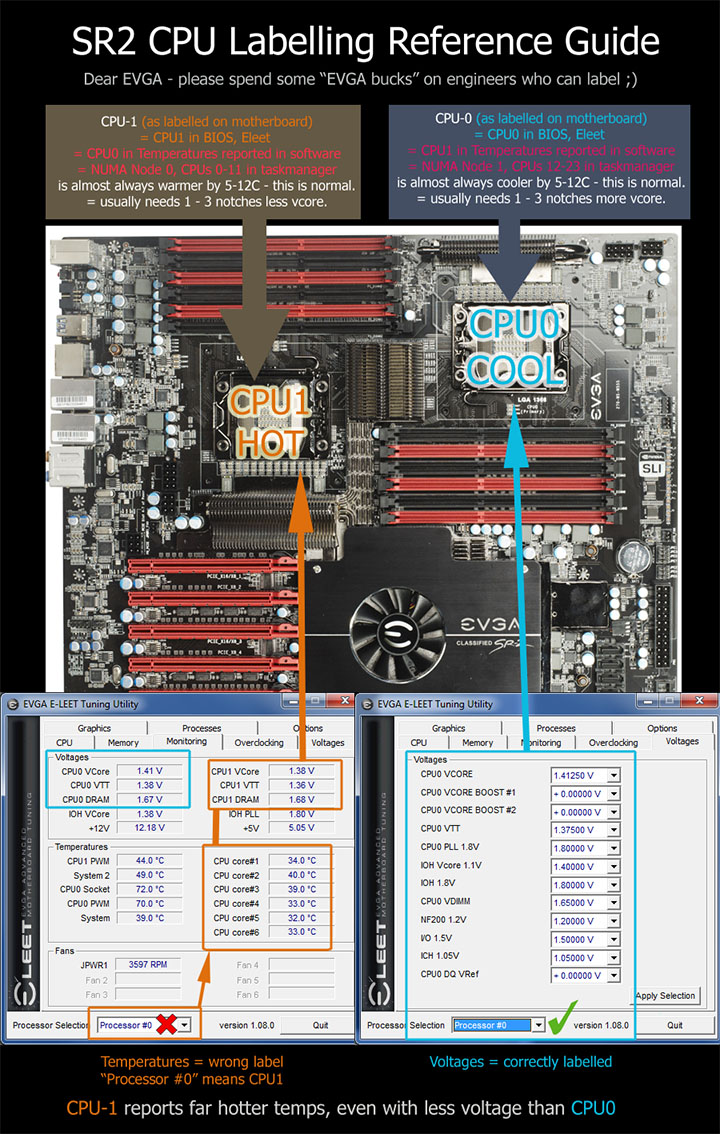
I got tired of banging my head against the wall, so I made a graphic to help me remember what is going on.

original.jpg


@phoenicis - well done! Glad you jumped in - I thought your ppd was lacking frankly:p
 
My E5530s are running fine with corsair RAM. 1333 RAM with BLCK set to 200.

My guess is it was some setting that wasn't happy with that paticular flavor of chip.
 
this is weird, it's my CPU1 (bios) who needs more vcore (well at stock it eats more) and I get exact same temps (the cpus have different airflow orientation, that might be why)
 
MIBW, I mean FTFDU, that's a great graphic. I just wanted to add a little bit of info, since I'm currently trying to drop the voltage on my X5650s to get the temps down. You say "CPU-1 reports far hotter temps, even with less voltage than CPU-0" and that CPU-1 "needs 1-3 notches less Vcore". This seems counterintuitive, but I think this is due to yet another case of the software reporting one thing but reality being different.

When I measured Vcore using a multimeter, CPU0 and CPU1 measured almost exactly the same, even though CPU1 displays as having 0.03V less voltage in E-LEET, just like your screenshot. In other words, CPU1 is not running hotter with less voltage, it's running hotter with the same voltage (which is displayed as less in software). Since CPU1 tends to run hot for whatever reason, I think it makes sense to back off slightly on the voltage, which might help equal things out.

FWIW, RAM voltages are slightly different from each other even when set the same in BIOS, just as shown in E-LEET.

I'm seeing some interesting results by using E-LEET to slowly lower voltage and running passes of LinX. I started at 1.35V and dropped a step at at time, with very little change in temp. I just got to 1.325V and my temps really dropped a lot (~15 degrees) on physical CPU0 (shown as CPU1 in software) and to a lesser extent on CPU1 (~8 degrees), and the LinX pass failed. That got me thinking about setting different voltages for each proc, which reminded me of your graphic.
 
I think tweaking the SR-2 could be a full-time job. There's so much weirdness. My system has a voltage wall around 1.33125V-1.33750V at 178 BCLK. The slight changes between those two voltages has a huge effect on CPU temps. Of course, like everything else it's not consistent, and dropping to 177 BCLK at 1.33125V made my temps go up (but LinX achieve stability).

I'm keeping track of my LinX pass times, because I can tell I'm right on the edge of stability and some "successful" passes take extra long. I think I'm going to have to back off a few notches on the OC to achieve stability on the cool side of the voltage wall. Hopefully then I can tighten up my RAM timings and maybe try disabling NUMA again.
 
MIBW, I mean FTFDU, that's a great graphic. I just wanted to add a little bit of info, since I'm currently trying to drop the voltage on my X5650s to get the temps down. You say "CPU-1 reports far hotter temps, even with less voltage than CPU-0" and that CPU-1 "needs 1-3 notches less Vcore". This seems counterintuitive, but I think this is due to yet another case of the software reporting one thing but reality being different..

Yes - when I started mucking with socket voltages independently, I thought what would happen is that the volts and temps would even out. The temps did, but the volts actually increased in delta.

I decided to test my OC with 2 instances of IBT with affinity to each core - discovering that on all 3 of my rigs at least, CPU1 needs 1-3 notches more vcore for stability.

I do not know what that means. I simply adjusted testing for what works, not what should make things neat. Apart from the volts situation it is a big win - saves power, and lowers temps on hottest CPU. :cool:

When I measured Vcore using a multimeter, CPU0 and CPU1 measured almost exactly the same, even though CPU1 displays as having 0.03V less voltage in E-LEET, just like your screenshot. In other words, CPU1 is not running hotter with less voltage, it's running hotter with the same voltage (which is displayed as less in software). Since CPU1 tends to run hot for whatever reason, I think it makes sense to back off slightly on the voltage, which might help equal things out..

Agreed - I remembered you reporting such with the multimeter, and I decided at the end of the day I did not care what the actual voltage was - worst case now I am risking one CPU :p In most cases I was able to drop the vcore on the hotter CPU - evening out the temp difference a bit.

Final results.

SR2#1
CPU0 = 1.41250 vcore = +3 notches
CPU1 = 1.39375 vcore

SR2#2
CPU0 = 1.43150 vcore = +1 notches
CPU1 = 1.42500 vcore

SR2#3 - not super final - still tweaking
CPU0 = 1.44375 vcore = +3 notches
CPU1 = 1.4250 vcore

But the graphic helps a lot to keep my head straight. (it built on the work of safield at evga - who did an awesome one with memory slots worked out too.)

I'm seeing some interesting results by using E-LEET to slowly lower voltage and running passes of LinX. I started at 1.35V and dropped a step at at time, with very little change in temp. I just got to 1.325V and my temps really dropped a lot (~15 degrees) on physical CPU0 (shown as CPU1 in software) and to a lesser extent on CPU1 (~8 degrees), and the LinX pass failed. That got me thinking about setting different voltages for each proc, which reminded me of your graphic

When graphing temps, I also saw interesting behavior when things are marginal. One failure was preceded by a runaway temps where the temps rose about 7 degrees hotter than for previous frames, either because of/or causing the stability problem.

Likewise I have seen certain voltage bumps make very little difference - seems the notches are not that even in practice.

I think tweaking the SR-2 could be a full-time job.

QFT ;).
 
When graphing temps, I also saw interesting behavior when things are marginal. One failure was preceded by a runaway temps where the temps rose about 7 degrees hotter than for previous frames, either because of/or causing the stability problem.

I saw something similar while running LinX. When I lowered voltage a notch (1.325V, 177 BCLK) my temps were very low, but the first pass was taking extra long so I knew I wasn't stable. Right before the pass finished "successfully" the temps shot up about 5C.

A couple extra things I forgot to mention before. When I'm on the hot side of the voltage wall, my temps on both CPUs are very similar. However, when I reduce Vcore enough that the temps drop, CPU0 is 6-9C cooler than CPU1. This seems to be the area where adding a few steps of Vcore to CPU0 would help.

The other weird thing is that Vcore on CPU0 seems to drive temps. When I increase Vcore on CPU0 so that it's above the wall, but reduce Vcore on CPU1, temps on both CPUs increase! (And they even out, like I mentioned before.) For example, temps can be around 73C on CPU0 and 80C on CPU1 with Vcore at 1.325V on both. If I increase CPU0 to 1.3375V but decrease CPU1 to 1.31875V, temps jump up to around 89C on both. I have no idea if this is repeatable or not. :rolleyes:

So, since my current mission is to find my highest overclock with low temps, I'm sticking with Vcore of 1.325 on both and backing off on BCLK until I'm stable. Then I can probably drop Vcore a few notches on CPU1. I can't add to CPU0 because it pushes me back into high temp range.

P.S. - How is it that 200K+ PPD isn't good enough for top 5 anymore? Pretty soon I'll be out of the top 10 again! :D
 
Aha! I just realized why the temp wasn't dropping when I lowered the voltage on CPU1. I'm running LinX, and LinX stresses RAM. The memory controller is on the CPU, and VDIMM is independent of Vcore. And, according to my multimeter, VDIMM for CPU1 is 0.03V higher than CPU0. I just bumped VDIMM up 0.03V for CPU0, and now my LinX pass is showing the same temps for both CPUs.

My RAM specifies 1.5V, which should mean better temps than 1.65V, but unfortunately there is no fine control over VDIMM below 1.5V. With CPU0 at 1.53V and CPU1 at 1.50V, the multimeter reads 1.55V for both. Also, because I have 24GB and run 20GB LinX passes, I'm seeing much higher temps than on my 12GB box. More tweaking...
 
The other weird thing is that Vcore on CPU0 seems to drive temps. When I increase Vcore on CPU0 so that it's above the wall, but reduce Vcore on CPU1, temps on both CPUs increase! (And they even out, like I mentioned before.) For example, temps can be around 73C on CPU0 and 80C on CPU1 with Vcore at 1.325V on both. If I increase CPU0 to 1.3375V but decrease CPU1 to 1.31875V, temps jump up to around 89C on both. I have no idea if this is repeatable or not. :rolleyes:

Is this with CPU at a solid 100% the whole time?

I have not used linpack - but I do use Intelburntest as a front end to linpack, and on a NUMA hexcore system it does not seem to assign 24 threads correctly on Auto - you have to use 32 threads to saturate.

Just remembered something from way back - when I had NUMA enabled, and I was using Intelburntest with threads to Auto - it would spend part of the frame at 50% CPU use, and the end at 100% - but the 50% time was not evenly distrubuted between sockets - see old graphic:

original.jpg


Now I noticed at the time it was always favouring loading cpus 12-23 - which at the time I was annoyed by, as I thought they were the hot ones. (before I knew about wrong labels) But could there be logic in the system that favours loading the cooler NUMA node? Could this also be responsible for the weird behavior you are seeing? Try 2 instances affinity assigned?

P.S. - How is it that 200K+ PPD isn't good enough for top 5 anymore? Pretty soon I'll be out of the top 10 again! :D

It's a [H]ard life we have chosen my friend. And nobody seems keen on my idea to freeze things as they are this week. :p
 
Is this with CPU at a solid 100% the whole time?

I have not used linpack - but I do use Intelburntest as a front end to linpack, and on a NUMA hexcore system it does not seem to assign 24 threads correctly on Auto - you have to use 32 threads to saturate.

Just remembered something from way back - when I had NUMA enabled, and I was using Intelburntest with threads to Auto - it would spend part of the frame at 50% CPU use, and the end at 100% - but the 50% time was not evenly distrubuted between sockets - see old graphic:

Now I noticed at the time it was always favouring loading cpus 12-23 - which at the time I was annoyed by, as I thought they were the hot ones. (before I knew about wrong labels) But could there be logic in the system that favours loading the cooler NUMA node? Could this also be responsible for the weird behavior you are seeing? Try 2 instances affinity assigned?

It's a [H]ard life we have chosen my friend. And nobody seems keen on my idea to freeze things as they are this week. :p

For a 24 thread system like the SR-2 with the current version of IntelBurntest, you'll definitely want to run two instances with each instance running 12 threads with affinity set. If you run 32 threads with one instance of IBT, you're not stressing the CPUs to the same degree -- significant time is spent context switching (not useful work) since there are more threads wanting to run than available threads on the system.

See here for affinity and IBT instructions:
http://www.evga.com/forums/tm.aspx?m=651731

There is no logic or knowledge in the scheduler related to system temperatures. On a NUMA system, the first thread of a process is generally assigned to the first thread/processor of any NUMA node, and subsequent threads within that process get assigned in a round-robin fashion within the NUMA node and then beyond the NUMA node. If one NUMA node is already saturated with work (and may or may not have high temperatures -- not relevant), a new process may start it's initial thread on another NUMA node that was idle.
 
Last edited:
Is this with CPU at a solid 100% the whole time?

I've noticed the same odd behavior with IntelBurnTest, but LinX seems to run all threads at 100% for each pass. Between passes it will drop as it does whatever prep work.

So yes, I saw temps go up while the CPU was maxed at 100%, so something changed besides processor load. It seems that the mobo can boost the volts if it senses that there is not enough stability. I've noticed something similar in that if I reduce voltage too much at a certain clock speed, my temps will go up, which makes me think some sort of "boost" is being applied. I haven't done enough testing with the multimeter to isolate it.
 
There is no logic or knowledge in the scheduler related to system temperatures. On a NUMA system, the first thread of a process is generally assigned to the first thread/processor of any NUMA node, and subsequent threads within that process get assigned in a round-robin fashion within the NUMA node and then beyond the NUMA node. If one NUMA node is already saturated with work (and may or may not have high temperatures -- not relevant), a new process may start it's initial thread on another NUMA node that was idle.

So what is the mechanism that IBT ends up with such asymmetric use of the numa nodes, and what was more, repeatable - always dominant on the CPU1? Perhaps if it was setting it's own affinity...

So yes, I saw temps go up while the CPU was maxed at 100%, so something changed besides processor load. It seems that the mobo can boost the volts if it senses that there is not enough stability. I've noticed something similar in that if I reduce voltage too much at a certain clock speed, my temps will go up, which makes me think some sort of "boost" is being applied. I haven't done enough testing with the multimeter to isolate it.

I thought the temps went up because the type of instruction set used was using different/more of the CPU at different times during the linx frame. It is clear that FAH stresses the CPU in ways different to IBT (both always 100% cpu but different temps) and that overclocks can be weak in certain tasks, and not weak across the board. Are you saying you think the mobo is volting up at that point? It is hard to tell without a multimeter - I have not noticed significant voltage fluctuation at all. Well nothing like the bad old days before vdroop.

How did you do stabilising on the cool side of your voltage wall?
 
being that its a server based system most likely the bios does have an option to increase voltage on the cpu if it becomes unstable. the whole point of servers is stability so it would be dumb if evga didnt include it in the SR-2.

as far as the other post you were talking about the temps being effected by the IMC. your ram voltage should be completely separate from your IMC(northbridge) voltage unless intel some how has this combined which i guess could explain why they have a 1.65v limit on it(not an intel person so i've never bothered to look it up). but AMD's are completely separate voltages.
 
I spent most of yesterday tweaking, and I've seen all sorts of weird results, including temp and performance differences between even and odd BCLKs (even is hotter/faster). I think I'm past the point of trying to understand why it does what it does, and just trying to get a stable OC.

How did you do stabilising on the cool side of your voltage wall?

I moved all of my notes from Notepad to a spreadsheet to keep track of LinX passes. When the temps drop steeply, I can't maintain stability, so I've given up on that. I have been able to drop Vcore from 1.35V to 1.30V and go back from MCH 1600 to MCH Auto (RAM back at spec 9-9-9-24 1T) simply by backing off from my previous max 178 BCLK (currently at 172 but I should be able to get back to 174 or maybe 176). LinX shows very little performance drop (~3%), but also very little temp drop -- peak CPU temps have gone from 94,94 to 90,88.

LinX 20GB passes put a heck of a lot more stress on my system as far as temps than IBT, even running two IBT processes with 12 cores and 10GB each. Maybe that makes IBT a more "realistic" test because I know I'll never hit the LinX temps with F@H or BOINC. I like to test for the worst case, but I also know LinX doesn't test everything, because my other SR-2 is LinX stable (I think, need to retest!) and F@H stable but has crashed on WCG. That system has seen very little tweaking yet. I ran WCG overnight on this SR-2 and my peak temps were in the mid 70s. I'm going to see how close I can get to my old OC, and then wrap things up today.

BTW, there's a new version of E-LEET that just came out a few days ago. I just installed it and haven't had a change to tweak with it yet, but reportedly "fixed some bugs" as well as tweaking the GPU code.
 
as far as the other post you were talking about the temps being effected by the IMC. your ram voltage should be completely separate from your IMC(northbridge) voltage unless intel some how has this combined which i guess could explain why they have a 1.65v limit on it(not an intel person so i've never bothered to look it up). but AMD's are completely separate voltages.

You're right, they should be separate. I just do occasional checks with the multimeter to compare reality with what the monitoring software shows me. The motherboard definitely makes up its own mind on how to set the voltages, based roughly on my BCLK and voltage settings, so I don't know exactly what's being boosted, and at this point I'm not too interested in finding out. I do know that by boosting VDIMM on CPU0 from 1.5V to 1.53V so that measured VDIMM is 1.55V for both CPUs, I've gained some more stability and the ability to drop Vcore. I tried pushing VDIMM higher but it didn't seem to accomplish anything.

One last weird note. I rebooted to a known stable 174 BCLK, and I started reducing BLCK by one and running a LinX pass after each step. That's how I discovered the even/odd weirdness. However, even weirder, when I got down to 167 BCLK, LinX became unstable. I've never seen a system become unstable by running too slow (albeit still overclocked). That's when I started tightening up my RAM timings, but I still had trouble getting a stable LinX pass at that BCLK. The 170s seem to be the sweet spot with these X5650s, and I'm sticking with even BCLKs.
 
I'm only experiencing one problem with my 206x18 overclock. After folding hard for 10 or so frames, Windows will lose the ability to use the LAN port. I get a big exclamation point over it. Has anyone else seen this? Any suggestions?
 
One last weird note. I rebooted to a known stable 174 BCLK, and I started reducing BLCK by one and running a LinX pass after each step. That's how I discovered the even/odd weirdness. However, even weirder, when I got down to 167 BCLK, LinX became unstable. I've never seen a system become unstable by running too slow (albeit still overclocked). That's when I started tightening up my RAM timings, but I still had trouble getting a stable LinX pass at that BCLK. The 170s seem to be the sweet spot with these X5650s, and I'm sticking with even BCLKs.

Is this clocking down in eleet? I have found it great for changing voltages on the fly, but totally funky and unrepeatable when changing baseclock - especially large amounts from where you booted at. But even starting from known stable settings, moving up to experiment, then back to the original settings via eleet were then proved unstable.. rebooted and all fine. So I get a lot of use of eleet changing voltages to see temps graphs go up and down, but I find it a misleading waste of time to change baseclock in my experience.

And I have noticed better stability on odd number baseclocks - all of my max stable OC happened to end up on odd numbers: 191, 187, 205 etc. Could be coincidence.

I'm only experiencing one problem with my 206x18 overclock. After folding hard for 10 or so frames, Windows will lose the ability to use the LAN port. I get a big exclamation point over it. Has anyone else seen this? Any suggestions?

Afraid not - on my rig at 205 baseclock I am using the upper LAN port with no probs. Of course things start to go to poo with each extra notch, so that may not mean a lot.:rolleyes:
 
Afraid not - on my rig at 205 baseclock I am using the upper LAN port with no probs. Of course things start to go to poo with each extra notch, so that may not mean a lot.:rolleyes:
I am using the generic Windows drivers, maybe I should try using EVGA's drivers.
 
Looking to get some new ram and am going to take my DDR3 1600 out my SR-2 and upgrade it.

What is a good set that people have had good luck overclocking w/ high blck (200+) with?
 
Kingston HyperX has been great for me. I have 12 x 1 Gb of the cas 8 PC1600.
 
Kingston KHX1600C7D3K3/6GX while "1600" RAM works great at DDR 2050 @ 7 8 7 20 1T @ 2:8.

Funnily enough is a smidge faster (but far more stable) than DDR 2050 @ 9 10 9 24 1T @ 2:10.
 
I was looking at these KHX2000C9AD3K3/3GX

I was think that something with a higher rate clock would help me more than lower CAS Latency.

Should i just grab some 1600 CL7 instead?
 
I haven't tried pushing them hard yet but they are doing this easily at 206 BCLK:

501u91.jpg
 
I don't think memory is limiting my overclock...maybe, but i doubt it. Tobit is significantly underclocked on the PC2000 right now. *shrug* no idea how much difference actually running PC2000 will make.
 
FWIW, I am now running the Kingston 2000's at 2060 MHz (2:10) and the SR-2 auto-selected some loose timings of 11-11-11-29. Frame times so far are ~4s better. When this live unit finishes, I will tighten them up and do some real bench comparisons. I merely set the memory to DDR-1333 and left UNCORE and MCH strap at auto.
 
MIBW, yes I was changing BCLK in E-LEET. I'd seen some notes on here that weirdness could result. I've been doing more recent testing with reboots, but it's hard to get repeatable results that way too.

Tobit, are you having a problem with both LAN ports? I believe they use different chips. Have you hooked power to the little floppy power connector near the ports? I've heard that helps with flaky USB but I have no idea about the LAN.
 
Edit: Nevermind, spoke too soon.. it's dead again.
 
Same problem. :(

Either NIC port on the motherboard is fine at first boot, after anywhere between 30 minutes to 3 hours (very random), the LAN connection just dies. Link status remains active but the port can no longer communicate on the LAN with any other nodes. Windows 7 reports "No Network Access". I've also tried plugging the SR-2 into a different port on the switch and I've even replaced the switch with an entirely new switch.
 
Well, my bigadv finished fine earlier this morning and, after a reboot to reactivate the NICs, I was able to upload it. I am now benching a 2684 at stock clocks to see if the NICs still fail after a certain period of time to rule out a bad overclock.

Ya know, it really sucks when your overclock is perfect except for a stupid NIC problem. :confused:
 
Back
Top