• Some users have recently had their accounts hijacked. It seems that the now defunct EVGA forums might have compromised your password there and seems many are using the same PW here. We would suggest you UPDATE YOUR PASSWORD and TURN ON 2FA for your account here to further secure it. None of the compromised accounts had 2FA turned on.
    Once you have enabled 2FA, your account will be updated soon to show a badge, letting other members know that you use 2FA to protect your account. This should be beneficial for everyone that uses FSFT.

Simple mod / mesh / airflow - need some help / tips

koston88

n00b
Joined
Jun 11, 2008
Messages
19
Hey there I'm new to these forums and I just wanted to ask a few questions about a mod idea I had. I tried the search option but couldn't find much info on how to attach mesh onto a case.

I am going to cut a few holes out of my case for some new fans and also will make some sections mesh to let it breathe a bit more.

The case in question is an old one, Coolermaster Wavemaster - really bad airflow in its' current state. I was intending to buy a new one but instead decided to try mod this one a bit.

Basically I want to:
  • mesh out both sides a bit and bottom
  • 1 x 92mm fan on bottom
  • 1 x 120mm FM121 Silverstone on side panel
  • 2 x 120mm FM121 Silverstone's on top
  • 2 x 80mm fans on rear exhaust
  • make the front more airflow friendly for the 2 x 80mm fans there (mesh the front a bit maybe / drill more breathing holes)

I've got a Dremmel to do the cutting and the only problem I have at the moment is working out the best position the side panel fan and a method to attach the mesh.

DSC01837.jpg

(gonna use the old panel without the window and get rid of my neon / uv lights)

This is my first mod so any tips would be greatly appreciated. Also not sure if intake / exhaust is balanced enough.

Searched a bit for other wavemaster mods and only found one where he extended the top for a radiator.

p.s Using Meshx to mesh the sides / bottom
 
fan on the bottom??? :confused:

for the side panel fan, i think it should be on the half of the window near the front of the case since thats where all the other intakes are. near the back and top should be exhaust
 
Here's how I did a mesh mod on my V2100 side panel. Maybe it'll give you some ideas :)

panel-01.jpg

panel-02.jpg

panel-03.jpg

1.jpg
 
fan on the bottom??? :confused:

for the side panel fan, i think it should be on the half of the window near the front of the case since thats where all the other intakes are. near the back and top should be exhaust

Was thinking of putting a fan at the bottom to blow cool air up to the video card fan, not a good idea? There is about 1cm under my case, is that enough room for a bottom intake?

@ Volkum
That looks good I might try that. Only reason I was asking is that I've seen another wavemaster mod with mesh and it had no bolts / rivets. Would bonding epoxy work as well?
 
That looks good I might try that. Only reason I was asking is that I've seen another wavemaster mod with mesh and it had no bolts / rivets. Would bonding epoxy work as well?

I've seen it done many times. I've always been worried that flex in the panel would break the mesh loose one day though, but I'm probably just paranoid. The bolt and nut was much easier and quicker as well.
 
Whether epoxy would work will depend on the type of epoxy (how flexible it is) and how stiff the case is relative to the mesh. Cheap 5 minute epoxies that I've used tend to be quite stiff and brittle and would not work well. Marine epoxies (hard to find in small quantities) can be rather flexible if applied thinly. Other adhesives would work as well if they are suitably flexible. Even Goop would probably do.

If both the mesh and the case are aluminum, you could probably have good luck with an adhesive suitable for aluminum. Just avoid ones that require a tight fit - instead you'd need a gap-filling adhesive.
 
Whether epoxy would work will depend on the type of epoxy (how flexible it is) and how stiff the case is relative to the mesh. Cheap 5 minute epoxies that I've used tend to be quite stiff and brittle and would not work well. Marine epoxies (hard to find in small quantities) can be rather flexible if applied thinly. Other adhesives would work as well if they are suitably flexible. Even Goop would probably do.

If both the mesh and the case are aluminum, you could probably have good luck with an adhesive suitable for aluminum. Just avoid ones that require a tight fit - instead you'd need a gap-filling adhesive.

I just checked again and the mesh I'm getting is stainless steel, so I'll have to test out how well it bonds together. Thanks for the info.

Comp-1.jpg

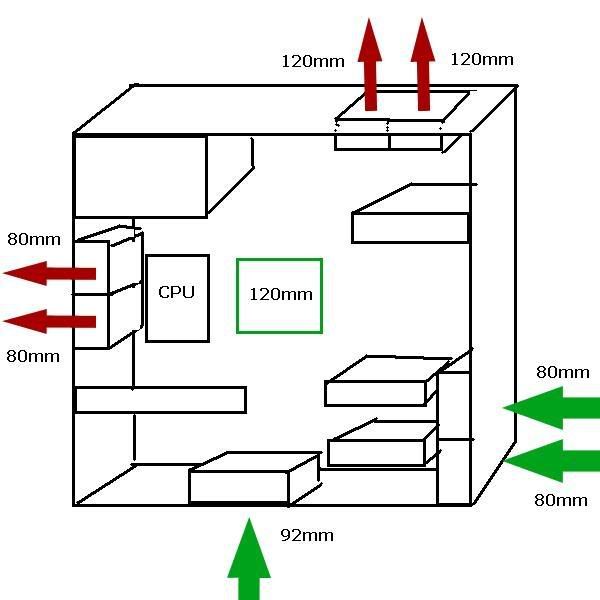
Made a simple pic showing where the fans are going. I'm not quite sure if the 1cm leeway at the bottom is enough for the bottom 92mm fan.

The green square is the side panel fan. I'm thinking it should be in front of the Zalman 9500 so the cool air can go to it from outside the case similar to what roarsoar suggested. Should it be lower also or is being in line with the cpu cooler ok?

Will post more pics once I start cutting / meshing stuff.
 
You've got 3x120 (inc. PSU) plus 2x80 out and only 2x80 + 1x92 in. That's going to create significant negative pressure. With all that mesh, you're potentially going to have a dust problem.

I'd get something to lift the case higher off the ground - that 1cm gap will choke the bottom fan. I put a bottom fan in my case and there's good clearance due to the 5cm caster wheels I previously put on (yeilding about 6cm total).
 
Any reason 80mm over a few 120s? better cfm to noise ratio

Case is built that way so that only 80mm fans fit on the rear / front. It is relatively smallish width-wise 198mm.
120mm fans don't really fit at the front unless I drill a bunch of new holes and new air holes to allow air in but I don't really want to drill into the curved front. Front is like this.

You've got 3x120 (inc. PSU) plus 2x80 out and only 2x80 + 1x92 in. That's going to create significant negative pressure. With all that mesh, you're potentially going to have a dust problem.

I'd get something to lift the case higher off the ground - that 1cm gap will choke the bottom fan. I put a bottom fan in my case and there's good clearance due to the 5cm caster wheels I previously put on (yeilding about 6cm total).

Ah yeh that's what I was trying to work around.
Another option I thought of would be to use one exhaust on top instead of 2 and no bottom fan but another 120mm side intake fan lower down for the video card.
That makes it

In:
2 x 80mm
2 x 120mm

Out:
2 x 80mm
2 x 120mm

I think that's more balanced and I could adjust the speed of one of the 120mm to match the PSU fan? Pretty sure my psu fan runs pretty slow - Antec Neopower 650w.

I think this alternate setup is better than my original.
 
Ok wow, just added in 1st Silverstone FM121.

Before temps @ 3.0Ghz (lil overclock):

Idle: 37-39
Load: 47-49

Now temps:

Idle: 24-28
Load: 36-39

Thats with only 1 extra fan. Also replaced the old front sleeve fans and the other two exhaust with AC PWM fans. Seems pretty cool atm :D
 
Yea I like my rotary tool I just thought the circular saw would have been faster and straighter.
 
What type of blade did you use on your saw? Is the case aluminum?

The case is definitely aluminum. I don't recall what blade I used, but I could check when I get home from work.

use your dremel if you're gonna cut something like that out, it's easy and fast

Yea I like my rotary tool I just thought the circular saw would have been faster and straighter.

That's why I used the circular saw instead of a dremmel. It was long cut and I was able to get a very straight cut with the saw without the effort of using the dremmel..
 
Ive always thought about putting in a bottom intake fan into my case....
Figured I would locate it either directly under the video card or locate it in the center of the case and angle it towards the back of the case to the graphics card.
My idea was to take a 38mm thick fan and cut it at an angle to use that as a duct (blue part in picture)
2616548644_fc0df3ffd1.jpg


Only problem is how to attach them.
My other idea was to make some kind of duct out of pvc pipe...
Any ideas?
 
If you can, use anything but a dremel to try to cut a straight line. A jigsaw with a fine tooth metal cutting blade is excellent for side panels. You clamp a straight board along your cut line and use it as a fence and just let the shoe of the jigsaw ride against it. If you do use the dremel for gods sake wear eye protection those cutoff disks love to explode.
 
My idea was to take a 38mm thick fan and cut it at an angle to use that as a duct (blue part in picture)

I don't think you'd gain much from angling it. That would take up a lot of space.

You might try making louvers over a flat fan - just use some flat aluminum sheet - or visit your local big-box hardware store and see what kind of heating/ventilating vent covers you could modify. This will be easier with an 80-92 (3.x-4 inch) fan than with a 120 due to the sizes of products out there.
 
The case is definitely aluminum. I don't recall what blade I used, but I could check when I get home from work.


That's why I used the circular saw instead of a dremmel. It was long cut and I was able to get a very straight cut with the saw without the effort of using the dremmel..


cutting straight with a dremel is not a problem if you know hoe to handle it.
 
If you can, use anything but a dremel to try to cut a straight line. A jigsaw with a fine tooth metal cutting blade is excellent for side panels. You clamp a straight board along your cut line and use it as a fence and just let the shoe of the jigsaw ride against it. If you do use the dremel for gods sake wear eye protection those cutoff disks love to explode.

like i said in my previous post, if you know how to use a dremel, cutting a straight line is not a problem...
 
I am curious about the type of blade. I may descide to do a bigger case mod than just cutting out a hole for a fan. lol :)
 
Ok so a slow reply to my old thread :p.

An update on what I've done.

Cut a 120mm blowhole at the top and cut 2 x 120mm fan holes on the side. Also cut out a slot at the front for 2 usb ports.

However, I recently installed a massive heatsink on the video card so the lower fanhole is just a fan grill and you can see the heatsink behind it.

I'm thinking of cutting the hole out a bit more, maybe a rectangle with rounded corners then covering it with mesh. Any recommendations what would look best? Was thinking either the rectangle or a simple circular design that extended out a bit over the length of the video card.

Will post some pics tmr.
 
The bolted grill is one good way to do it, if that visually blends well with your design.

If your mesh or grill is behind a front bezel or somewhere else where the interior edges won't be visible, a hot melt glue gun works just fine.
 
Back
Top