![[H]ard|Forum](/styles/hardforum/xenforo/logo_dark.png)
Navigation
Install the app
How to install the app on iOS
Follow along with the video below to see how to install our site as a web app on your home screen.
Note: This feature may not be available in some browsers.
More options
You are using an out of date browser. It may not display this or other websites correctly.
You should upgrade or use an alternative browser.
You should upgrade or use an alternative browser.
Silverstone FT03... matx
- Thread starter kencheeto
- Start date

NickJames
Supreme [H]ardness
- Joined
- Apr 28, 2009
- Messages
- 6,698
Thanks, I want to try and do something about the GTX logo though.
New page monster defeated.
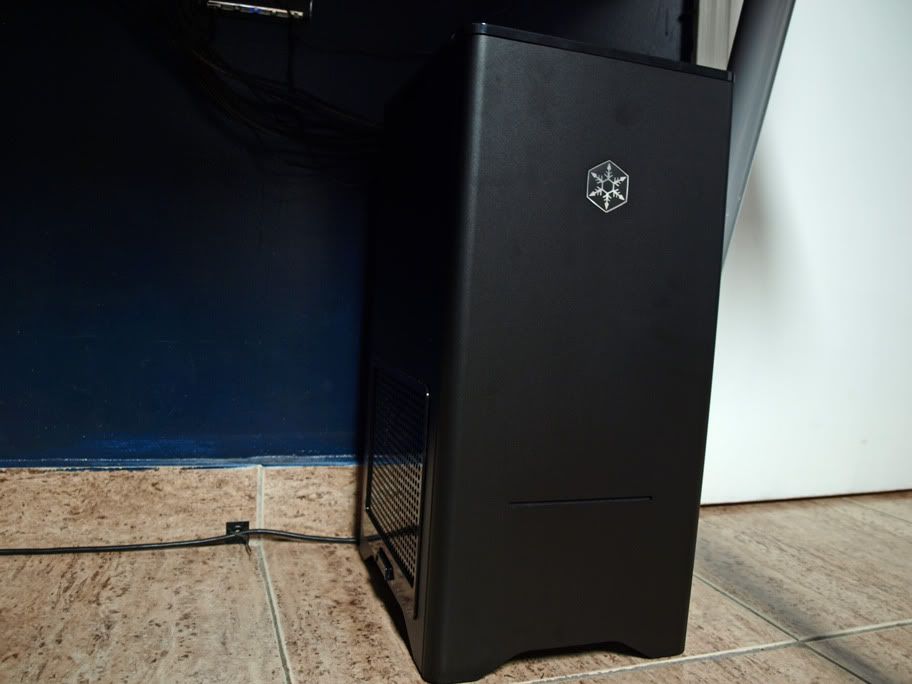
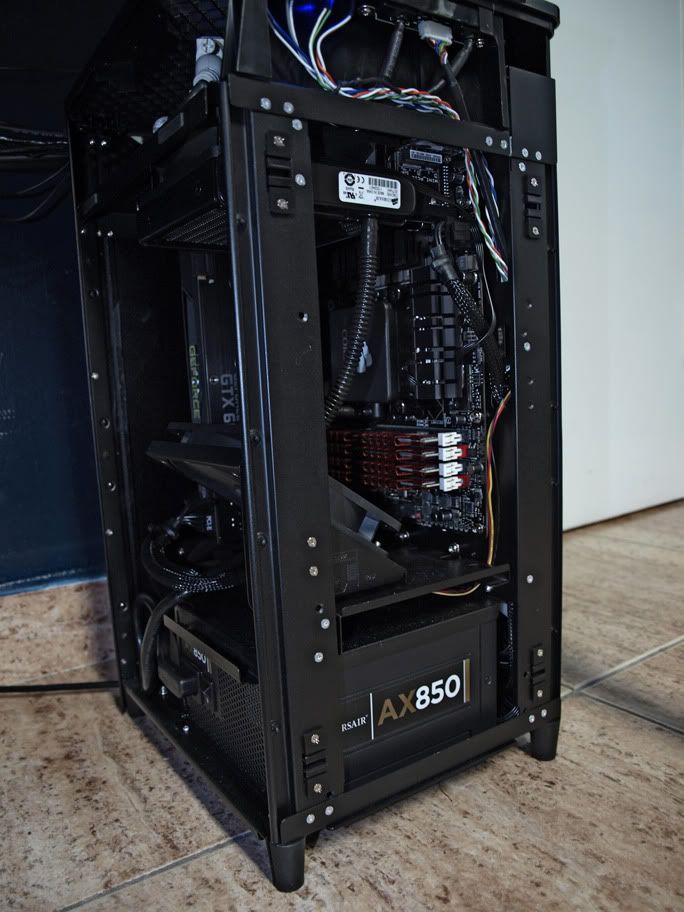
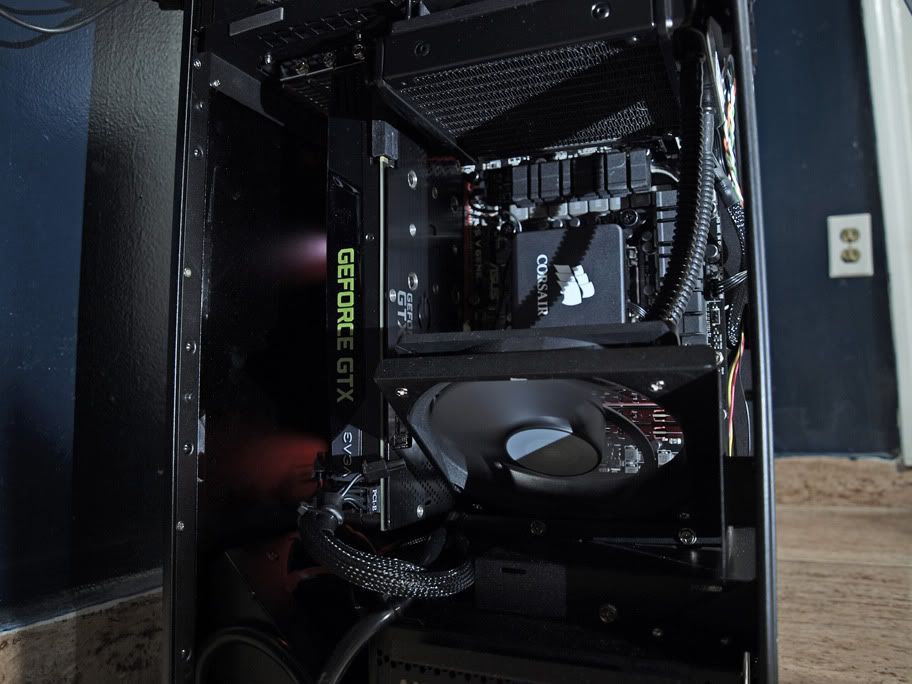
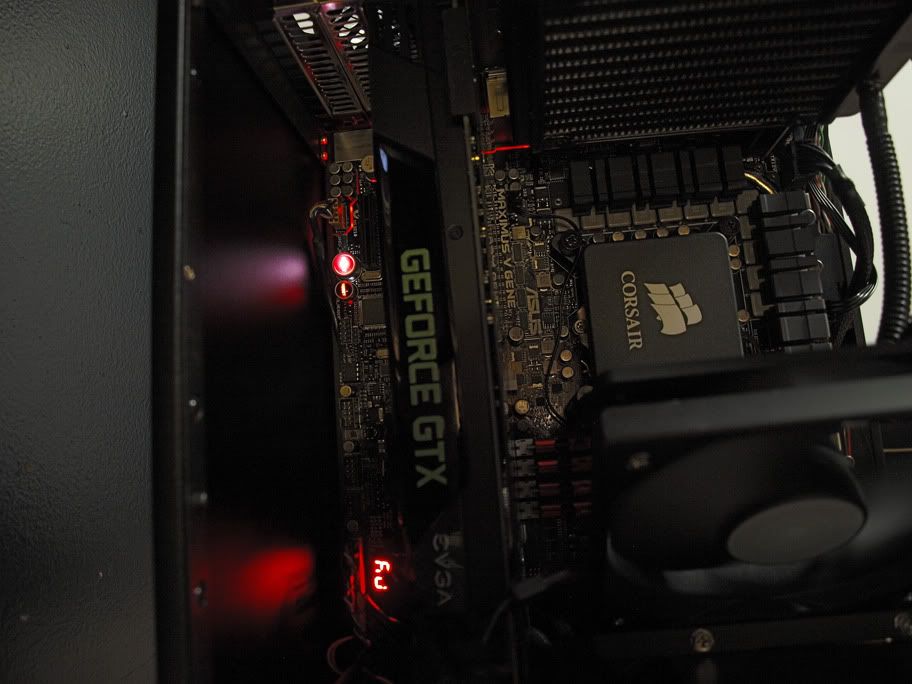
Final Specs:
Silverstone Fortress FT03B
ASUS Maximus V Gene Z77
i7 2600K Processor
Corsair H60 Hydro CPU Cooler
G. Skill Ripjaws X Series 4x4GB DDR3 1600mhz
Corsair AX850 Power Supply (Still waiting on red cable sleeving so I'll have to tear it down next week)
EVGA GTX 680 2GB
New page monster defeated.
Final Specs:
Silverstone Fortress FT03B
ASUS Maximus V Gene Z77
i7 2600K Processor
Corsair H60 Hydro CPU Cooler
G. Skill Ripjaws X Series 4x4GB DDR3 1600mhz
Corsair AX850 Power Supply (Still waiting on red cable sleeving so I'll have to tear it down next week)
EVGA GTX 680 2GB
Last edited:
will this kind of vertical case be a problem for a graphics card with heat pipes oriented like this:
http://cdn.overclock.net/1/1a/1a2b70d2_180e.jpeg
or, more specifically, can i put an Asus 7979 CUII TOP card in a FT03?
cheers
http://cdn.overclock.net/1/1a/1a2b70d2_180e.jpeg
or, more specifically, can i put an Asus 7979 CUII TOP card in a FT03?
cheers
Johnny McEuter
n00b
- Joined
- Jan 22, 2012
- Messages
- 36
@R3MF: Looks like the right part (as shown in the link) of the heatsink will have problems, whereas the left one should work fine. Thus I would try to find another model.
@all: Just wondering: As the Thermalright HR02 Macho and the Noctua NH-D14 often seem to perform equally well in a semi-passive setup I was wondering which one I should use for my soon to come Ivy Bridge based semi-passive system? I am tending to the Noctua...
@all: Just wondering: As the Thermalright HR02 Macho and the Noctua NH-D14 often seem to perform equally well in a semi-passive setup I was wondering which one I should use for my soon to come Ivy Bridge based semi-passive system? I am tending to the Noctua...
@all: Just wondering: As the Thermalright HR02 Macho and the Noctua NH-D14 often seem to perform equally well in a semi-passive setup I was wondering which one I should use for my soon to come Ivy Bridge based semi-passive system? I am tending to the Noctua...
I was considering the exact same thing the other day, as I ordered the FT03. I went with the NH-14. I got the case today, but not the CPU cooler or the fans. I ordered like 8 different 120mm PWN fan's to test different setups and optimize the case for semi passive silence with my 3770K/7970 combo in idle/surf mode. I don't care about fan noise when gaming, but I want that baby silent when I'm doing other less demanding stuff.
Johnny McEuter
n00b
- Joined
- Jan 22, 2012
- Messages
- 36
@DrRetina: Thanks for the answer. I was going to go for a 3770K as well, but was going to get a reference design HD 7770 and supply it with a nice Arctic Accelero S1 PLUS. I don't need that much gaming power, so the 7770 should be more than enough and according to Arctic it should be able to cool it (semi-)passively.
However, I was also thinking of installing one silent PWM-Fan as a backup on the CPU heatsink and will most likely go for a Noiseblocker Multiframe M12-PS. Other candidates are bequiet SilentWings or the Alpenföhn Wingboost (did I mention that I am German? ). One of the non-PWM-versions of the Noiseblocker will probably serve as case fans.
However, I was also thinking of installing one silent PWM-Fan as a backup on the CPU heatsink and will most likely go for a Noiseblocker Multiframe M12-PS. Other candidates are bequiet SilentWings or the Alpenföhn Wingboost (did I mention that I am German?
). One of the non-PWM-versions of the Noiseblocker will probably serve as case fans.


rat
Supreme [H]ardness
- Joined
- Apr 16, 2008
- Messages
- 4,915
Wow. Just for how that looks, I'm sorely tempted to cut the unused cables off my power supply. That looks damned nice.
NickJames
Supreme [H]ardness
- Joined
- Apr 28, 2009
- Messages
- 6,698
Nice job on cable management, I kind of shoved all mine in there because I am waiting for my red sleeved cables to come in. Also my ASUS board brought all angled SATA connectors which are NOT FT03 FRIENDLY!
_PixelNinja
[H]ard|Gawd
- Joined
- Feb 12, 2011
- Messages
- 1,460
Cable Fu is strong with this one.
@DrRetina: Thanks for the answer. I was going to go for a 3770K as well, but was going to get a reference design HD 7770 and supply it with a nice Arctic Accelero S1 PLUS. I don't need that much gaming power, so the 7770 should be more than enough and according to Arctic it should be able to cool it (semi-)passively.
However, I was also thinking of installing one silent PWM-Fan as a backup on the CPU heatsink and will most likely go for a Noiseblocker Multiframe M12-PS. Other candidates are bequiet SilentWings or the Alpenföhn Wingboost (did I mention that I am German?
Looks like you are on the right path when it comes to parts for a silent setup.
The Accelero S1 Plus looks nice for a HD7770. I went with an Alpenföhn Peter (terrible name) for my 7970, but I'm unsure if the heatpipes are orientated in the right direction for the case. Looks like that will not be a problem with the Accelero S1.
I'm also planning on using a 120mm PWM directly on the "Peter", and hopefully i can get it to be completely silent at 20%.
I don't know a lot about the noiseblocker fans you are referring to, but after reading up on fans the whole weekend I got into a conversation with a guy that does fan testing for a big review site, and he recommended the Antec TrueQuiet Pro 120 as the most inaudible fan he had ever tested. That was unfortunately a couple of hours after I placed an order for 8 other PWM fans for my own testing.
I will have to get a TrueQuiet Pro as well, but I have not been able to find one on sale locally, as its a pretty new productJohnny McEuter
n00b
- Joined
- Jan 22, 2012
- Messages
- 36
The Alpenföhn Peter looks like one of the typical GPU cooling solutions, that will not be compatible with the 90° design of the Fortress/Raven series cases. I am pretty sure I heard people complaining about the cooler not working in the Fortress FT02.
Re the fans: It's quite interesting to have a look at and compare the most popular fans in German and non-German enthusiast forums. In most German forums you will often see people recommending the Noiseblocker Multiframe or bequiet SilentWings (interesting: Noctua fans are often regarded as good quality but actually not really recommended as they are not considered to be silent enough). The Noiseblocker Multiframe fans are usually considered the (quite pricey) non-plus-ultra. However, especially the Noiseblockers are only found in a few shops outside of Germany so they are not really known outside the Vaterland (NB: Noiseblocker, bequiet and EKL Alpenföhn are all German companies). One the other hand you barely see anybody using Scythe Gentle Typhoons etc. in Germany. Anyway, here is a review (the only English one I found) testing some Noiseblocker fans in a roundup.
The Antec TrueQuiet Pro looks very interesting; in fact Noiseblocker announced a similar fan design recently as well.
On the other hand: I hope I will be able to let the fans run at 500-600 rpm so that any more or less good quality fan should be inaudible.
Oh, and about the names of the Alpenföhn products: There was comic series like 20 years about a little girl (Heidi [VGA cooler]) and her friends (one of them called Peter [VGA cooler]) living in the Alps (all Alpenföhn CPU tower-style heatsinks are named after Mountains). They also have other products which translate into funicular or tobogganist and "Föhn" is actually a special kind of wind that occurs in mountain ranges. So it all makes perfectly sense
Re the fans: It's quite interesting to have a look at and compare the most popular fans in German and non-German enthusiast forums. In most German forums you will often see people recommending the Noiseblocker Multiframe or bequiet SilentWings (interesting: Noctua fans are often regarded as good quality but actually not really recommended as they are not considered to be silent enough). The Noiseblocker Multiframe fans are usually considered the (quite pricey) non-plus-ultra. However, especially the Noiseblockers are only found in a few shops outside of Germany so they are not really known outside the Vaterland (NB: Noiseblocker, bequiet and EKL Alpenföhn are all German companies). One the other hand you barely see anybody using Scythe Gentle Typhoons etc. in Germany. Anyway, here is a review (the only English one I found) testing some Noiseblocker fans in a roundup.
The Antec TrueQuiet Pro looks very interesting; in fact Noiseblocker announced a similar fan design recently as well.
On the other hand: I hope I will be able to let the fans run at 500-600 rpm so that any more or less good quality fan should be inaudible.
Oh, and about the names of the Alpenföhn products: There was comic series like 20 years about a little girl (Heidi [VGA cooler]) and her friends (one of them called Peter [VGA cooler]) living in the Alps (all Alpenföhn CPU tower-style heatsinks are named after Mountains). They also have other products which translate into funicular or tobogganist and "Föhn" is actually a special kind of wind that occurs in mountain ranges. So it all makes perfectly sense
Last edited:
Oh interesting about the naming. So there is no chance they will make a Johnny cooler, because then you will have no choice but to use it.
Yeah, all the American users are praising the Nexus fans, but I have had a hard time finding then locally (I'm in Denmark) and ended up ordering all the different fans from CaseKing in Germany as they seemed to have the best selection. Just got a mail from them that they shipped my order.
I didn't get a Noiseblocker either, but I'll try to pick one up next time i have to order from Caseking, as they are not on sale here either.
What i did get was some different Scythe Slip Stream's, a Thermalright PWM, 2 different Be Quiet! Shadow Wings, Noctua NF-P12 PWM, an Arctic one, mostly PWM fans.
Hopefully I'll get them all tomorrow or the day after and will start messing around with the case. I need to mod the PSU case for a fanless Seasonic X-460 i'm getting as well.
Yeah, all the American users are praising the Nexus fans, but I have had a hard time finding then locally (I'm in Denmark) and ended up ordering all the different fans from CaseKing in Germany as they seemed to have the best selection. Just got a mail from them that they shipped my order.
I didn't get a Noiseblocker either, but I'll try to pick one up next time i have to order from Caseking, as they are not on sale here either.
What i did get was some different Scythe Slip Stream's, a Thermalright PWM, 2 different Be Quiet! Shadow Wings, Noctua NF-P12 PWM, an Arctic one, mostly PWM fans.
Hopefully I'll get them all tomorrow or the day after and will start messing around with the case. I need to mod the PSU case for a fanless Seasonic X-460 i'm getting as well.
Last edited:
Johnny McEuter
n00b
- Joined
- Jan 22, 2012
- Messages
- 36
Oh, you are Danish. When looking whether it is feasible to install the Seasonic X-400/460 in the FT03 I stumbled upon this thread: http://www.sweclockers.com/galleri/7814-ft03-d14-gene-z-seasonic-x460fanless-sant The Danish people I know are capable of reading/speaking Swedish so maybe you can tell me the experience of the guy in that article because he uses a very interesting setup with a 2600K, Noctua NH-D14 and the Seasonic X-460. it doesn't look like he modded the PSU-cage and it seems to be fine (as far as the pictures tell).
I would like to use the X-400 but preferable without modding. As the 3770K and a HD 7770 shouldn't draw that much power (<200W load) I assume the PSU will not really be stressed anyway and thus it might be fine to stick it into the case against the manufacturer direction and without any additional ventilation.
The other idea I had was just to install the top case fan but not the bottom one. By doing this you would create a low pressure situation in the case so the air might actually enter the case via the vents in the PSU and thus cool it sufficiently.
NB: Caseking is a very good store with a highly praised customer service and also runs support forum in many of the German enthusiast sites (ComputerBase, HardwareLuxx, ...)
And btw, the planned components for my build:
CPU: Intel i7 3770K
MB: ASUS P8Z77-M Pro
CPU Cooler: Noctua NH-D14
CPU cooler fan: Noiseblocker Multiframe M12 PS
VGA: HD 7770
VGA Cooler: Accelero S1 PLUS
Memory: Corsair Vengeance low profile, 8 GB
PSU: Seasonic X-400
SSD: Adata 511 128 GB
Case fans: 2x Noiseblocker Multiframe M12 S1
I would like to use the X-400 but preferable without modding. As the 3770K and a HD 7770 shouldn't draw that much power (<200W load) I assume the PSU will not really be stressed anyway and thus it might be fine to stick it into the case against the manufacturer direction and without any additional ventilation.
The other idea I had was just to install the top case fan but not the bottom one. By doing this you would create a low pressure situation in the case so the air might actually enter the case via the vents in the PSU and thus cool it sufficiently.
NB: Caseking is a very good store with a highly praised customer service and also runs support forum in many of the German enthusiast sites (ComputerBase, HardwareLuxx, ...)
And btw, the planned components for my build:
CPU: Intel i7 3770K
MB: ASUS P8Z77-M Pro
CPU Cooler: Noctua NH-D14
CPU cooler fan: Noiseblocker Multiframe M12 PS
VGA: HD 7770
VGA Cooler: Accelero S1 PLUS
Memory: Corsair Vengeance low profile, 8 GB
PSU: Seasonic X-400
SSD: Adata 511 128 GB
Case fans: 2x Noiseblocker Multiframe M12 S1
Last edited:
Yeah, he is saying the PSU barely gets warm at full CPU load, but it looks like he is pretty aggressive on the fan control. I'm not sure how it will effect the longevity of the PSU, and usually when there is a BIG warning all over a product, it's pretty clever to not ignore that.
I think I'm going to order a HD 7770 and a Asus Gene V later tonight so I can get started when Peter shows up with the fans, X460 and NH-D14 in a few days. It will be interesting to see what kind of heat difference there is between the 7970 and 7770 cards.
I think I'm going to order a HD 7770 and a Asus Gene V later tonight so I can get started when Peter shows up with the fans, X460 and NH-D14 in a few days. It will be interesting to see what kind of heat difference there is between the 7970 and 7770 cards.
Johnny McEuter
n00b
- Joined
- Jan 22, 2012
- Messages
- 36
Meh, the X-400/460 PSUs are basically 500-600W PSU with a lower watt label. And the 200W at peak are nearly within the range of load at which the semi-passive X-560 would run passively anyway. I will just give it a go. If the PSU dies it will be my (expensive) fault but I am trusting the safety mechanisms Seasonic built into the unit.
NickJames
Supreme [H]ardness
- Joined
- Apr 28, 2009
- Messages
- 6,698
I am having issues with my front panel audio jacks, they can't be used.. everything I plug into it just pops out because the jacks are so recessed into the plastic that unless I shove in the plug and hold it there, it will not make contact. I tried to tighten to screws and reseat the PCB but it's still not good enough. Any fixes or a replacement front panel jacks, maybe with USB3 headers this time?
rat
Supreme [H]ardness
- Joined
- Apr 16, 2008
- Messages
- 4,915
I am having issues with my front panel audio jacks, they can't be used.. everything I plug into it just pops out because the jacks are so recessed into the plastic that unless I shove in the plug and hold it there, it will not make contact. I tried to tighten to screws and reseat the PCB but it's still not good enough. Any fixes or a replacement front panel jacks, maybe with USB3 headers this time?
One thing about the front audio jacks is that they are grounded to the USB ground, so you will get noise from them anyway. First thing I did when I opened up the case was cut the glue and pull those wires out. FAJ are worthless to me since I use external sound cards. I know this doesn't help you much, but FAJ are largely best avoided by many case makers. Almost always unshielded and grounded improperly.
NickJames
Supreme [H]ardness
- Joined
- Apr 28, 2009
- Messages
- 6,698
One thing about the front audio jacks is that they are grounded to the USB ground, so you will get noise from them anyway. First thing I did when I opened up the case was cut the glue and pull those wires out. FAJ are worthless to me since I use external sound cards. I know this doesn't help you much, but FAJ are largely best avoided by many case makers. Almost always unshielded and grounded improperly.
Yeah, I guess I'll just get some male to female 3.5mm extensions. Sucks to have them and not be able to use them though. I may move my X-Fi Titanium over but too lazy to take it out of my old rig.
rat
Supreme [H]ardness
- Joined
- Apr 16, 2008
- Messages
- 4,915
Yeah, I guess I'll just get some male to female 3.5mm extensions. Sucks to have them and not be able to use them though. I may move my X-Fi Titanium over but too lazy to take it out of my old rig.
I don't know what it is myself, but I've just had really horrible luck with PCI based sound cards (Express or plain old PCI, either way)... either it was grounding issues with the card itself, grounding issues to the jacks, noise bleeding over from one bus to the other (USB chittering noise was common when I'd move the mouse), etc...
I really was at my wit's end until I gave up and tried using a generic USB sound card. Even the crappiest ones seem to have less issues in the end.
Moved up to a Creative X-Fi Go Pro... more than good enough sound quality compared to integrated boards and no internal noise. I keep a Creative XMod USB sound card handy for line in recording since the S/N ratio is really good on those.
It just seemed really comical that a PCI sound card could have USB bus interference without using the FAJ, but a USB sound card itself can be immune to that problem. I gave up trying to figure it out.
Other issues I ran into with PCI/PEx sound cards: Games crashing and leaving a stuttering sound loop persistent until rebooting, inconsistencies in monitoring levels versus actual microphone levels, it just ended up being a nightmare to deal with. Easier to just unplug and replug the card if any apps crash leaving me with fubar sound.
NickJames
Supreme [H]ardness
- Joined
- Apr 28, 2009
- Messages
- 6,698
Only issue I have with my Creative is they have shit driver support. Why can't they just bundle a simple all in one driver? I have to install 6 different things to get full use of my card.
rat
Supreme [H]ardness
- Joined
- Apr 16, 2008
- Messages
- 4,915
Whelp. I finally got off my butt and did it.
The culprits:

Before:

After:

Much better.
Rather than hiding all the cables, I prefer to keep as many different sets of cables from being bundled together so I can easily get back to what I'd need. Not as pretty but more manageable. I use Molex to SATA connectors so I only have to run one peripheral line instead of two (fan header splitter uses molex, all drives are SATA, one less cable from the power supply needed overall)
What ended up being an annoying purchase (only had bright green tiestraps in stock and I needed them) ended up being an incredibly happy accident. I thought, at first, ew, neon green on black is not going to look good... But when it came to needing to find where I zip tied to cut them and reroute cables... Every spot I had tied down was incredibly easy to find. Zero accidentally unplugged cables because I tugged on something I didn't know still had zip ties on it.
Worth a try if you're probably going to redo your config later on and you aren't vain/ocd about making sure everything absolutely matches.
Unneeded cable ends cut, shortened, covered with heatshrink tubing twice over (one for each wire, one for all the wires together to keep the sleeve ends from getting frizzy) and zip tied shut. Left long enough so I can reconnect them later on if I need to. Cables rerouted so I can hide more in the cracks/gaps of the case, fan header splitter moved to a spot where I can easily plug in another or swap voltages as needed without having to untangle more wires.
I'm really glad I got this case now. It allows me to do so much when it comes to cable routing.
The culprits:
Before:
After:
Much better.
Rather than hiding all the cables, I prefer to keep as many different sets of cables from being bundled together so I can easily get back to what I'd need. Not as pretty but more manageable. I use Molex to SATA connectors so I only have to run one peripheral line instead of two (fan header splitter uses molex, all drives are SATA, one less cable from the power supply needed overall)
What ended up being an annoying purchase (only had bright green tiestraps in stock and I needed them) ended up being an incredibly happy accident. I thought, at first, ew, neon green on black is not going to look good... But when it came to needing to find where I zip tied to cut them and reroute cables... Every spot I had tied down was incredibly easy to find. Zero accidentally unplugged cables because I tugged on something I didn't know still had zip ties on it.
Worth a try if you're probably going to redo your config later on and you aren't vain/ocd about making sure everything absolutely matches.
Unneeded cable ends cut, shortened, covered with heatshrink tubing twice over (one for each wire, one for all the wires together to keep the sleeve ends from getting frizzy) and zip tied shut. Left long enough so I can reconnect them later on if I need to. Cables rerouted so I can hide more in the cracks/gaps of the case, fan header splitter moved to a spot where I can easily plug in another or swap voltages as needed without having to untangle more wires.
I'm really glad I got this case now. It allows me to do so much when it comes to cable routing.
rat
Supreme [H]ardness
- Joined
- Apr 16, 2008
- Messages
- 4,915
Only issue I have with my Creative is they have shit driver support. Why can't they just bundle a simple all in one driver? I have to install 6 different things to get full use of my card.
Their USB cards require no drivers. That's specifically why I have the XFi Go Pro for all sound and the XMod for recording. Then again, I don't use faux surround sound effects and the windows built in volume control sliders do well enough. I adjust everything else on the amp.
faugusztin
2[H]4U
- Joined
- Mar 9, 2008
- Messages
- 2,668
Their USB cards require no drivers. That's specifically why I have the XFi Go Pro for all sound and the XMod for recording. Then again, I don't use faux surround sound effects and the windows built in volume control sliders do well enough. I adjust everything else on the amp.
That was a good one (i mean joke). Well, technically yes, they don't require drivers. But Creative X-Fi Go Pro is sub-par without them - i mean the data flow to the sound card is underprioritized, so when you get a bit higher load on system, the sound would simply stop (happened to me on HP Microserver with 1.5GHz Athlon II Neo N40L). Once drivers were installed, no sound problems at all.
rat
Supreme [H]ardness
- Joined
- Apr 16, 2008
- Messages
- 4,915
That was a good one (i mean joke). Well, technically yes, they don't require drivers. But Creative X-Fi Go Pro is sub-par without them - i mean the data flow to the sound card is underprioritized, so when you get a bit higher load on system, the sound would simply stop (happened to me on HP Microserver with 1.5GHz Athlon II Neo N40L). Once drivers were installed, no sound problems at all.
Innnnnnnnnnteresting. I haven't had that issue yet. But I'm also using it on a Quadcore desktop. Is there in any difference in sound _quality_ with the Creative specific (as opposed to generic usb sound) drivers?
Johnny McEuter
n00b
- Joined
- Jan 22, 2012
- Messages
- 36
Any fixes or a replacement front panel jacks, maybe with USB3 headers this time?
Even if you are going for an external sound card solution, this replacement front panel should satisfy your wish for proper USB3.0 headers.
faugusztin
2[H]4U
- Joined
- Mar 9, 2008
- Messages
- 2,668
Is there in any difference in sound _quality_ with the Creative specific (as opposed to generic usb sound) drivers?
Don't think so, if you don't count the X-Fi effects. As i said, for me the most important thing was the removal of audio dropouts above 70% CPU usage with high kernel usage (software RAID5 in Windows Server 2008 R2).
In short - if your CPU is too busy or your USB bus too crowded with data, then the precise timing of audio data is gone, and you get audio dropouts using the USB sound card. I am not sure what the driver does, but i guess it either preallocates the needed USB bandwidth (so no other device can "steal it"); maybe it has higher priority than the generic driver and this way it gets it's cpu time everytime it needs it or maybe it fills up more data in audio card buffer than the standard USB Audio driver. The fact is that before i installed the driver for X-Fi Go Pro on the Microserver i had audio dropouts, after that none.
@ JOHNNY MCEUTER - re heat pipes:
is it known whether this card uses grooved or powder heat pipes?
if grooved will that be good enough to let thos card operate vertically?
http://www.silverstonetek.com/product.php?pid=333&area=en
will this kind of vertical case be a problem for a graphics card with heat pipes oriented like this:
http://cdn.overclock.net/1/1a/1a2b70d2_180e.jpeg
or, more specifically, can i put an Asus 7979 CUII TOP card in a FT03?
cheers
is it known whether this card uses grooved or powder heat pipes?
if grooved will that be good enough to let thos card operate vertically?
http://www.silverstonetek.com/product.php?pid=333&area=en
Q. I have a custom cooler, how do I know which way the heat pipes should be situated to obtain the best performance in the FT03-MINI?
A: There are two main types of heat pipes used in popular aftermarket coolers, they are groove and powder. Groove heat pipes are very susceptible to gravity while powder heat pipes are less so. To achieve best performance in either heat pipe technology, they need to be placed horizontally or have the heat source side located below the other end of the heat pipe. We recommend choosing and installing components with heat pipes carefully by taking into consideration of the following examples:
Last edited:
Johnny McEuter
n00b
- Joined
- Jan 22, 2012
- Messages
- 36
This is a quote from a guy answering to a MSI HD 6950 TwinFrozr review:
However, as he didn't check the differences upon changing the orientation is just shows that other coolers might run cooler in a Fortress case.
However, in this review somebody is actually testing DirectCu coolers in a Raven case, has the same inner orientation as the FT03.
Sweet review! Bought this card after testing a coulpe different 6950's (ref/TFii/DCII) in my FT02-chassis. Didn't record any change in temperature between horizontal/vertical setup with this card, as opposed to both the reference and the DCII cards that run significantly (about 10c) hotter when mounted as supposed to in the ft02. Running stable and cool @ 900 with the silent fancurve.
However, as he didn't check the differences upon changing the orientation is just shows that other coolers might run cooler in a Fortress case.
However, in this review somebody is actually testing DirectCu coolers in a Raven case, has the same inner orientation as the FT03.
cheers,
desperate to pull the trigger on an overclocked 7970 (i have a OCuk 10% voucher for the next 10 days), for use in a vertical case and quite liked the asus as it has two DVI sockets and full-size display-port (for eyefinity), and i am struggling to pick the right one........?
desperate to pull the trigger on an overclocked 7970 (i have a OCuk 10% voucher for the next 10 days), for use in a vertical case and quite liked the asus as it has two DVI sockets and full-size display-port (for eyefinity), and i am struggling to pick the right one........?
Johnny McEuter
n00b
- Joined
- Jan 22, 2012
- Messages
- 36
Looks like these these for cards are the only ones with 2x DVI connectors:
http://skinflint.co.uk/?cat=gra16_512&xf=1440_HD+7970~135_2x+DVI#xf_top
Only the MSI and the ASUS are OCed. And the MSI seems to have a cooler compatible with the FT03 (as it runs across the VGA.
http://skinflint.co.uk/?cat=gra16_512&xf=1440_HD+7970~135_2x+DVI#xf_top
Only the MSI and the ASUS are OCed. And the MSI seems to have a cooler compatible with the FT03 (as it runs across the VGA.
Johnny McEuter
n00b
- Joined
- Jan 22, 2012
- Messages
- 36
Nae bother. Would definitely go for the MSI; the quote from the guy from one of my previous posts also seems to favour the TwinFrozr over the DirectCU. Should be quite a nice rig you will have


NickJames
Supreme [H]ardness
- Joined
- Apr 28, 2009
- Messages
- 6,698
So for the past couple of days the FP audio ports kept detecting something being plugged in.. weird as hell, every few minutes my drivers would detect a mic being plugged in and then suddenly it's gone. It was extremely annoying so I unplugged the FP, I need to buy that USB3 upgrade kit.
rat
Supreme [H]ardness
- Joined
- Apr 16, 2008
- Messages
- 4,915
So for the past couple of days the FP audio ports kept detecting something being plugged in.. weird as hell, every few minutes my drivers would detect a mic being plugged in and then suddenly it's gone. It was extremely annoying so I unplugged the FP, I need to buy that USB3 upgrade kit.
Fairly common. It's why I don't bother with FP audio ports at all anymore. One pretty egregious example I can remember was when I had a sound card with mic in the front (via FP) and mic in the rear (on the riser)... Every time I'd disconnect the microphone from the front panel, it'd reset the mic settings and make mic in the rear the default microphone jack. Even after you plugged a mic back into the front panel.
I recently got bitten by the Valve sound stutter bug again and it was so nice to just be able to unplug and replug the USB sound card at this point.
rat
Supreme [H]ardness
- Joined
- Apr 16, 2008
- Messages
- 4,915
What cooler in one of these for 3770k? Will it hold a Megahalem?
https://s3.amazonaws.com/assets.overclock.net/e/ed/edaa94b3_vbattach211822.jpeg
http://img832.imageshack.us/img832/8965/img0759u.jpg
http://www.longjan.se/Spcr/Silverstone_400.jpg
http://i16.photobucket.com/albums/b41/The_Greater_Lich/IMG_0952.jpg
http://img12.imageshack.us/img12/6448/ft03rhs.jpg
http://img1.bbs.163.com/new/20110330/nbdiy/ta/tanlay.shaw/ce4858b6df032a0982d7a56a601e1531.jpg
http://cdn.overclock.net/e/e5/e598ca0f_1QVit.jpeg
It can fit some of the biggest heatsinks on the market.