
- Joined
- Feb 14, 2004
- Messages
- 7,456
thanks Guys, i am big time pleased and feel like a little kid at Christmas
![[H]ard|Forum](/styles/hardforum/xenforo/logo_dark.png)
Follow along with the video below to see how to install our site as a web app on your home screen.
Note: This feature may not be available in some browsers.
Well she is pretty stable, thats where i placed my 2405 with no issuesrandy5554 said:jacuzz1, make sure that doesn't fall off the table!

honkee said:King of LCDS next to the King of all Beers, good shit dude
Happy Hopping said:But why 2 vertical APC UPS? You only have 1 computer sys.

jacuzz1 said:Dude i use one for my puter an one for my screen and peripherials. Not a big issue with my new house but the place i leased while my house was being built had realy bad power, there were brown outs every 30 seconds, I like to protect my expensive equipment.
Plus they come in handy when i am building rigs for others
dwai said:That 30" is beautiful. I can only imagine WoW on that thing.
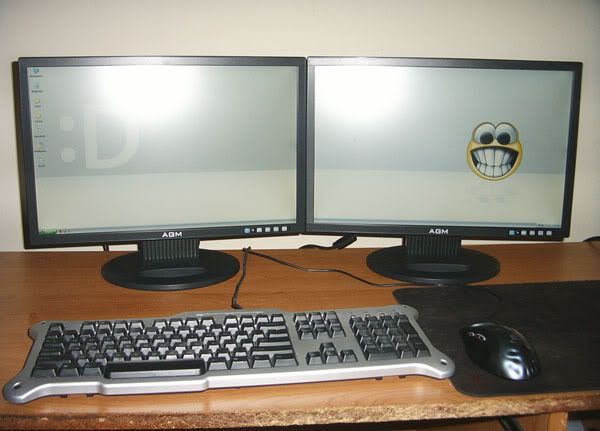
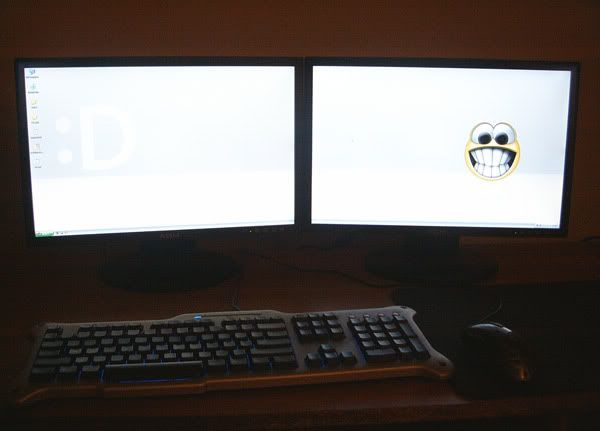
inotocracy said:Just got these earlier this week. Two 19" widescreen AG Neova CW-19s, I have them running at 2880x900, I'm in love with the setup:
http://i22.photobucket.com/albums/b304/mannymiller/lcd_light.jpg
http://i22.photobucket.com/albums/b304/mannymiller/lcd_dark.jpg
Happy Hopping said:Living in US w/ such bad power, I won't put up w/ it. I would call the elec. co. long ago. There is a component inside your APC UPS, called Varsistor, it can withstand brown out, but if it happens every 30 sec. ongoingly each day, that component would be long gone inside by now.
So if you have a surge by lightning, it will fly everything because that components has been weaken in your last place. I have seen it happened to any UPS, it can no longer withstand something such as a lightning surge.
patrik_e said:My setup, nothing special.... all the way from Sweden


Happy Hopping said:How can you use the DVD/CD drive, won't you have to walk over each time you need to use the drive?
And how do you like the Zalman cooling fan? It is not a direct fan cooling facing the CPU, it brings the heat up and then the fan kicks in. So I thought the weakest link is the part where the fan is NOT directly blowing the CPU, and is not as effective as the other Zalman that blow the CPU directly. What do you think?

stopmenow said:inotocracy, how is the image quality on these monitors?

Liquid_Cooled said:yes i game on this setup. 1920x1200 native res, max settings, no AA/AF.
http://img.photobucket.com/albums/v482/aybeeceeboi/IMG_1481.jpg
http://img.photobucket.com/albums/v482/aybeeceeboi/IMG_1484.jpg
mr_zen256, I like your Wacom tablet. Do you use it for graphic design? I was thinking of getting one myself. What model is that and how do you like it? Thanks!
Cool setup btw

Liquid_Cooled said:yes i game on this setup. 1920x1200 native res, max settings, no AA/AF.]


jcll2002 said:WOULD SOMEONE POST AN ASPIRE CASE REVIEW. There are none around!
Grazehell said:Budwiser the king of beers? That must have been a joke!
mr_zen256 said:It is a Wacom Intuos3 9x12 and yes I use it for graphic design and illustration. I think the Intuos3 is a fantastic tablet and for all you widescreen lovers out there they have released a panoramic tablet to suit widescreen...
board2death986 said:
recent setup
old setup hehe
) it's just my stupid iogear KVM switcher isn't working with my mouse/keyboard setup, whenver i connect it either my keyboard doesn't work or my mouse doesn't, but never do both work or don't work, its just one.


