• Some users have recently had their accounts hijacked. It seems that the now defunct EVGA forums might have compromised your password there and seems many are using the same PW here. We would suggest you UPDATE YOUR PASSWORD and TURN ON 2FA for your account here to further secure it. None of the compromised accounts had 2FA turned on.
    Once you have enabled 2FA, your account will be updated soon to show a badge, letting other members know that you use 2FA to protect your account. This should be beneficial for everyone that uses FSFT.

Resolved.

Status
Not open for further replies.
Hi all,

Ok, here are some pics with partial build, still waiting on my new Noctua NH-D14 Cooler and memory.

snip

Hey, I noticed you swapped for the 150cfm fans. Did you get your system up and running yet? And how are the temps because I stopped using my Raven RV02 because the temps were so bad in an SLI setup. Using stock 100cfm fans.
 
I disagree with this broad generalization. Personally, I am 60/40 on running water for my next build, and "yes" I will be doing it mainly for quiet computing rather than outright cooling performance, but plenty of other people want their 4GHz+ overclocks, TECs etc. YMMV.

4GHz+ OC's can be achieved on air these days but it can be done much quieter on water. I just don't understand how some people build these high-end WC loops for personal use. That money should be invested in components before some fancy WC system that they will end up selling anyway. In one way or another we are obsessed with PC overkill, but I like overkill in computing power not flashy PC accessories.
 
Hey, I noticed you swapped for the 150cfm fans. Did you get your system up and running yet? And how are the temps because I stopped using my Raven RV02 because the temps were so bad in an SLI setup. Using stock 100cfm fans.

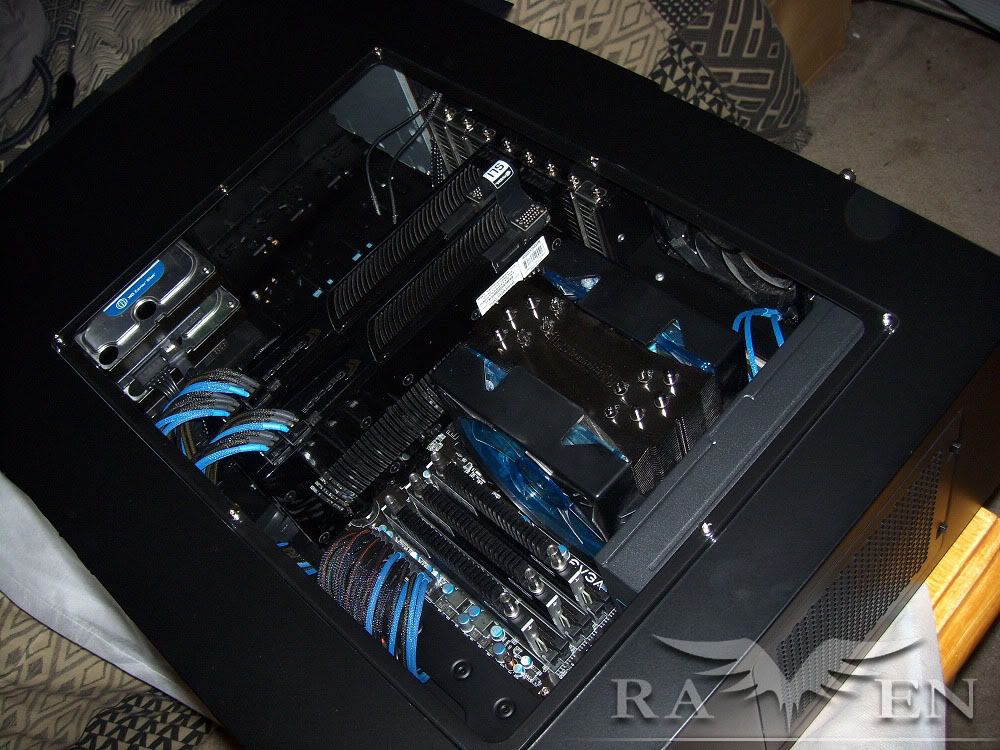
Not up and running yet, waiting on my memory and CPU cooler.

Yes, I bought the upgraded fans for the sole reason of trying to get more airflow to those GPUs and get those temps down. I will let you know how this works out once I get it up and running next weekend.
 
4GHz+ OC's can be achieved on air these days but it can be done much quieter on water.
You forgot stable. 1156 is still in its infancy and I notice a fair number of those people who were pleased with their air-cooled 4GHz X58 overclocks have since learned the price of overclocking on the edge and scaled back or lost their hardware. Over the years, I along w/ a couple friends have had our fair share of fried systems. My last burnout came after an enjoyable 4 years of use with a fairly aggressive oc. It was expected (eventually) and not a big deal because I only oc my gaming builds, not my primary machine.

I'm not disagreeing that water isn't useful for keeping things quiet nor am I saying air sucks, I'm saying that physics haven't changed. Fact is, so long as it's done properly, water trumps air for staying close to ambient. Any wasted equipment or other caveats is entirely a matter of budget and user decision. In a thread about a $200+ case, complaining about the cost of watercooling is silly. No personal offense intended.
 
Last edited:
Could one of you fellas please do me a favor and measure your window's dimensions and maybe the interior cutout as well, or else the amount of window overlap? I checked the pdf manual, but found no details. If I order an FT02, I'd like to order my modding parts at the same time rather than wait till I receive the case.
 
acheleus

Sweet system. And thanks for the info & pics.

Here's what I have spec'd out for my next build:
  • Silverstone FT02B-W Fortress
  • ASUS Crosshair III Formula AM3 AMD 790FX
  • AMD Phenom II X4 965 Black 3.4GHz AM3 125W Quad-Core Processor
  • (2) Mushkin Enhanced Blackline 4GB (2 x 2GB) 240-Pin DDR3 SDRAM DDR3 1600 (PC3 12800) M996657
  • Powercolor LCS AX5870 1GBD5-WMDH Radeon HD 5870 1GB 256-bit GDDR5 PCI Express 2.0 x16 HDCP Ready CrossFire Supported
  • (2) WD RE3 WD5002ABYS-01B1B0 500GB 7200 RPM 16MB SATA 3.0Gb/s 3.5" Internal HD
  • Intel X25-M Mainstream SSDSA2MH080G2C1 2.5" 80GB SATA II MLC
  • Corsair CMPSU-850HX 850W
  • Eheim 1250 Pump
  • (3) Black Ice GT Stealth 240 Radiators
  • Heatkiller CPU Rev 3.0 754/939/AM2
  • Tuniq TX-3 Thermal Compound

I think we've all pretty well established that every dime I spend on it will be "wasted" and should really be going to help free Tibel from the PRC or something, but I still can't wait to get started.
 
Hi Gem,

Sounds like you have a fantastic system planned yourself!

My buddy has the same SSD you are getting and that will increase your everyday speed more than almost any other component outside of 8GB good DDR3 memory. I got the same SSD basically, I just splurged for the 160GB version.

I got a great deal on the GTX 275s, during a local sale where I paid $180 each, and will give me roughly the same performance as two 5870s in the only game that really matters (Crysis) at $260 less. Now the question is can I cool them.

I thought about doing water cooling, but what I really would need that for is my video cards and I just can't see spending almost $400 on the water blocks alone only to have to throw them away when I want to upgrade my video cards....I guess I also just don't want to mess with water yet....
 
Nice contrasting look with the black FT02 and white SIlverstone Ball Bearing Fan upgrades. Those pics look nice. Better than I thought it would look, kinda like my Megasoma and Deathadder combo.

I get my PC-B10 tomorrow and I'm getting more and more into my mod plans! From a mod perspective, the PC-B10 is more exciting to me vs the FT02. So that was my hook. It's hard to find a case that is perfect IMHO. So a moddin' I will go.
 
i had a question regarding your upgraded silverstone fans. The upgraded fans include a pci bracket adapter that controls speed. What did you do with these? Did you just plug them to the top of the case using the low/high switch?
 
Upgraded 180mm fans to Silverstone FM-181ball bearing 500rpm - 1300rpm fans.

Id love to know how these fans go compared to the stock fans. Let us know if they are quieter and push more air through!

Im keen to see how those graphics cards get cooled as well. Simple thing that might help, I would recommend zip-tieing/siliconing/fastening a 120mm fan on top of them to blow cool air into them.
 
Id love to know how these fans go compared to the stock fans. Let us know if they are quieter and push more air through!

Im keen to see how those graphics cards get cooled as well. Simple thing that might help, I would recommend zip-tieing/siliconing/fastening a 120mm fan on top of them to blow cool air into them.

Huh? Did I read that correctly? Are you saying to place a fan "on top" to blow cool air down into the GPU's . . . and counteract the 180mm fan pushing air up through them? Wouldn't that just defeat the purpose of the whole case design? Want to clarify?
 
Huh? Did I read that correctly? Are you saying to place a fan "on top" to blow cool air down into the GPU's . . . and counteract the 180mm fan pushing air up through them? Wouldn't that just defeat the purpose of the whole case design? Want to clarify?

Hah sorry yes on top isnt the same thing in this case as it is in most I can see the confusion. Rewording will fix that: Place a fan on the top side of the graphics cards inside the case laying accross them (so the fan would be parallel to the side of the case) hope this makes sense :confused: :) So not blowing air in or out of the case, just helping to move air in and around the cards inside the case. I have seen this help on SLI before, but the person that did this was not using stock coolers.
 
I've had that same situation in my old P4 865 system. I remember adding the fan raised my temps for my northbridge (which were so low it didn't matter if they went up), and helped my gpu tremendously. Putting fans in odd locations can screw with overall case airflow and create more dBs, but sometimes it's the easiest fix and pays worthwhile dividends. Willingness to experiment even when it seemed counterintuitive has helped me several times in the past.
 
Hah sorry yes on top isnt the same thing in this case as it is in most I can see the confusion. Rewording will fix that: Place a fan on the top side of the graphics cards inside the case laying accross them (so the fan would be parallel to the side of the case) hope this makes sense :confused: :) So not blowing air in or out of the case, just helping to move air in and around the cards inside the case. I have seen this help on SLI before, but the person that did this was not using stock coolers.

I'm still not clear on your idea. If we understand that the "top" on this case is the ACTUAL top of the case where the DVI ports on the GPU's are and also where the hot air exhausts out of the case - then how and where exactly are you going to place an extra 120mm fan so that it is parallel to the "top"?

I have the RV02 - which is almost the same interior as the FT02 - almost. There is no room either above or below the GPU's to place a 120mm fan. The only way I could putting a 120mm fan in there somewhere is to put it so that it is perpendicular to the top - which, even if you could do it, would probably mess with the airflow. The cooling on these cases (RV02 & FT02) are designed to be simple and take advantage of the notion that heat rises. So you have the three 180mm on the bottom pulling cool air from the bottom and blowing it up, thus helping the hot air exhaust more efficiently out the top. Throwing an extra 120mm fan in there (wherever you can fit it) wouldn't do much to help the cooling and would likely affect it adversely.
 
What he means, I'm pretty sure, is the same layout as if the FT02 had a fan intake on the side window blowing right at the GPUs. Sure it might disturb the upwards flow of the heat, but if multi-GPU cooling becomes an issue in the FT02 (or any case), it's time to start experimenting. Scoobth is talking about doing it w/o a side panel fan intake; just use wire ties/brackets/whatever to mount the fan.
 
so the fan would be parallel to the side of the case
then how and where exactly are you going to place an extra 120mm fan so that it is parallel to the "top"?

I can see where you went wrong, you think that when I say side, I really mean top. Well i'll let you in on a little secret, when I say side, I mean side.*
*In this instance only

What he means, I'm pretty sure, is the same layout as if the FT02 had a fan intake on the side window blowing right at the GPUs. Sure it might disturb the upwards flow of the heat, but if multi-GPU cooling becomes an issue in the FT02 (or any case), it's time to start experimenting. Scoobth is talking about doing it w/o a side panel fan intake; just use wire ties/brackets/whatever to mount the fan.

Yeah thats pretty close to what im getting at. The thing we need to pay attention to is that the cards are very close together, and so as much as you can get a little bit of convection to move the air around them a little, air in itself is really quite bad at conducting heat. So the more that flows over an area the more effective the heat exchange will be. Air is still going from the bottom of the case to the top, but with a fan blowing over* the graphics cards its also being moved around the areas of the case where there is restricted airflow.

*Air moving over and around an object, nothing to do with the top

I hope this helps clear up the physics of it all ;)

Edit: Note: this is all just a suggestion to help acheleus with cooler temperatures, none of this has been proven in this situation but its one of those things that its so simple to test, why not try it?
 
I have the Raven RV02, coming from the Antec 1200 and I hated the temps, even with an SLI setup they were horrible. I expected worse temps, but not a good 10C+ temp increase for GPU's.

HPIM1021.jpg


I loved the case so much still that it went into my backup machine to be usefull and not collect dust w/o any components inside of it.

HPIM1232.jpg


Now recently I got back bored of my Antec 1200 and planned on doing a re-haul of the Raven, I mean HUUUUGE rehaul. I planned on a Murder-Mod kinda look. But... after relizing that after I do the mod I will be bored again I decided to scrap the idea as it would be a waste for me unless I had unlimited funds or this was a total new build.

I made some quick sketch-up in Photoshop of adding a Lian-Li mesh and another HDD cage, it'll be different for the FT02 obviously but put your guys' thinking cap on because I know it'll work.

Sorry about the LOL pics:
RV02-Insidstucture.png

RV02-Insidstucture2.png


This would obviously only help the last card on the board. Instead of spending $80 on fans and getting three replacement fans you can just get one, paint it black, and put it in the middle to cool the other two (or one) GPU. Just some ideas, you guy's can modify them as you wish. I was aiming for an almost stock look without going and dremeling out the case and making it look like crap.
 
Awsome looking setup in that pic, but again the problem with the SLI setup is that the cards are too close together, no air can get into the air intake of the rear most card.

You don't want to know the temps when I added the 3rd card...

How do you get the light to stay on at the front of the case when theres no power supply :D

Powered by hopes and dreams. :D
 
4GHz+ OC's can be achieved on air these days but it can be done much quieter on water.

Depends on the fans (on both) and the pump.
Some people think water is the end-all be-all quietest thing there is, until they hear the gurgling of a pump. :p
 
Thanks for relating your experiences nascasho. I'd considered doing something similar for my FT02 mod where I was gonna buy a silver case, use mnpctech honeycomb modder's mesh to replace 3 of the 5.25" bays (backed by dust filtering cloth). Except instead of a fan blowing in, I was gonna have it blow out to help quickly vent my hdd bay since, if I buy an FT02, I plan on filling all 5 bays. Now, after having seen how inferior the interior of the silver FT02 looks, I'm going black instead and I'll just paint the mesh. Got a few other tweaks I plan on as well, but none of it is too fancy or complicated.

I'm only going to be using one vid card for now, maybe two around next summer/fall when prices drop, so hdd cooling is a bigger concern for me. Gonna test it before modding though because I suspect replacing the front drive bay covers with mesh might make the case a lil' too transparent and leak unacceptably loud fan noise.
 
I am a little confused by the user manual and other things I've read...so here is what I am wondering:

1. Is there a 120mm fan
2. If there is, can I mount my Corsair H50 at that location without modification?
 
I am a little confused by the user manual and other things I've read...so here is what I am wondering:

1. Is there a 120mm fan
2. If there is, can I mount my Corsair H50 at that location without modification?

1. Yes, as an exhaust fan above the CPU.
2. Seems that way, someone has a pic of this or the raven with the H50 attahed. Go back a page or two and you'll see it.

Page 24, first post, second photo.
 
Depends on the fans (on both) and the pump.
Some people think water is the end-all be-all quietest thing there is, until they hear the gurgling of a pump. :p

Haven't used a gurgling pump for a water cooled system yet, where do you get them ...?
 
since the top 120 is the only exhaust fan.......maybe not such a good idea to use an h50......you have 3 180's blowing in and a restricted 120 (because of the radiator) blowing out (excluding the power supply fan)
 
Gemütlichkeit;1035018818 said:
Haven't used a gurgling pump for a water cooled system yet, where do you get them ...?

I'm just saying, one part to another - there are quiet water systems and quiet air systems, just like there are noisy water systems and noisy air systems.

Air cooling is not automatically noisy and water cooling is not automatically quiet; it depends on what parts you use.
 
well didn't like the pc-b10. I'm hopeless. Just could not like that door design on the pc-b10 and it is smaller in person than I want. Nice case, just not feeling I should stop looking for my perfect case. Can't return so I'm selling it myself. Then I'm eyeing up the ft02 again or a modified 800d. Got 8 gentle typhoons to fill whatever I get still.
 
I'm just saying, one part to another - there are quiet water systems and quiet air systems, just like there are noisy water systems and noisy air systems.

Air cooling is not automatically noisy and water cooling is not automatically quiet; it depends on what parts you use.

Mmmm... to a point, but for all but trivial cooling requirements, air cooling is *not* quiet. I welcome comments from owners of high end air-cooled graphics cards whose experience with the cards under load differs.

Why all the bad vibes for water cooling anyway? It is what it is: more expensive--yes, but also more effective and with less noise.

Besides, we're here to discuss the merits of the FT02 which *still* isn't listed on NewEgg. I do see another online retailer advertising a Dec 20th availability, and there are probably some to be had somewhere, but I'm partial to NewEgg. Looks like a January build for me :(
 
You don't want to know the temps when I added the 3rd card...

I know I have my work cut out for me cooling a tri-sli setup without the need to take the side panel off and use my box fan to cool them.

If the upgraded fans still don't work I am also thinking about putting a 120mm fan over the top of the three card's exhaust to help suck the air out of them and allow air to move more freely from the bottom to the top and out. Maybe get a 3000rpm 120mm KAZE fan if needed that I can turn on and off as needed.

I was also trying to figure out how I could tie a 120 mm fan to the bottom of the 3 cards to just force air into them using another high speed fan. There is room still between my bottom fans and the end of my cards for this.

I could also replace the middle 180 mm fan with a high speed, high air flow 120mm fan with a duct directing all that air directly into the bottom of the 3 cards.
 
I know I have my work cut out for me cooling a tri-sli setup without the need to take the side panel off and use my box fan to cool them.

If the upgraded fans still don't work I am also thinking about putting a 120mm fan over the top of the three card's exhaust to help suck the air out of them and allow air to move more freely from the bottom to the top and out. Maybe get a 3000rpm 120mm KAZE fan if needed that I can turn on and off as needed.

I was also trying to figure out how I could tie a 120 mm fan to the bottom of the 3 cards to just force air into them using another high speed fan. There is room still between my bottom fans and the end of my cards for this.

I could also replace the middle 180 mm fan with a high speed, high air flow 120mm fan with a duct directing all that air directly into the bottom of the 3 cards.

Here's another I dea I had that maybe you can try. Keep the idea with a nice quiet intake fan to cool the last card.

Tear the gut's of the middle 180mm fan, just leave the frame, and drop a 5000rpm delta with a fan controller in there, lol. It'll look stock and sound stock untill you turn that fan all the way up!
 
Another alternative is to consider removing the vid card's shroud. I thought about this myself when I first saw the Raven 2. You lose the directed airflow of the cooler, but you gain the entire output of the case fans as well as what I'm guessing will be reduced noise. Even with my single Radeon 5850, I'm going to see what happens temp-wise by removing the housing and comparing temps. That is, assuming I end up buying an FT02. I wouldn't bother trying this in a case that didn't orient the cards vertically.
 
Gemütlichkeit;1035019581 said:
Mmmm... to a point, but for all but trivial cooling requirements, air cooling is *not* quiet. I welcome comments from owners of high end air-cooled graphics cards whose experience with the cards under load differs.

:waves:

Hi, how ya doin'? :D

Buy a better cooler. Stock coolers suck; everyone knows this. :p Lone exception I give is nV's dual slot coolers; I left my 9800GTX by itself and my current GTX 260 216 SC I've left alone as well and the cooler does a great job. Quiet and decently cool even under load.
I have an 8800GT with an HR-03 GT and a Vantec Stealth; it's quiet. No higher than 52c under load IIRC. I believe the fan is a 20dB/40cfm fan and yes, it does the job.

I had 4830's in CF with Accelero S1 rev 2's on both with 120x120x10mm slim Scythe fans. Even in CF at load neither card got above 42c.

I repeat - it depends on what you buy.
Most people can deal with occasionally dusting/air blasting, slightly more noise (depending on the fans), slightly higher temps, at a fraction of the cost. (air v water)

Again I ask: how is water quiet versus air? You still have to use fans on the rad, correct? You buy noisy fans, water is no quieter than those same fans blowing through the fins on a heatsink. It depends on what you buy. Pumps make noise just like fans make noise.

Not going to comment on this anymore in this thread, sorry. If you think there's no option in air cooling other than noisy fans and shitty coolers, then I suggest you post a thread in the cooling subforum and see how many jump at the chance to prove you wrong. :cool: Good day :)
 
Here's another I dea I had that maybe you can try. Keep the idea with a nice quiet intake fan to cool the last card.

Tear the gut's of the middle 180mm fan, just leave the frame, and drop a 5000rpm delta with a fan controller in there, lol. It'll look stock and sound stock untill you turn that fan all the way up!

Interesting idea, but the problem is that the positioning of where you would mount the 120 mm fan in the bottom middle would not direct air into all the video cards. In fact you would only really get air blowing over the card closest to the processor leaving the second card without much cool air intake. Therefore you would need a duct to direct the airflow.

I have the standard clocked GTX275s and have no intension to over clock them so I am hoping that with the upgraded fans and removal of the pretty restrictive fan covers that they will get enough air.
 
since the top 120 is the only exhaust fan.......maybe not such a good idea to use an h50......you have 3 180's blowing in and a restricted 120 (because of the radiator) blowing out (excluding the power supply fan)

Yeah, I know that isn't ideal, but should do for now. I don't O/C or anything (for now).

Thanks for the feedback.
 
since the top 120 is the only exhaust fan.......maybe not such a good idea to use an h50......you have 3 180's blowing in and a restricted 120 (because of the radiator) blowing out (excluding the power supply fan)

Actually what ive read positive pressure works well with the H50 ... here is a review of raven 02 with it http://www.driverheaven.net/reviews.php?reviewid=835&pageid=5. Beats Lianli PC60 easily and inside the Raven 02 the temps are identical to open enviroment.

Raven 02 and Fortress 02 might be the two best cases for H50.

Going for Noctua NH-D14 cooling myself in FT02, should work ok.
 
I bought an h50 and did my research beforehand, including here at the [H]. Corsair prefers that the h50 receive exterior air because that is definitely going to be the coolest air available, but as seen in the h50 thread, plenty of people are having great success w/ the h50 receiving it's air from the interior of the case. Unless you're looking for a high overclock, the h50 will work fine using air that has been pre-heated by the hdds etc.
 
Having the motherboard tray rotated by 90 degrees can also help support those big heavy GPUs. This may be my next case.
 
I bought an h50 and did my research beforehand, including here at the [H]. Corsair prefers that the h50 receive exterior air because that is definitely going to be the coolest air available, but as seen in the h50 thread, plenty of people are having great success w/ the h50 receiving it's air from the interior of the case. Unless you're looking for a high overclock, the h50 will work fine using air that has been pre-heated by the hdds etc.

Hear the H50 can't compare to the high end air (temp/dollar or temp), why'd you go this route?
 
Status
Not open for further replies.
Back
Top