• Some users have recently had their accounts hijacked. It seems that the now defunct EVGA forums might have compromised your password there and seems many are using the same PW here. We would suggest you UPDATE YOUR PASSWORD and TURN ON 2FA for your account here to further secure it. None of the compromised accounts had 2FA turned on.
    Once you have enabled 2FA, your account will be updated soon to show a badge, letting other members know that you use 2FA to protect your account. This should be beneficial for everyone that uses FSFT.

Refurb server vs white box esxi

TType85

[H]ard|Gawd
2FA
Joined
Jul 8, 2001
Messages
1,575
There are a ton of refurb/off-lease servers out there on ebay right now. I picked up a 2x L5639/72GB ram server for under $600 to use for our disaster recovery hardware. Now i'm looking for another system to use for our development environment.

I am debating between a 2x L5520/36gb ram dell or building a supermicro white box e3-1230v2 with 32GB ram.

Would having the extra 4 cores (8 threads) make up for the speed difference between a more modern (ivy bridge) chip vs the older chip in a virtual environment? I know if I want to go over 32GB ram I need either a E5 or one of these other servers.

I can buy the dell server for the cost of the e3 chip so that is a factor too.
 
I don't understand the 32GB comment... Can I assume you referring to 32GB sticks?

What's your initial budget and what would you consider your maintenance budget for upkeep and upgrades in the future?

The usefulness of the extra cores entirely depends on the type of work the VMs will be performing. Are any of the Dev environments multithreaded and/or benefit from multiple cores? Given enough RAM, I'd think higher core density would be more beneficial in your case without knowing more about your environment. My experience has been that VDI reacts very well to increased clock speed, but Development and or Servers are less dependent.
 
Keep the shipping cost in mind too... ebay sellers can be ridiculous with that. I've seen some servers go for like $500 shipping. I was looking at some of these refurbs and turns out it would be cheaper for me to build one from scratch.
 
I don't understand the 32GB comment... Can I assume you referring to 32GB sticks?

What's your initial budget and what would you consider your maintenance budget for upkeep and upgrades in the future?

The usefulness of the extra cores entirely depends on the type of work the VMs will be performing. Are any of the Dev environments multithreaded and/or benefit from multiple cores? Given enough RAM, I'd think higher core density would be more beneficial in your case without knowing more about your environment. My experience has been that VDI reacts very well to increased clock speed, but Development and or Servers are less dependent.

My budget is up to $1200, but the lower the better

32GB ram on the E3-12xx system is the max it can take. The dual processor older servers can do 192gb ram+ I am looking at something like this: http://www.ebay.com/itm/Dell-Powere...689179?pt=COMP_EN_Servers&hash=item41776fca1b

I can buy that server, throw a few drives I have laying around in it and have a 8c/16t box. I am thinking more cores/ram is going to be better than increased core speed if the speed difference is not huge (like if the E3 is >2x as fast as the L5520)

The used servers are around 3 years old, but at that price if I bought 2 I would still be cheaper than the e3 system.

Keep the shipping cost in mind too... ebay sellers can be ridiculous with that. I've seen some servers go for like $500 shipping. I was looking at some of these refurbs and turns out it would be cheaper for me to build one from scratch.

The ebay sellers i'm looking at range between free and $70 to ship the 1u servers.
 
As an eBay Associate, HardForum may earn from qualifying purchases.
VM's, its all about the memory you can throw at them.

Go with gobs of ram, as much as you can afford. The 72GB variant of that
server you linked I got for $395 shipped. place is on ebay, just search for
C1100 72GB and find the eSiso seller, make him an offer and profit.
 
VM's, its all about the memory you can throw at them.

Go with gobs of ram, as much as you can afford. The 72GB variant of that
server you linked I got for $395 shipped. place is on ebay, just search for
C1100 72GB and find the eSiso seller, make him an offer and profit.

Yeah, and he's not to far from me, wonder if I can make an offer picked up...
 
Wow 72 gb for ~$400 is awesome, I have a similar setup at work on an asus dual 1366 5520's with 32gb of ram and defiantly run out of ram on vms way before cpus. Especially if you could get 3 of these vs one of your white box builds. You could probably throw that extra cash at a nice san or something.
 
VM's, its all about the memory you can throw at them.

Go with gobs of ram, as much as you can afford. The 72GB variant of that
server you linked I got for $395 shipped. place is on ebay, just search for
C1100 72GB and find the eSiso seller, make him an offer and profit.

I'm looking at possibly getting a C1100. It's very tempting given the price/RAM. A few questions:

- How loud is it? I know a 1u is not going to be silent, but I'd like to be able to close the door to the room it's in and not hear it through the walls.

- Do you know if a 2.5" drive (e.g., SSD) be put into the 3.5" tray? Is an adapter required?

- Any idea what the approximate power draw from the wall is at various loads?

TIA
 
- Do you know if a 2.5" drive (e.g., SSD) be put into the 3.5" tray? Is an adapter required?

Is this a trick question?
Why wouldn't you need some sort of adapter? If nothing else the mounting holes are not going to line up.
 
Is this a trick question?
Why wouldn't you need some sort of adapter? If nothing else the mounting holes are not going to line up.

No, honest question. My recollection is that some trays have mounting holes on the bottom to provide for 2.5" drives to be used and properly line up the SATA connector. Or I could be misremembering.
 
You are correct Blue. I've seen mention of it supporting 10 x 2.5" drives, but the units I've seen are all the 4 hot swap 3.5" ones.

It appears though that you'd have to order it that way, I don't know if the hotswap bay cage can be removed, but there is enough ports on the thing to support that many drives. Just review the manuals and it confirms all that.
 
- How loud is it? I know a 1u is not going to be silent, but I'd like to be able to close the door to the room it's in and not hear it through the walls.

-

You have to take this into context. I'm used to loud fans and it never bothers me. I sleep with a fan on for example. So the noise level i can tolerate is much higher than most people ok.

With that said, the thing was a total nightmare to listen to when I first got it. I had 1 drive in it that I had spare, and the thing was constantly spinning up the fans to 100% and back down, every 15 seconds at points and sometimes it would go on like that for hours on end.
My nerves were not appreciating it even knowing my level.

So I flashed it to the latest BMC and Firmware off the Dell site (it was outdated by a good 12-18 months, so many revisions). After doing that, its practically silent. When it spins up fans, I'm really more surprised, than expecting it like I was. Its happily churning away with 4 x 1TB SATA drives in it, and its serving up the love about 6-8 VM's right now w/o issue. I have 3 DC's for 2 domains, and a mixture of clients and various other things. Its flawless at this point. For the money, I woulda never been able to build anything remotely close to this. A board that supports this amount of memory alone costs more than I paid for the entire thing. I got the hdd's for free basically from an old friend who runs a local PC shop, I did some work for him and he paid me in drives ;) So I dropped $400 shipped on the thing, and I got a nice server. So nice I'm gonna buy another one.
 
You are correct Blue. I've seen mention of it supporting 10 x 2.5" drives, but the units I've seen are all the 4 hot swap 3.5" ones.

It appears though that you'd have to order it that way, I don't know if the hotswap bay cage can be removed, but there is enough ports on the thing to support that many drives. Just review the manuals and it confirms all that.


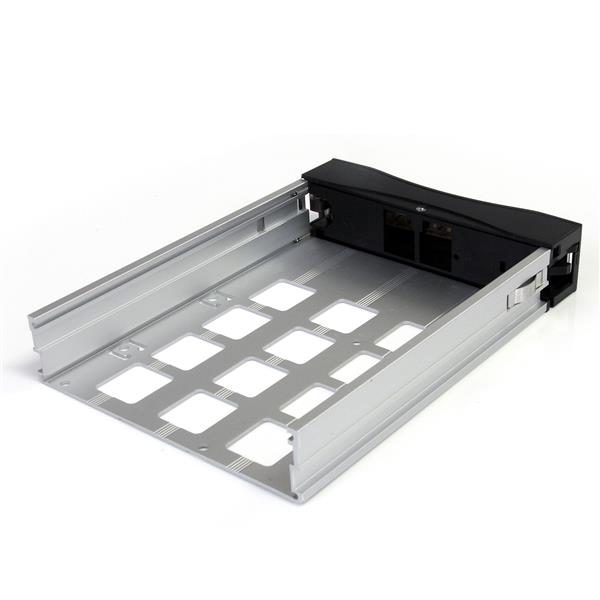
Not quite what I was referring to. Let me clarify. I'm asking if the 3.5" HD carrier has provisions for mounting a 2.5" drive. For example:

SATSASTRAYBK.B.jpg


Note the two holes in the base of the tray at the edge, and matching one ~2/3 back. Those are 2.5" mounting points. I'm hoping that the C1100 has the same.

I'm fine with 3.5" bays, personally. However I'd like the option of easily using SSDs as well.

Thanks.
 
And if not, a drill bit would probably work well also, provided you have enough structure.
 
Back
Top