• Some users have recently had their accounts hijacked. It seems that the now defunct EVGA forums might have compromised your password there and seems many are using the same PW here. We would suggest you UPDATE YOUR PASSWORD and TURN ON 2FA for your account here to further secure it. None of the compromised accounts had 2FA turned on.
    Once you have enabled 2FA, your account will be updated soon to show a badge, letting other members know that you use 2FA to protect your account. This should be beneficial for everyone that uses FSFT.

raid 0?

jimbiss

n00b
Joined
Apr 15, 2006
Messages
32
So i have a Gigabyte ep45-ds3r with ICH10R. I have been thinking about doing a raid 0 to get faster booting, just 2 drives in the raid. What can i expect out of the onboard raid? Or would it be worth getting a pci express raid card? And if so what would be a decent card?

Thanks
 
Just use the onboard controller.

And figure out a backup solution too. =) Hopefully you won't need it, but it sucks to lose data, photos, etc.
 
my other data already resides on other drives, just the OS and programs are on the C drive
 
Onboard is fine. Just pick up two WD 640 drives and short-stroke them.

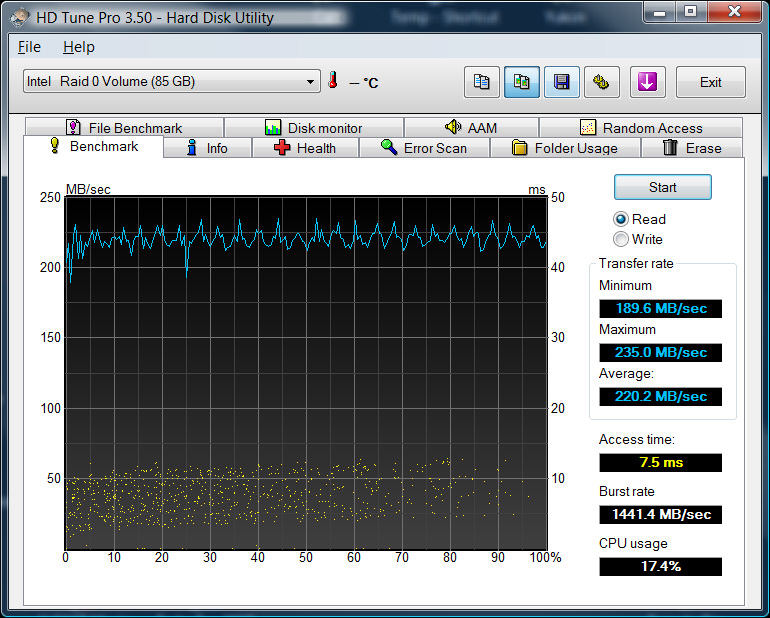
raid0-80.jpg

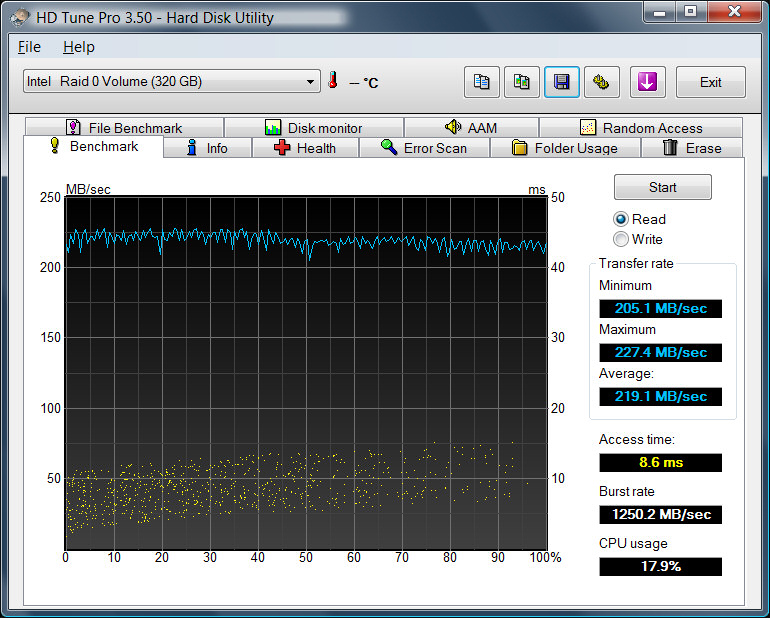
raid0.jpg
 
Agreed, ICH9 or 10 is great for raid 0, no need for a controller. And as stated above, make sure you short stroke 'em.
 
any guides for short stroking them? i get pretty fast speeds as it is but faster is always better :D
 
I think it depends on your drives, number of platters, etc. I saw someone who had 2x 640's and made 1 300gb partition (150 from each drive) which is about 23.4% of the array, and there was zero performance drop across the partition. I suspect you might be able to go even larger without losing performance, but 300GB seems like plenty for an OS. I made mine 150gb (75 each drive) and have plenty of room.

As for how to, it's really easy. Plug in your two drives, boot and hit the keystoke to go into the config tool for the Intel raid controller, add them to an array, and create a volume (raid 0) of a size of your choice (see above). The Intel controller automatically makes this volume on the faster part of the disk, so you don't need to do anything else. Do whatever you want with the remaining space. Install windows to the first partition you created and you're done.
 
Yes 25% of a 640 drive is about the best size for data transfers. Any smaller you can get better access times. As seen by my images above.
 
As for how to, it's really easy. Plug in your two drives, boot and hit the keystoke to go into the config tool for the Intel raid controller, add them to an array, and create a volume (raid 0) of a size of your choice (see above). The Intel controller automatically makes this volume on the faster part of the disk, so you don't need to do anything else. Do whatever you want with the remaining space. Install windows to the first partition you created and you're done.

thanks for the post

thing is though i have an nvidia raid controller... does that mean i cant use the intel storage matrix?

im a noob when it comes to raid...
 
Nvidia storage controllers are independent from Intel storage controllers, so you won't be able to use Intel Storage Matrix for your configuration.

And unfortunately, NVRAID has a tendency to have very awkward performance with RAID...in my experience they weren't very good as ICH10R was just flat out better performing and more consistent, while NVRAID just jumps all over the place with its performance in RAID 0 arrays in particular...some have even experienced corruption issues under NVRAID as well.

I'd do a bit of research into NVRAID performance and how it works in the long-run with others with a similar setup as yours and weigh in whether or not it's safer to get a PCI/PCIe simple RAID controller.
 
yeah i havent heard good things about them either but im getting pretty good performance out of mine... average of 185MB/s transfer speed in hdtune. i mean its a budget board that has served me well and i dont think it worth it spend money on a dedicated raid card. but i am keeping an eye on the health my raid setup. i back all my stuff at least once a week so im not too worried about corruption (if it were to occur)

but that sucks i cant short stroke it... that speed is making me jealous :(
 
I wonder if using 1 platter from each WD6400AAKS would give much of a decrease in performance. So having a total of 640GB...
 
I wonder if using 1 platter from each WD6400AAKS would give much of a decrease in performance. So having a total of 640GB...

You cant turn off a platter.

I mean if you want to use 640gb just make a 640gb partition and it will use the outermost 160gb on each platter
 
yeah i havent heard good things about them either but im getting pretty good performance out of mine... average of 185MB/s transfer speed in hdtune. i mean its a budget board that has served me well and i dont think it worth it spend money on a dedicated raid card. but i am keeping an eye on the health my raid setup. i back all my stuff at least once a week so im not too worried about corruption (if it were to occur)

but that sucks i cant short stroke it... that speed is making me jealous :(

What do you mean you cant SS?

You can do it at the FileSystem Level it will work just as well.

Just make a whatever size partition and leave the rest untouched.
 
WRT to one drive, if you short stroke your 640gb (600 actual) to 100gb for OS & games and performance is your goal, do you not touch the remaining 500gb on the 2nd partition, or does it not matter?
 
I use the remaining space for media storage. Of course if you are accessing that space, yes it will affect access to the first partition. But if you plan it so the data on your 2nd partition is no accessed often it shouldn't be a problem.
 
I was under the impression that the remaining space should be left unpartitioned because you don't want Windows looking there and moving the head out of the sweet spot you've created by short-stroking the drives.
 
[LYL]Homer;1033738414 said:
I was under the impression that the remaining space should be left unpartitioned because you don't want Windows looking there and moving the head out of the sweet spot you've created by short-stroking the drives.

exactly
 
Back
Top