Quick temperature question

grendel240sx

Limp Gawd
Joined
Sep 30, 2004
Messages
497
Hey all,

I have an e6600 not overclocked at all, and 2x 8800GTX. I just got speedfan, and its showing the CPU temp at 78C, GPUs are at 87 and 83C. Are these super high temps? Looking at a few other threads it seems other people have way lower temps.

My house is 70 degrees F, all I have running is WoW in a window and hulu.

Is this way too hot?
 
Its not to hot, but it is way hotter then it should be. What HSF? What Case? Is the HSF seated correctly?
 
Ok here is what real temp shows:

GPU 87 C Load 44.3%

Temperature (C)
88 88

Minimum

85C 86C

Maximum

94C 94C
 
Thats really hot.
Either the temp sensor is faulty or you have a serious cooling failure.
Is the fan spinning and free of dust?
What cooler do you have?
Does the heatsink get warm?

If the fan was spinning and clean, take the heatsink off and replace the thermal paste.
Check to see if the old paste was going powdery and that the heatsink was correctly fitted or not.
 
The whole case above the video cards is crazy hot to the touch, like almost burning hot. I have a bunch of fans in there and they are all spinning except for the one on the heat sink, not sure whats up with that.

I know it has worked before, and i think its set in the bios to run 100% of the time. Maybe the fan died.

Would just that one fan not spinning make all this heat?
 
Yes and it can kill your hardware too.
You need to sort the fan out asap.
ie dont use the PC until its sorted.

It looks like your case airflow is not too hot as well, demonstrated by the other excessive temps on things with fans working ok.
Your motherboard will likely be baking too and you risk excessive wear to your hard drives.
Give the case fans a clean and move anything you can that blocks air flow through the case.
Make sure the fans all blow in the same direction, in the front, out the back.
 
It's been running this way for a long time I just never worried about it till today, everything just locked up and it shut off.

I have had 2 hard drives die, guess thats why :(

I'll try to clean it out after work tomorrow morning i guess.
 
I concur with Nenu: Do not startup the system until the fans, HSF and airflow have been setup correctly. Any chance of you being able to take a pic of the inside of your case so that we can have an idea of what your airflow/case insides are like?

If the fan on the CPU HSF is not working, make sure that it's connected. If it is connected but not spinning, it's probably dead. So definitely get a new HSF.
 
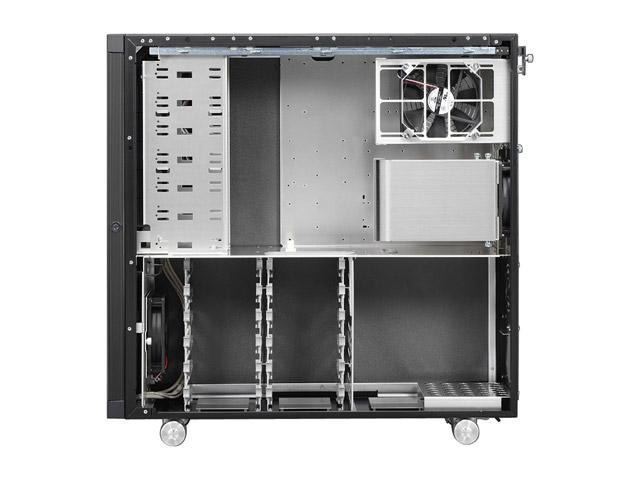
Just so we have a visual guide to go by:

11-112-064-05.jpg
 
I'll take some pics first thing tomorrow.

My case is exactly like that one above except I have taken out one of the drive bay rack things, and couldnt fit the CPU duct thing over my heat sink.

Right now I have the top right fan blowing into the case. Not sure if that was the right way to do it. I figured having it blow air into the case on top of the video cards would be the best way to do it. Then the vid cards can suck that air in fresh from outside.

This machine has been running hot for at least a month, probably longer. I originally built it about a year and a half ago when I was living in the dorms in germany with no AC, maybe the summer heat made the cpu fan work overtime and burn itself out.. :(

My friend has the antec 900 case, it seems like it has way better airflow than this case. I'm not sure if I can fit both 8800s in the 900 though.
 
its more to do with the crappy airflow in that case.. but the front fan should be an intake fan.. the top fan intake.. rear middle fan exhaust.. also if you are not using all the 5.25" bay slots.. buy a couple bay coolers.. basicly takes up 3-4 extra slots and has a fan in it..

maybe something like this http://www.newegg.com/Product/Product.aspx?Item=N82E16835192016

new egg had a bunch of different ones but i guess they are gone now..
 
Ok I went into the BIOS and set the fan to 100% on all the time. For some reason it wasnt kicking on automatically. I'm glad it's not dead, that saves me 60 bucks or so lol. I had it set to 100% on before, but had to reset the BIOS for some reason last time I reinstalled.

I just got through playing some COD4, and now I have WoW and hulu running again... max is 51/53 C and its doing 46/49C right now. Much better.

I have the side of the case off right now, I'll put it back on later and see if the temps go up. If they do I'll just leave it open.

Thanks everyone for the help, I appreciate it :)
 
Back
Top