• Some users have recently had their accounts hijacked. It seems that the now defunct EVGA forums might have compromised your password there and seems many are using the same PW here. We would suggest you UPDATE YOUR PASSWORD and TURN ON 2FA for your account here to further secure it. None of the compromised accounts had 2FA turned on.
    Once you have enabled 2FA, your account will be updated soon to show a badge, letting other members know that you use 2FA to protect your account. This should be beneficial for everyone that uses FSFT.

PSU sufficient?

Joined
Jan 26, 2012
Messages
13
Hi everyone, I'm having some trouble figuring out if my Seasonic M12II 520w is sufficient for the following hardware:

i5 2500k at stock speed
EVGA GTX 680 FTW+
2x 1333Mhz G.skill Ripjaws X 8gb
2x SATA II HDDs
1x SATA III SSD
1x SATA III HDD
1x 82mm fan
4x 120mm fans
1x 140mm fan
1x 230mm fan
2x Antec Kuhler 620

Any and all help is appreciated.
 
Yes but....

You should give yourself some more room in case you wanted to add another gpu or two ;) to your setup. Perhaps a Corsair 650 or 750. Unless I am mistaken, under load (such as a game) the GTX 680 will probably use ~ 300 watts, CPU ~ 150.

From my experience I would go with a 750, this gives you plenty of room to "grow" into it for another 20-30 bucks.
 
Unless I am mistaken, under load (such as a game) the GTX 680 will probably use ~ 300 watts, CPU ~ 150.

You are grossly mistaken because you haven't read the articles closely enough. A GTX 680 and i5 2500k system will use around 300 watts under load. The WHOLE system, not just the card.

I would not expect the OP's system to ever go over 400W unless he is doing crazy overvoltage overclocking on the CPU and video card, which he isn't.
 
More like 180 watts for the 680 and 60 watts for the 2500k, and 50-100 watts for the rest of the system.
 
Yes but....

You should give yourself some more room in case you wanted to add another gpu or two ;) to your setup. Perhaps a Corsair 650 or 750. Unless I am mistaken, under load (such as a game) the GTX 680 will probably use ~ 300 watts, CPU ~ 150.

From my experience I would go with a 750, this gives you plenty of room to "grow" into it for another 20-30 bucks.

No buts about it... Larger PSU's will still be available to buy when he actually needs them. If he were building a new computer and didn't have a PSU to begin with, your suggestion would be a reasonable one so you don't find yourself having to buy another PSU down the line. In this case however, with his existing PSU having MORE than enough power to handle is planned upgrade, it would be silly to upgrade it for the possibility of an unplanned upgrade.
 
Thanks for the info everyone, you really put my mind at ease.

I run an mITX setup so there's no way I'd be doing SLI anytime soon.
 
I'm curious to know what case you're using that has all those fans in mITX.
 
Using a BitFenix prodigy, not the smallest case but it keeps my stuff nice and cool and looks pretty bad arse, if I do say so myself.
 
Yes but....

You should give yourself some more room in case you wanted to add another gpu or two ;) to your setup. Perhaps a Corsair 650 or 750. Unless I am mistaken, under load (such as a game) the GTX 680 will probably use ~ 300 watts, CPU ~ 150.

From my experience I would go with a 750, this gives you plenty of room to "grow" into it for another 20-30 bucks.

Mistaken.

Current trend with CPU and GPU is LESS power as they get more powerful.
 
For clarity here is a recent Anandtech article that shows power usage of systems using the most power cards in single and SLI.

http://www.anandtech.com/show/6774/nvidias-geforce-gtx-titan-part-2-titans-performance-unveiled/15

I still confirms my perplexion about why there are so many 1000W power supplies for sale when even two of the most powerful cards on the market still only pulls less then 600 watts.

I have a p8z77-ws with an overclocked i7-3770, 32gb overclocked ram, and 2 gtx580 lightning Xtremes in SLI and overclocked to 940/1880/2400

When my system is benching I have to use GPU-z to remove the voltage limitations bolted into the 580's.

My system as a whole pulls an average of 1kw with a max of 1244w under heavy GPU load.

My cards pull between 400-500w each with the overclock (one GPU test of non-SLI 3dmark fire strike shows my system pulling 650-750 watts, 2 GPU pulls 1150).
 
I have a p8z77-ws with an overclocked i7-3770, 32gb overclocked ram, and 2 gtx580 lightning Xtremes in SLI and overclocked to 940/1880/2400

When my system is benching I have to use GPU-z to remove the voltage limitations bolted into the 580's.

My system as a whole pulls an average of 1kw with a max of 1244w under heavy GPU load.

My cards pull between 400-500w each with the overclock (one GPU test of non-SLI 3dmark fire strike shows my system pulling 650-750 watts, 2 GPU pulls 1150).

Wait. You're using software in your computer to measure how many watts you are using??

Hate to break it to you, but using real hardware to measure the power AT THE WALL... SLI 580s with a 2600k.

1332910830lxuqiwXcM0_8_1.gif


You can overclock all you want, but you're overclock isn't going to nearly double the power draw. Sorry.
 
I am measuring at the wall. Through my LCD screen on my UPS. It could be wrong, but I might just go get a watt meter and plug it in.

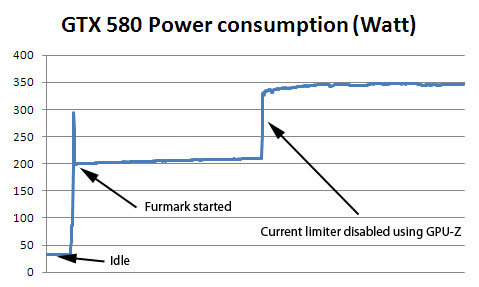
580's have a built in regulator that stops them from pulling full wattage. You have to disable it with GPU-z 0.4.8

No benchmark you will find makes use of disabling it. Google around. Stock settings pull 350-400 per card, not including power draw for OC or anything.

Since my rig runs at 260w at idle, and 1200w under load....at the wall...what do YOU think it is? Magic?

ETA for links : http://www.techpowerup.com/mobile/134460/Disable-GeForce-GTX-580-Power-Throttling-using-GPU-Z.html
gtx580_power_gpuz.jpg


Keep in mind the chart above was taken on a stock 580. OC adding 100+ MHz to the GPU, 300mhz to the ram and adding +131mv to the GPU, +70mv to memory and +30mv to aux could drive it over 400w. No way to tell, but single card load hits 750w at the wall (or the screen of my apc ups).

Also keep in mind that the 580gtx is just a hot rod version of the 480 so it shouldn't really be a surprise that it wants to eat power.
 
Last edited:
I look at the charts posted and shrug. When I measure AT THE WALL it shows between 1000 and 1100 watts for 3 cards under load with modest OC. I am not knocking the reviews but my own experience tells me other wise. If the chart shows 584 for Crossfire playing BF3 then yes it almost certainly doubles based upon my experience adding a 3rd card.

While I dont disagree with the charts that have been linked here, the testing I have seen shows a GTX 680 system pulling around 450 watts playing BF3 multiplayer. If OP has a 550 psu and he wants to OC or move to another card (which less face it most people do sooner or later) he may not have enough juice for the 2nd card. Better to have a bit more room than not for expansion.

And looking at what Titan is pulling under load it shows GPUs are not becoming more efficient. Speed comes at a price.

Lab tests/reviews are nice but real world, every day life tells me a different story.
 
I look at the charts posted and shrug. When I measure AT THE WALL it shows between 1000 and 1100 watts for 3 cards under load with modest OC. I am not knocking the reviews but my own experience tells me other wise. If the chart shows 584 for Crossfire playing BF3 then yes it almost certainly doubles based upon my experience adding a 3rd card.

While I dont disagree with the charts that have been linked here, the testing I have seen shows a GTX 680 system pulling around 450 watts playing BF3 multiplayer. If OP has a 550 psu and he wants to OC or move to another card (which less face it most people do sooner or later) he may not have enough juice for the 2nd card. Better to have a bit more room than not for expansion.

And looking at what Titan is pulling under load it shows GPUs are not becoming more efficient. Speed comes at a price.

Lab tests/reviews are nice but real world, every day life tells me a different story.

Even if we use your numbers, he does not need a new PSU. If the system pulls 450 (I have a 680 and 3770 and the only time I pull more than 400 at the wall is running OCCT stress test. BF3 is more like 380 watts but I'll use 450 just to appease you)

But anyway, even if we use 450, his PSU is 87% efficient at most and capable of 520 watts of continuous output. That translates to a maximum of 391.5 watts being drawn from a 520 watt PSU. He has well over 120watts of headroom, and again, that's assuming your bloated figures.

Plenty of power, he does not have a titan, he is not adding a new card. You can keep bringing in other cards into the equation, it's irrelevant. He's using a single card with plenty of power to SPARE. If he adds another card later, he can upgrade his PSU at that time. If there was ever a more wasteful upgrade, it's upgrading the PSU. It would do exactly nothing for him except cost him money.
 
Last edited:
I am measuring at the wall. Through my LCD screen on my UPS. It could be wrong, but I might just go get a watt meter and plug it in.

580's have a built in regulator that stops them from pulling full wattage. You have to disable it with GPU-z 0.4.8

No benchmark you will find makes use of disabling it. Google around. Stock settings pull 350-400 per card, not including power draw for OC or anything.

Since my rig runs at 260w at idle, and 1200w under load....at the wall...what do YOU think it is? Magic?

ETA for links : http://www.techpowerup.com/mobile/134460/Disable-GeForce-GTX-580-Power-Throttling-using-GPU-Z.html
gtx580_power_gpuz.jpg


Keep in mind the chart above was taken on a stock 580. OC adding 100+ MHz to the GPU, 300mhz to the ram and adding +131mv to the GPU, +70mv to memory and +30mv to aux could drive it over 400w. No way to tell, but single card load hits 750w at the wall (or the screen of my apc ups).

No magic, just the user misinterpreting power usage. There's no way a single 580 is pulling 400-500watts on it's own. Please show me a pic of the cooling solution you're using on those cards that is capable of dissipating 500 watts (per card). It would be a first around here and I personally would love to see it.
 
Then explain to me, in laymans terms, how my PC shows 1200watts out of the wall on the screen of my UPS? And 750 when SLI is off at max load? And 250-265 at idle?

Make it simple, because apparently I lick windows. Cooling is stock twinfrozriii's from msi on the lightning xtreme 3gb cards. Temp on GPU1 hits 93 and GPU 2 hits 81 at 100% load 100% fan.

I don't run it there for long because frankly it scares the piss out of me. Just long enough to finish the benchmarks. Except heaven 4.0, which I shut down when the GPU hit 98.
 
The hardware you are using is faaaar from accurate. Haha..
 
http://www.newegg.com/Product/Product.aspx?Item=N82E16842101400

Here is the UPS in question. I had to replace the APC Back-UPS RS 1500LCD after I put this computer together because it would scream when it hit 900+ watts on the screen and I couldn't keep it muted (only rated to 865watts).

So that would make (2) APC UPS units reporting bad wattage numbers under load.

So spell it out for me, because I will buy http://www.homedepot.com/p/t/202196...toreId=10051&N=5yc1v&R=202196386#.UTKpSYy9KSM tonight and take a video recording of it while benching.
 
Like I said, show me your cooling solution. By your numbers, simple math says you 2nd 580 caused your power usage to spike an additional 500-600 watts. (650-750 watts with a single one, 1150 with the 2nd). Simple physics tells us this heat needs to be dissipated. I'm not aware of any commercially available VGA cooling capable of pulling anywhere near that amount of heat energy away, so you would have to have a custom cooling setup no one has ever seen to keep from burning a hole straight through the PCB.

You may very well have ~900 watts of load on your APC, I have no idea what's connected to it, but your 580's are NOT pulling 500 watts.
 
Then explain to me, in laymans terms, how my PC shows 1200watts out of the wall on the screen of my UPS? And 750 when SLI is off at max load? And 250-265 at idle?

Make it simple, because apparently I lick windows. Cooling is stock twinfrozriii's from msi on the lightning xtreme 3gb cards. Temp on GPU1 hits 93 and GPU 2 hits 81 at 100% load 100% fan.

Simply put, the PSU's APFC feature is throwing off the power draw figures. The same thing is seen with KAW and other similar devices that uses the same method of measuring power draw.

So spell it out for me, because I will buy http://www.homedepot.com/p/t/202196...toreId=10051&N=5yc1v&R=202196386#.UTKpSYy9KSM tonight and take a video recording of it while benching.
As noted earlier, even KAW figures can be inaccurate as shown here:

Here's Paul Johnson's post, PSU reviewer of HardOCP.com, about the inaccuracy of the Kill-A-Watt:
http://hardforum.com/showpost.php?p=1032190998&postcount=7

Another Paul Johnson's post:
http://www.jonnyguru.com/forums/showpost.php?p=27745&postcount=26

In addition, three other PSU experts backs up Paul Johnson's statement:
Oklahoma Wolf of JonnyGuru.com:
http://hardforum.com/showpost.php?p=1034843536&postcount=21
http://hardforum.com/showpost.php?p=1034555880&postcount=17

JonnyGuru of JonnyGuru.com and the former product manager for BFG acknowledge the inaccuracies of a KAW (Post #7 in regards to Post #2):
http://www.jonnyguru.com/forums/showthread.php?t=5977
http://www.jonnyguru.com/forums/showpost.php?p=29907&postcount=2

Redbeard of Corsair also acknowledges the inaccuracies:
http://hardforum.com/showpost.php?p=1032811067&postcount=22

Related discussions:
http://hardforum.com/showthread.php?t=1447774
http://hardforum.com/showthread.php?t=1509210
http://www.jonnyguru.com/forums/showthread.php?t=3102
http://www.jonnyguru.com/forums/showthread.php?t=2695
http://www.jonnyguru.com/forums/showthread.php?t=2284

Considering that the UPS that you bought uses essentially the same methods of measuring power draw IIRC, you're gonna see inaccuracy. Since the KAW is a different device, it may show different figures from the UPS but would still be inaccurate.

EDIT: Then there's also RamonGTP's explanation as well. So there you have it: Two good reasons that shows that your UPS is inaccurate.
 
While a K-A-W isn't that accurate either, it's probably a lot more accurate than the UPS's method. Just make sure your rig is the only thing running through the K-A-W. I could load up all three of my systems on my K-A-W and make it seem as if it's a huge load.
 
Is it only your computer connected to your UPS, or are there other things connected as well?
 
See, now this makes sense. My router, cable modem, switch, and 3 monitors are the only things other than the PC connected. It does spin 10-180mm fans, 2 120mm fans (NH-d14), 4 ssd's, 3 HDD's, and the 2 n580gtx lightning Xtremes as well as a Bluray drive and sound card.

So...if I plug it directly into the wall through that kill-a-watt, that would give an accurate reading of total draw...

Any way to measure what the cards are getting? I know they draw at least 350 based on the stock one techpowerup took the limiter off. My overclocked cards might draw 400 each then? Based off the above?

These cards do have direct hardware external voltage monitor hookups. Just need to figure out which ports to put the meter on.

http://us.msi.com/product/vga/N580GTX-Lightning-Xtreme-Edition.html cards in question.
 
No, a Kill a Watt can be just as inaccurate. You will need expensive hardware to accurately measure DC power draw for that. TPU already does this.
 
See, now this makes sense. My router, cable modem, switch, and 3 monitors are the only things other than the PC connected. It does spin 10-180mm fans, 2 120mm fans (NH-d14), 4 ssd's, 3 HDD's, and the 2 n580gtx lightning Xtremes as well as a Bluray drive and sound card.

Insert face palm here.
 
Also, just to add, you cannot measure power consumption by measuring voltage. You need to measure both voltage and amperage.
 
Insert face palm here.

Well, the monitors and routers etc. all run at a fixed wattage use which is already in the idle and max load numbers, and all fans in the system run at 100% when I bench (because I force them to manually)

If my idle load shows 250-265 watts and my 100% SLI GPU load shows 985-1200 watts (it bounces a lot depending on what's being rendered) what was I supposed to assume? Especially when I specifically have to load software to remove the voltage limiter on the 580 to keep them from throttling?

I guess I should check my OCCT linpack 100% load voltage to see what it draws without including the GPU's.

Thanks for the info on the voltages, I just wish there was a way to get accurate readings. You would think that a $1000 UPS would be more accurate. My bad for assuming that if they bothered to put a meter on there that it would actually mean something.
 
Back
Top