• Some users have recently had their accounts hijacked. It seems that the now defunct EVGA forums might have compromised your password there and seems many are using the same PW here. We would suggest you UPDATE YOUR PASSWORD and TURN ON 2FA for your account here to further secure it. None of the compromised accounts had 2FA turned on.
    Once you have enabled 2FA, your account will be updated soon to show a badge, letting other members know that you use 2FA to protect your account. This should be beneficial for everyone that uses FSFT.

Problems with my Crossover 27Q

gezer

n00b
Joined
Nov 8, 2012
Messages
12
Hey guys, I recently received my Crossover 27Q but immediatly stumbled upon problems. I have a pc with a HD6870 Sapphire graphics card, this card has a dual link DVI-I and DVI-D port. I connected it to the dual link DVI-D port with the provided DVI-D cable since I read that these only work with DVI-D. I received no display. The DVI-I port worked, however the monitor was stuttering. I set it to different resolutions, updated the Catalyst drivers, nothing.

I thought I received a bad cable so I bought a new DVI-D dual link m/m cable but neither did that work.

Just to be sure, I took a picture of the ports:

http://i.imgur.com/dMFRF.jpg

The right one is the dual link dvi-d port right? This is the port that does not work. The left port works.
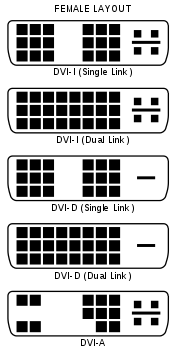
181px-DVI_Connector_Types.svg.png


On this comparison pic it tells me I'm connected to the DVI-I port.


I also took a video, showing the stuttering it gives, took it with my crappy phonecam but what you don't see are flickering white pixels:

http://www.youtube.com/watch?v=NPhnP1_IyS0&feature


The seller explicitly said this monitor only works with DVI-D, but on my Sapphire the port does not work and I'm connected to the DVI-I. I believe this is the reason my screen stutters, how do I make the DVI-D port work?

Thanks in advance!
 
Last edited:
no, the dvi port on the right is the single link, that's why it doesn't work at all.

you've got the monitor on the correct port, but it seems there's a problem with either the monitor or the port. most likely the monitor. test it on another pc.
 
no, the dvi port on the right is the single link, that's why it doesn't work at all.

you've got the monitor on the correct port, but it seems there's a problem with either the monitor or the port. most likely the monitor. test it on another pc.

Really? On all comparison images Ive seen it says both are dual link, left is DL DVI-I, right is DL DVI-D.

I'll try it with another pc.
 
You can't tell which is dual link by looking at the port because it will always have all the holes, but on AMD/ATI cards, it's normally the DVI-I port. The letter doesn't matter. DVI-I just means it can be used with a VGA adapter. Otherwise, it functions the same as DVI-D.
 
Really? On all comparison images Ive seen it says both are dual link, left is DL DVI-I, right is DL DVI-D.
.

that single link dvi port is designed to physically accept a dual link cable, but electrically is only single link. it's like a pci-e slot that physically is 16x, but is only 8x or 4x electrically.
 
I have come to the conclusion that it is a faulty monitor, tested it on a 2nd pc:
http://www.youtube.com/watch?v=caVSr2AAsf4

Still stuttering and white flickering pixels.

I'm relieved now that I know the problem lies with the monitor. I will send it back. The seller was AccesoriesWhole. Who takes care of the shipping fee?
 
I have the exact same stuttering with my Crossover monitor, otherwise is an excellent monitor.
This stuttering however stops after I turn on/off the monitor once or twice, and by the time I reach Windows the problem is completely gone.

I decided to not send it back to AW tho I've been offered a full refund, for the simple fact that if I were to choose what defect my monitor should have out of all the possible problems that do come with those screens, I prefer this problem to be honest. I was unable to find information on what is the future of this monitor in regards to this problem, but considering that I can't find a better screen I accepted the risk.
Here are the reasons why I accepted the risk:
- The problem seems to be a panel problem, not a monitor one, so is one that is calculated for the Grade A- panel.
- The panel has no PWM flickering.
- The panel has a coating that is not even half as glossy as a tempered glass, and unless you got a window behind you, you shouldn't have any problem.
- No backlight bleeding on mine
- Excellent white/black/gray levels.
- Colors are excellent, blues are awesome, reds are awesome, only greens are very visibly better on a wide gamut monitor. Except for the crisp grass pictures and the poison from games, there isn't other reason to consider a wide gamut monitor.
- I intentionally bought one without OSD, so that I get 0 input lag, which does makes a huge difference in fps games, compared to any other screen out there. Unless you test the same game on both monitors, one with 0 lag and one with bigger input lag, you will blame it as being low fps instead of the input lag of the monitor itself.

All those qualities, made it the best possible option for me, and I am happy I took this decision.
There is no other monitor out there on the market except for a few very expensive options, that can deliver all those qualities together in the same monitor. No input lag, perfect coating, excellent colors, no image retention, no other problems, just perfect.
However, keep in mind, those panels are not A+, they are A-, unless specified otherwise by the vendor itself(different options like pixel perfect).
Also, buy the Pivot stand only if you really need Pivot Stand and can't afford a professional one, cause they are totally bad.(not perfectly flat feet).
 
Have you checked the two common problems from the overclock.net forum:

1) On your crossover, use a flashlight and look at the vent holes in the back of the monitor. What color is the PCB board in the back? If you have a blue pcb board, you need to replace it with the green one.

2) Check out your power brick. Make sure you have a 110V power brick not the Asian ones. You can buy a replacement power brick for $25 on ebay.
 
I have the exact same stuttering with my Crossover monitor, otherwise is an excellent monitor.
This stuttering however stops after I turn on/off the monitor once or twice, and by the time I reach Windows the problem is completely gone.

I decided to not send it back to AW tho I've been offered a full refund, for the simple fact that if I were to choose what defect my monitor should have out of all the possible problems that do come with those screens, I prefer this problem to be honest. I was unable to find information on what is the future of this monitor in regards to this problem, but considering that I can't find a better screen I accepted the risk.
Here are the reasons why I accepted the risk:
- The problem seems to be a panel problem, not a monitor one, so is one that is calculated for the Grade A- panel.
- The panel has no PWM flickering.
- The panel has a coating that is not even half as glossy as a tempered glass, and unless you got a window behind you, you shouldn't have any problem.
- No backlight bleeding on mine
- Excellent white/black/gray levels.
- Colors are excellent, blues are awesome, reds are awesome, only greens are very visibly better on a wide gamut monitor. Except for the crisp grass pictures and the poison from games, there isn't other reason to consider a wide gamut monitor.
- I intentionally bought one without OSD, so that I get 0 input lag, which does makes a huge difference in fps games, compared to any other screen out there. Unless you test the same game on both monitors, one with 0 lag and one with bigger input lag, you will blame it as being low fps instead of the input lag of the monitor itself.

All those qualities, made it the best possible option for me, and I am happy I took this decision.
There is no other monitor out there on the market except for a few very expensive options, that can deliver all those qualities together in the same monitor. No input lag, perfect coating, excellent colors, no image retention, no other problems, just perfect.
However, keep in mind, those panels are not A+, they are A-, unless specified otherwise by the vendor itself(different options like pixel perfect).
Also, buy the Pivot stand only if you really need Pivot Stand and can't afford a professional one, cause they are totally bad.(not perfectly flat feet).

Can you please tell me how your contact went with AW? How did he offer you a full refund? What is the address to send the monitor back? I'm disappointed that my screen is stuttering, however I'll try the method of turning it off and back on.

@af22: I will look that up now. However I don't need that power adapter since Asia uses the same adapter as Europe, where I live.
 
Can you please tell me how your contact went with AW? How did he offer you a full refund? What is the address to send the monitor back? I'm disappointed that my screen is stuttering, however I'll try the method of turning it off and back on.

@af22: I will look that up now. However I don't need that power adapter since Asia uses the same adapter as Europe, where I live.

Just make sure you got enough proofs (video), as is obvious that many people are tempted to return those due to other problems, which are covered by the A- panel.(you have to understand the risk first before purchase, and be ready to live with minor defects). However, your problem, if is not disappearing after turning on/off the display, then yes, is a major problem.
 
Have you checked the two common problems from the overclock.net forum:

1) On your crossover, use a flashlight and look at the vent holes in the back of the monitor. What color is the PCB board in the back? If you have a blue pcb board, you need to replace it with the green one.

2) Check out your power brick. Make sure you have a 110V power brick not the Asian ones. You can buy a replacement power brick for $25 on ebay.

This is also applicable for Europe people? Or only the power brick?(point 2)
Also, I have the blue pcb, can you detail what is the difference and if is possible to order only that small particular pcb?
 
The blue pcb board is from the earlier batch of monitors. They are defective and the mosfet on them burn out and your monitor dies, while the mosfet overheats you'll notice problems. You sellers should be able to give you the new green one, or sell it to you at a small fee. You'll need to open up the monitor and swap it out.

Plenty of literature over on overclock forums regarding the blue vs green pcb boards.
 
The blue pcb board is from the earlier batch of monitors. They are defective and the mosfet on them burn out and your monitor dies, while the mosfet overheats you'll notice problems. You sellers should be able to give you the new green one, or sell it to you at a small fee. You'll need to open up the monitor and swap it out.

Plenty of literature over on overclock forums regarding the blue vs green pcb boards.

I just looked on the back of my monitor and noticed I have the blue pcb board. I was just about to send it back. But if it is easy to replace the blue with the green board, I'll do it myself.

Where can I get the green pcb board?
 
Is it difficult to open up a crossover? Gonna have a look to the pcb board.
 
I managed to get a good picture of my blue pcb that has obvious signs of burn, and I got a confirmation that a good pcb will be send to me. I have no idea yet how to replace it, though I assume you need to unscrew the whole back of the monitor to have full access to it.
If anyone got a link to someplace where is explained, would be nice.
 
Back
Top