• Some users have recently had their accounts hijacked. It seems that the now defunct EVGA forums might have compromised your password there and seems many are using the same PW here. We would suggest you UPDATE YOUR PASSWORD and TURN ON 2FA for your account here to further secure it. None of the compromised accounts had 2FA turned on.
    Once you have enabled 2FA, your account will be updated soon to show a badge, letting other members know that you use 2FA to protect your account. This should be beneficial for everyone that uses FSFT.

Problems installing ESXi 5

Jesse B

[H]ard|Gawd
Joined
May 30, 2010
Messages
1,631
Finally got around to attempting installing ESXi 5.0 on my server. Hardware is as follows:

Intel i5 2500
BIOSTAR TP67B+
4GB DDR3
Intel PRO/1000 MT

I have more hardware I plan on using, but this is just the barebones system; I've removed everything else to try to figure out what the hell is going on.

Anyways, I burnt the ESXi 5.0 *.iso to a CD. I booted from said CD. Once it gets to initializing the scheduler, the following screen pops up, and everything halts.
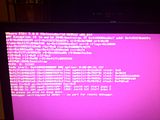
I've tried googling, but I can't really find a whole lot. I don't really know what's causing this, or where to start finding out.

Any suggestions? If I'm missing any info lemme know.

Thanks,


- Jesse
 
latest BIOS should be P67CF102.BST, dated 2012-01-02.
I understand it should be there but just make sure Virtualization option in BIOS is enabled.

1. Try to temporary remove the PRO/1000 card. ESXi 5.x has driver support for Realtek Gigabit ethernet card (on-board ethernet).
2. Else if you insist Intel NIC, try a supported PCI-Express version. check HCL before buying.
 
latest BIOS should be P67CF102.BST, dated 2012-01-02.
I understand it should be there but just make sure Virtualization option in BIOS is enabled.

1. Try to temporary remove the PRO/1000 card. ESXi 5.x has driver support for Realtek Gigabit ethernet card (on-board ethernet).
2. Else if you insist Intel NIC, try a supported PCI-Express version. check HCL before buying.

Alright, well I pulled everything. Still no dice. The firmware is outdated however. From the looks of things, I need to be in Windows to update it. I don't have time to make that happen right now, exams next week. I'll have to get that done next Thursday.

off topic, but some one knows how to use Eagle :)

I dabble ;) Nothing overly impressive in my album unfortunately :D
 
you can update the firmware from a cd or usually USB key.

Yeah I figured I should be able to do that, couldn't for the life of me find an option in the BIOS however (I've seen it before on other mobo's). I'll look into it in a bit more detail tomorrow.
 
error shot says no disk for the file....is the onboard sata compatable in esxi 5?
 
error shot says no disk for the file....is the onboard sata compatable in esxi 5?

Yeah, if you've taken everything out and you're still having an issue I would bet the controller isn't compatible. Try booting and installing to USB drive?
 
Just because the screenshot says it couldn't dump debug info to a disk doesn't mean that's the root cause.

Earlier in the shot I see "couldn't start pcpu 2". I find that much more likely to be related to the cause but I don't know.
 
If you're pure of heart and make a wish on a shooting star, lopoetve will see your thread and offer help.

In the meantime, here's a thread on the VMWare support about someone having a similar issue. If you have a BIOS option for "Max CPUID Value Limit" try disabling it.

Earlier in the shot I see "couldn't start pcpu 2". I find that much more likely to be related to the cause but I don't know.

Correct. "No place on disk to dump data" is not causing the error. Failure to start the PCPU is the actual cause of the purple screen.
 
Thanks for the help guys. I got it figured out.

Turns out I had the disk plugged into the Sata3 port, not the Sata2 port. Swapped it over, everything works now. Had to go to class, so I'll finish up with installation when I get home. Everything was working fine before I left however.
 
...which was totally not evident from the screenshot and it still feels like handwaving.
 
...which was totally not evident from the screenshot and it still feels like handwaving.

Yeah. I have no idea how the drive being plugged into a wrong/unsupported controller would cause a PCPU init failure. PCPU 2 should be the 3rd core of OP's i5, which makes even less sense. I'm wondering if there was a non-fatal error (related to the disk/controller?) just prior that cascaded into the actual PSOD OP posted.

In any case, glad OP got it sorted.
 
Yeah, that's what was throwing me off. When it started piping up about PCPU2, I figured the complaint about the disk was just a side effect.
 
Thanks for the help guys. I got it figured out.

Turns out I had the disk plugged into the Sata3 port, not the Sata2 port. Swapped it over, everything works now. Had to go to class, so I'll finish up with installation when I get home. Everything was working fine before I left however.

WOOT WOOT! good job dude.!
 
Yeah, that's what was throwing me off. When it started piping up about PCPU2, I figured the complaint about the disk was just a side effect.

it is. until you install, there's no core partition - so it has no where to dump.
 
it is. until you install, there's no core partition - so it has no where to dump.

Ahh, gotcha. Makes sense.

Anyways, just got home. No class tomorrow, so I got a long-ish weekend. Just starting the rig back up right now, hopefully all goes well!
 
Back
Top