• Some users have recently had their accounts hijacked. It seems that the now defunct EVGA forums might have compromised your password there and seems many are using the same PW here. We would suggest you UPDATE YOUR PASSWORD and TURN ON 2FA for your account here to further secure it. None of the compromised accounts had 2FA turned on.
    Once you have enabled 2FA, your account will be updated soon to show a badge, letting other members know that you use 2FA to protect your account. This should be beneficial for everyone that uses FSFT.

Powershell Script to set DSS 2013 Auditing

JayteeBates

[H]ard|Poof
Joined
Jul 21, 2007
Messages
5,500
Well there are tools that do this for you (if you want to pay) but I wanted to learn more about file/folder security in Windows and I am updating my DSS setup scripts from VBS to PowerShell.


PowerShell Script : DSSAuditing
Description: This PowerShell script will set and check auditing on files/folders per DSS requirements
Usage:
.\DSSAuditing.ps1

Initial Auditing Settings (Null)
InitialAuditing.jpg


Set Execution Policy to RemoteSigned to allow local Powershell scripts to run (remember to set it back to default "Restricted")

SetExecutionPolicy.jpg


Change to the directory containing DSSAuditing.ps1 and the two list files and execute the script
CheckFolders.jpg


Enter Y to make corrections - Script will process INCORRECT entries and then verify the changes
FixFolders.jpg


Check a File/Folder manually to verify if you wish
AuditingUpdated.jpg


AuditingUpdatedDetail.jpg


Code:
# R.A.C.
#
# J.Bates
#
# Revision History
#
# Version 1.0 February 7 2014
# Version 1.1 August 28, 2015 Revision by D.Barras
#
# This powershell script will check for auditing on files/folders
# per the DSS July 2013 Baseline Technical Security Configuration of 
# Microsoft Windows 7 and Microsoft Server 2008 R2
#
# Script should be run as an admin - it will mostly work but some
# folders (system32\config) will not be accessible as a non-admin
# 
# Script expects two files be in the same directory as the script
# that contain the list of files/folders to be checked.  They 
# need to be named filesToAudit.txt and foldersToAudit.txt
# They should have one file/folder name per line 
# For example:
#          C:\windows\system32\at.exe
#          C:\Windows\system32\ftp.exe
#
# NOTE
# To enable scripts to run on a system run this in a Powershell Window
#    Set-ExecutionPolicy RemoteSigned
# Use RemoteSigned so local scrips run but downloaded or foreign do not
#
# FOR REFERENCE
    # FOLDER ACCESS MASK
    # PS C:\scripttemp> .\showAccessMask.ps1 852071

    # Allowed Permissions
    # ===================
    # Bit 0: List Directory / read data (file)
    # Bit 1: Create files / write data
    # Bit 2: Create folders / append data
    # Bit 5: Traverse folder / execute file
    # Bit 6: Delete subfolders and files
    # Bit 16: Delete
    # Bit 18: Write DAC (Change permissions)
    # Bit 19: Write Owner (Take Ownership)

    # Denied Permissions
    # ==================
    # Bit 3: Read extended attributes
    # Bit 4: Write extended attributes
    # Bit 7: Read attributes
    # Bit 8: Write attributes
    # Bit 17: Read Control

    # FILE ACCESS MASK
    # PS C:\scripttemp> .\showAccessMask.ps1 852007

    # Allowed Permissions
    # ===================
    # Bit 0: List Directory / read data (file)
    # Bit 1: Create files / write data
    # Bit 2: Create folders / append data
    # Bit 5: Traverse folder / execute file
    # Bit 16: Delete
    # Bit 18: Write DAC (Change permissions)
    # Bit 19: Write Owner (Take Ownership)

    # Denied Permissions
    # ==================
    # Bit 3: Read extended attributes
    # Bit 4: Write extended attributes
    # Bit 6: Delete subfolders and files
    # Bit 7: Read attributes
    # Bit 8: Write attributes
    # Bit 17: Read Control


# BEGIN SCRIPT 


# *** START REVISION 

# Get the current working directory
$scriptpath = $MyInvocation.MyCommand.Path
$workdir = Split-Path $scriptpath


# Close the current window
# Open a PowerShell window as Administrator
If (-NOT ([Security.Principal.WindowsPrincipal][Security.Principal.WindowsIdentity]::GetCurrent()).IsInRole([Security.Principal.WindowsBuiltInRole] "Administrator"))
{
	$arguments = "& '" + $myinvocation.mycommand.definition + "'"
	Start-Process "$psHome\powershell.exe" -Verb runAs -ArgumentList $arguments
	break
}

cd $workdir

# *** END REVISION


[console]::backgroundColor= "Black"

$folders =@()
$files =@()
$badFolders = @()
$badFiles = @()
$badFileCount = 0
$badFolderCount = 0
#$windir = gc env:windir
#Get-ChildItem C:\Scripts -recurse

#$folders
#Get-Content .\foldersToAudit.txt | Foreach-Object {$folder = $windir + "\" + $_;$folder = $folder.replace("\", "\\");$folders += $folder}
Get-Content .\foldersToAudit.txt | Foreach-Object {$folder = $_;$folder = $folder.replace("\", "\\");$folders += $folder}

#$files
#Get-Content .\filesToAudit.txt | Foreach-Object {$file = $windir + "\" + $_;$file = $file.replace("\", "\\");$files += $file}
Get-Content .\filesToAudit.txt | Foreach-Object {$file = $_;$file = $file.replace("\", "\\");$files += $file}

#Check that Folders meet the appropriate auditing SACL
function checkFolders($folderArray){
#Get the SD for the object we will process
$computer = gc env:computername
$badFolderCount = 0

foreach($folder in $folderArray){
    $path = $folder
    
    $folderExists=Test-Path $path
    if($folderExists){
        $wPrivilege = gwmi Win32_LogicalFileSecuritySetting -computername $computer -filter "path='$path'"
        $wPrivilege.psbase.Scope.Options.EnablePrivileges = $true
        $osd = $wPrivilege.GetSecurityDescriptor()

        if (!$osd.Descriptor.SACL) {Write-Host INCORRECT $path No Auditing Set $osd.Descriptor.ControlFlags -foregroundcolor red; $badFolders += $path;$badFolderCount++}Else{
            foreach ($acl in $osd.Descriptor.SACL){
                if(($acl.AceFlags -eq 131) -and ($acl.AccessMask -eq 852071) -and ($acl.Trustee.Name -eq "Everyone")){
                Write-Host "=correct=" $path AceFlags: $acl.AceFlags AccessMask: $acl.AccessMask Trustee: $acl.Trustee.Name -foregroundcolor green}
                Else {Write-Host INCORRECT $path AceFlags`(131`): $acl.AceFlags AccessMask`(852071`): $acl.AccessMask Trustee`(Everyone`): $acl.Trustee.Name -foregroundcolor red; $badFolders += $path; $badFolderCount++}
            }#End foreach acl
        }#End if for SACL existance
    }#End If for folderExists
    Else{Write-Host ========= $path Does Not Exist -foregroundcolor "yellow"}

    }#End foreach folder
    fixIt
}#End checkFolders


#Check that files meet the appropriate auditing SACL
function checkFiles($fileArray){
#Get the SD for the object we will process
$computer = gc env:computername
$badFileCount = 0

foreach($file in $fileArray){
    $path = $file
    
    $fileExists=Test-Path $path
    if($fileExists){
        $wPrivilege = gwmi Win32_LogicalFileSecuritySetting -computername $computer -filter "path='$path'"
        $wPrivilege.psbase.Scope.Options.EnablePrivileges = $true
        $osd = $wPrivilege.GetSecurityDescriptor()

        if (!$osd.Descriptor.SACL) {Write-Host INCORRECT $path No Auditing Set $osd.Descriptor.ControlFlags -foregroundcolor red;$badFiles += $path;$badFileCount++}Else{
            foreach ($acl in $osd.Descriptor.SACL){   
                if(($acl.AceFlags -eq 128) -and ($acl.AccessMask -eq 852007) -and ($acl.Trustee.Name -eq "Everyone")){
                Write-Host "=correct=" $path AceFlags: $acl.AceFlags AccessMask: $acl.AccessMask Trustee: $acl.Trustee.Name -foregroundcolor green
                }
                Else {Write-Host INCORRECT $path AceFlags`(128`): $acl.AceFlags AccessMask`(852007`): $acl.AccessMask Trustee`(Everyone`): $acl.Trustee.Name -foregroundcolor red; $badFiles += $path; $badFileCOunt++;}
            }#End foreach acl
        }#End if for SACL existance
    }#End If for fileExists
    Else{Write-Host ========= $path Does Not Exist -foregroundcolor yellow}
    
    }#End foreach file
    fixIt
}#End checkFiles

function fixIt(){
    
    if($badFileCount -gt 0 -or $badFolderCount -gt 0){
    $host.UI.WriteLine()
    Write-Host $badFileCount Bad Files, $badFolderCount Bad Folders. Would you like to correct any incorrect entries now?
    [console]::foregroundColor= "Green"
    $input = Read-Host "Y for YES | N for NO" 
    [console]::ResetColor()
    if($input -Like "*y*")
        {
        if($badFolders.Length -gt 0){setAuditing $badFolders 0}
        if($badFiles.Length -gt 0){setAuditing $badFiles 1}
        Write-Host Correction`(s`) Complete
        }
       Else
       {Write-Host You elected not to make corrections}
    }Else{Write-Host There appears to be nothing to fix}
}#End Function fixIt


function setAuditing(){
Param([parameter(Mandatory=$true)]$arrayList,[parameter(Mandatory=$true)]$folders0Files1)#End Param  

#if($folders1Files2 -eq 0){Write-Host I received an arrayList with $arrayList.Length and an indication that it is a list of folders}
#if($folders1Files2 -eq 1){Write-Host I received an arrayList with $arrayList.Length and an indication that it is a list of files}

$computer = gc env:computername

    foreach ($item in $arrayList){
        # Create a new SD per requirements
        Write-Host Processing $item
        $path = $item
        $user = "everyone"
        #$path = $path.replace("\", "\\")
        $SD = ([WMIClass] "Win32_SecurityDescriptor").CreateInstance()
        $ace = ([WMIClass] "Win32_ace").CreateInstance()
        $Trustee = ([WMIClass] "Win32_Trustee").CreateInstance()
        $SID = (new-object security.principal.ntaccount $user).translate([security.principal.securityidentifier])
        [byte[]] $SIDArray = ,0 * $SID.BinaryLength
        $SID.GetBinaryForm($SIDArray,0)
        $Trustee.Name = $user
        $Trustee.SID = $SIDArray
        switch($folders0Files1)
            {
            0{$ace.AccessMask = "0xD0067"} #= 852071 
            1{$ace.AccessMask = "0xD0027"} #= 852007 
            default {$ace.AccessMask = [System.Security.AccessControl.FileSystemRights]"FullControl"}
            }
        switch($folders0Files1)
            {
            0{$ace.AceFlags = "0x83"} #0x83 = 131 = Failed Access Ace Flag (128) Container Inherit Ace (2) Object Inherit Ace (1)
            1{$ace.AceFlags = "0x80"} #0x80 = 128 = Failed Access Ace Flag
            }
        $ace.AceType = 2 #2 = Audit ACE
        $ace.Trustee = $trustee
        $SD.SACL = $ace
        $SD.ControlFlags = "0x10" #controlFlag($path)   #Accepts a Hex string e.g. 0x10
        $wPrivilege = gwmi Win32_LogicalFileSecuritySetting -computername $computer -filter "path='$path'"
        $wPrivilege.psbase.Scope.Options.EnablePrivileges = $true
#        $wPrivilege.setsecuritydescriptor($SD) #remove comment to remove output from this function from console | Out-Null
        $wPrivilege.setsecuritydescriptor($SD) | Out-Null
        
    }#End foreach $item

    Write-Host Checking items to verify corrections...
    switch($folders0Files1)
    {
    0{checkFolders($arrayList)}
    1{checkFiles($arrayList)}
    default {Write-Host Could not determine if a Files or Folders request had been made}
    }

}#End function setAuditingOld


function controlFlag($path){
$fileExists=Test-Path $path
    if($fileExists){
        $wPrivilege = gwmi Win32_LogicalFileSecuritySetting -computername $computer -filter "path='$path'"
        $wPrivilege.psbase.Scope.Options.EnablePrivileges = $true
        $osd = $wPrivilege.GetSecurityDescriptor()
        $returnValue = determineSDControlFlagValue($osd.Descriptor.ControlFlags)
        $returnValue = convertBinaryStringToIntString($returnValue)
        return $returnValue
    }
}#End function controlFlag


function determineSDControlFlagValue($controlFlags){
    # First take the passed int and convert to binary
    $myControlFlagsBinary = [Convert]::ToString($ControlFlags,2) 
    # Second converty the int to a char array
    $text = $myControlFlagsBinary.ToCharArray()
    Write-Host Text is $text
    # Third reverse the char array to have the binary string in a reverse order array
    [Array]::Reverse($text) 
    Write-Host Reversed Text is $text
    #Since we only care to check if the SACL Exists check for bit 5 
    if($text[4] -eq "0"){$text[4] = "1"}
    [Array]::Reverse($text)
    #$text = [string]::Join("", $text )
    Write-Host Text is $text
    return $text
}


function convertBinaryStringToIntString($arrayOfChar){
# Function accepts a Char[] object variable that contains a binary representation of a number
# Function returns a string with hex value represented by the binary number

# First we need to get the decimal value
[Array]::Reverse($arrayOfChar)
$index = 0
$sum = 0
do{if($arrayOfChar[$index] -eq "1"){$sum = $sum + [math]::Pow(2,$index)};$index++}while($index -lt $arrayOfChar.Length)
return $sum

}#End function convertBinaryStringToHexString


function presentMenu(){
    $done = $false
    do{
        Write-Host "Make a Selection:"
        Write-Host "1: Check Auditing on Files Only"
        Write-Host "2: Check Auditing on Folders Only"
        Write-Host "3: Check Auditing on Both Files and Folders"
        Write-Host "4: Quit"
        $input = Read-Host "Enter the number of your selection"

        if($input -Like 1 -or $input -Like 2 -or $input -Like 3 -or $input -Like 4){
            switch($input){
            1 {checkFiles($files)}
            2 {checkFolders($folders)}
            3 {checkFolders($folders);checkFiles($files)}
            4 {$done = $true}
            default {}
            }
      #Write-Host "--" | Out-Default; Clear-Host;      
        }Else{Write-Host Invalid}
    }while(!$done)
}#End function presentMenu

# Main Section of the script that presents the menu and awaits input from user
presentMenu

filesToAudit.txt
Code:
C:\Windows\System32\activeds.dll
C:\Windows\System32\adsldpc.dll
C:\Windows\System32\advapi32.dll
C:\Windows\System32\advpack.dll
C:\Windows\System32\apphelp.dll
C:\Windows\System32\arp.exe
C:\Windows\System32\at.exe
C:\Windows\System32\atl.dll
C:\Windows\System32\attrib.exe
C:\Windows\System32\authz.dll
C:\Windows\System32\bootvid.dll
C:\Windows\System32\browseui.dll
C:\Windows\System32\cabinet.dll
C:\Windows\System32\cacls.exe
C:\Windows\System32\certcli.dll
C:\Windows\System32\cfgmgr32.dll
C:\Windows\System32\clbcatq.dll
C:\Windows\System32\clusapi.dll
C:\Windows\System32\comdlg32.dll
C:\Windows\System32\comres.dll
C:\Windows\System32\credui.dll
C:\Windows\System32\crypt32.dll
C:\Windows\System32\cryptdll.dll
C:\Windows\System32\cryptui.dll
C:\Windows\System32\cscdll.dll
C:\Windows\System32\dbghelp.dll
C:\Windows\System32\devmgr.dll
C:\Windows\System32\dhcpcsvc.dll
C:\Windows\System32\dnsapi.dll
C:\Windows\System32\drivers\ksecdd.sys
C:\Windows\System32\DRIVERS\ntfs.sys
C:\Windows\System32\duser.dll
C:\Windows\System32\efsadu.dll
C:\Windows\System32\esent.dll
C:\Windows\System32\eventcreate.exe
C:\Windows\System32\ftp.exe
C:\Windows\System32\gdi32.dll
C:\Windows\System32\hal.dll
C:\Windows\System32\imagehlp.dll
C:\Windows\System32\imm32.dll
C:\Windows\System32\inetcomm.dll
C:\Windows\System32\iphlpapi.dll
C:\Windows\System32\kdcom.dll
C:\Windows\System32\kdcsvc.dll
C:\Windows\System32\kerberos.dll
C:\Windows\System32\kernel32.dll
C:\Windows\System32\linkinfo.dll
C:\Windows\System32\loadperf.dll
C:\Windows\System32\lsasrv.dll
C:\Windows\System32\lsass.exe
C:\Windows\System32\lz32.dll
C:\Windows\System32\mfc42u.dll
C:\Windows\System32\mlang.dll
C:\Windows\System32\mobsync.exe
C:\Windows\System32\mpr.dll
C:\Windows\System32\mprapi.dll
C:\Windows\System32\msasn1.dll
C:\Windows\System32\msgina.dll
C:\Windows\System32\mshtml.dll
C:\Windows\System32\msi.dll
C:\Windows\System32\msimg32.dll
C:\Windows\System32\msoert2.dll
C:\Windows\System32\msrating.dll
C:\Windows\System32\mssign32.dll
C:\Windows\System32\msv1_0.dll
C:\Windows\System32\msvcp60.dll
C:\Windows\System32\msvcrt.dll
C:\Windows\System32\mswsock.dll
C:\Windows\System32\nbtstat.exe
C:\Windows\System32\nddeapi.dll
C:\Windows\System32\net.exe
C:\Windows\System32\net1.exe
C:\Windows\System32\netapi32.dll
C:\Windows\System32\netcfgx.dll
C:\Windows\System32\netman.dll
C:\Windows\System32\netplwiz.dll
C:\Windows\System32\netsh.exe
C:\Windows\System32\netshell.dll
C:\Windows\System32\netstat.exe
C:\Windows\System32\ntbackup.exe
C:\Windows\System32\ntdll.dll
C:\Windows\System32\ntdsa.dll
C:\Windows\System32\ntdsapi.dll
C:\Windows\System32\ntdsatq.dll
C:\Windows\System32\ntlanman.dll
C:\Windows\System32\ntoskrnl.exe
C:\Windows\System32\odbc32.dll
C:\Windows\System32\ole32.dll
C:\Windows\System32\oleacc.dll
C:\Windows\System32\oleaut32.dll
C:\Windows\System32\oledlg.dll
C:\Windows\System32\pautoenr.dll
C:\Windows\System32\powrprof.dll
C:\Windows\System32\printui.dll
C:\Windows\System32\psapi.dll
C:\Windows\System32\query.dll
C:\Windows\System32\rasapi32.dll
C:\Windows\System32\rasdlg.dll
C:\Windows\System32\rasman.dll
C:\Windows\System32\reg.exe
C:\Windows\System32\regapi.dll
C:\Windows\System32\regedt32.exe
C:\Windows\System32\regini.exe
C:\Windows\System32\regsvr32.exe
C:\Windows\System32\route.exe
C:\Windows\System32\rpcrt4.dll
C:\Windows\System32\rshx32.exe
C:\Windows\System32\rtutils.dll
C:\Windows\System32\samlib.dll
C:\Windows\System32\samsrv.dll
C:\Windows\System32\sc.exe
C:\Windows\System32\scecli.dll
C:\Windows\System32\secedit.exe
C:\Windows\System32\secur32.dll
C:\Windows\System32\security.dll
C:\Windows\System32\setupapi.dll
C:\Windows\System32\sfc.dll
C:\Windows\System32\shdocvw.dll
C:\Windows\System32\shlwapi.dll
C:\Windows\System32\shsvcs.dll
C:\Windows\System32\subst.exe
C:\Windows\Systeminfo.exe
C:\Windows\System32\tapi32.dll
C:\Windows\System32\urlmon.dll
C:\Windows\System32\user32.dll
C:\Windows\System32\userenv.dll
C:\Windows\System32\utildll.dll
C:\Windows\System32\uxtheme.dll
C:\Windows\System32\version.dll
C:\Windows\System32\w32topl.dll
C:\Windows\System32\wininet.dll
C:\Windows\System32\winipsec.dll
C:\Windows\System32\winlogon.exe
C:\Windows\System32\winmm.dll
C:\Windows\System32\winscard.dll
C:\Windows\System32\winspool.drv
C:\Windows\System32\winsta.dll
C:\Windows\System32\wintrust.dll
C:\Windows\System32\wldap32.dll
C:\Windows\System32\wmi.dll
C:\Windows\System32\ws2_32.dll
C:\Windows\System32\ws2help.dll
C:\Windows\System32\wsock32.dll
C:\Windows\System32\wtsapi32.dll
C:\Windows\System32\wzcdlg.dll
C:\Windows\System32\regedit.exe
C:\Windows\System32\timedate.cpl
C:\Windows\winsxs\x86_microsoft-Windows-msvbvm60_31bf3856ad364e35_6.1.7600.16385_none_c25a1af6b30d72ee\msvbvm60.dll
C:\Windows\winsxs\amd64_microsoft-Windows-telnet-client_31bf3856ad364e35_6.1.7600.16385_none_1426830c3ebb712d\telnet.exe
C:\Windows\winsxs\amd64_microsoft-Windows-t..-deployment-package_31bf3856ad364e35_6.1.7600.16385_none_bac291589d407fde\tftp.exe
C:\Windows\winsxs\amd64_microsoft-Windows-telnet-server-tlntsvr_31bf3856ad364e35_6.1.7600.16385_none_1ab997fb0a83afdd\tlntsvr.exe
C:\Windows\SysWOW64\activeds.dll
C:\Windows\SysWOW64\adsldpc.dll
C:\Windows\SysWOW64\advapi32.dll
C:\Windows\SysWOW64\advpack.dll
C:\Windows\SysWOW64\arp.exe
C:\Windows\SysWOW64\at.exe
C:\Windows\SysWOW64\atl.dll
C:\Windows\SysWOW64\attrib.exe
C:\Windows\SysWOW64\apphelp.dll
C:\Windows\SysWOW64\authz.dll
C:\Windows\SysWOW64\bootvid.dll
C:\Windows\SysWOW64\browseui.dll
C:\Windows\SysWOW64\cabinet.dll
C:\Windows\SysWOW64\cacls.exe
C:\Windows\SysWOW64\certcli.dll
C:\Windows\SysWOW64\cfgmgr32.dll
C:\Windows\SysWOW64\clbcatq.dll
C:\Windows\SysWOW64\clusapi.dll
C:\Windows\SysWOW64\comdlg32.dll
C:\Windows\SysWOW64\comres.dll
C:\Windows\SysWOW64\credui.dll
C:\Windows\SysWOW64\crypt32.dll
C:\Windows\SysWOW64\cryptdll.dll
C:\Windows\SysWOW64\cryptui.dll
C:\Windows\SysWOW64\cscdll.dll
C:\Windows\SysWOW64\dbghelp.dll
C:\Windows\SysWOW64\devmgr.dll
C:\Windows\SysWOW64\dhcpcsvc.dll
C:\Windows\SysWOW64\dnsapi.dll
C:\Windows\SysWOW64\duser.dll
C:\Windows\SysWOW64\efsadu.dll
C:\Windows\SysWOW64\esent.dll
C:\Windows\SysWOW64\eventcreate.exe
C:\Windows\SysWOW64\ftp.exe
C:\Windows\SysWOW64\gdi32.dll
C:\Windows\SysWOW64\imagehlp.dll
C:\Windows\SysWOW64\imm32.dll
C:\Windows\SysWOW64\inetcomm.dll
C:\Windows\SysWOW64\iphlpapi.dll
C:\Windows\SysWOW64\kerberos.dll
C:\Windows\SysWOW64\kernel32.dll
C:\Windows\SysWOW64\linkinfo.dll
C:\Windows\SysWOW64\loadperf.dll
C:\Windows\SysWOW64\lz32.dll
C:\Windows\SysWOW64\mfc42u.dll
C:\Windows\SysWOW64\mlang.dll
C:\Windows\SysWOW64\mobsync.exe
C:\Windows\SysWOW64\mpr.dll
C:\Windows\SysWOW64\mprapi.dll
C:\Windows\SysWOW64\msasn1.dll
C:\Windows\SysWOW64\mshtml.dll
C:\Windows\SysWOW64\msi.dll
C:\Windows\SysWOW64\msimg32.dll
C:\Windows\SysWOW64\msoert2.dll
C:\Windows\SysWOW64\msrating.dll
C:\Windows\SysWOW64\mssign32.dll
C:\Windows\SysWOW64\msv1_0.dll
C:\Windows\SysWOW64\msvcp60.dll
C:\Windows\SysWOW64\msvcrt.dll
C:\Windows\SysWOW64\mswsock.dll
C:\Windows\SysWOW64\nddeapi.dll
C:\Windows\SysWOW64\net.exe
C:\Windows\SysWOW64\net1.exe
C:\Windows\SysWOW64\netapi32.dll
C:\Windows\SysWOW64\netcfgx.dll
C:\Windows\SysWOW64\netplwiz.dll
C:\Windows\SysWOW64\netsh.exe
C:\Windows\SysWOW64\netshell.dll
C:\Windows\SysWOW64\netstat.exe
C:\Windows\SysWOW64\nslookup.exe
C:\Windows\SysWOW64\ntdll.dll
C:\Windows\SysWOW64\ntdsapi.dll
C:\Windows\SysWOW64\ntlanman.dll
C:\Windows\SysWOW64\ntoskrnl.exe
C:\Windows\SysWOW64\odbc32.dll
C:\Windows\SysWOW64\ole32.dll
C:\Windows\SysWOW64\oleacc.dll
C:\Windows\SysWOW64\oleaut32.dll
C:\Windows\SysWOW64\oledlg.dll
C:\Windows\SysWOW64\olepro32.dll
C:\Windows\SysWOW64\pautoenr.dll
C:\Windows\SysWOW64\powrprof.dll
C:\Windows\SysWOW64\printui.dll
C:\Windows\SysWOW64\psapi.dll
C:\Windows\SysWOW64\query.dll
C:\Windows\SysWOW64\rasapi32.dll
C:\Windows\SysWOW64\rasdlg.dll
C:\Windows\SysWOW64\rasman.dll
C:\Windows\SysWOW64\reg.exe
C:\Windows\SysWOW64\regapi.dll
C:\Windows\SysWOW64\regedt32.exe
C:\Windows\SysWOW64\regini.exe
C:\Windows\SysWOW64\regsvr32.exe
C:\Windows\SysWOW64\route.exe
C:\Windows\SysWOW64\rpcrt4.dll
C:\Windows\SysWOW64\rshx32.exe
C:\Windows\SysWOW64\rtutils.dll
C:\Windows\SysWOW64\samlib.dll
C:\Windows\SysWOW64\sc.exe
C:\Windows\SysWOW64\scecli.dll
C:\Windows\SysWOW64\secedit.exe
C:\Windows\SysWOW64\secur32.dll
C:\Windows\SysWOW64\security.dll
C:\Windows\SysWOW64\setupapi.dll
C:\Windows\SysWOW64\sfc.dll
C:\Windows\SysWOW64\shdocvw.dll
C:\Windows\SysWOW64\shlwapi.dll
C:\Windows\SysWOW64\shsvcs.dll
C:\Windows\SysWOW64\subst.exe
C:\Windows\Systeminfo.exe
C:\Windows\SysWOW64\tapi32.dll
C:\Windows\SysWOW64\urlmon.dll
C:\Windows\SysWOW64\user32.dll
C:\Windows\SysWOW64\userenv.dll
C:\Windows\SysWOW64\utildll.dll
C:\Windows\SysWOW64\uxtheme.dll
C:\Windows\SysWOW64\version.dll
C:\Windows\SysWOW64\w32topl.dll
C:\Windows\SysWOW64\wininet.dll
C:\Windows\SysWOW64\winipsec.dll
C:\Windows\SysWOW64\winmm.dll
C:\Windows\SysWOW64\winscard.dll
C:\Windows\SysWOW64\winspool.drv
C:\Windows\SysWOW64\winsta.dll
C:\Windows\SysWOW64\wintrust.dll
C:\Windows\SysWOW64\wldap32.dll
C:\Windows\SysWOW64\wmi.dll
C:\Windows\SysWOW64\ws2_32.dll
C:\Windows\SysWOW64\ws2help.dll
C:\Windows\SysWOW64\wsock32.dll
C:\Windows\SysWOW64\wtsapi32.dll
C:\Windows\SysWOW64\wzcdlg.dll
C:\Windows\SysWOW64\regedit.exe

foldersToAudit.txt
Code:
C:\Windows\System32\winevt\Logs
C:\Windows\System32\config
C:\Windows\SysWOW64\spool\printers
 
Last edited:
There was a question to me about changing what was audited.

I see that you have provided a decent script that changes the Audit "failed" to the everyone group. I have to say the this works great and it changes the Attributes. Per DSS ODAA Auditing there is another level that needs more Auditing for the same files and folders. Anyway that you can change the attributes in the script to "full control"? If you are unable to make the changes can you direct me to someone that can as the script is very useful and time saving.

In my script you simply have to change the Win32_ACE Access Mask to Full Control from what I have it set to in my script because we are looking explicitly for what DSS wants to see and no more. The access mask for full control (all possible permissions) is 983551. My script is already looking for

OBJECT_INHERIT_ACE (1)
CONTAINER_INHERIT_ACE (2)
FAILED_ACCESS_ACE_FLAG (128)
===========================
Searches for AceFlag value of 131

Hope that helps you out.
 
Last edited:
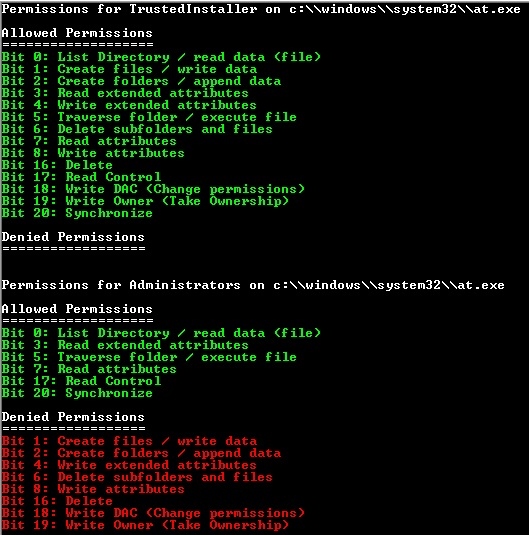
Some additional scripts I wrote to help me clearly understand security settings on a file system object.

PowerShell Script : showAccessMask
Description: This PowerShell script will show the Access Mask (permissions) on a file system object for all users.
Usage:
showAccessMask.ps1 [AccessMask Value]
showAccessMask.ps1 [Filename with full path]

ShowAccessMaskByValue.jpg


ShowAccessMaskByFileName.jpg


Code:
# Display AccessMask (Permissions)
#
# J.Bates
#
# Revision History
#
# Version 1.0 April 6, 2015
#
# This powershell script will show the AccessMask (permissions) 
# on a file system object for all users. 
#
# Script should be run as an admin - it will mostly work but some
# folders (system32\config) will not be accessible as a non-admin
#
# NOTE
# To enable scripts to run on a system run this in a Powershell Window
#    Set-ExecutionPolicy RemoteSigned
# Use RemoteSigned so local scrips run but downloaded or foreign do not

[console]::backgroundColor= "Black"


# Win32_ACE Access Mask 
$aceAccessMaskArray = @()
$aceAccessMaskArray += "Bit 0: List Directory / read data (file)" 
$aceAccessMaskArray += "Bit 1: Create files / write data" 
$aceAccessMaskArray += "Bit 2: Create folders / append data" 
$aceAccessMaskArray += "Bit 3: Read extended attributes" 
$aceAccessMaskArray += "Bit 4: Write extended attributes" 
$aceAccessMaskArray += "Bit 5: Traverse folder / execute file" 
$aceAccessMaskArray += "Bit 6: Delete subfolders and files" 
$aceAccessMaskArray += "Bit 7: Read attributes" 
$aceAccessMaskArray += "Bit 8: Write attributes" 
$aceAccessMaskArray += "Bit 9: Unknown"
$aceAccessMaskArray += "Bit 10: Unknown"
$aceAccessMaskArray += "Bit 11: Unknown"
$aceAccessMaskArray += "Bit 12: Unknown"
$aceAccessMaskArray += "Bit 13: Unknown"
$aceAccessMaskArray += "Bit 14: Unknown"
$aceAccessMaskArray += "Bit 15: Unknown"
$aceAccessMaskArray += "Bit 16: Delete" 
$aceAccessMaskArray += "Bit 17: Read Control" 
$aceAccessMaskArray += "Bit 18: Write DAC (Change permissions)" 
$aceAccessMaskArray += "Bit 19: Write Owner (Take Ownership)" 
$aceAccessMaskArray += "Bit 20: Synchronize"
$aceAccessMaskArray += "Bit 21: Unknown"
$aceAccessMaskArray += "Bit 22: Unknown"
$aceAccessMaskArray += "Bit 23: Unknown"
$aceAccessMaskArray += "Bit 24: Unknown"
$aceAccessMaskArray += "Bit 25: Unknown"
$aceAccessMaskArray += "Bit 26: Unknown"
$aceAccessMaskArray += "Bit 27: Unknown"
$aceAccessMaskArray += "Bit 28: Unknown"
$aceAccessMaskArray += "Bit 29: Unknown"
$aceAccessMaskArray += "Bit 30: Unknown"
$aceAccessMaskArray += "Bit 31: Unknown"
$aceAccessMaskArray += "Bit 32: Unknown"
$aceAccessMaskArray += "Bit 33: Unknown"
$aceAccessMaskArray += "Bit 34: Unknown"
$aceAccessMaskArray += "Bit 35: Unknown"
$aceAccessMaskArray += "Bit 36: Unknown"
$aceAccessMaskArray += "Bit 37: Unknown"
$aceAccessMaskArray += "Bit 38: Unknown"
$aceAccessMaskArray += "Bit 39: Unknown"
$aceAccessMaskArray += "Bit 40: Unknown"
$aceAccessMaskArray += "Bit 41: Unknown"
$aceAccessMaskArray += "Bit 42: Unknown"
$aceAccessMaskArray += "Bit 43: Unknown"
$aceAccessMaskArray += "Bit 44: Unknown"
$aceAccessMaskArray += "Bit 45: Unknown"
$aceAccessMaskArray += "Bit 46: Unknown"
$aceAccessMaskArray += "Bit 47: Unknown"
$aceAccessMaskArray += "Bit 48: Unknown"
$aceAccessMaskArray += "Bit 49: Unknown"
$aceAccessMaskArray += "Bit 50: Unknown"
$aceAccessMaskArray += "Bit 51: Unknown"
$aceAccessMaskArray += "Bit 52: Unknown"
$aceAccessMaskArray += "Bit 53: Unknown"
$aceAccessMaskArray += "Bit 54: Unknown"
$aceAccessMaskArray += "Bit 55: Unknown"
$aceAccessMaskArray += "Bit 56: Unknown"
$aceAccessMaskArray += "Bit 57: Unknown"
$aceAccessMaskArray += "Bit 58: Unknown"
$aceAccessMaskArray += "Bit 59: Unknown"
$aceAccessMaskArray += "Bit 60: Unknown"
$aceAccessMaskArray += "Bit 61: Unknown"

function determineAceAccessMask($AccessMask){

    # First take the passed int and convert to binary
    $myAccessMaskBinary = [Convert]::ToString($AccessMask,2) 
    # Second converty the int to a char array
    $text = $myAccessMaskBinary.ToCharArray()
    # Third reverse the char array to have the binary string in a reverse order array
    [Array]::Reverse($text) 
    
    #DEBUG Write-Host Access Mask originally : $AccessMask and in binary $myAccessMaskBinary reversed in binary is: $text
    
    # If the Access Mask is Full Control (983551) just shoot that out and move on, if not
    # We need to loop through the flags (bits) and if the bit is "1" then write out the 
    # ACE Flag Properties
    if($AccessMask -eq 983551){ Write-Host "FULL CONTROL - ALL PERMISSIONS" }
    $allowedPermissions = @()
    $deniedPermissions = @()
        $index = 0
        foreach ($item in $text){
            switch ($item)
                {
                0    {$deniedPermissions += $aceAccessMaskArray[$index]}
                1    {$allowedPermissions += $aceAccessMaskArray[$index]}
                default {Write-Host Could not determine Access Mask Value at bit $index}

# This works to print out what the AccessMask has but going to try and get a list of both has and does not have
#                0    {}# Do nothing value is 0
#                1    {Write-Host ACE Access Mask : $aceAccessMaskArray[$index]}
#                default {Write-Host Could not determine Access Mask Values}
                }
            $index++    
            }#End Foreach
            
    Write-Host "`nAllowed Permissions"
    Write-Host ===================
    [console]::foregroundColor= "Green"
    Write-Output $allowedPermissions
    [console]::foregroundColor= "White"
  
    Write-Host "`nDenied Permissions"
    Write-Host ==================
    [console]::foregroundColor= "Red"
    Foreach ($item in $deniedPermissions){if($item -NotLike "*Unknown*"){Write-Output $item}}
    Write-Host "`n"
    [console]::foregroundColor= "White"
   
}#End Function
#==============================================================

function showHelp(){
    cls
    Write-Host "`n"
    Write-Host Access Mask properties are commonly referred to as the Permissions on an object
    Write-Host "`n"
    Write-Host HELP ===========================================================================
    Write-Host Usage`t: To diplay the Access Mask properties for all users on a given file
    Write-Host Syntax`t: .\showAccessMask.ps1 [Filename with full path]
    Write-Host Example`t: .\showAccessMask.ps1 c:\windows\system32\at.exe
    Write-Host ================================================================================
    Write-Host "`n"
    Write-Host HELP ===========================================================================
    Write-Host Usage`t: To display the permissions based on a numeric value
    Write-Host Syntax`t: .\showAccessMask.ps1 [Access Mask value to be interpreted]
    Write-Host Example`t: .\showAccessMask.ps1 131
    Write-Host ================================================================================`n
}

    if($args[0] -is [int]){determineAceAccessMask($args[0])}Else
        {
        if($args[0] -is [string])
            {#Get the SD to then get the AccessMask
            $path = $args[0]
            $path = $path.replace("\", "\\")
            $fileExists=Test-Path $path
            $computer = gc env:computername
            cls
            
            if($fileExists){
                $wPrivilege = gwmi Win32_LogicalFileSecuritySetting -computername $computer -filter "path='$path'"
                $wPrivilege.psbase.Scope.Options.EnablePrivileges = $true
                $osd = $wPrivilege.GetSecurityDescriptor()
                
                if($osd.Descriptor.DACL){foreach ($acl in $osd.Descriptor.DACL){Write-Host Permissions for $acl.Trustee.Name on $path ;determineAceAccessMask($acl.AccessMask)}}Else{Write-Host No DACL on $path}
                if($osd.Descriptor.SACL){foreach ($acl in $osd.Descriptor.SACL){Write-Host Permissions for $acl.Trustee.Name on $path ;determineAceAccessMask($acl.AccessMask)}}Else{Write-Host No SACL on $path}       
            }#End If for fileExists
        }Else{showHelp}#End String If
    }#End Main If
 
Last edited:
Powershell Script: showControlFlags
Description: Function to determine what Control Flags are in effect given a Win32_SecurityDescriptor object. This function accepts either a full path to a file system object or a decimal number and returns the Control Flags represented by said value.
Usage:
showControlFlags.ps1 [Decimal based value]
showControlFlags.ps1 [Filename with full path]

Example Output: PS C:\scripttemp> .\showControlFlags.ps1 48148
ShowControlFlagsByValue.jpg


Example output: PS C:\scripttemp> .\showControlFlags.ps1 c:\windows\system32\at.exe
ShowControlFlagsByFileName.jpg


Code:
# R.C.F.C.
#
# J.Bates
#
# Revision History
#
# Version 1.0 April 6, 2015
#
# This powershell script will determine what Control Flags are in
# effect given a full path to a Win32_SecurityDescriptor object 
# or decimal number representing the Control Flag (decimal) value
#
# Script should be run as an admin - it will mostly work but some
# folders (system32\config) will not be accessible as a non-admin
#
# NOTE
# To enable scripts to run on a system run this in a Powershell Window
#    Set-ExecutionPolicy RemoteSigned
# Use RemoteSigned so local scrips run but downloaded or foreign do not


[console]::backgroundColor= "Black"

# Win32_SecurityDescriptor Control Flags Array
$sdControlFlagsArray = @()
$sdControlFlagsArray += "Bit 0  (1)    : SE_OWNER_DEFAULTED"
$sdControlFlagsArray += "Bit 1  (2)    : SE_GROUP_DEFAULTED"
$sdControlFlagsArray += "Bit 2  (4)    : SE_DACL_PRESENT"
$sdControlFlagsArray += "Bit 3  (8)    : SE_DACL_DEFAULTED"
$sdControlFlagsArray += "Bit 4  (16)   : SE_SACL_PRESENT"
$sdControlFlagsArray += "Bit 5  (32)   : SE_SACL_DEFAULTED"
$sdControlFlagsArray += "Bit 6  (64)   : Unknown bit"
$sdControlFlagsArray += "Bit 7  (128)  : Unknown bit"
$sdControlFlagsArray += "Bit 8  (256)  : SE_DACL_AUTO_INHERIT_REQ"
$sdControlFlagsArray += "Bit 9  (512)  : SE_SACL_AUTO_INHERIT_REQ"
$sdControlFlagsArray += "Bit 10 (1024) : SE_DACL_AUTO_INHERITED"
$sdControlFlagsArray += "Bit 11 (2048) : SE_SACL_AUTO_INHERITED"
$sdControlFlagsArray += "Bit 12 (4096) : SE_DACL_PROTECTED"
$sdControlFlagsArray += "Bit 13 (8192) : SE_SACL_PROTECTED"
$sdControlFlagsArray += "Bit 14 (16384): Unknown bit"
$sdControlFlagsArray += "Bit 15 (32768): SE_SELF_RELATIVE"


#Function Declarations

function determineControlFlags($ControlFlags){
#Function to determine what Control Flags are in effect given a Win32_SecurityDescriptor object
#This function needs two things to work
# 1 - pass it the integer value of the Control Flags
# 2 - a two dimentional array defined as $sdControlFlagsArray where 
#     ascending numeric property values are in the 0 column and descriptions in the 1 column

#Starting with the largest flag value compare to Cummulative value. If it is >= then
#the value is active. Subtract that from our Cummulative number and check the next property.

    # First take the passes int and convert to binary
    $myControlFlagsBinary = [Convert]::ToString($ControlFlags,2) 
    
    # Second convert the int to a char array
    $text = $myControlFlagsBinary.ToCharArray()
    
    # Third reverse the char array to have the binary string in a reverse order array
    [Array]::Reverse($text) 
    
    # Now we need to loop through the flags and if the bit is "1"
    # then write out the Security Descriptor Control Flag Property
    $returnArray = @()
    $index = 0
    foreach ($item in $text){
        switch ($item)
        {
            0    {}# Do nothing value is 0
            1    {Write-Host SD Control Flag: $sdControlFlagsArray[$index];$returnArray += $index}
            default {Write-Host ACE Access Flag Bit is not a valid}
        }
        $index++    
    }#End Foreach
    return $returnArray
}#End Function
#==============================================================

function showHelp(){
cls
Write-Host "`n"
Write-Host HELP ===========================================================================
Write-Host Usage   : .\interpretControlFlags.ps1 [filename]
Write-Host Example : .\interpretControlFlags.ps1 c:\windows\system32\at.exe
Write-Host ================================================================================
Write-Host Usage   : .\interpretControlFlags.ps1 [SD ControlFlag value to be interpreted]
Write-Host Example : .\interpretControlFlags.ps1 48148
Write-Host ================================================================================`n


}


if($args[0] -is [string]){
#Get the SD to then get the ControlFlags
    $path = $args[0]
    $path = $path.replace("\", "\\")
    $fileExists=Test-Path $path
    $computer = gc env:computername
    if($fileExists){
        $wPrivilege = gwmi Win32_LogicalFileSecuritySetting -computername $computer -filter "path='$path'"
        $wPrivilege.psbase.Scope.Options.EnablePrivileges = $true
        $osd = $wPrivilege.GetSecurityDescriptor()
        $returnArray = determineControlFlags($osd.Descriptor.ControlFlags)
        #return $returnArray
        }
    }Else{if($args[0] -is [int]){ $returnArray = determineControlFlags($args[0])} Else{showHelp}}
 
This is one of the most interesting scripts - it gives you the complete Security Descriptor for an file system object.

Powershell Script: showObjSD
Description: Display a file system objects Win32_SecurityDescriptor in its entirety
Warning - It can be an obscene amount of text that is generated
Usage:
showObjSD.ps1 [Filename with full path]

Example Output
PS C:\scripttemp> .\showObjSD.ps1 "C:\Windows\System32\config"
=====================================================
Object reviewed : C:\\Windows\\System32\\config
Owner: Administrators
ControlFlags: 48148
----------------------------
SD Control Flag: Bit 2: SE_DACL_PRESENT
SD Control Flag: Bit 4: SE_SACL_PRESENT
SD Control Flag: Bit 10: SE_DACL_AUTO_INHERITED
SD Control Flag: Bit 11: SE_SACL_AUTO_INHERITED
SD Control Flag: Bit 12: SE_DACL_PROTECTED
SD Control Flag: Bit 13: SE_SACL_PROTECTED
SD Control Flag: Bit 15: SE_SELF_RELATIVE
=====================================================
SACL ACE for C:\\Windows\\System32\\config
=====================================================
----------------------------------------
Security Descriptor ACE Object for
C:\\Windows\\System32\\config
----------------------------------------
Audit account Everyone on This folder, subfolders and files
ACE Flag 131 | Access Mask 852071

Explanation of Flags and Mask
-----------------------------
ACE Flag: 1: Object Inherit ACE
ACE Flag: 2: Container Inherit ACE
ACE Flag: 128: Failed Access ACE Flag
ACE Access Mask : Bit 0: List folder / read data
ACE Access Mask : Bit 1: Create files / write data
ACE Access Mask : Bit 2: Create folders / append data
ACE Access Mask : Bit 5: Traverse folder / execute file
ACE Access Mask : Bit 6: Delete subfolders and files
ACE Access Mask : Bit 16: Delete
ACE Access Mask : Bit 18: Write DAC (Change permissions)
ACE Access Mask : Bit 19: Write Owner (Take Ownership)
----------------------------------------
=====================================================
DACL ACE Objects
=====================================================
------------------------------
Security Descriptor ACE Object
------------------------------
Access Allowed. account TrustedInstaller on C:\\Windows\\System32\\config
ACE Flag: 2: Container Inherit ACE
ACE Access Mask : Bit 0: List folder / read data
ACE Access Mask : Bit 1: Create files / write data
ACE Access Mask : Bit 2: Create folders / append data
ACE Access Mask : Bit 3: Read extended attributes
ACE Access Mask : Bit 4: Write extended attributes
ACE Access Mask : Bit 5: Traverse folder / execute file
ACE Access Mask : Bit 6: Delete subfolders and files
ACE Access Mask : Bit 7: Read attributes
ACE Access Mask : Bit 8: Write attributes
ACE Access Mask : Bit 16: Delete
ACE Access Mask : Bit 17: Read Control
ACE Access Mask : Bit 18: Write DAC (Change permissions)
ACE Access Mask : Bit 19: Write Owner (Take Ownership)
ACE Access Mask : Bit 20: Synchronize
------------------------------
------------------------------
Security Descriptor ACE Object
------------------------------
Access Allowed. account SYSTEM on C:\\Windows\\System32\\config
ACE Flag: 1: Object Inherit ACE
ACE Flag: 2: Container Inherit ACE
ACE Access Mask : Bit 0: List folder / read data
ACE Access Mask : Bit 1: Create files / write data
ACE Access Mask : Bit 2: Create folders / append data
ACE Access Mask : Bit 3: Read extended attributes
ACE Access Mask : Bit 4: Write extended attributes
ACE Access Mask : Bit 5: Traverse folder / execute file
ACE Access Mask : Bit 6: Delete subfolders and files
ACE Access Mask : Bit 7: Read attributes
ACE Access Mask : Bit 8: Write attributes
ACE Access Mask : Bit 16: Delete
ACE Access Mask : Bit 17: Read Control
ACE Access Mask : Bit 18: Write DAC (Change permissions)
ACE Access Mask : Bit 19: Write Owner (Take Ownership)
ACE Access Mask : Bit 20: Synchronize
------------------------------
------------------------------
Security Descriptor ACE Object
------------------------------
Access Allowed. account Administrators on C:\\Windows\\System32\\config
ACE Flag: 1: Object Inherit ACE
ACE Flag: 2: Container Inherit ACE
ACE Access Mask : Bit 0: List folder / read data
ACE Access Mask : Bit 1: Create files / write data
ACE Access Mask : Bit 2: Create folders / append data
ACE Access Mask : Bit 3: Read extended attributes
ACE Access Mask : Bit 4: Write extended attributes
ACE Access Mask : Bit 5: Traverse folder / execute file
ACE Access Mask : Bit 6: Delete subfolders and files
ACE Access Mask : Bit 7: Read attributes
ACE Access Mask : Bit 8: Write attributes
ACE Access Mask : Bit 16: Delete
ACE Access Mask : Bit 17: Read Control
ACE Access Mask : Bit 18: Write DAC (Change permissions)
ACE Access Mask : Bit 19: Write Owner (Take Ownership)
ACE Access Mask : Bit 20: Synchronize
------------------------------
------------------------------
Security Descriptor ACE Object
------------------------------
Access Allowed. account CREATOR OWNER on C:\\Windows\\System32\\config
ACE Flag: 1: Object Inherit ACE
ACE Flag: 2: Container Inherit ACE
ACE Flag: 8: Inherit Only ACE
ACE Access Mask : Bit 0: List folder / read data
ACE Access Mask : Bit 1: Create files / write data
ACE Access Mask : Bit 2: Create folders / append data
ACE Access Mask : Bit 3: Read extended attributes
ACE Access Mask : Bit 4: Write extended attributes
ACE Access Mask : Bit 5: Traverse folder / execute file
ACE Access Mask : Bit 6: Delete subfolders and files
ACE Access Mask : Bit 7: Read attributes
ACE Access Mask : Bit 8: Write attributes
ACE Access Mask : Bit 16: Delete
ACE Access Mask : Bit 17: Read Control
ACE Access Mask : Bit 18: Write DAC (Change permissions)
ACE Access Mask : Bit 19: Write Owner (Take Ownership)
ACE Access Mask : Bit 20: Synchronize
------------------------------
End of Object : C:\\Windows\\System32\\config
=====================================================


Code:
# Show Object Security Descriptor in Detail
#
# J. Bates
#
# Revision History
#
# Version 1.0 April 6, 2015
#
# This powershell script will display in complete detail the 
# entire SD for a given file system object. This is very helpful
# in determining what an objects security stance is and in simply
# learning what is going on with file system objects and security
#
# Script should be run as an admin - it will mostly work but some
# folders (system32\config) will not be accessible as a non-admin
#
# NOTE
# To enable scripts to run on a system run this in a Powershell Window
#    Set-ExecutionPolicy RemoteSigned
# Use RemoteSigned so local scrips run but downloaded or foreign do not

# Array Definitions
# Create data arrays for Win32_ACE Flag, Win32_ACE Access Mask, Wim32_SecurityDescriptor Control Flags

# Win32_ACE Access Mask 
$aceAccessMaskArray = @()
$aceAccessMaskArray += "Bit  0: List folder / read data" 
$aceAccessMaskArray += "Bit  1: Create files / write data" 
$aceAccessMaskArray += "Bit  2: Create folders / append data" 
$aceAccessMaskArray += "Bit  3: Read extended attributes" 
$aceAccessMaskArray += "Bit  4: Write extended attributes" 
$aceAccessMaskArray += "Bit  5: Traverse folder / execute file" 
$aceAccessMaskArray += "Bit  6: Delete subfolders and files" 
$aceAccessMaskArray += "Bit  7: Read attributes" 
$aceAccessMaskArray += "Bit  8: Write attributes" 
$aceAccessMaskArray += "Bit  9: Unknown"
$aceAccessMaskArray += "Bit 10: Unknown"
$aceAccessMaskArray += "Bit 11: Unknown"
$aceAccessMaskArray += "Bit 12: Unknown"
$aceAccessMaskArray += "Bit 13: Unknown"
$aceAccessMaskArray += "Bit 14: Unknown"
$aceAccessMaskArray += "Bit 15: Unknown"
$aceAccessMaskArray += "Bit 16: Delete" 
$aceAccessMaskArray += "Bit 17: Read Control" 
$aceAccessMaskArray += "Bit 18: Write DAC (Change permissions)" 
$aceAccessMaskArray += "Bit 19: Write Owner (Take Ownership)" 
$aceAccessMaskArray += "Bit 20: Synchronize"
$aceAccessMaskArray += "Bit 21: Unknown"
$aceAccessMaskArray += "Bit 22: Unknown"
$aceAccessMaskArray += "Bit 23: Unknown"
$aceAccessMaskArray += "Bit 24: Unknown"
$aceAccessMaskArray += "Bit 25: Unknown"
$aceAccessMaskArray += "Bit 26: Unknown"
$aceAccessMaskArray += "Bit 27: Unknown"
$aceAccessMaskArray += "Bit 28: Unknown"
$aceAccessMaskArray += "Bit 29: Unknown"
$aceAccessMaskArray += "Bit 30: Unknown"
$aceAccessMaskArray += "Bit 31: Unknown"
$aceAccessMaskArray += "Bit 32: Unknown"
$aceAccessMaskArray += "Bit 33: Unknown"
$aceAccessMaskArray += "Bit 34: Unknown"
$aceAccessMaskArray += "Bit 35: Unknown"
$aceAccessMaskArray += "Bit 36: Unknown"
$aceAccessMaskArray += "Bit 37: Unknown"
$aceAccessMaskArray += "Bit 38: Unknown"
$aceAccessMaskArray += "Bit 39: Unknown"
$aceAccessMaskArray += "Bit 40: Unknown"
$aceAccessMaskArray += "Bit 41: Unknown"
$aceAccessMaskArray += "Bit 42: Unknown"
$aceAccessMaskArray += "Bit 43: Unknown"
$aceAccessMaskArray += "Bit 44: Unknown"
$aceAccessMaskArray += "Bit 45: Unknown"
$aceAccessMaskArray += "Bit 46: Unknown"
$aceAccessMaskArray += "Bit 47: Unknown"
$aceAccessMaskArray += "Bit 48: Unknown"
$aceAccessMaskArray += "Bit 49: Unknown"
$aceAccessMaskArray += "Bit 50: Unknown"
$aceAccessMaskArray += "Bit 51: Unknown"
$aceAccessMaskArray += "Bit 52: Unknown"
$aceAccessMaskArray += "Bit 53: Unknown"
$aceAccessMaskArray += "Bit 54: Unknown"
$aceAccessMaskArray += "Bit 55: Unknown"
$aceAccessMaskArray += "Bit 56: Unknown"
$aceAccessMaskArray += "Bit 57: Unknown"
$aceAccessMaskArray += "Bit 58: Unknown"
$aceAccessMaskArray += "Bit 59: Unknown"
$aceAccessMaskArray += "Bit 60: Unknown"
$aceAccessMaskArray += "Bit 61: Unknown"

# Win32_SecurityDescriptor Control Flags Array
$sdControlFlagsArray = @()
$sdControlFlagsArray += "Bit  0: SE_OWNER_DEFAULTED"
$sdControlFlagsArray += "Bit  1: SE_GROUP_DEFAULTED"
$sdControlFlagsArray += "Bit  2: SE_DACL_PRESENT"
$sdControlFlagsArray += "Bit  3: SE_DACL_DEFAULTED"
$sdControlFlagsArray += "Bit  4: SE_SACL_PRESENT"
$sdControlFlagsArray += "Bit  5: SE_SACL_DEFAULTED"
$sdControlFlagsArray += "Bit  6: Unknown bit"
$sdControlFlagsArray += "Bit  7: Unknown bit"
$sdControlFlagsArray += "Bit  8: SE_DACL_AUTO_INHERIT_REQ"
$sdControlFlagsArray += "Bit  9: SE_SACL_AUTO_INHERIT_REQ"
$sdControlFlagsArray += "Bit 10: SE_DACL_AUTO_INHERITED"
$sdControlFlagsArray += "Bit 11: SE_SACL_AUTO_INHERITED"
$sdControlFlagsArray += "Bit 12: SE_DACL_PROTECTED"
$sdControlFlagsArray += "Bit 13: SE_SACL_PROTECTED"
$sdControlFlagsArray += "Bit 14: Unknown bit"
$sdControlFlagsArray += "Bit 15: SE_SELF_RELATIVE"


# Win32_ACE Flags
$aceFlagsArray = @()
$aceFlagsArray += "  1: Object Inherit ACE"          #0
$aceFlagsArray += "  2: Container Inherit ACE"       #2
$aceFlagsArray += "  4: NO_ PROPOGATE_INHERIT_ACE"   #4
$aceFlagsArray += "  8: Inherit Only ACE"            #8
$aceFlagsArray += " 16: INHERITED_ACE"              #16
$aceFlagsArray += " 32: Unknown"                    #32
$aceFlagsArray += " 64: Successful Access ACE Flag" #64
$aceFlagsArray += "128: Failed Access ACE Flag"    #128


#==================================================


#Function Declarations

function determineControlFlags($ControlFlags){
#Function to determine what Control Flags are in effect given a Win32_SecurityDescriptor object
#This function needs two things to work
# 1 - pass it the integer value of the Control Flags
# 2 - a two dimentional array defined as $sdControlFlagsArray where 
#     ascending numeric property values are in the 0 column and descriptions in the 1 column

#Starting with the largest flag value compare to Cummulative value. If it is >= then
#the value is active. Subtract that from our Cummulative number and check the next property.

    # First take the passes int and convert to binary
    $myControlFlagsBinary = [Convert]::ToString($ControlFlags,2) 
    
    # Second convert the int to a char array
    $text = $myControlFlagsBinary.ToCharArray()
    
    # Third reverse the char array to have the binary string in a reverse order array
    [Array]::Reverse($text) 
    
    # Now we need to loop through the flags and if the bit is "1"
    # then write out the Security Descriptor Control Flag Property
    $index = 0
    foreach ($item in $text){
        switch ($item)
        {
            0    {}# Do nothing value is 0
            1    {Write-Host SD Control Flag: $sdControlFlagsArray[$index]}
            default {Write-Host ACE Access Flag Bit is not a valid}
        }
        $index++    
    }#End Foreach

}#End Function
#==============================================================


function determineAceAccessMask($AccessMask){
#Function to determine what ACE Access Properties are invoked for a given a Win32_ACE object
#This function needs two things to work
# 1 - pass it the integer value of the Ace Access Mask
# 2 - a two dimentional array defined as $aceAccessMaskArray where 
#     ascending numeric property values are in the 0 column and descriptions in the 1 column

#Starting with the largest flag value compare to Cummulative value. If it is >= then
#the value is active. Subtract that from our Cummulative number and check the next property.

    # First take the passes int and convert to binary
    $myAccessMaskBinary = [Convert]::ToString($AccessMask,2) 
    # Second converty the int to a char array
    $text = $myAccessMaskBinary.ToCharArray()
    # Third reverse the char array to have the binary string in a reverse order array
    [Array]::Reverse($text) 
    
    #DEBUG Write-Host Access Mask originally : $AccessMask and in binary $myAccessMaskBinary reversed in binary is: $text
    
    # If the Access Mask is Full Control (983551) just shoot that out and move on, if not
    # We need to loop through the flags (bits) and if the bit is "1" then write out the 
    # ACE Flag Properties
    if($AccessMask -eq 983551){ Write-Host "FULL CONTROL - ALL PERMISSIONS" }

        $index = 0
        foreach ($item in $text){
            switch ($item)
                {
                0    {}# Do nothing value is 0
                1    {Write-Host ACE Access Mask : $aceAccessMaskArray[$index]}
                default {Write-Host Could not determine Access Mask Values}
                }
            $index++    
            }#End Foreach
}#End Function
#==============================================================


function aceAppliesTo($AceFlags){
#Function to determine what ACE Access Properties are invoked for a given a Win32_ACE object

#debug Write-Host ACE Flag is : $AceFlags
    switch ($AceFlags)
    {
        64  {Return "This folder only"}
        65  {Return "This folder and files"}
        66  {Return "This folder and subfolders"}
        67  {Return "This folder, subfolders and files"}
        73  {Return "Files only"}
        74  {Return "Subfolders only"}
        75  {Return "Subfolders and files only"}
        128 {Return "This folder only"}
        129 {Return "This folder and files"}
        130 {Return "This folder and subfolders"}
        131 {Return "This folder, subfolders and files"}
        137 {Return "Files only"}
        138 {Return "Subfolders only"}
        139 {Return "Subfolders and files only"}
        192 {Return "This object only"}
        default {Return "Unknown ACE Flag"}
        
    }


}#End Function
#==============================================================


function determineAceFlags($AceFlags){
#Function to determine what ACE Access Properties are invoked for a given a Win32_ACE object
#This function needs two things to work
# 1 - pass it the integer value of the Ace Flag
# 2 - an array detailing the ACE Flags - and the items must be in the order of the power of 2 ascending

    # First take the passes int and convert to binary
    $myAceFlagsBinary = [Convert]::ToString($AceFlags,2) 
    # Second converty the int to a char array
    $text = $myAceFlagsBinary.ToCharArray()
    # Third reverse the char array to have the binary string in a reverse order array
    [Array]::Reverse($text) 
    
    # Now we need to loop through the flags 0-7 (8 bits) and if the bit is "1"
    # then write out the ACE Flag Property
    $index = 0
    foreach ($item in $text){
        switch ($item)
        {
            0    {}# Do nothing value is 0
            1    {Write-Host ACE Flag: $aceFlagsArray[$index]}
            default {Write-Host ACE Access Flag is not a valid value}
        }
        $index++    
    }#End Foreach

}#End Function
#==============================================================


function determineAceType($type){
switch ($type) 
    { 
        0 {Return "Access Allowed."} 
        1 {Return "Access Denied."} 
        2 {Return "Audit"} 
        default {"The type value is not set to a legal value of 0, 1 or 2"}
    }

}#End Function
#==============================================================


Function Get-FileName($initialDirectory)
{   
 [System.Reflection.Assembly]::LoadWithPartialName("System.windows.forms") |
 Out-Null

 $OpenFileDialog = New-Object System.Windows.Forms.OpenFileDialog
 $OpenFileDialog.initialDirectory = $initialDirectory
 $OpenFileDialog.filter = "All files (*.*)| *.*"
 $OpenFileDialog.ShowDialog() | Out-Null
 $OpenFileDialog.filename
} #end function Get-FileName
#Function was found here: http://blogs.technet.com/b/heyscriptingguy/archive/2009/09/01/hey-scripting-guy-september-1.aspx
#==============================================================


#Get the SD for the object we will process

$computer = gc env:computername
if($args.Length -gt '0'){
foreach($arg in $args){
    $path = $arg
    $objectExists=Test-Path $path
    if($objectExists){
    $path = $path.replace("\", "\\")
    $wPrivilege = gwmi Win32_LogicalFileSecuritySetting -computername $computer -filter "path='$path'"
    $wPrivilege.psbase.Scope.Options.EnablePrivileges = $true

    $osd = $wPrivilege.GetSecurityDescriptor()
    Write-Host =====================================================
    Write-Host Object reviewed : $path
    Write-Host Owner: $osd.Descriptor.Owner.Name
    Write-Host ControlFlags: $osd.Descriptor.ControlFlags
    Write-Host ----------------------------
    determineControlFlags($osd.Descriptor.ControlFlags)

    Write-Host =====================================================
    Write-Host SACL ACE for $path
    Write-Host =====================================================
    foreach ($acl in $osd.Descriptor.SACL){
        Write-Host ----------------------------------------
        Write-Host Security Descriptor ACE Object for 
        Write-Host $path
        Write-Host ----------------------------------------
        Write-Host (determineAceType($acl.AceType)) account $acl.Trustee.Name on (aceAppliesTo($acl.AceFlags))
        Write-Host ACE Flag $acl.AceFlags "|" Access Mask $acl.AccessMask 
        Write-Host ""
        Write-Host Explanation of Flags and Mask
        Write-Host -----------------------------
        determineAceFlags($acl.AceFlags)
        determineAceAccessMask($acl.AccessMask)
        Write-Host ----------------------------------------
        } 

# -- Comment this section if you don't want to see the DACL's
Write-Host =====================================================
Write-Host DACL ACE Objects
Write-Host =====================================================
foreach ($acl in $osd.Descriptor.DACL){
    Write-Host ------------------------------
    Write-Host Security Descriptor ACE Object
    Write-Host ------------------------------
    Write-Host (determineAceType($acl.AceType)) account $acl.Trustee.Name on $path
    determineAceFlags($acl.AceFlags)
    determineAceAccessMask($acl.AccessMask)
    Write-Host ------------------------------
    } 
    Write-Host End of Object : $path
    Write-Host =====================================================
    }#End If objectExists
    Else{
    Write-Host Path: `" ($path) `" does not exist or is invalid}
}#End foreach arg
}#End args = 0
Else{
Write-Host No Files/Folders passed.
Write-Host =====================================================
Write-Host USAGE: ChkObjAuditProp.ps1 [File/Folder] `n
Write-Host E.G. ChkObjAuditProp.ps1  `"C:\Windows\System32\config`" `n}
 
Last edited:
Mr. Bates, thank you for updating this over time. Much appreciated. I also used this on Windows XP, and now I'm trying to get this to work on Windows 10. I have been given the green light to use the Windows 7 baseline as there currently isn't a DSS Windows 10 baseline.

Anyways, your script works on Windows 10, however, it only works 1 line at a time. If I have more than 1 file or folder in the txt file, I see that it tries to process everything as one string and fails. The first part of the script where it checks the items initially, it works fine...but then when I go to make a correction, I see it process the full string and fails with several errors such as:

"EnablePrivileges" cannot be found
CategoryInfo: Invalid Operation: :)) {}, RuntimeException
FullyQualifiedErrorID: Property not found
Fully QualifiedErrorId: InvokeMehtodOnNull

I have tried adding a space at the end, a carriage return in between lines, quotes, etc...but nothing seems to work. How can I update this script to handle this? I am new to PowerShell so the answer isn't as obvious to me.

Thanks!

KC
 
That is interesting - I have not yet updated to Win10 myself as we have not deployed it yet in our closed areas. It is coming though.

So it checks ok but has trouble correcting/setting. Will it check the entire list of files ok and then fail corrections or does it fail even on the check if there are more than one file or folder listed?
 
That is interesting - I have not yet updated to Win10 myself as we have not deployed it yet in our closed areas. It is coming though.

So it checks ok but has trouble correcting/setting. Will it check the entire list of files ok and then fail corrections or does it fail even on the check if there are more than one file or folder listed?


It checks the entire list of files OK (doesn't produce an error at least) when there is more than 1 file/folder. Strange I know.. since its working in one place, I'm hoping this could possibly be a quick fix. I'm running out of time and will soon have to resort to the manual update of all the auditing.

I thought I'd receive an email If I heard back from you. I didn't receive one (or might have been blocked by network filter) or I would have responded back on Tuesday. I'll check this frequently if there is anything we can try to get this fixed.

Thanks!!
 
I was able to get this working for Windows 10 by making the following corrections:

1) In the checkFiles function in the line beginning with "Else {Write-Host INCORRECT"...near the end of the line I appended a delimter to "$badFiles += $path" so it now reads $badFiles += $path + "|"; $badFileCOunt++;}

2) Had to follow that up with a split call in the fixIt function. IF statement should now read: "if($badFiles.Length -gt 0){setAuditing $badFiles.Split("|") 1}

This works just fine now, but will give an error at the end due to the last expected "|" of the file. I double-checked the audit permissions of the files and its perfect.

I hope this helps others that move to Windows 10 and run into this.

-KC
 
Thank you for responding with your fix. Maybe I can get time to work on it again soon and try and fix that last thing.
 
We have over 30 PC's and servers that I need to apply these DSS Audit requirements too. This is genius for Windows 7 and Server 2008 R2, but I'm only able to get it to work with one line of text in each of the two .txt files. Not sure why it won't work for multiple files or multiple folders in the same text file. I'd be willing to donate if you could post a corrected version! Thanks so much, Jatee Bates!

Raj
 
It does not look like the fix is working. When I tried it with the fix, I am getting an object not found error in the SetAuditing function that can be traced back to the Check Files function. The $badFiles += $path code is appending the $badFiles value so that the path to the files are appended with no delimiters. The fix needs to be $badfiles = $badFiles + "|" + $path if this is on the second error, otherwise it should be $badFiles = $path
 
I have it working with this change in the Check Folders function

if (!$osd.Descriptor.SACL){
if($badFileCount -eq 0){
Write-Host INCORRECT $path No Auditing Set $osd.Descriptor.ControlFlags -foregroundcolor red;
$badFiles += $path;
Write-Host "Bad File Count = "
Write-Host $badFileCount
Write-Host "Bad File = "
Write-Host $badFiles
$badFileCount++
}
else{
Write-Host INCORRECT $path No Auditing Set $osd.Descriptor.ControlFlags -foregroundcolor red;
$badFiles = $badFiles + "," + $path;
Write-Host "Bad File Count = "
Write-Host $badFileCount
Write-Host "Bad File = "
Write-Host $badFiles
$badFileCount++
}
}
Else{
foreach ($acl in $osd.Descriptor.SACL){
if(($acl.AceFlags -eq 128) -and ($acl.AccessMask -eq 852007) -and ($acl.Trustee.Name -eq "Everyone")){
Write-Host "=correct=" $path AceFlags: $acl.AceFlags AccessMask: $acl.AccessMask Trustee: $acl.Trustee.Name -foregroundcolor green
}
Else {Write-Host INCORRECT $path AceFlags`(128`): $acl.AceFlags AccessMask`(852007`): $acl.AccessMask Trustee`(Everyone`): $acl.Trustee.Name -foregroundcolor red;
if($badFileCount -eq 0){
$badFiles += $path;
$badFileCOunt++;
}
else{
$badFiles = $badFiles + "," + $path;
$badFileCOunt++;
}
}
}#End foreach acl
}#End if for SACL existance

And the FixIt set to:

if($badFiles.Length -gt 0){setAuditing $badFiles.Split(",") 1}

The same changes will likely need to be made in the CheckFolders function
 
Here is the revised version 1.2 of script

# R.A.C.
#
# J.Bates
#
# Revision History
#
# Version 1.0 February 7 2014
# Version 1.1 August 28, 2015 Revision by D.Barras
# Version 1.2 December 18, 2017 Revision by J.Goodrow
#
# This powershell script will check for auditing on files/folders
# per the DSS July 2013 Baseline Technical Security Configuration of
# Microsoft Windows 7 and Microsoft Server 2008 R2
#
# Script should be run as an admin - it will mostly work but some
# folders (system32\config) will not be accessible as a non-admin
#
# Script expects two files be in the same directory as the script
# that contain the list of files/folders to be checked. They
# need to be named filesToAudit.txt and foldersToAudit.txt
# They should have one file/folder name per line
# For example:
# C:\windows\system32\at.exe
# C:\Windows\system32\ftp.exe
#
# NOTE
# To enable scripts to run on a system run this in a Powershell Window
# Set-ExecutionPolicy RemoteSigned
# Use RemoteSigned so local scrips run but downloaded or foreign do not
#
# FOR REFERENCE
# FOLDER ACCESS MASK
# PS C:\scripttemp> .\showAccessMask.ps1 852071

# Allowed Permissions
# ===================
# Bit 0: List Directory / read data (file)
# Bit 1: Create files / write data
# Bit 2: Create folders / append data
# Bit 5: Traverse folder / execute file
# Bit 6: Delete subfolders and files
# Bit 16: Delete
# Bit 18: Write DAC (Change permissions)
# Bit 19: Write Owner (Take Ownership)

# Denied Permissions
# ==================
# Bit 3: Read extended attributes
# Bit 4: Write extended attributes
# Bit 7: Read attributes
# Bit 8: Write attributes
# Bit 17: Read Control

# FILE ACCESS MASK
# PS C:\scripttemp> .\showAccessMask.ps1 852007

# Allowed Permissions
# ===================
# Bit 0: List Directory / read data (file)
# Bit 1: Create files / write data
# Bit 2: Create folders / append data
# Bit 5: Traverse folder / execute file
# Bit 16: Delete
# Bit 18: Write DAC (Change permissions)
# Bit 19: Write Owner (Take Ownership)

# Denied Permissions
# ==================
# Bit 3: Read extended attributes
# Bit 4: Write extended attributes
# Bit 6: Delete subfolders and files
# Bit 7: Read attributes
# Bit 8: Write attributes
# Bit 17: Read Control


# BEGIN SCRIPT


# *** START REVISION

# Get the current working directory
$scriptpath = $MyInvocation.MyCommand.Path
$workdir = Split-Path $scriptpath


# Close the current window
# Open a PowerShell window as Administrator
If (-NOT ([Security.Principal.WindowsPrincipal][Security.Principal.WindowsIdentity]::GetCurrent()).IsInRole([Security.Principal.WindowsBuiltInRole] "Administrator"))
{
$arguments = "& '" + $myinvocation.mycommand.definition + "'"
Start-Process "$psHome\powershell.exe" -Verb runAs -ArgumentList $arguments
break
}

cd $workdir

# *** END REVISION


[console]::backgroundColor= "Black"

$folders =@()
$files =@()
$badFolders = @()
$badFiles = @()
$badFileCount = 0
$badFolderCount = 0
#$windir = gc env:windir
#Get-ChildItem C:\Scripts -recurse

#$folders
#Get-Content .\foldersToAudit.txt | Foreach-Object {$folder = $windir + "\" + $_;$folder = $folder.replace("\", "\\");$folders += $folder}
Get-Content .\foldersToAudit.txt | Foreach-Object {$folder = $_;$folder = $folder.replace("\", "\\");$folders += $folder}

#$files
#Get-Content .\filesToAudit.txt | Foreach-Object {$file = $windir + "\" + $_;$file = $file.replace("\", "\\");$files += $file}
Get-Content .\filesToAudit.txt | Foreach-Object {$file = $_;$file = $file.replace("\", "\\");$files += $file}

#Check that Folders meet the appropriate auditing SACL
function checkFolders($folderArray){
#Get the SD for the object we will process
$computer = gc env:computername
$badFolderCount = 0

foreach($folder in $folderArray){
$path = $folder

$folderExists=Test-Path $path
if($folderExists){
$wPrivilege = gwmi Win32_LogicalFileSecuritySetting -computername $computer -filter "path='$path'"
$wPrivilege.psbase.Scope.Options.EnablePrivileges = $true
$osd = $wPrivilege.GetSecurityDescriptor()

if (!$osd.Descriptor.SACL){
if($badFolderCount -eq 0){
Write-Host INCORRECT $path No Auditing Set $osd.Descriptor.ControlFlags -foregroundcolor red;
$badFolders += $path;
$badFolderCount++
}
else{
Write-Host INCORRECT $path No Auditing Set $osd.Descriptor.ControlFlags -foregroundcolor red;
$badFolders = $badFolders + "," + $path;
#$badFolders += $path;
$badFolderCount++
}
}
Else
{
foreach ($acl in $osd.Descriptor.SACL){
if(($acl.AceFlags -eq 131) -and ($acl.AccessMask -eq 852071) -and ($acl.Trustee.Name -eq "Everyone")){
Write-Host "=correct=" $path AceFlags: $acl.AceFlags AccessMask: $acl.AccessMask Trustee: $acl.Trustee.Name -foregroundcolor green}
Else {
if($badFolderCount -eq 0){
Write-Host INCORRECT $path AceFlags`(131`): $acl.AceFlags AccessMask`(852071`): $acl.AccessMask Trustee`(Everyone`): $acl.Trustee.Name -foregroundcolor red;
$badFolders += $path;
$badFolderCount++
}
else{
Write-Host INCORRECT $path AceFlags`(131`): $acl.AceFlags AccessMask`(852071`): $acl.AccessMask Trustee`(Everyone`): $acl.Trustee.Name -foregroundcolor red;
$badFolders = $badFolders + "," + $path;
#$badFolders += $path;
$badFolderCount++
}

}
}#End foreach acl
}#End if for SACL existance
}#End If for folderExists
Else{Write-Host ========= $path Does Not Exist -foregroundcolor "yellow"}

}#End foreach folder
fixIt
}#End checkFolders


#Check that files meet the appropriate auditing SACL
function checkFiles($fileArray){
#Get the SD for the object we will process
$computer = gc env:computername
$badFileCount = 0

foreach($file in $fileArray){
$path = $file

$fileExists=Test-Path $path
if($fileExists){
$wPrivilege = gwmi Win32_LogicalFileSecuritySetting -computername $computer -filter "path='$path'"
$wPrivilege.psbase.Scope.Options.EnablePrivileges = $true
$osd = $wPrivilege.GetSecurityDescriptor()

if (!$osd.Descriptor.SACL){
if($badFileCount -eq 0){
Write-Host INCORRECT $path No Auditing Set $osd.Descriptor.ControlFlags -foregroundcolor red;
$badFiles += $path;
#Write-Host "Bad File Count = "
#Write-Host $badFileCount
#Write-Host "Bad File = "
#Write-Host $badFiles
$badFileCount++
}
else{
Write-Host INCORRECT $path No Auditing Set $osd.Descriptor.ControlFlags -foregroundcolor red;
$badFiles = $badFiles + "," + $path;
#Write-Host "Bad File Count = "
#Write-Host $badFileCount
#Write-Host "Bad File = "
#Write-Host $badFiles
$badFileCount++
}
}
Else{
foreach ($acl in $osd.Descriptor.SACL){
if(($acl.AceFlags -eq 128) -and ($acl.AccessMask -eq 852007) -and ($acl.Trustee.Name -eq "Everyone")){
Write-Host "=correct=" $path AceFlags: $acl.AceFlags AccessMask: $acl.AccessMask Trustee: $acl.Trustee.Name -foregroundcolor green
}
Else {Write-Host INCORRECT $path AceFlags`(128`): $acl.AceFlags AccessMask`(852007`): $acl.AccessMask Trustee`(Everyone`): $acl.Trustee.Name -foregroundcolor red;
if($badFileCount -eq 0){
$badFiles += $path;
$badFileCOunt++;
}
else{
$badFiles = $badFiles + "," + $path;
$badFileCOunt++;
}
}
}#End foreach acl
}#End if for SACL existance
}#End If for fileExists
Else{Write-Host ========= $path Does Not Exist -foregroundcolor yellow}

}#End foreach file
fixIt
}#End checkFiles

function fixIt(){

if($badFileCount -gt 0 -or $badFolderCount -gt 0){
$host.UI.WriteLine()
Write-Host $badFileCount Bad Files, $badFolderCount Bad Folders. Would you like to correct any incorrect entries now?
[console]::foregroundColor= "Green"
$input = Read-Host "Y for YES | N for NO"
[console]::ResetColor()
if($input -Like "*y*")
{
if($badFolders.Length -gt 0){setAuditing $badFolders.Split(",") 0}
if($badFiles.Length -gt 0){setAuditing $badFiles.Split(",") 1}
Write-Host Correction`(s`) Complete
}
Else
{Write-Host You elected not to make corrections}
}Else{Write-Host There appears to be nothing to fix}
}#End Function fixIt


function setAuditing(){
Param([parameter(Mandatory=$true)]$arrayList,[parameter(Mandatory=$true)]$folders0Files1)#End Param

#if($folders1Files2 -eq 0){Write-Host I received an arrayList with $arrayList.Length and an indication that it is a list of folders}
#if($folders1Files2 -eq 1){Write-Host I received an arrayList with $arrayList.Length and an indication that it is a list of files}

$computer = gc env:computername

foreach ($item in $arrayList){
# Create a new SD per requirements
Write-Host Processing $item
$path = $item
$user = "everyone"
#$path = $path.replace("\", "\\")
$SD = ([WMIClass] "Win32_SecurityDescriptor").CreateInstance()
$ace = ([WMIClass] "Win32_ace").CreateInstance()
$Trustee = ([WMIClass] "Win32_Trustee").CreateInstance()
$SID = (new-object security.principal.ntaccount $user).translate([security.principal.securityidentifier])
[byte[]] $SIDArray = ,0 * $SID.BinaryLength
$SID.GetBinaryForm($SIDArray,0)
$Trustee.Name = $user
$Trustee.SID = $SIDArray
switch($folders0Files1)
{
0{$ace.AccessMask = "0xD0067"} #= 852071
1{$ace.AccessMask = "0xD0027"} #= 852007
default {$ace.AccessMask = [System.Security.AccessControl.FileSystemRights]"FullControl"}
}
switch($folders0Files1)
{
0{$ace.AceFlags = "0x83"} #0x83 = 131 = Failed Access Ace Flag (128) Container Inherit Ace (2) Object Inherit Ace (1)
1{$ace.AceFlags = "0x80"} #0x80 = 128 = Failed Access Ace Flag
}
$ace.AceType = 2 #2 = Audit ACE
$ace.Trustee = $trustee
$SD.SACL = $ace
$SD.ControlFlags = "0x10" #controlFlag($path) #Accepts a Hex string e.g. 0x10
$wPrivilege = gwmi Win32_LogicalFileSecuritySetting -computername $computer -filter "path='$path'"
$wPrivilege.psbase.Scope.Options.EnablePrivileges = $true
# $wPrivilege.setsecuritydescriptor($SD) #remove comment to remove output from this function from console | Out-Null
$wPrivilege.setsecuritydescriptor($SD) | Out-Null

}#End foreach $item

Write-Host Checking items to verify corrections...
switch($folders0Files1)
{
0{checkFolders($arrayList)}
1{checkFiles($arrayList)}
default {Write-Host Could not determine if a Files or Folders request had been made}
}

}#End function setAuditingOld


function controlFlag($path){
$fileExists=Test-Path $path
if($fileExists){
$wPrivilege = gwmi Win32_LogicalFileSecuritySetting -computername $computer -filter "path='$path'"
$wPrivilege.psbase.Scope.Options.EnablePrivileges = $true
$osd = $wPrivilege.GetSecurityDescriptor()
$returnValue = determineSDControlFlagValue($osd.Descriptor.ControlFlags)
$returnValue = convertBinaryStringToIntString($returnValue)
return $returnValue
}
}#End function controlFlag


function determineSDControlFlagValue($controlFlags){
# First take the passed int and convert to binary
$myControlFlagsBinary = [Convert]::ToString($ControlFlags,2)
# Second converty the int to a char array
$text = $myControlFlagsBinary.ToCharArray()
Write-Host Text is $text
# Third reverse the char array to have the binary string in a reverse order array
[Array]::Reverse($text)
Write-Host Reversed Text is $text
#Since we only care to check if the SACL Exists check for bit 5
if($text[4] -eq "0"){$text[4] = "1"}
[Array]::Reverse($text)
#$text = [string]::Join("", $text )
Write-Host Text is $text
return $text
}


function convertBinaryStringToIntString($arrayOfChar){
# Function accepts a Char[] object variable that contains a binary representation of a number
# Function returns a string with hex value represented by the binary number

# First we need to get the decimal value
[Array]::Reverse($arrayOfChar)
$index = 0
$sum = 0
do{if($arrayOfChar[$index] -eq "1"){$sum = $sum + [math]::pow(2,$index)};$index++}while($index -lt $arrayOfChar.Length)
return $sum

}#End function convertBinaryStringToHexString


function presentMenu(){
$done = $false
do{
Write-Host "Make a Selection:"
Write-Host "1: Check Auditing on Files Only"
Write-Host "2: Check Auditing on Folders Only"
Write-Host "3: Check Auditing on Both Files and Folders"
Write-Host "4: Quit"
$input = Read-Host "Enter the number of your selection"

if($input -Like 1 -or $input -Like 2 -or $input -Like 3 -or $input -Like 4){
switch($input){
1 {checkFiles($files)}
2 {checkFolders($folders)}
3 {checkFolders($folders);checkFiles($files)}
4 {$done = $true}
default {}
}
#Write-Host "--" | Out-Default; Clear-Host;
}Else{Write-Host Invalid}
}while(!$done)
}#End function presentMenu

# Main Section of the script that presents the menu and awaits input from user
presentMenu
 
Back
Top