• Some users have recently had their accounts hijacked. It seems that the now defunct EVGA forums might have compromised your password there and seems many are using the same PW here. We would suggest you UPDATE YOUR PASSWORD and TURN ON 2FA for your account here to further secure it. None of the compromised accounts had 2FA turned on.
    Once you have enabled 2FA, your account will be updated soon to show a badge, letting other members know that you use 2FA to protect your account. This should be beneficial for everyone that uses FSFT.

Post Your Sandy Bridge Build

C2D E8400 - i5 2500K
Giga GA-P35-DS3L - ?????
eVGA 8600 GTS - XFX HD-585X-ZAFC Radeon HD 5850
2 Gigs Micron DDR2 5300 - G.SKILL Sniper 8GB 1600
Stock cooler - Corsair H50

Re-using

Antec Earthwatts 500W
Antec Sonata
Seagate and WD HD

Trying to keep costs relatively low to appease the wife, will upgrade other components when funds are available. Still deciding which MB to get and if I want to drive 1.5 hours to MC tommorrow for the i5 or see what the Egg has available.
 
since all of your cpu overclocking is done via the multiplier, it 'devalues' the importance of fast ram (in that regard). however fast ram is still just that....fast ram. i went with 1600mhz because it was basically the same price as 1333mhz. if i had to guess, i'd say that you'll be fine with either speed. though i think you'll find yourself in the same situation i did - little price difference between the two.

as far as ordering ram that is not listed on the QVL, chances are you'll be just fine. i didn't feel like risking it because there are many ram options available and i had no trouble finding ASUS-approved ram. congrats on the new build :)

Porter_

When it comes to QVLs, does it mean they have physically tested with that stuff? Do specs not count for much these days? Way back when (I last had a desktop machine) you just bought RAM that was of the correct spec (pin count/frequency) and you were done.

What could the potential issues be if I got the Patriot stuff that isn't on the QVL? Would the worst case be that I have to relax the timings? Also, are motherboard voltage ranges listed anywhere? That link to the Patriot stuff I posted earlier says it's 1.7-1.9 volts, do I just need to check that the motherboard can support those voltages?
 
honestly the QVL list from ASUS is a new thing to me too. i've always done exactly as you have - get the correct memory type/speed and be on my way without looking back. since i happened to notice ASUS' QVL list i decided to play it safe and purchase ram from that list. if i had to guess, i'd say ram that doesn't appear on that list will probably function just fine. as far as voltages go the P67 chipset specifies 1.5V. i have no idea if there is any ramification to using 1.7-1.9V ram. the ram i purchased is rated at 1.55-1.75V, and it is on the QVL list. i know i'm not exactly answering your question, maybe someone more knowledgeable will chime in.
 
Thanks for the input. It's tricky because the QVL list shows some Patriot RAM that is the same timings and the same voltage settings (well 1.7 at any rate) but it has a slightly different model number. The one I linked is PVS34G1600LLK.

In the QVL they list the same model number twice (PGS34G1600LLKA) and the specs are the same in that they're both:

2x 2GB
7-7-7-20 timings
1.7V

Which as it happens, is the same spec as the PVS34G1600LLK I linked to...I reckon it would work but there's always a chance it wouldn't. If it didn't work but the fix was simple (say drop the timings or change the volts) then I'd still go with the PVS34G1600LLK stuff I linked because it's a good price (£55 for a 4GB kit, I'd buy two for 8GB).

Gah, things were simpler with my last setup, though that was sometime ago (Abit IC7-MAX3 based system)!!!
 
i'd just get the ram you're interested in. i'm sure you'll be fine.

edit: in FACT, i just checked my motherboard manual which also has a QVL in it. it lists "Patriot PVS34G1600LLK (XMP) 4GB (2X2GB) 7-7-7-20 1.9V". this is what you're looking at. so it looks like they updated the QVL for the user's manual. get it, you're good to go.
 
Last edited:
i'd just get the ram you're interested in. i'm sure you'll be fine.

edit: in FACT, i just checked my motherboard manual which also has a QVL in it. it lists "Patriot PVS34G1600LLK (XMP) 4GB (2X2GB) 7-7-7-20 1.9V". this is what you're looking at. so it looks like they updated the QVL for the user's manual. get it, you're good to go.

God damnit! I guess this means I will have to try and reorder tomorrow :p

I was hoping this RAM issue woudl put my ideas about a Sandy Bridge build (or any build) to bed...but now you've twisted my arm I will probably try and reorder tomorrow!!!

:rolleyes:

The missus will not be impressed! :(
 
God damnit! I guess this means I will have to try and reorder tomorrow :p

I was hoping this RAM issue woudl put my ideas about a Sandy Bridge build (or any build) to bed...but now you've twisted my arm I will probably try and reorder tomorrow!!!

:rolleyes:

congrats! building a new rig is always fun :)

The missus will not be impressed! :(

haha i hear ya. today i did the dishes, cleaned our place, made a run to the dump, and we're heading out in a little bit to go to dinner. good offense is the best defense :D
 
So as not to clutter up the hardware forum with another post, here's what I just ordered off newegg/amazon a few moments ago. Coming from sig rig.

CPU - Intel Core i7-2600K Sandy Bridge 3.4GHz
MOBO - Asus P8P67 PRO
RAM - Corsair Vengeance 8GB (2 x 4GB) DDR3 1600
HD - WD Caviar Black WD1002FAEX 1TB
GPU - XFX HD-695A-CNFC Radeon HD 6950
HSF - CM Hyper 212 Plus
PSU - Silverstone ST1000-P 1000W
Case - Silverstone Raven RV02-BW

Totalling around $1400.

Longer term, would like to add a C400 128GB SSD when they're released and another 6950.

Also, for anyone who's owned the RV02. Is there any other easy additions that can be made to the air cooling in the case? From what I've read these have great air cooling stock, but just wondering if there's a good cost/performance upgrade you can do with it. Thanks in advance.
 
Stayed up until 12:30AM EST last night waiting for the chips to hit New Egg but it looks like I should have waited just a little bit longer! Picked up my i7 2600k this morning and should have all components by this Friday to work on my install next weekend! Only thing I am missing is an after market CPU cooler. Been thinking about picking up the H50 or 70 but wondering if it is worth it with as efficient as these chips are.
 
Hey guys,

Just a quick heads up. I've been doing some reading/digging after the memory discussion Porter_ and I were having above.

In the Asus P8P67 manual it explicitly states the following:

According to Intel CPU spec, DIMMs with voltage requirement over 1.65V may damage the CPU permanently. We recommend you install the DIMMs with the voltage requirement below 1.65V.

However, in the same manual the QVL for memory shows some DIMMs running at anything from 1.5V all the way up to 2.0V (depending on the brand/model/spec).

If you ask me this information is pretty contradictory and you might want to be careful when choosing which RAM to use in your new builds. I would be wary of bumping the DRAM voltages over 1.65V when the manual states this may cause damage to the CPU (I assume because the memory controller is on-die?).

According to the manual the DRAM voltage range (on the Asus P8P67) is 1.20V to 2.20V (with an increment of 0.00625V).

What are people's thoughts on this? I'd be interested to know what the gurus think...
 
CPU: i5-2500k
MOBO: No idea yet
Cooler: COOLER MASTER Hyper 212 Plus $30
RAM: G.SKILL Ripjaws Series 8GB (2 x 4GB) 240-Pin DDR3 SDRAM DDR3 1333 (PC3 10666) $90
HD: SAMSUNG Spinpoint F3 HD103SJ 1TB 7200 RPM SATA 3.0Gb/s $70
SSD: Crucial RealSSD C300 CTFDDAC128MAG-1G1 2.5" 128GB SATA III $245
Case: COOLER MASTER RC-692-KKN2 CM690 II Advanced $80
Kb: RAZER Black USB Wired BlackWidow $130
Mouse: Mx518 (re-use)
PSU: Antec 650w (re-use)
GPU: GTX 290 (re-use)
Monitor: Asus 23" (re-use)

Total: $645 + CPU & Mobo cost

Upgrading from C2D 8400. This will all be ordered from newegg since I have some gift card monies. I went with DDR3 1333 RAM after reading a lot of comments around [H] how 1600 might not make a big difference.

What about the SATA II HD for storage? Does it make sense to go with a SATA III HD instead?

bought last night, minus the BlackWidow keyboard. couldn't justify the money on a peripheral...yet. also, i stayed with the spinpoint instead of WD caviar black. $20 premium for SATA III wasn't worth it, considering the SSD primary drive.

I also went with the ASUS P8P67 PRO after reading TechReports review. seemed to offer the best price/performance ratio. the RAM is on Asus' QVL, so i'm good there.

so damn excited!
 
What's the difference between the ASUS P8P67 Pro and non pro version?
 
I believe the Pro allows 8x8x on the PCIe slots (for SLI/CFX) whereas the non-Pro does not I think.

The information I posted above is from the non-Pro manual (I couldn't find the Pro one online) but I am guessing the same is true for the Pro as the memory controller is CPU based not a function of the motherboard/chipset (or I am wrong?).
 
How do folks rate the P67 Pro against the MSI GD65?

from TR comparison @ http://techreport.com/articles.x/20190/15

For just $10 more than the GD65, you should be able to pick up Asus' P8P67 PRO. Totally worth it. Asus ticks all the right boxes on the peripherals front and even adds a few extras like built-in Bluetooth and a third PCI Express x16 slot. The UEFI BIOS is a revelation, offering both a slick presentation and an incredibly responsive interface that's really a pleasure to use. And, while the PRO's peripheral performance isn't particularly stunning, it's very competitive.

The P8P67 PRO has a few niggling flaws, but they're easily balanced by all the things the board does right. Among the four, the PRO feels like the most refined attempt at a next-generation motherboard. If we were building a desktop system with a Sandy Bridge CPU, that's exactly the kind of motherboard we'd want.
 
Hey guys,

Just a quick heads up. I've been doing some reading/digging after the memory discussion Porter_ and I were having above.

In the Asus P8P67 manual it explicitly states the following:


However, in the same manual the QVL for memory shows some DIMMs running at anything from 1.5V all the way up to 2.0V (depending on the brand/model/spec).

If you ask me this information is pretty contradictory and you might want to be careful when choosing which RAM to use in your new builds. I would be wary of bumping the DRAM voltages over 1.65V when the manual states this may cause damage to the CPU (I assume because the memory controller is on-die?).

According to the manual the DRAM voltage range (on the Asus P8P67) is 1.20V to 2.20V (with an increment of 0.00625V).

What are people's thoughts on this? I'd be interested to know what the gurus think...

that is interesting. it says the same thing in my manual for the P8P67 PRO, but it's worded with a little less cautionary tone:

According to Intel CPU spec, DIMM voltage below 1.65V is recommended to protect the CPU.

also, i just noticed that MY ram does not appear on the QVL list printed in the manual. i just checked the rev date of the QVL list on ASUS' website and it's 12/29/2010, so i suppose that's the most recent (since they couldn't have revised and printed all the manuals since then). this is an absurdly convoluted way to handle memory. so...my ram is on the updated QVL list (from the website), but it is spec'd at "1.5 - 1.75V". i suppose my solution is to manually set the dram voltage to 1.65 (or lower) in the bios and hope i can still maintain the 1600mhz speed as supplied by the vendor. i have a feeling that we're splitting hairs and making mountains out of mole-hills. i'm sure your average consumer isn't even aware of the QVL list, will just get whatever ram pops up at the top of newegg's list, and it will run just fine.
 
What's the difference between the ASUS P8P67 Pro and non pro version?

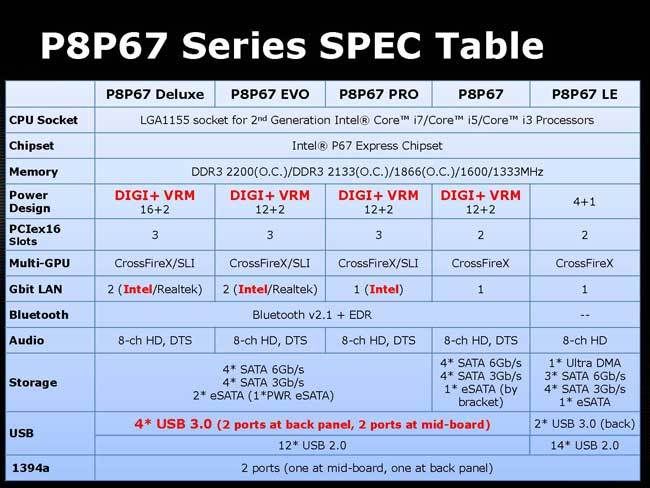
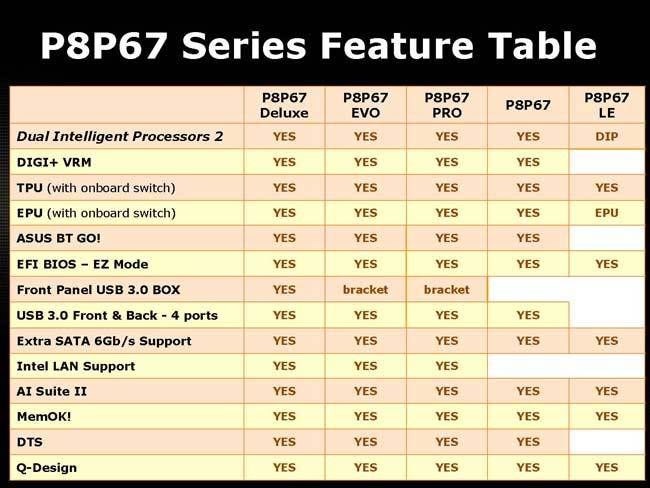
here's some tables i found helpful:

ASUSP8P67SPECTABLE.jpg

ASUSP8P67FEATURETABLE.jpg
 
bought last night, minus the BlackWidow keyboard. couldn't justify the money on a peripheral...yet. also, i stayed with the spinpoint instead of WD caviar black. $20 premium for SATA III wasn't worth it, considering the SSD primary drive.

I also went with the ASUS P8P67 PRO after reading TechReports review. seemed to offer the best price/performance ratio. the RAM is on Asus' QVL, so i'm good there.

so damn excited!

congrats! it'll be fun when you get to put it all together :)
 
Porter_

I suspect you are right but things have moved on a lot since my last build, on-die memory controllers may well be less tolerant of increased voltages so it may pay to be cautious. I'm out of my depth and before (if) I splash out on a build nothing would be more gutting than to have it all arrive but not function because I have the wrong RAM!!

I guess as long as the frequency is correct and it will operate at the correct voltages (i.e. below 1.65V according to the literature that both you and I have been reading) then things should be fine.

What we really need to know is the true voltage spec of the memory controller.

I notice you got A-Data RAM, what voltage is it spec'd at (to run at advertised speeds/timings).
 
Looks like I haven't missed much going with a non pro version..

I believe you lose the ability to do 8x8x on the PCIe slots (for SLI/CFX). Other than that, not much other than what is shown on the slides above.
 
Thanks to some ideas from this thread and info on these forums I ordered my build:

CPU: i7-2600K
Mobo: ASUS P8P67 PRO
GPU: Sapphire 6950 (will flash to 6970)
RAM: Corsair Vengeance DDR3 1600 8gb kit
CPU cooling: Corsair A50
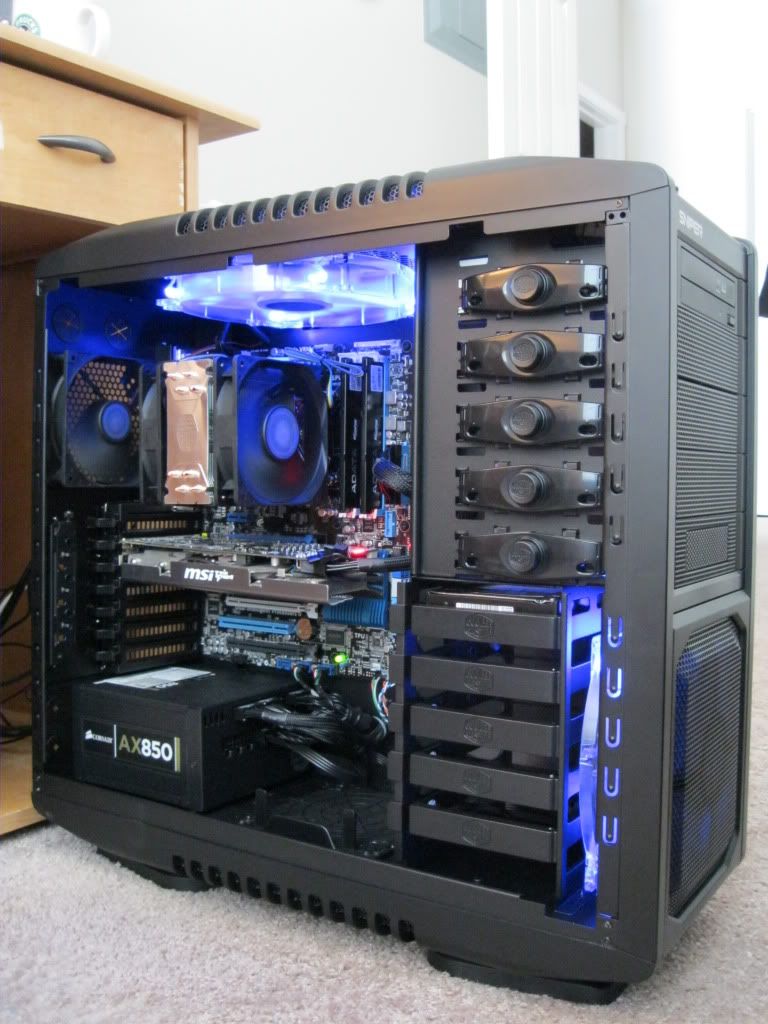
Power supply: Corsair AX850
Case: Lian-Li PC-60FNWX
Mouse: Razer Death Adder + Razer mousepad
HD (reusing): WD caviar 1tb (will upgrade to 3rd generation SSD when out in a few mos)
Soundcard (reusing): Creative SB X-Fi

Also getting Windows 7 ultimate x64 (finally)
 
Thanks to some ideas from this thread and info on these forums I ordered my build:

CPU: i7-2600K
Mobo: ASUS P8P67 PRO
GPU: Sapphire 6950 (will flash to 6970)
RAM: Corsair Vengeance DDR3 1600 8gb kit
CPU cooling: Corsair A50
Power supply: Corsair AX850
Case: Lian-Li PC-60FNWX
Mouse: Razer Death Adder + Razer mousepad
HD (reusing): WD caviar 1tb (will upgrade to 3rd generation SSD when out in a few mos)
Soundcard (reusing): Creative SB X-Fi

Also getting Windows 7 ultimate x64 (finally)

very nice build! the all-modular design of that PSU is great, my case has almost no clutter.
 
gah...my i5-2500K has been delivered to my home and i'm stuck in my office for another 5 hours
 
CPU: i7-2600K
Mobo: ASUS P8P67 PRO
GPU: XFX 6950 (will flash to 6970)
RAM: 8GB G.Skill DDR3 1333

Reusing everything else from my current comp. Really want an SSD, but gonna wait till the next generation comes out. I'm hoping to see a nice boost versus the comp in my sig.
 
gah...my i5-2500K has been delivered to my home and i'm stuck in my office for another 5 hours

Patience young grasshoppa!

I've put my build on hold :(

I really want to do it but something is holding me back...not sure what it is though.
 
Patience young grasshoppa!

I've put my build on hold :(

I really want to do it but something is holding me back...not sure what it is though.

thankfully i'm busy today, so the 5 hours will go by relatively quickly. then it's time to nerd-out. waiting for a spectacular combo deal, perhaps?
 
Haven't built a system in a looonnng time. Kinda out of the loop on so many things :(

Thinking about:

CPU: i7 2600K
Mobo: Asus P8P67 Deluxe
RAM: G Skill Ripjaws 8GB 1333
Graphics: MSI GTX 460 Hawk (Not sure, don't really game much anymore)
HD: Intel X25-M 120GB SSD (Or C300)
PSU = ?
Case: Corsair 600T (Still iffy on this)
Monitor: Need 2 23-24inchers, going to have to check out the Display forum :) Any recommendations here? (Max ~$200 per panel)

I just got an itch to build something new. Last build was a cheap AM2 build :( Looking at prices here in Canada, nothing has really changed (big surprise).

Would really appreciate any feedback/input anyone has on this build. Thanks!
 
I noticed the P8P67 WS Revolution wasn't on there.

i forget where i snatched those tables from, but i haven't seen a user-friendly table that compares the WS Revolution to the other ASUS boards.
 
Nah it's not that, just not been able to "square" the cost with myself yet (even though I saved the money speficially for a comp).


Looks like a nice build...how's it running?

no issues yet, even updated the mobo BIOS through windows :)eek:) via the ASUS AI suite. i was on edge watching it process...but it went well and was surprisingly painless. Windows feels much snappier but it's difficult to say if that's a product of the CPU, faster HD, faster RAM, or all of them in conjunction (which is probably the case). gaming-wise BC2 vanilla and Vietnam, and COD Black Ops all run absurdly better than my Q6600. those were the games giving me fits. i'm going to install ARMA2 later today and see how that goes. it was unplayable (20 fps) on my Q6600, literally had to stop playing the campaign before i finished it. *fingers crossed*
 
Got mine ordered: Pulled trigger and got these for $514.60 Newegg + they thru in CivilizationV
Intel 2500k
Asus P8P67 Pro
G-Skill Sniper 2x4gb 1600 Ram


Reused:
G-Skill 2x2gb 1600 Ram
Cooler Master Haf 922
Cooler Master Hyper N520 cpu cooler
2 Seagate 750gb HD'S RAID 0 7200rpm
1 Hitachi 750gb HD 7200rpm
2 GTX 460 SLI (850/1700/4000)
Logitech G9x and G15
Ultra X4 750w psu
I-INC 25" LED Monitor & ASUS 24" LED Monitor

The barb-wire is the ring
 
Last edited:
I ordered from Amazon:
Intel DP67DE motherboard $117.21 + free shipping
Cooler Master Hyper 212+ CPU Cooler $27.58 + free shipping
Arctic Silver 5 thermal paste $6.45 + free shipping
I did have to pay $13.48 tax, bummer, but I got free shipping. The CPU cooler and thermal paste were much cheaper on Amazon than newegg or elsewhere, and I got the motherboard there because I got an Amazon gift card for Christmas that I needed to use up (or I would have gotten it from newegg).

I ordered from SuperBiiz:
Samsung SpinPoint F3 HD103SJ 1TB Hard Drive $60.99 + free shipping -$6.10 from HIBERNATE10 coupon code = $54.89
This was a hot deal for a hard drive that's $70 on newegg.

I ordered from Newegg:
G.Skill Ripjaws 4GB (2x2GB) DDR3-1600 $49.99 + free shipping
Intel i5-2500K $224.99 + free shipping

Total: $494.59
(No case, PSU, video card, monitor or Win7 64-bit OS since I'm using those from my old build.)

I'm upgrading a 4-year-old E6600 system with a Bad Axe 2 motherboard. I'm keeping the beautifully quiet Antec P180B case (probably forever). I'm keeping the Corsair 520HX PSU and EVGA GTX 275 for now, and will upgrade them next Christmas. I'm keeping my 1680x1050 NEC 20WMGX2 monitor until an OLED replacement because, due to peripheral vision loss, I can't see the edges of a monitor larger than 20 inches.
 
As an Amazon Associate, HardForum may earn from qualifying purchases.
Got mine ordered: Pulled trigger and got these for $514.60 Newegg + they thru in CivilizationV
Intel 2500k
Asus P8P67 Pro
G-Skill Sniper 2x4gb 1600 Ram


Reused:
G-Skill 2x2gb 1600 Ram
Cooler Master Haf 922
Cooler Master Hyper N520 cpu cooler
2 Seagate 750gb HD'S RAID 0 7200rpm
1 Hitachi 750gb HD 7200rpm
2 GTX 460 SLI (850/1700/4000)
Logitech G9x and G15
Ultra X4 750w psu
I-INC 25" LED Monitor & ASUS 24" LED Monitor

The barb-wire is the ring

that'll be a very nice setup
 
Still surprised many of you are not going for the i7-2600K. Seemed like a no brainer to me. I suppose it may not be worth it for a pure gaming rig.

What are folks attracted to with the Asus P8P67 Pro versus the alternatives (Gigabyte and MSI)?
 
Still surprised many of you are not going for the i7-2600K. Seemed like a no brainer to me. I suppose it may not be worth it for a pure gaming rig.

One of the big differences is that the 2600K has hyperthreading while the 2500K does not. HT is hugely beneficial to folding and other non-gaming apps, but rarely helps gaming, and can even reduce gaming performance. The extra $100 is probably better spent elsewhere for a gaming rig.

mattchapman said:
What are folks attracted to with the Asus P8P67 Pro versus the alternatives (Gigabyte and MSI)?

I suspect techreport's review of P67 boards from ASUS, Gigabyte, MSI and Intel was very influential in a lot of decisions here. I almost went for the ASUS P8P67 based on that, but I approached my build (and got the Intel DP67DE) in terms of keeping costs down by not paying extra for features I would never use. I think Intel's motherboards may be the most underrated of the bunch.
 
Back
Top