• Some users have recently had their accounts hijacked. It seems that the now defunct EVGA forums might have compromised your password there and seems many are using the same PW here. We would suggest you UPDATE YOUR PASSWORD and TURN ON 2FA for your account here to further secure it. None of the compromised accounts had 2FA turned on.
    Once you have enabled 2FA, your account will be updated soon to show a badge, letting other members know that you use 2FA to protect your account. This should be beneficial for everyone that uses FSFT.

Post Your Mac Setup!

Here is mine...this is my office at school.

Its a 20 inch stock Core 2 Duo iMac (2.16 GHz, 1 GB RAM), connected to a 23 inch ACD (post Aug '06 revision). Total ouput is about 4 MP's.

129365947-L.jpg


Here is what it connects to. A Dell 3100CN Color laser and a HP inkjet, both on a network share. There is also a Zip 100, Selphy printer and a fanless hard drive.

129365015-L-1.jpg
 
Here is mine...this is my office at school.

Its a 20 inch stock Core 2 Duo iMac (2.16 GHz, 1 GB RAM), connected to a 23 inch ACD (post Aug '06 revision). Total ouput is about 4 MP's.

129365947-L.jpg


Here is what it connects to. A Dell 3100CN Color laser and a HP inkjet, both on a network share. There is also a Zip 100, Selphy printer and a fanless hard drive.

129365015-L-1.jpg

OK, I've got a question.. How do college kids get so much nice stuff when college is so obscenely expensive? Awesome setup BTW :cool:
 
Bacillus can u post a close up photo of your Enterprise E model? I've got one too...
 
why is your dell monitor facing the wall?

I am guessing a personal wallpaper that bacillus would rather not share? If you look at the other photos on the walls, they are covered with stickies. Just my sleuthing here.........

Bacillus, OCD much?;) :D
 
OK, I've got a question.. How do college kids get so much nice stuff when college is so obscenely expensive? Awesome setup BTW :cool:

I just work constantly. Get a job with your school's IT department, usually pays better than other on-campus jobs.
(I make enough to buy toys and beer!)
 
I just work constantly. Get a job with your school's IT department, usually pays better than other on-campus jobs.
(I make enough to buy toys and beer!)

Doesn't pay as well as an off campus IT job, but at most schools they are forced to let you make your schedule according to classes, ie you don't have to work in long chunks and shifts but for an hour or two between classes. Plus if you live on campus you learn a lot about the inner workings of the network, which comes in quite handy sometimes ;)
 
The issue with all of the schools up here (Canada) is that if the government isn't handing you free money it's impossible to get a job on campus.
 
10-12 bucks an hour is decent for an on campus IT job, if you work enough hours, that's savings right there
 
10 - 12 bucks an hour for any on-campus job is insane, the most anyone on campus here gets paid is 8 bucks an hour.
 
6.75 (USD) is the max you can be paid at my campus. They started me at 6.25 and gave me a "raise" of .25 every semester.
 
Help desk jobs at my campus typically start around $8-9 dollars with 25-50 cent raises each quarter (about ~8-10 weeks). Actual computer type jobs like unix/linux admin, distributed systems etc range from $10-20 an hour. These are student jobs btw. All in US currency.
 
heres my dorm setup. I need to do something about the cables, but i was too excited to get all setup before worrying about the details.

specs: 2ghz c2d, 1gb ram, 80gb hd, 802.11n, superdrive, glossy screen
other stuff: 2x 200gb external hard drives (behind picture frame), 20.1" sceptre LCD, denon reciever, polk r-15 speakers, Rebel XT digi cam, mx518 mouse, corepad mouse pad, etc


IMG_4054.JPG


IMG_4053.JPG


IMG_4052.JPG


omgwtfbbqroom-01.jpg

IMG_4047.JPG
 
it seems to run fine, i have not experienced any lag or anything. my normal apps that I run are office (mostly word), photoshop, ichat, iphoto and firefox and it is always fast and snappy. I would like to have 2gbs, but for now 1gb is fine.
 
it seems to run fine, i have not experienced any lag or anything. my normal apps that I run are office (mostly word), photoshop, ichat, iphoto and firefox and it is always fast and snappy. I would like to have 2gbs, but for now 1gb is fine.

What kind of enclosure is that? Looks like the Dlink dual-harddrive raid capable model.
 
hey guys can I play too?

DSC03302.JPG


I just bought the Mini on Friday. Upgraded to 1gb ram yesterday.

The G4 is 400mhz/764mb/40gb/Slow as fuck

The laptop is an HP, not a Macbook.

The PC mostly serves for torrents and file server now. I'm enjoying the Mac world so far
 
I feel you on the slow as fuck line. The only real option is find a used G4 processor on macmod.com or ebay. Gigadesigns.com has some good options but they are expensive. For the price of a slow G4 you could get a top line X2 AMD. At least you can set it up as a server in the future. I had a similar G4 I bought a while ago and turned it into a file server. Works great, and you can get a cheap 1000 Mbit NIC for pretty cheap. Check out xl8yourmac.com for some interesting info. The only problem using Mac as your main rig is software imo. If you find yourself dying for software you can install X11 and run gimp and Open Office. If you need software for multimedia your only options for entry-level stuff is the iApps for DVD creation and stuff. But for games you're really SOL so it's nice you have a PC too. What kind of KVM are you using?

Try making a network/system diagram. It'll give you some insights about your setup. I did one recently on the request of another [H]er and it made me see the setup from a whole new level. Allowed me to make some changes that I didn't realize were options. example.
 
I'm planning on using the G4 as a personal web server for just whatever random crap I don't feel like uploading to my site. I may throw another hd in there but I haven't decided yet. The G4 keeps randomly freezing on me (usually with iTunes playing and minimizing something) which has me thinking that the processor is overheating. I'm going to get some more thermal paste and give that a go. Tried different ram and a clean install of 10.4.6 and still the same.

I hear you on the software bit. While most of the stuff I use for the PC is available for the Mac, the biggest issue I'm having is a lot of the software isn't universal binary yet (cough Photoshop CS2 cough) so it runs slower than it should.

I installed X11 and installed Gimp on here and it runs pretty good but I haven't fully figured out how to use it yet.

About the KVM switch, I don't have one yet. I wan't to get a 4-port DVI/USB kvm switch but jesus they're expensive. I have the Mini using my DVI input right now and the PC on VGA. I may get a cheap 2port vga/usb switch to swap between the G4 and PC and use my extra wireless mouse/keyboard combo. I thought about the 4port VGA/USB switch route but the Mini looks like crap through VGA as did the G4. The PC on the otherhand looks fine (Probably the X1950 Pro gets the credit for that).

Thanks for the insight, I'll have to throw together a diagram just to see what my setup looks like in nice graphics. I've got a copy of Visio on my laptop so I'll do that later.
 
bumpety bump.

im off to the apple shop today! going to further evaluate the macbook pro and the imac so that i can choose the optimal one for my purposes! should be buying one in the next few months.
 
bumpety bump.

im off to the apple shop today! going to further evaluate the macbook pro and the imac so that i can choose the optimal one for my purposes! should be buying one in the next few months.

That's all nice and good, but both lines will probably be updated within the next few months, so aside from basic design differences, your comparison won't be valid by the time you're buying!

Really, the question between those two comes down to the importance of portability. If you're a college student, the MBP would let you take notes in class. And if you're the kind who visits a coffee house or a friend's place and wishes he could have his system to demo something, then you might want a notebook after all.

That said, having a fast 250GB hard disk and dedicated graphics would be very useful if your system will remain static.
 
Even on the off chance that you may want portability, I would say a powerful MBP is the way to go. Surprisingly, the 5400 RPM drive in the MBP is a work horse. I am completely enamored with my MBP as you can tell. The only other Mac I would consider over its 17" brethren and the Mac Pro.

:D
 
I just did, thanks for the tip. I got the MacBook on Thursday and the sleeve today so I doubt it's too ruined lol.
 
That's all nice and good, but both lines will probably be updated within the next few months, so aside from basic design differences, your comparison won't be valid by the time you're buying!

Really, the question between those two comes down to the importance of portability. If you're a college student, the MBP would let you take notes in class. And if you're the kind who visits a coffee house or a friend's place and wishes he could have his system to demo something, then you might want a notebook after all.

That said, having a fast 250GB hard disk and dedicated graphics would be very useful if your system will remain static.

I have heard these rumours too, probably should w ait then. I only have a few months left of university but nonetheless im drawn to MBP purely because it is powerful and portable so you get the best of both worlds. I will have to wait and see what Mr. Jobs cooks up in the next few months. Thanks for the advice.
 
I just did, thanks for the tip. I got the MacBook on Thursday and the sleeve today so I doubt it's too ruined lol.

hah yea, you could do that for a long time, its not really gonna damage it, but anything you can do to keep your macbook cooler is better for it in the long run....
 
i noticed that you are using the mx518 and i don't know if you have something similar already installed, but USB Overdrive is great for programming all the buttons on that mouse including the up/down arrows, side buttons and the "alt-tab" button from windows.

I have mine set up as follows
up arrow: screen saver
down arrow: dashboard
"alt-tab button": show all windows / expose
back: back
forward: forward
 
Thanks for the tip. I actually used that in the past. I got tired of the pop-up messages and didn't want to spend the money, so I deleted it. I then spent the money on the Powermate (kind of contradictory eh? ;) ) which I have set to do some of those duties. I would love a free alternative though to USB Overdrive.

Interesting thing. I thought I read somewhere that Logitech's extra buttons are supposed to work fine on everything except the MX518. You know if that is true? If so, a bit odd.
 
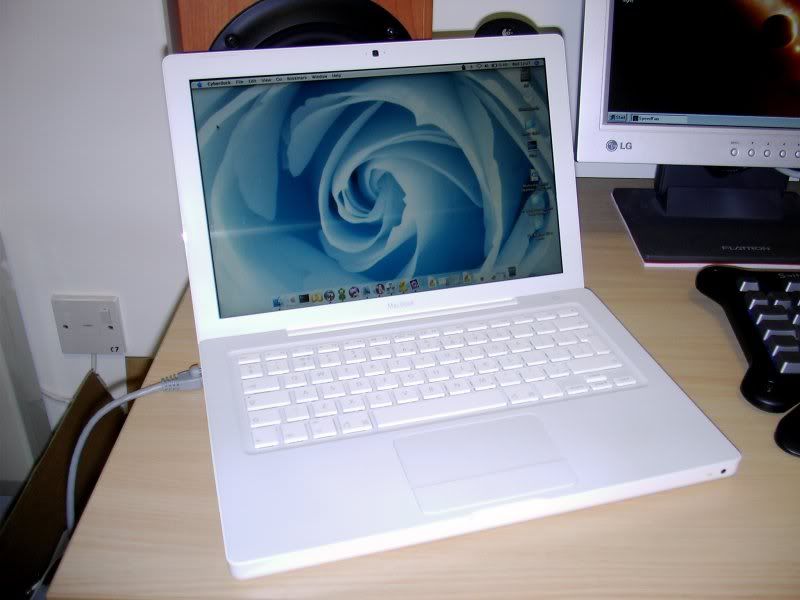
Just joined the club (what happenned to the other mouse buttons?!).

I3010009.jpg


Just a 1.83GHz C2D wih 1GB RAM. Rest of my setup in the workstaion thread.
 
Back
Top