Please, Advise.

mindrise

n00b
Joined
Apr 19, 2009
Messages
17
Hello [H]ardForum members,

I am looking to purchase a new computer to replace my current desktop (DFI LP nF4 Ultra-D in a case I've had since 1999, 4GB of Corsair XMS, new Sapphire 4830, Opteron 165 OC'ed to 2.4GHz), as well as my monitor (19" Samsung SyncMaster CRT from 2002 which I inherited from my friend after my Princeton LCD broke).

I desire to build a "high-end" core i7 PC designed for everything. By that I mean it will be the centerpiece of my digital life, I will be playing (hopefully) high end games and use it for work purposes as well as watching movies and mixing some audio tracks (non-professionally, but with professional grade software), photoshop, and all the usual activity (web browsing, etc..). Possibly want to dual boot with OSX.

I do plan on overclocking to reach optimum performance, within safe bounds of course.

I will be purchasing a monitor with this PC. I would like it to be no less than 22" preferably 24" and up, I'd even consider a 30" setup but no new 30" screens have been released lately so perhaps waiting for the next wave? Then again who knows how long it will take in this economical environ we are in.

I live in San Francisco but I prefer to order from online retailers. Amazon is a favorite since it offers tax free products, newegg is awesome as well.

My budget is somewhat loose, I am looking to spend 1,800 - 3,000 total including shipping & handling, though I certainly hope not to spend the full amount I have allocated.

I have done considerable research on the components that follow, feel free to skip this through and post your suggestions, I understand it can be a lot of reading. Alternatively you can just skim it...

-----------------------------------------------------------------------------------------------------------------------------------------------------------------------------------------------------------------------------------------------------------------

Here is my NEW proposed wish list - http://secure.newegg.com/WishList/PublicWishDetail.aspx?WishListNumber=15590947

You may have noticed I selected the intel x25m over the vertex this time, as it stands the price has dropped to an acceptable level.

Thanks for taking your time to read, I look forward to all of your invaluable input!
 
Last edited:
no comments/suggestions for me? pretty quiet in here.

It's the weekend.

That's pretty huge wall of text. So I skimmed through it:

RE: Motherboard
What features do you need in a motherboard?

RE: RAM:
None of the RAM sets you mentioned are worth the money. You won't notice the lower latency nor would you notice the higher speed of DDR3 2000 RAM. I highly recommend this set instead:
$85 - G.Skill F3-12800CL9T-6GBNQ 3 x 2GB DDR3 1600 RAM

G.Skill is a good brand and has a history of pretty solid products. At $85 without any sort of rebate, there's very little reason to not go with the above G.Skill RAM.

RE: PSU:
The 850TX would be more than enough unless you plan on GTX 295 SLI or something.

RE: HSF
The V8 is a good choice. This is also a good choice:
$70 - Thermalright Ultra-120 Extreme 1366 RT HSF

RE: Video Card:
We need to find out what size monitor you're planning first before we can start recommending video cards. The video card is dependent on the monitor you know..

RE: Cas: Some other case recommendations:
$65 - Cooler Master RC-590-KKN1-GP ATX Case
$70 - Cooler Master Sileo 500 RC-500-KKN1-GP ATX Case
$70 - Lian Li Lancool PC-K1B ATX Case
$80 - Cooler Master RC-690-KKN1-GP ATX Case
$90 - Lian Li PC-7B Plus II ATX Case
$90 - Lian Li Lancool PC-K7B ATX Case
$90 - AeroCool Masstige ATX Case
$110 - Lian Li PC-K6 ATX Case
$120 - Thermaltake ElementS VK60001N2Z ATX Case
$120 - Antec P182 ATX Case
$150 - Cooler Master HAF 932 RC-932-KKN1-GP ATX Case
$180 - Antec P183 ATX Case
$200 - Cooler Master Cosmos S 1000 RC-1100-KSN1-GP Full Tower ATX Case
$200 - Cooler Master ATCS 840 RC-840-KKN1-GP Full Tower ATX Case
$200 - Lian Li PC-V1100A Plus II ATX Case
$220 - Silverstone FT01-B ATX Case
$250 - Lian Li PC-V1200B Plus II ATX Case
$240 - Lian Li PC-A71B ATX Case
$285 - Silverstone TJ09-B Full Tower ATX Case
$320 - Silverstone TJ10-B Full Tower ATX Case
$330 - Silverstone Temjin SST-TJ07B Full Tower ATX Case
 
It's a good thing that you have such a large budget, because you have quite the list of demands. However, some of the parts that you're considering are those that I feel are overpriced.

For now, I'm going to focus on the computer tower itself. Here's something along the line of what you were considering earlier:

$554 - Intel Core i7 920 & Asus P6T Deluxe V2 combo deal
$70 - Cooler Master V8 CPU cooler
$85 - G.Skill 3x2GB DDR3 1600 tri-channel kit (free shipping)
$208 - OCZ Vertex 60GB SSD (free shipping)
$107 - Western Digital Caviar Black (free shipping)
$100 - Asus BC-06B1ST SATA BD-ROM drive (free shipping)
$260 - Asus HD4890 ($20 mail-in rebate)
$135 - Corsair TX850 (free shipping & $10 mail-in rebate)
$160 - Cooler Master Cosmos ATX full tower case ($20 mail-in rebate)
$100 - Vista Home Premium 64-bit OEM (free shipping)
=====
$1779 - Subtotal (not including shipping, taxes, or rebates)

And the above has more or less what you were considering. I changed the RAM because you aren't going to gain much more overclocking headroom with the more expensive DDR3 2000 kits. And though you said you wanted a case with more fans, the bad news is that most cases don't come with a lot of fans. If you wanted to really cut corners in the price of the tower alone, dropping the SSD and switching the optical drive from a BD-ROM to a DVD burner would give you the most immediate benefits.

For a 24 inch monitor, the HD4890 could handle, at least, medium visual settings in most of today's games. If you want anything better, or you plan on using a 30 inch monitor, you may want to consider a CrossFire or an SLI setup -- but only if you plan on buying both cards immediately.
 
Thanks, I slimmed the OP down a little bit.

PSU - One of my desires was to use a modular PSU for cable management reasons... Do you think the price is not justified? I don't really want the guts of my PC to be all tangled.

@ RAM - I'm not a fan of G-Skill, used there sticks before and felt like they underperformed for the specs, but this was a while back... Still I'd prefer to stick with Corsair or OCZ unless you are absolutely certain that it would be a waste of money. For overclocking though it would be logical to have 1866 or 2000 mhz speed, no? That's what I read on anandtech at least...

V10 - not worth it? Theoretically, according to the specs it is superior to the V8.

P182, I very much like the design, minimalist and slick looking.

http://www.newegg.com/Product/Product.aspx?Item=N82E16811129062 This is new at newegg... It's a bit more expensive but it's the latest model and it has more fans. I also like the lian-li cases which I'll be looking through. Thoughts?

The display I want to utilize is going to be at least 22", preferably 24". I would like a newer model with superior resolution. I like the design of the Samsung LCD monitors (with touch of color)... anyone have experience with them?
 
I'm sorry, I forgot to mention I already have a copy of Vista which I will be using. No need to pencil that into the price.

@ tiraides, Your suggestions are similar to Danny's, though I am curious as to why you suggest a 60GB vertex as opposed to the 120.

Actually, you just made me think of something more interesting, perhaps a RAID 0 setup with 2 60GB Vertext drives? I couldn't even imagine moving to that sort of speed... mindblowing.

Again, non-modular PSU. Cheaper, yes, but will it clog up my case?
 
PSU - One of my desires was to use a modular PSU for cable management reasons... Do you think the price is not justified? I don't really want the guts of my PC to be all tangled.

That's up to you to decide. If you really want a cleaner case, then as long as you know you're paying extra for the modular cables, then get the 1000HX if you wish.

@ RAM - I'm not a fan of G-Skill, used there sticks before and felt like they underperformed for the specs, but this was a while back... Still I'd prefer to stick with Corsair or OCZ unless you are absolutely certain that it would be a waste of money. For overclocking though it would be logical to have 1866 or 2000 mhz speed, no? That's what I read on anandtech at least...

DDR3 1600 is enough for overclocking. And yes I'm 100% absolutely sure that ANY of the RAM sets you mentioned are a complete and total waste of money. If you want Corsair, then I recommend this set:
http://www.newegg.com/Product/Product.aspx?Item=N82E16820145222

V10 - not worth it? Theoretically, according to the specs it is superior to the V8.
AFAIK, not really.

http://www.newegg.com/Product/Product.aspx?Item=N82E16811129062 This is new at newegg... It's a bit more expensive but it's the latest model and it has more fans. I also like the lian-li cases which I'll be looking through. Thoughts?
More fans and being the latest doesn't always mean that it's the best. You're gonna hve to do some research and figure out which case best appeals to you.
 
i agree with both of their suggestions.. and for the price no the v10 isnt worth it when the noctua NH-U12P is silent and can handle an i7 at any overclock.. but you are correct it is better then the v8.. but then again there are a lot of heatsinks out there better then the v8.. since you were planning to buy a v10 anyways.. the noctua or thermalright ultra 120, or megahalem are your 3 best options in my honest opinion..

g-skills gotten better over the years.. and in all honestly ddr3 1866 and 2000 is worthless.. you wouldnt notice any difference between 1600 and 2000.. its not worth the extra money they cost..

though instead of going with an SSD drive like was suggested by tiraides id go with the 300GB WD VR.. more storage and just a tad slower then the SSD.. about the only thing an SSD drive has over the VR is the access time..

and the 4890 would be perfect with a 22 or 24" display.. anything higher eg running crossfire or 4870x2 would be complete overkill and a waste of electricity..

as for the case.. if cooling is what you want.. the only case in that class is the antec 1200.. http://www.newegg.com/Product/Product.aspx?Item=N82E16811129043&Tpk=antec%201200
 
Neither of those are heatsink/fan combo's, heatsink only. Do you have fan recommendations to go with them? Regarding RAM if ya'll say so I guess I'll stick with 1600. Just out of curiosity how much of a difference is there between 1600 and 2000? Any benchmarking links?

VR are the same price as the flash based disks, and the storage is sufficient for the OS and most my applications. After reading all those reviews my mouth is just watering for the amazing OCZ vertex.

As to the case, the antec 1200 is nice, but a tad flashy for my taste. I do like the one I mentioned in my last post from Antec, and there's a couple of Lian Li cases which I quite like. But I'll definitely consider it. Also I saw the SilverStone which got selected by anandtech for their i7 dream machine build, it uses some negative air pressure technology or something for maximum airflow... anyone know about that? Silversone FT01-BW is the name.

As to the monitor... I saw a refurbished Samsung LED 40" for $900 dollars... Perhaps I should use that as a monitor? I want a big one, as I said 22" is bare minimum. I'd prefer 24", but even more so 26" or higher... any suggestions as to my display questions?
 
The Xigmatek HDT-S1283V (aka Dark Knight), the Noctua NH-U12P SE 1366, and the Thermaltake Ultra 120 Extreme RT 1366 all come with fans in addition to the heatsink.

Most people here are getting their high overclocks (3.6GHz and beyond) using DDR3 1600 RAM. Whichever sites that you view for additional research will most likely be the same sites that we've used for our numbers.

Personally, I feel that the SSD technology is still too immature to be worth their added prices. Then again, I'm not a max-performance-at-any-cost type of guy.

40 inch LCD? Are you sure that it isn't an HDTV? Monitors are a very sensitive subject around here, so you may be better served by going to the Displays forum here for recommendations.
 
All 1080p HDTVs use a resolution of around 1920x1080. One HD4890 would be enough for that, unless you must have max everything (in terms of visual settings).

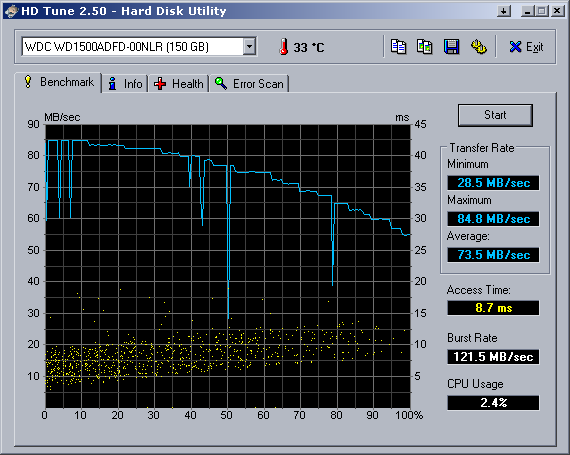
Also, take a look at these HD Tune scores. This shows the VelociRaptor against the WD6400AAKS and the last-gen Raptor X.

WD6400AAKS for $60 is the best value (best performance for your money). New VRaptor, then WD6400AAKS, and then the old 2nd gen Raptor...

New VRaptor...
HDTune_Benchmark_WDC%20WD3000GLFS-01F8U.png


New WD6400AAKS...
HDTune_Benchmark_WDC%20WD6400AAKS-65A7B.png


Old 2nd Gen Raptor...
HDTune_Benchmark_WDC%20WD1500ADFD-00NLR.png

The point is that if you change your mind about requiring the SSD as the OS drive, you wouldn't go wrong with either the WD6400AAKS or the (slightly faster) WD6401AALS.
 
Naturally, I am aware that VR supply the cream of the crop performance with SATA Hard Disks, but from what I've read the SSD is still superior.
 
In terms of raw performance, yes, the SSD is superior to any single SATA HDD. In terms of price per performance, I still believe that SSDs aren't worth the money. However, you have a luxury that most builders here don't have: a budget in which you could afford an SSD.

If you want the best performance possible, get the OCZ Vertex.
 
Get two of them, though, for RAID0. The only things stopping me from getting such a setup are price and all the tweaking necessary for good performance (hence tiraides saying they're still immature). Newegg had a hot deal for the 30GB Vertex SSDs for only $90 each after MIR, but that deal is long gone. :( Woulda been nice to play with, though, lol. Anyhow, yah, if you don't mind having to tweak those SSDs and their price, definitely go for two or three in RAID0 (4 won't be any better than 3 unless you spend a huge chunk on a better than on-board RAID controller, IIRC).

argh, I keep forgetting to email myself my single 30GB vertex HDTune SS from work, lol.
 
The idea of 2 Vertex's in RAID sounds complicated. I have limited experience with RAID setup, never done it myself... And please don't mention deals that are long gone, you're making me feel bad :(.

Any other comments/suggestions regarding my configuration? Liven up my thread, por favor. :)
 
RAID0 isn't the complicated part, its all the tweaking to the damn SSD thats more complicated than I'd like.

I want to share my pain with you (re: deals long gone) lol.
 
Alright I'll definitely put that into consideration, but wouldn't 2000 be more effective for overclocking?

@ enginurd: I'm fairly confident that a single Vertex will provide more than enough performance... or at least I hope.
 
I was underwhelmed by a single Vertex. I didn't keep mine, sold it for what I paid.
 
Hmm... alright. I find that odd though, how could you be unsatisfied with the Vertex?

Anyway, can anyone else comment upon my build?
 
Hmm... alright. I find that odd though, how could you be unsatisfied with the Vertex?

The performance of a single one wasn't enough over my VRaptor to justify its cost. Then again, my VRaptor was free (gift), but still... I guess my expectations were too high. When I find some extra cash I'll probably go with 2 or 3 of them for RAID0 -- However, I may just wait until no tweaking is necessary.
 
The RAM that you chose for yourself isn't worth the money. Get the cheaper CL9 kit instead for half price. CAS Latency matters little towards overall RAM performance, and matters less when it comes to overclocking. The lower voltage of the CL9 kit will also give you a bit more headroom for overclocking.

I don't see a power supply in that build list. (To make things easier on us, please list out your current build list here as well.) What did you have in mind?
 
sorry, I forgot about that. I meant to have the corsair 1000 watt modular there. It's either that or the 850TX which is not modular unfortunately. :(

i remain unconvinced in regards to the the higher latency being the same argument... 6 is clearly lower than 9, my logic is clearly infallible, if it provides 0% increase in performance there would be no reason for it's existence.

http://www.newegg.com/Product/Product.aspx?Item=N82E16811163120

BTW how does this case stack up against my chosen p193?
 
Here's the list for those who are too lazy to click a link :p

Logitech Z-5500 505 Watts 5.1 Speaker - Retail

CORSAIR CMPSU-1000HX 1000W ATX12V 2.2 / EPS12V 2.91 SLI Ready CrossFire Ready 80 PLUS Certified Modular Active PFC Compatible ... - Retail

LITE-ON Black Blu-ray Disc Combo SATA Model iHES208-08 - Retail


mushkin 6GB (3 x 2GB) 240-Pin DDR3 SDRAM DDR3 1600 (PC3 12800) Desktop Memory Model 998691 - Retail

Intel Core i7 920 Nehalem 2.66GHz LGA 1366 130W Quad-Core Processor Model BX80601920 - Retail

BFG Tech BFGEGTX2851024OC2E GeForce GTX 285 1GB 512-bit GDDR3 PCI Express 2.0 x16 HDCP Ready SLI Supported Video Card - Retail

Logitech MX Revolution Black 7 Buttons 2 x Wheels USB RF Wireless Laser Mouse - Retail

Intel X25-M SSDSA2MH080G1 80GB SATA MLC Internal Solid state disk (SSD) - Retail

Noctua NH-U12P SE1366 120mm SSO CPU Cooler - Retail

Western Digital Caviar Black WD1001FALS 1TB 7200 RPM SATA 3.0Gb/s 3.5" Internal Hard Drives - OEM

DFI LP UT X58-T3eH8 LGA 1366 Intel X58 ATX Intel Motherboard - Retail

SAMSUNG T240HD Rose-Black 24" 5ms HDMI Widescreen HDTV Monitor - Retail

Antec P193 Gunmetal Gray Aluminum / Steel / Plastic ATX Mid Tower Computer Case - Retail

Saitek Eclipse III Black USB Wired Standard Backlit Multimedia Keyboard - Retail

steelseries 63008SS QcK heavy Mouse Pad - OEM
 
Before you dismiss me as a complete and utter retard, take a look at the chart posted in the first page of the Benchmark Reviews DDR3 RAM article. If nothing else, it shows that lower latency isn't a guarantee of greater overclocking performance. The difference, performance-wise, between the CL9 RAM kit and the CL7 kit is measured in nanoseconds; in most cases, depending on the program/game being run, you won't even notice the difference.

Since I obviously don't know what I'm talking about, I'll let someone else explain it a little better. Though the figures are for DDR2 RAM (and I haven't been able to find any similar benchmarks/charts for DDR3 RAM), DDR3 RAM operates under the same principles -- namely, that the Intel chipsets benefit more from higher memory bandwidth than they do from lower/tighter RAM timings. (Currently, however, only the Core i7/X58 chipset can take advantage of the added bandwidth provided by DDR3 RAM.)

If you aren't planning on going with a multi-card setup, you can use a different power supply. The Corsair HX620, the Silverstone ST70F, the Seasonic M12 SS-700HM, and the Enermax MODU82+ EMD625AWT are all capable of handling the GTX 285 on their own.

Cases are a matter of personal taste, so I can't really say which one is "better" for you. That said, I personally prefer the look of the Silverstone case over that of the Antec P193.
 
lol,

I'm sorry if I came across as offensive, I tend to be a bit sarcastic at times and forget this is the internet. Thank you greatly for providing the charts for me, very helpful.

In regards to the power supply, I plan on buying a second card halfway through summer or so, and I would like to have a significant amount of leeway in order to do so.

About the case though, do either one have a cooling advantage?
 
Last edited:
Back
Top