• Some users have recently had their accounts hijacked. It seems that the now defunct EVGA forums might have compromised your password there and seems many are using the same PW here. We would suggest you UPDATE YOUR PASSWORD and TURN ON 2FA for your account here to further secure it. None of the compromised accounts had 2FA turned on.
    Once you have enabled 2FA, your account will be updated soon to show a badge, letting other members know that you use 2FA to protect your account. This should be beneficial for everyone that uses FSFT.

Overclocking & Throttling?

BassKozz

Limp Gawd
Joined
Nov 10, 2005
Messages
311
My Abit IP35-Pro comes with two CPU throttling functions:
  1. C1E (Enhanced Halt State)
  2. EIST (Enhanced Intel SpeedStep Technology)

I believe my Q6600 supports both of these functions, but I could be wrong...
My question is, is it wise to turn off these functions when you are overclocking to get the best performance (so long as temps + voltages remain in range) or should you leave them on?

The reason I ask is because I am running Ubuntu 7.10 64-bit on this rig and even when it's under LOAD it sometimes throttles down from 3330mhz to 2220mhz; See Here

TIA,
-BassKozz
 
While you are actually trying overclocks it is best to have the speedstep off. However after you are done and have a "working system", you will save power/energy by turning it back on.

Now having your's drop while under load is interesting. Normally while idle it drops, but once the processor gets a good demand, it should speed up.....
 
Now having your's drop while under load is interesting. Normally while idle it drops, but once the processor gets a good demand, it should speed up.....

That's exactly my concern...

I would rather the CPU stick to it's OC of 3330mhz during LOAD (to get peak preformance) and drop when Idleing (to save power), but for some odd reason my Chip is bouncing back and forth from 2220mhz and 3330mhz even when under LOAD :confused:
 
Those features don't have anything to do with throttling at high temperatures, they're to do with reducing power at idle. Throttling if the CPU is too hot is a thermal safety measure which is a good thing. How hot does your CPU get under load?
 
It is highly recommend it to turn both of those functions off while you are overclocking your system.
 
Those features don't have anything to do with throttling at high temperatures, they're to do with reducing power at idle. Throttling if the CPU is too hot is a thermal safety measure which is a good thing. How hot does your CPU get under load?
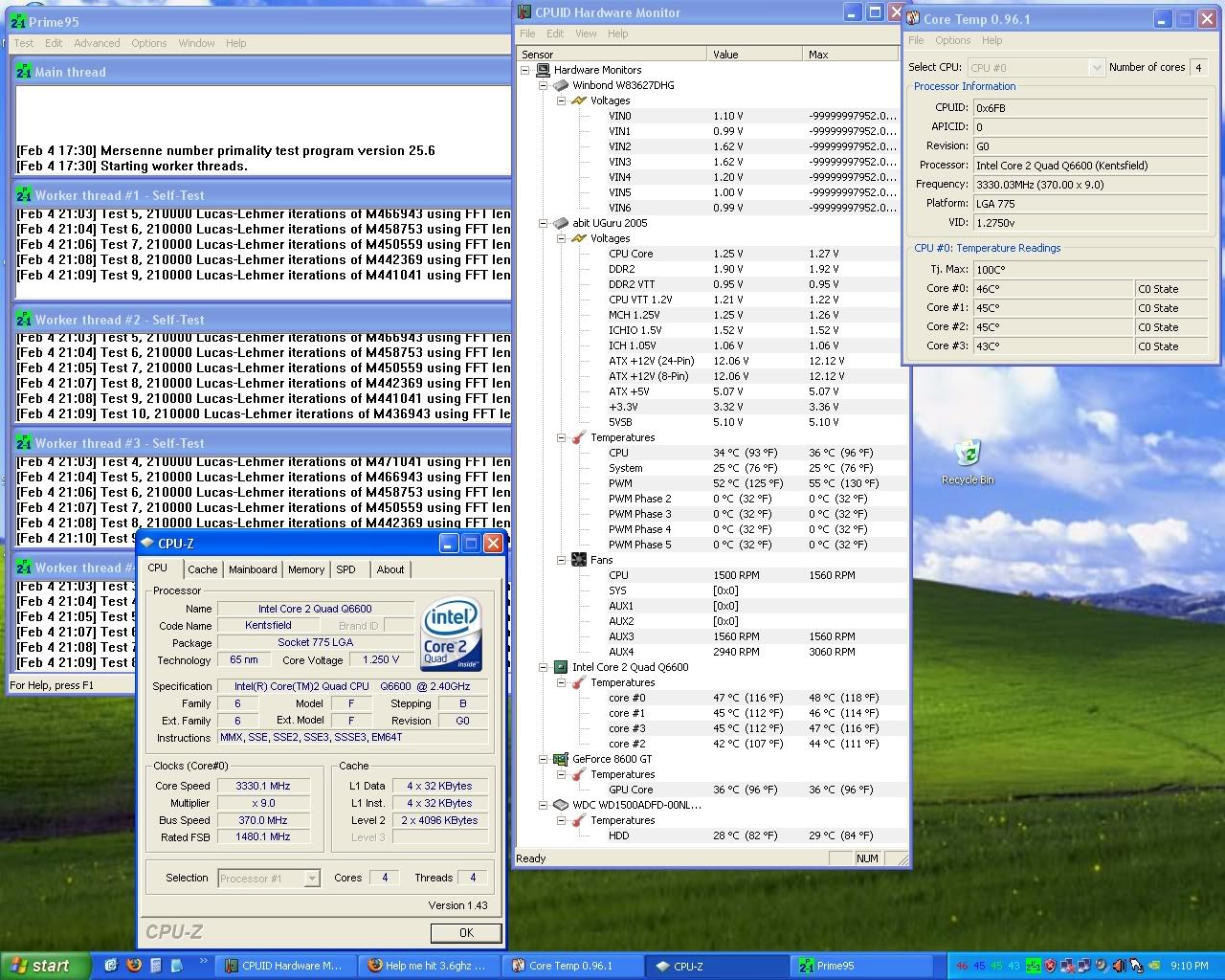
48°c at load is about as high as I've seen it get, and thats running Prime95 stressing all 4 cores in WinXP for hours on end (you gotta love the Thermalright UItra-120 Extreme :D)
If your interested: Here is a full spreadsheet of voltages and temps at different FSB settings, right now I am running @ 370x9 = 3330mhz

It is highly recommend it to turn both of those functions off while you are overclocking your system.
Really, that's what I've been hearing, but I've been getting conflicting stories...
Is there any proof of this or documentation on this issue?
 
It is highly recommend it to turn both of those functions off while you are overclocking your system.

I'm not convinced that it would make much difference in many cases - if the system is unstable enough to crash with EIST on then it's pretty dodgy, but it is one less variable I guess. But while there's no harm in leaving them off while overclocking, people should generally turn them back on when they're done sorting out their overclock. Too often people think 'gasp, it makes my CPU run at a lower multiplier, it's reducing my performance', which isn't true.
 
I kept both of mine on even when I was doing my overclocking tests, because I planned to run it after my overclocking was done.

So far any random freezes or issues have been minimal and few, but if they do come up, I will have to look into turning off C1E/EIST or setting my Cpu voltage from "standard" to a fixed number. In the latter case, the multiplier will throttle but the voltage will not fall lower than what i set it too.

It's kind of funny to see my idle voltage higher than my load voltage under such a setting.
 
Too often people think 'gasp, it makes my CPU run at a lower multiplier, it's reducing my performance', which isn't true.
So this is not the case, even thou the core clock bounces between 2220mhz and 3330mhz under LOAD?
I kept both of mine on even when I was doing my overclocking tests, because I planned to run it after my overclocking was done.

So far any random freezes or issues have been minimal and few, but if they do come up, I will have to look into turning off C1E/EIST or setting my Cpu voltage from "standard" to a fixed number. In the latter case, the multiplier will throttle but the voltage will not fall lower than what i set it too.

It's kind of funny to see my idle voltage higher than my load voltage under such a setting.

I haven't had any stability issues, I am more concerned w/ the systems preformace, especially since it's bouncing between 2220mhz and 3330mhz under LOAD
 
Someone over at the Abit Forums recommended I try Folding@Home to stress the cores and see if it bounces back and forth between 2.22ghz and 3.33ghz;

FAH-conkytop-2.png


Yup, it still does :(
I am getting mixed reviews... should I turn the throttling features of my Q6600 off, or leave them on?
 
Someone over at the Abit Forums recommended I try Folding@Home to stress the cores and see if it bounces back and forth between 2.22ghz and 3.33ghz;

FAH-conkytop-2.png


Yup, it still does :(
I am getting mixed reviews... should I turn the throttling features of my Q6600 off, or leave them on?

If you're running F@H most/all of the time, I would turn off the throttling features. The system is fighting with the user to save power, whilst the user wants the cpu to be running at 100%.

How about running orthos to see if there is any throttling? When I ran that the cpu did not cycle up and down.
 
So this is not the case, even thou the core clock bounces between 2220mhz and 3330mhz under LOAD?

If it's fully loaded, then something looks to be wrong there. That's not the normal behaviour of EIST - mine is solidly at 9x multiplier when I run Prime95. As said above, if you plan to keep your CPU at 100% load most of the time then just turn EIST off and see if it fixes the problem, since it wouldn't give any benefit if the CPU is rarely idle.
 
How about running orthos to see if there is any throttling? When I ran that the cpu did not cycle up and down.
IIRC orthos doesn't work for quad cores because it doesn't stress all 4 cores, but prime95 does...
If it's fully loaded, then something looks to be wrong there. That's not the normal behaviour of EIST - mine is solidly at 9x multiplier when I run Prime95.


Running prime it stays pinned @ 3330Mhz, but in Ubuntu 64-bit OS there isn't a similar app I can use to stress all 4 cores like Prime95 does in WinBlowz. So I can't test :(
If you're running F@H most/all of the time, I would turn off the throttling features.
As said above, if you plan to keep your CPU at 100% load most of the time then just turn EIST off and see if it fixes the problem, since it wouldn't give any benefit if the CPU is rarely idle.
I won't be running 100% LOAD all the time, but I do want to make sure I am getting the best performance out of my chip...
 
You can run Orthos X 2.
Load Orthos.
Run 2 instances.
In Task Manager, click on the Orthos exe. You can then enable the first instance to run on cores A and B, the second to run on cores C and D; simply by rt clicking the .exe and going to "affinity".

I stress my Q6600 in this way, and it pins the cores at 100% until I tell it to stop.
I turned all the throttle functions off and never looked back.
I followed this:http://www.nvidia.com/docs/CP/45121/nforce_680i_sli_overclocking.pdf from day 1.
 
Running prime it stays pinned @ 3330Mhz, but in Ubuntu 64-bit OS there isn't a similar app I can use to stress all 4 cores like Prime95 does in WinBlowz. So I can't test :(

Theres your answer, when it truly is running 100%, the power saving doesnt get a chance to activate.
I looks like its working as intended.

If you want to make absolutely sure its the power saving, try turning it off.
 
I am trying to get a feel for the consensus here on weather or not to disable the throttling features... some say leave 'em on, some say turn 'em off
The people who say leave 'em on, also say they don't hurt preformance, but others believe they do and think they should be turned off...
So who's right?
 
Its up to you to find out what is best for you.
Some people have experienced issues, others havent.
If you dont experience any problems, leave it on, if it affects you negatively, turn it off.
 
Back
Top