Overclocked GPU Showdown

FrgMstr

Just Plain Mean
Staff member
2FA
Joined
May 18, 1997
Messages
58,704
Mark over at Babel Tech gets to the point when it comes to overclocking the newest least expensive enthusiast GPUs and throws in a GTX 980 as a sort of control. I have been overclocking GPUs for a long time and I have never seen an OC break an LCD panel though. Odd stuff at best.

Ultimately 20 of our 26 benches were run at either a 6% or 6.5% overclock until the RX 480 had a hard crash which not only forced us to recover from a restore point, our Monoprice display was evidently affected when we rebooted and it now has a vertical pink line running up the left side, and it will have to be replaced.
 
As much as I have a hard time believing OC'ing a GPU would cause a monitor to fail, I also have a hard time believing it's coincidental. Is it even possible to have an out of spec voltage on a display cable, and what would have to happen for such a thing to occur?
 
Overclocking the gpu broke a monitor? Da fuck?

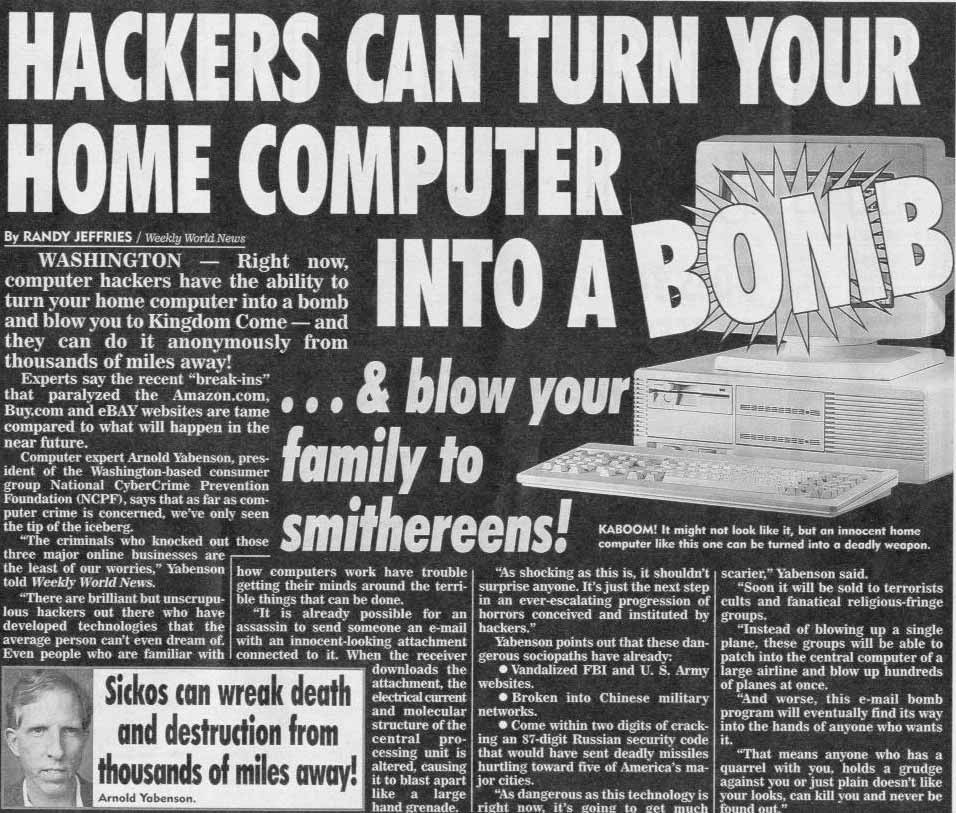
Man, AMD is da bomb!

hackers-can-turn-your-computer-in-to-a-bomb.jpg
 
As much as I have a hard time believing OC'ing a GPU would cause a monitor to fail, I also have a hard time believing it's coincidental. Is it even possible to have an out of spec voltage on a display cable, and what would have to happen for such a thing to occur?
Sure. Voltage spikes are pretty common when you switch a circuit on or off too quickly and there's an inductance somewhere in the circuit. And the thing is, there's always an inductance in the circuit.

Is it likely? I'd have to see the details of the RX 480's VRM and video-out circuitry to know. Every modern graphics card has a switching VRM built in, and those VRMs include inductors that are capable of creating a pretty big voltage spike, with substantial energy, under the wrong circumstances. The VRMs are also firmware-controlled. So if the GPU crashes and the firmware quits controlling the VRMs properly, or worse, starts controlling it improperly, well, the energy in the VRM's inductors has to go somewhere!

Good fail-safe design can remove the risk of that happening. But frankly, there's been a lot of evidence that the reference RX 480 isn't designed well at all, especially with regard to the VRMs.
 
Extremely unlikely the video card caused this.

The video chain goes from GPU to the input processor and scaler on the monitor. The input processor and scaler modifies the input data and slaps it into a buffer to be something the LCD screen can use. In some cases the data alters back and forth on high speed screens to simulate a greater bit depth. The reason this is done is so the monitor can report a greater range of capabilities in the EDID even if the LCD screen itself can't support it directly. Sure it might report handling HDR, but will the native LCD screen be able to handle the extra bit depth? Nope. It's likely emulated. Sure it can handle 1280x720 on a 1920x1080 display. But the scaler needs to fix that before it goes to the screen buffer.

That said the input - scaler section scans from left to right, and top to bottom. Not the vertical pattern shown. What we are seeing here is damage to the LCD screen itself or the buffer that drives it. That means the power spike would have to pass through the input-scaler somehow and go straight to the buffer without damaging the scaler in any way.

Like I said...unlikely.
 
Last edited by a moderator:
Extremely unlikely the video card caused this.
If the video card didn't have a 150+ watt firmware-controlled switched-inductor VRM on it, you'd probably be right.
But because it does, there's a substantial possibility that the video card is to blame.
 
If the video card didn't have a 150+ watt firmware-controlled switched-inductor VRM on it, you'd probably be right.
But because it does, there's a substantial possibility that the video card is to blame.

Show be a functional logic block diagram that directly connects the video buffer to the GPU and I'll believe you.
 
A few minutes with a pixel changing program and it will be good as new.

It looks like one of the LCD column driver transistor arrays died forcing all pixels in the column to be red+blue only (no green) at full brightness. red+blue=magenta
 
It looks like one of the LCD column driver transistor arrays died forcing all pixels in the column to be red+blue only (no green) at full brightness. red+blue=magenta

That is one of the two possibilities.
 
Yeah, after watching the teardown/breakdown video of the ASUS RX480, I'm inclined to believe the card itself didn't cause this. At least on the ASUS card the VRM's (responsible for the GPU and Memory) were totally isolated from the rest of the functioning card.
 
Show be a functional logic block diagram that directly connects the video buffer to the GPU and I'll believe you.
Voltage spikes don't have to follow logic circuit paths, you know. For example, if the circuit receiving the spike has a PSU with a high enough high-frequency impedance (such as a PSU with a LCL output filter) then a voltage spike on any input to a circuit can potentially forward-bias a protection diode and propagate to the supply rails. The whole system is at risk if this happens, and on a cheap monitor, it's not inconceivable.

In fact, it's a lot more likely that something like this happened than that the monitor "just happened" to have a failure when the overclock of the GPU caused the GPU to hard-crash. Note that the hard-crash of the GPU also forced the reviewers to restore the system from a restore point - do you think that was just a coincidence too?
 
Last edited:
Voltage spikes don't have to follow logic circuit paths, you know. For example, if the circuit receiving the spike has a PSU with a high enough high-frequency impedance (such as a PSU with a LCL output filter) then a voltage spike on any input to a circuit can potentially forward-bias a protection diode and propagate to the supply rails. The whole system is at risk if this happens, and on a cheap monitor, it's not inconceivable.

In fact, it's a lot more likely that something like this happened than that the monitor "just happened" to have a failure when the overclock of the GPU caused the GPU to hard-crash. Note that the hard-crash of the GPU also forced the reviewers to restore the system from a restore point - do you think that was just a coincidence too?

The input processor/scaler is usually on a separate circuit from the video buffer and driver panel. They are connected by a couple pins that read and write data. Is it possible the spike went from the input processor without damaging it, across the pins to the video buffer/driver panel, or from the input processor to the power supply to the video buffer? Yes. Likely?..not. It would more than likely damage the input processor first. I have seen weirder things happen. But stuck columns on LCD displays are not that uncommon.
 
I had this happen to a Hanns-G monitor, no OC at all. Was actually able to fix it pretty easily by tapping on the monitor where the line was and it would go away. It would occasionally come back, but just had to give it another tap.
 
I can't help but think that was a coincidence. That the monitor would have failed one way or another, and he just happened to be doing overclock testing at the time.
 
Thank you [H] for NOT embedding numerical results in a Table as a picture.

Jeez. The preview is fuzzy and not legible. What good reason is there for the results to be a picture instead of an actual table?
 
Thank you [H] for NOT embedding numerical results in a Table as a picture.

Jeez. The preview is fuzzy and not legible. What good reason is there for the results to be a picture instead of an actual table?
Probably so it's harder to copy pasta without attribution. I guess they're that paranoid.
 
On that note:
No one here has yet to pull out the pitchforks and torches for them running DOOM using OpenGL instead of Vulkan? What about the Hitman DX12 numbers showing NVIDIA cards getting higher framerates almost across the board?
 
On that note:
No one here has yet to pull out the pitchforks and torches for them running DOOM using OpenGL instead of Vulkan? What about the Hitman DX12 numbers showing NVIDIA cards getting higher framerates almost across the board?
Probably because nobody cares anymore. Is there anything else coming down the pipe that will be using Vulkan or is DOOM the one-hit wonder for it (for now)....
 
The input processor/scaler is usually on a separate circuit from the video buffer and driver panel. They are connected by a couple pins that read and write data.
From your response, it seems you didn't understand the whole paragraph about voltage spike propagation via the supply rails.
But if it is simply that you don't think that's a possibility, then please stay away from BLDC motor driver design. Oh, and switched-mode VRM design too.
 
Thank you [H] for NOT embedding numerical results in a Table as a picture.

Jeez. The preview is fuzzy and not legible. What good reason is there for the results to be a picture instead of an actual table?
Taking a screen-snip of an Excel sheet, chart or graph, saving it as a PNG, and sticking that in a web article is very very fast and easy.
 
Taking a screen-snip of an Excel sheet, chart or graph, saving it as a PNG, and sticking that in a web article is very very fast and easy.
When you paste your tables online, people steal those. A screenshot makes your data a lot more "secure." Generally the people lazy enough to steal it and use it, are too lazy to actually copy it all using keystrokes. At least with a picture, it usually just gets posted and hotlinked everywhere, but at least then you hopefully have it branded with the source.
 
I clicked to open the picture hoping it wouldn't be as bad, but after looking at it for a few seconds just reinforces that it's still lousy.
I will give you that. Even when we are forced to compress graph images to fit formatting, we do link to a full resolution screenshot.
 
From your response, it seems you didn't understand the whole paragraph about voltage spike propagation via the supply rails.
But if it is simply that you don't think that's a possibility, then please stay away from BLDC motor driver design. Oh, and switched-mode VRM design too.

RIF...

digitalgriffin said:
or from the input processor to the power supply to the video buffer? Yes. Likely?..not.

I used to design and build amplifiers in college all the time for fun. You want to talk about feedback from a moving cone....
 
I quite enjoyed reading through the theory-crafting so far regarding the damage to the monitor. Keep that shit up!
 
So aside from the screen, what is the consensus? Not going to read the article because lazy.
 
This seems to be an isolated case. Without more evidence it would fall under a coincidence.
 
So aside from the screen, what is the consensus? Not going to read the article because lazy.

The RX480 stinks at overclocking. After he drew too much power he couldn't overclock it more than 3%. Likely a polyfuse blew.

But the 1070FE would likely have problems as well if you pushed it too far. NVIDIA removed a VRM increasing the load to each one which raises the PEG close to it's power limit. Comparing the 1070FE to the RX480 though isn't fair.

I should note the 1060FE has plenty of headroom. (about 30 watts give or take) And it has a great overclock. I put one in my nephew's first gaming build. The article reflected similar comments. But I would get the non-FE edition as the $50 premium really isn't worth it.
 
Last edited by a moderator:
This seems to be an isolated case. Without more evidence it would fall under a coincidence.
No, without more evidence it is simply unexplained. "Coincidence" would imply that we know the RX 480 could not have damaged the monitor, and we don't know that.
 
My first thought about the screen upon seeing it was the 480 was "well, if the PCI-E is out of spec who knows what else is" .
 
My first thought about the screen upon seeing it was the 480 was "well, if the PCI-E is out of spec who knows what else is" .

You know it's funny. For the longest time NVIDIA had a serious problem with the tightness of their timing eye on the HDMI which would cause a number of monitors not to work.
 
I'm hard pressed to find that the monitor actually has this issue vs, the Rx 480. I've seen a few videos cards on eBay with this exact issue due to mining/over clocking. This normally happens to the video card, and not the monitor. I don't even think it's possible..... Maybe back in the days of vga, but not with a modern connection.
 
Has to be a frequency overdrive problem right? Or the monitor just chose that moment in time to break.

Back in the DOS/CRT days there were a couple games that used to force a display mode / frequency that my cheapo Viewsonic HATED and it would squeal and makes sounds of death. I've read online about people having monitors die from those kinds of things. I specifically remember a game review from Old Man Murray (don't remember which game, and their site is long dead) and that blew up his CRT monitor during the review.

edit - WOW I can't believe the site is still up, it hasn't been updated in like 15 years,

Freedom: First Resistance Review
 
Back
Top