• Some users have recently had their accounts hijacked. It seems that the now defunct EVGA forums might have compromised your password there and seems many are using the same PW here. We would suggest you UPDATE YOUR PASSWORD and TURN ON 2FA for your account here to further secure it. None of the compromised accounts had 2FA turned on.
    Once you have enabled 2FA, your account will be updated soon to show a badge, letting other members know that you use 2FA to protect your account. This should be beneficial for everyone that uses FSFT.

Official 660Ti Overclocking Thread

I have an interesting case. Well, I think it's interesting anyway. Asus card, the standard one that sold for $299, not the OC or TOP.

Well Asus put out BIOS updates about a week ago, and I decided boldly to put the TOP bios on my Standard card, since previous overclocks showed it could handle the clocks.

So I did that. My max core overclock did not change, but with the new bios I was able to take the memory to 7300, versus previously 6900 was the stable max. I settled for 7200 to keep things a little under max. I can boost the core to 1180, but again like to keep things safe.

Anyway. To comply with the topic of the thread, here's my GPU-Z:
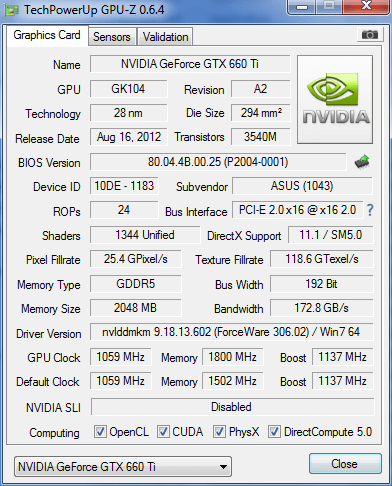
ux.png
 
Well, I don't know what to tell you except possibly the 660 Ti cards are different. But my 680 sits at 1275 like a rock below 70C, then rolls off at temps above 70C. Did you turn up your power limit? Maybe your card is power throttling.

I don't know why you are LoLing. The boost behavior is very well understood. It'll boost to the boost clock until it reaches predefined temperatures (or exceeds the power limit), at which point it will clock down slightly. And yes, I've watched both Heaven, and Furmark, and games, because I have a second monitor I use to monitor the system. It boosts to 1275 (overclocked) below 70C, then at 70C it starts rolling off the freqs as temperature increases. Maybe your card is power throttling.

Do you need visual proof? Here is my card in Furmark and Heaven, you can clearly see it is solid at 1275 below 70C, a solid 1260 between 70C and 80C, and then at the end you can see it drops to 1247 at 80C a couple of places.

furmark.jpg

heaven2.jpg

I see your posts, and I'll quote your other post from the other thread here to consolidate everything.

I spent the night messing around the power limit is set to 122% on, but is throttling power %, its weird, when it doesn't throttle, it sticks to 13c drops and not the 1228,1215 nonsense.......I don't understand though why the two different 660Ti's I have behave the same since they're different cards, maybe its a 660Ti thing?

I'm lost even more, I dialed down the EVGA card even more and its benching higher at 1215 lol, but it doesn't seem to blip, but does throttle power though.
 
Last edited:
I see your posts, and I'll quote your other post from the other thread here to consolidate everything.

I spent the night messing around the power limit is set to 122% on, but is throttling power %, its weird, when it doesn't throttle, it sticks to 13c drops and not the 1228,1215 nonsense.......I don't understand though why the two different 660Ti's I have behave the same since they're different cards, maybe its a 660Ti thing?

I'm lost even more, I dialed down the EVGA card even more and its benching higher at 1215 lol, but it doesn't seem to blip, but does throttle power though.

Are you watching the GPU power while you are using it? I've noticed that if mine gets above 125% or so (out of 132%) it'll sometimes drop down to an intermediate freq (like 1267 instead of 1260). Sounds like that might be what is happening with you. Does it still do it if you lower settings (and so lower the power load)? Maybe try running Heaven at a lower resolution and see if it still does it. What does it do if you have Vsync on?
 
Are you watching the GPU power while you are using it? I've noticed that if mine gets above 125% or so (out of 132%) it'll sometimes drop down to an intermediate freq (like 1267 instead of 1260). Sounds like that might be what is happening with you. Does it still do it if you lower settings (and so lower the power load)? Maybe try running Heaven at a lower resolution and see if it still does it. What does it do if you have Vsync on?

I just turned down Heaven to 1280x1024, but since that doesn't stress the card past 70c, I'm not seeing the bonkers behavior, it pegs 1238 just fine, but its also harder to tell if its power throttling because usage dips more often and is all over obviously.

Its post 70c where it just goes bonkers and only likes to stick 1215, with the power limit riding around 100-108%, it doesn't even get to 122% regardless, so it sounds like the TDP is lower on these cards.

I wonder if any of those with the Gigabyte or Asus cards would jump in.
 
Mine runs 1305boost clock with only 1120 base clock all day long. Only +50mv 114%power limit (never breaks 100% even in kombuster) and +450 memory. Temps never break 65° @60% fan in kombuster. Mid 50s while gaming. I have no idea why people r trying to get these stupid high baseclocks. The temps and power usage are so high it keeps your boost clock from getting its full potential, and isn't boost clock what really matters.
 
Last edited:
Does increasing voltage affect memory overclocks? or Just core?

I'm rockin' a eVGA 660 TI Reference model, no SC.

Currently trying to max out my memory, I can hit 7000 but it's not stable, wondering if the voltage bump would help.
 
Last edited:
gpu-z shows the logical boost clock. i think a certain % or increment of mhz above base clock. if u watch the sensor on gpu-z while gaming it will read the same as msi afterburner. looks like evga precision shows actual max boost clock if u look it shows the little arrows blue being base clock and orange showing logical boost clock (i call it that dont know why lol). which if u notice the orange arrow is right around what gpu-z shows. the sensor tab will show under load the 1202 that evga show. my card runs stock at that max boost clock :)
 
gpu-z shows the logical boost clock. i think a certain % or increment of mhz above base clock. if u watch the sensor on gpu-z while gaming it will read the same as msi afterburner. looks like evga precision shows actual max boost clock if u look it shows the little arrows blue being base clock and orange showing logical boost clock (i call it that dont know why lol). which if u notice the orange arrow is right around what gpu-z shows. the sensor tab will show under load the 1202 that evga show. my card runs stock at that max boost clock :)

thanks :)
 
Mine runs 1305boost clock with only 1120 base clock all day long. Only +50mv 114%power limit (never breaks 100% even in kombuster) and +450 memory. Temps never break 65° @60% fan in kombuster. Mid 50s while gaming. I have no idea why people r trying to get these stupid high baseclocks. The temps and power usage are so high it keeps your boost clock from getting its full potential, and isn't boost clock what really matters.

Furmark/kombuster sucks, I'm willing to bet you crash Heaven with 1305 lol...
 
Does increasing voltage affect memory overclocks? or Just core?

I'm rockin' a eVGA 660 TI Reference model, no SC.

Currently trying to max out my memory, I can hit 7000 but it's not stable, wondering if the voltage bump would help.

It can affect the memory OC if you're on the edge, since adding more volts to the core means you're upping it to the memory controller inside.
 
Furmark/kombuster sucks, I'm willing to bet you crash Heaven with 1305 lol...

you can bet all you want i ran heaven for an hour maxed lol;). my card does 1202 top boost constant stock. 1305 is only 103 mhz oc. only running 1120 base clock. stock is 1020. runs stable at 1320 with +.75 but only went up like half a frame so i like 1305. good mix of voltage and clock. guys at hardware legion got 1342 or something like that out of same card as mine at same voltage... so mines nothing special. kombuster is very powerful if u run it right. maxing out aa makes the force on the core much lower. with no aa im pegged at 99% with 66 temp. with aa im like 95-96% with 58 temp. run fan a bit higher in kombuster than while gaming.
Did a run just for you. 1302 is what it was not 1305 i tripped out. but ya its weird res cuz i had to run it non full screen cuz i couldn't figure out how to get it to show when i alt tabbed out in full screen. sat threw a whole fullscreen run for no reason.
wtioi9.png
 
Last edited:
you can bet all you want i ran heaven for an hour maxed lol;). my card does 1202 top boost constant stock. 1305 is only 103 mhz oc. only running 1120 base clock. stock is 1020. runs stable at 1320 with +.75 but only went up like half a frame so i like 1305. good mix of voltage and clock. guys at hardware legion got 1342 or something like that out of same card as mine at same voltage... so mines nothing special. kombuster is very powerful if u run it right. maxing out aa makes the force on the core much lower. with no aa im pegged at 99% with 66 temp. with aa im like 95-96% with 58 temp. run fan a bit higher in kombuster than while gaming.

Base clock doesn't really matter, the only number that you need to report is the boost clock.
 
Base clock doesn't really matter, the only number that you need to report is the boost clock.

I know im just saying cuz people r trying to get the highest base clock and pumping voltage... which usually nets to a lower boost clock because hitting power/temp limits. trying to help.
 
I know im just saying cuz people r trying to get the highest base clock and pumping voltage... which usually nets to a lower boost clock because hitting power/temp limits. trying to help.

I'm not even sure what you are talking about with changing the base clock. On most cards (all?) the only thing you are changing is the boost clock. The +150 on the card adds 150 to whatever the card wants to run at, but that's the only number you are changing. There aren't two clock speeds to adjust. The only number people talk about is the fully loaded boost clock.
 
That's the fastest PE I have seen.

I'm kind of curious though, why at load you don't break past 88% power though.
 
I'm not even sure what you are talking about with changing the base clock. On most cards (all?) the only thing you are changing is the boost clock. The +150 on the card adds 150 to whatever the card wants to run at, but that's the only number you are changing. There aren't two clock speeds to adjust. The only number people talk about is the fully loaded boost clock.
raising the clock speed raises the base clock too.
 
raising the clock speed raises the base clock too.

But by the same amount. So I don't understand what he is talking about people trying to get high base clocks and that affecting their boost clock. You only change one number. On top of that, when do you even see the base clock? My card goes from idle clocks (324) to boost clock (1275), and that's pretty much it. It doesn't ever go to a "base" clock.
 
Well I got real lucky with MSI 660Ti OC edition. sigh

GPU: 1163 MHz ... 68 degrees at full load.

MEM: Will not move more than a few MHz..

Increasing voltage only helped a tiny bit but the temps went up too.
 
Well I got real lucky with MSI 660Ti OC edition. sigh

GPU: 1163 MHz ... 68 degrees at full load.

MEM: Will not move more than a few MHz..

Increasing voltage only helped a tiny bit but the temps went up too.

Something seems up with that, my reference cooler does 71c, which sucks because its soo close to not being throttled it pisses me off.
 
But by the same amount. So I don't understand what he is talking about people trying to get high base clocks and that affecting their boost clock. You only change one number. On top of that, when do you even see the base clock? My card goes from idle clocks (324) to boost clock (1275), and that's pretty much it. It doesn't ever go to a "base" clock.
yeah it should rarely ever run at base clock except if its under just enough load to be demanding for 3D but not enough to boost. for example running vsync or using a frame rate cap will make it run at base clock in some undemanding games like RAGE.
 
Something seems up with that, my reference cooler does 71c, which sucks because its soo close to not being throttled it pisses me off.

I test with Kombustor, latest version and or in games such as MP3 and Nexuiz (Cryengine3). Artifacts start happening in Kombustor, "OpenGL driver lost connection with the display, Error Code 7" or simply nothing displayed in games. Those are the typical results. Even with the fans at 100%.

Setting the fan to auto in Afterburner settles it at "42" when GPU has been at full load for 5 minutes. 69 degrees. GPU 1170 @ +40 voltage.

Should I take it out and see if the heat sink is properly set?

BIOS version: 80.04.4B.00.16 (P2004-0001)
 
I test with Kombustor, latest version and or in games such as MP3 and Nexuiz (Cryengine3). Artifacts start happening in Kombustor, "OpenGL driver lost connection with the display, Error Code 7" or simply nothing displayed in games. Those are the typical results. Even with the fans at 100%.

Setting the fan to auto in Afterburner settles it at "42" when GPU has been at full load for 5 minutes. 69 degrees. GPU 1170 @ +40 voltage.

Should I take it out and see if the heat sink is properly set?

BIOS version: 80.04.4B.00.16 (P2004-0001)

You shouldn't be seeing artifacting at those temps with those clocks though, your temps are off a few degrees but not enough to be causing problems.

My reference card boosts to 1137 out of the box, or round that, without voltage mods, or upping the power limit, my Galaxy 660Ti boosted higher out of the box than your card....

I don't think reapplying TIM is going to help your card. :(
 
You shouldn't be seeing artifacting at those temps with those clocks though, your temps are off a few degrees but not enough to be causing problems.

My reference card boosts to 1137 out of the box, or round that, without voltage mods, or upping the power limit, my Galaxy 660Ti boosted higher out of the box than your card....

I don't think reapplying TIM is going to help your card. :(

After much more testing I can safely say that the card prefers absolute reference clocks. When resetting everything I have no issues in games and no artifacts. So essentially this OC edition with "super cooler" that is Twinfrozor IV is as good as any reference card. Thanks MSI. To be fair, default setting allows for a boost of up to 1098 MHz, so I will be "feeling" the overclocking...

My PSU is 850W Zalman (Enhance).
 
After much more testing I can safely say that the card prefers absolute reference clocks. When resetting everything I have no issues in games and no artifacts. So essentially this OC edition with "super cooler" that is Twinfrozor IV is as good as any reference card. Thanks MSI. To be fair, default setting allows for a boost of up to 1098 MHz, so I will be "feeling" the overclocking...

My PSU is 850W Zalman (Enhance).

That's pretty bad then, any chance of RMA'ing it through the vendor?
 
That's pretty bad then, any chance of RMA'ing it through the vendor?

Overclocks aren't guaranteed... I agree it's a disappointing card but it's kinda shady to just return it due to a poor oc.

Something seems up with that, my reference cooler does 71c, which sucks because its soo close to not being throttled it pisses me off.

I briefly owned a pair of MSI 660 Ti Power Editions... they ran hot as hell, the cooler on them is horrible compared to my GTX 670 WindForce 3.
 
Overclocks aren't guaranteed... I agree it's a disappointing card but it's kinda shady to just return it due to a poor oc.


I briefly owned a pair of MSI 660 Ti Power Editions... they ran hot as hell, the cooler on them is horrible compared to my GTX 670 WindForce 3.

I don't see it as being shady, if you're not completely satisfied with a product, send it back, some vendors actually encourage you to do so; buying a card that implies its setup to oc and doesn't seems grounds enough to me.

I can't say I'm shocked about the cooler though, I've never had any luck with MSI, I've owned 3 cards in the past and always had their fans crap out on me.
 
Overclocks aren't guaranteed... I agree it's a disappointing card but it's kinda shady to just return it due to a poor oc.

I briefly owned a pair of MSI 660 Ti Power Editions... they ran hot as hell, the cooler on them is horrible compared to my GTX 670 WindForce 3.

Keep in mind that the model name features "OC" at the end... so yes, bad overclock is bad.

Not at all shady. It is my right. The law dictates a 3 week return right here in the EU. The thing is that I claimed my Borderlands 2 registration code already, which makes it impossible to return for me. So I set myself nicely up for having to live with this card. Oh well, good thing it was only $450

I don't see it as being shady, if you're not completely satisfied with a product, send it back, some vendors actually encourage you to do so; buying a card that implies its setup to oc and doesn't seems grounds enough to me.

I can't say I'm shocked about the cooler though, I've never had any luck with MSI, I've owned 3 cards in the past and always had their fans crap out on me.

I wish I had talked to you guys first. This will be my last MSI video card. Too many alternatives to stick with a company that disappoints. I have been very happy with MSI motherboards though. Anyway will be selling this POS locally for a non enthusiast as soon as 700 series hits the streets :)
 
Keep in mind that the model name features "OC" at the end... so yes, bad overclock is bad.

Not at all shady. It is my right. The law dictates a 3 week return right here in the EU. The thing is that I claimed my Borderlands 2 registration code already, which makes it impossible to return for me. So I set myself nicely up for having to live with this card. Oh well, good thing it was only $450


I wish I had talked to you guys first. This will be my last MSI video card. Too many alternatives to stick with a company that disappoints. I have been very happy with MSI motherboards though. Anyway will be selling this POS locally for a non enthusiast as soon as 700 series hits the streets :)

No company is infallible, its just one of those things, if I went back to ATi I would pickup another MSI card because sadly nobody else makes a decent 7850 that clocks as well on a factory cooler; its just one of those things.
 
No company is infallible, its just one of those things, if I went back to ATi I would pickup another MSI card because sadly nobody else makes a decent 7850 that clocks as well on a factory cooler; its just one of those things.

I know, I have had bad luck with all except Intel, Crucial, Corsair, Samsung, LiteOn and Dell so far. Been through A LOT of hardware. I just meant to say that I would try another brand for the heck of it.
 
I don't see it as being shady, if you're not completely satisfied with a product, send it back, some vendors actually encourage you to do so; buying a card that implies its setup to oc and doesn't seems grounds enough to me.

I can't say I'm shocked about the cooler though, I've never had any luck with MSI, I've owned 3 cards in the past and always had their fans crap out on me.
Well, the OC in the name means it comes with a stock overclock. That said, unless you try returning it as defective, there's nothing wrong with returning if the vendor's willing, I agree.
 
Well, the OC in the name means it comes with a stock overclock. That said, unless you try returning it as defective, there's nothing wrong with returning if the vendor's willing, I agree.

I am screwed, since I activated the Borderlands 2 key that came with the card. Talked to the vendor, they would gladly take it back, but I screwed myself over activating that key. Waiting for Steam support to tell they cant help me. The card is not faulty, just not a very good GPU. Should be fine for Borderlands 2, which is why I got it.
 
I am screwed, since I activated the Borderlands 2 key that came with the card. Talked to the vendor, they would gladly take it back, but I screwed myself over activating that key. Waiting for Steam support to tell they cant help me. The card is not faulty, just not a very good GPU. Should be fine for Borderlands 2, which is why I got it.

Yipes.... It should run well, but if you really want to return it maybe see if they can deduct borderlands 2 from the refund? You may lose 15 or so compared to sale pricing but if you want it gone, it's a thought to ask.
 
But by the same amount. So I don't understand what he is talking about people trying to get high base clocks and that affecting their boost clock. You only change one number. On top of that, when do you even see the base clock? My card goes from idle clocks (324) to boost clock (1275), and that's pretty much it. It doesn't ever go to a "base" clock.

OK so I should of worded this differently aparently. I said it the way I did because I was constantly watching gpu-z. When you increase your overclock you increase the base clock as well. Mine is 1020 base and raises to 1202 boost clock. When its set to +100 in afterburner it shows in gpu-z as 1120 base clock and it'll boost in afterburner to 1302. Just my own f'd up way of figuring out how these cards work. I'm sure its quite new to everyone. Mines not the fastest I've seen.
http://www.hitechlegion.com/reviews/graphics/30110-msi-660ti-pow-oc?start=9
They didn't get as much out of the memory as I did, but a higher core clock.
 
I am screwed, since I activated the Borderlands 2 key that came with the card. Talked to the vendor, they would gladly take it back, but I screwed myself over activating that key. Waiting for Steam support to tell they cant help me. The card is not faulty, just not a very good GPU. Should be fine for Borderlands 2, which is why I got it.

Sorry, but I'd call that karma for trying to return a working card just because it doesn't overclock as well as you'd like.
 
After much more testing I can safely say that the card prefers absolute reference clocks. When resetting everything I have no issues in games and no artifacts. So essentially this OC edition with "super cooler" that is Twinfrozor IV is as good as any reference card. Thanks MSI. To be fair, default setting allows for a boost of up to 1098 MHz, so I will be "feeling" the overclocking...

My PSU is 850W Zalman (Enhance).

If its the same card as mine it'll boost to 1202 stock. Meaning if u can get a decent OC on the memory your not missing out on much. I dont know what you guys are talking about saying the cooler is horrible. Check the pick near bottom of page 3. I maxed out at 58 last night after like 4 hours of bf3 at 55% fan. My BIOS version is 80.04.4B.00.17(P2004-0001). Maybe an update would help ?
 
Last edited:
Sorry, but I'd call that karma for trying to return a working card just because it doesn't overclock as well as you'd like.

Love you too.

First of all I did not try to return it... zzzz read man, read.

I will try updating the BIOS :)
 
Last edited:
If its the same card as mine it'll boost to 1202 stock. Meaning if u can get a decent OC on the memory your not missing out on much. I dont know what you guys are talking about saying the cooler is horrible. Check the pick near bottom of page 3. I maxed out at 58 last night after like 4 hours of bf3 at 55% fan. My BIOS version is 80.04.4B.00.17(P2004-0001). Maybe an update would help ?

Yeah, I needed 55 percent or so to make it cool too, but on this cooler it is loud that way.
 
I can't here it till over 65% over my 180mm case fans, which aren't loud. But, one mans quiet is another mans jet plane lol. I only need 45% at stock to run under 70. Runs bf3 and crysis 2 maxed stock so screw it.
 
I think I'll just grab a GTX 670 & call it a day. No need to overclock if it's a crap shoot with the 660Ti
 
Sorry, but I'd call that karma for trying to return a working card just because it doesn't overclock as well as you'd like.

Haha, I'm pretty sure the karma gods have better things to do than strike you down for not liking something, besides he kept the card.

As for rolling the dice on 660Ti they're not that bad, there's a couple bad ones I have seen, but the same goes for the 670...
 
Back
Top