OC cpu 24/7??

sladesurfer

[H]ard|Gawd
Joined
Feb 4, 2006
Messages
1,142
On what OC are you running your CPU 24/7?? Im running my E6400 @ 3.9 for everyday use/gaming/24/7 :D
 
Athlon XP 2500+ Mobile Barton
12.5x202 (2525 MHz) @ 2.0 volts on water

:D
 
C2D4300@ 3.2Ghz running 24/7, use it as a multimedia PC connected to my TV if I'm not using it for anything else.
 
E6300@ 3.35


But my Question is how much it will cost me to let it run 24/7

with this setup:

680i EVGA SLI Motherboard.
8800GTS default.
2x160GB RAID 0
2X18X DVD Writers.
8X 120mm fans.
MCP655 Pump.
500 watts PSU

My electric charge is 10c / watt
 
Q6600 at 3.5ghz daily crunching F@H (24/7 daily, running 3 months)
P-M 1.6ghz at 2.13ghz daily crunching F@H (24/7 daily, running for almost a year now)
XP 3000 @ 2.25ghz daily crunching F@H (2.5 years now, 24/7 daily :) )
 
I keep my E4300 at 3GHz. Because dang it's gonna get hooooooooooooot this summer in Arizona and I still use the stock HSF. :cool:
 
Sorry to dredge up a slightly old thread....

I was wondering if others had experimented with CPU throttling along with overclocking?

I've got an Opty 175 slightly overclocked to 2.4Ghz... and I run it like that 24/7. But at the same time I have Cool and Quiet turned on... and use the "Laptop" profile in Windows... so the cpu is usually running around half-speed... and only when I need it, does it jump up to 2.4GHz.

For me, this is the ideal situation... using SpeedFan to control my fans... my comp is absolutely silent until I play a game or something.

It seems to me that this would be the ideal way to overclock, because your CPU isn't burning itself up all the time when you're not using it. Anyone else run it this way?

Friedmud
 
E6600 @ 3.2 on stock voltage. its all i need and i dont want to push it further.
 
Sorry to dredge up a slightly old thread....

I was wondering if others had experimented with CPU throttling along with overclocking?

I've got an Opty 175 slightly overclocked to 2.4Ghz... and I run it like that 24/7. But at the same time I have Cool and Quiet turned on... and use the "Laptop" profile in Windows... so the cpu is usually running around half-speed... and only when I need it, does it jump up to 2.4GHz.

For me, this is the ideal situation... using SpeedFan to control my fans... my comp is absolutely silent until I play a game or something.

It seems to me that this would be the ideal way to overclock, because your CPU isn't burning itself up all the time when you're not using it. Anyone else run it this way?

Friedmud
Not useful if you've got F@H running 24/7.
 
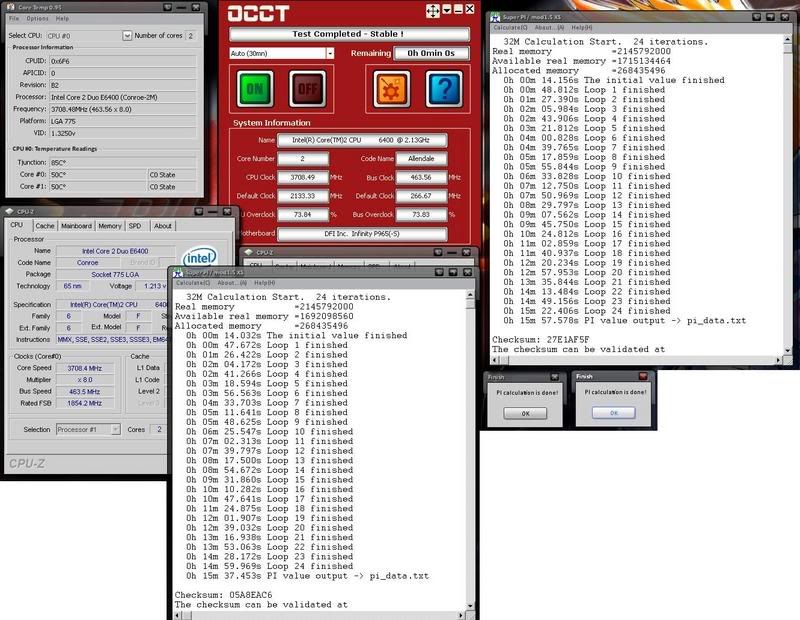
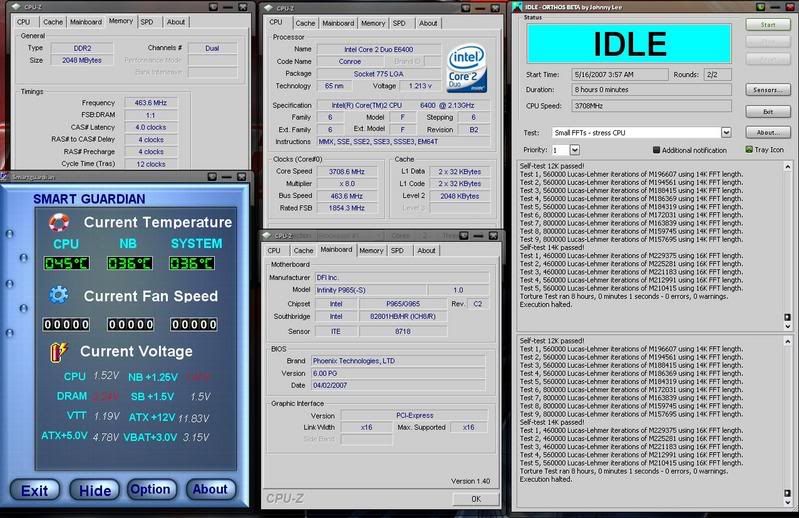
User Name: bail_w
Stability: 8 hours+ Small FFTs orthos and OCCT

CPU: E6400
OC: 3708
Stepping: 6B2
Week: L28
Code: A457
Vcore: 1.52 (in bios)

Cooling: Water
Cooler brand/model: Custom: D-Tek Fuzion, Thermochill PA 120.2, Swiftech MCP655

Motherboard: DFI P965-S
Bios Version: 4/02/2007
Operating System: XP 32

RAM brand: G SKill
RAM rated speed: 6400
RAM actual speed: 927
Latency: 4-4-4-12

untitled-2.jpg


untitled-3.jpg


Crunching WCG for a week now.
 
I feel more a part of the [H] community now that I learned how to OC.

Opty 165 @ 2.95ghz 1.4v (stock 1.8ghz)
 
Opteron 165 @ 2.82GHz 1.35V with a Thermaltake Big Typhoon.

Idle: 32-34C
Load: 45C Max
 
Back
Top
