![[H]ard|Forum](/styles/hardforum/xenforo/logo_dark.png)
Navigation
Install the app
How to install the app on iOS
Follow along with the video below to see how to install our site as a web app on your home screen.
Note: This feature may not be available in some browsers.
More options
-
Some users have recently had their accounts hijacked. It seems that the now defunct EVGA forums might have compromised your password there and seems many are using the same PW here. We would suggest you UPDATE YOUR PASSWORD and TURN ON 2FA for your account here to further secure it. None of the compromised accounts had 2FA turned on.
Once you have enabled 2FA, your account will be updated soon to show a badge, letting other members know that you use 2FA to protect your account. This should be beneficial for everyone that uses FSFT.
You are using an out of date browser. It may not display this or other websites correctly.
You should upgrade or use an alternative browser.
You should upgrade or use an alternative browser.
New gaming rig
- Thread starter Maestro
- Start date

Mr. Miyagi
2[H]4U
- Joined
- Sep 21, 2004
- Messages
- 2,982
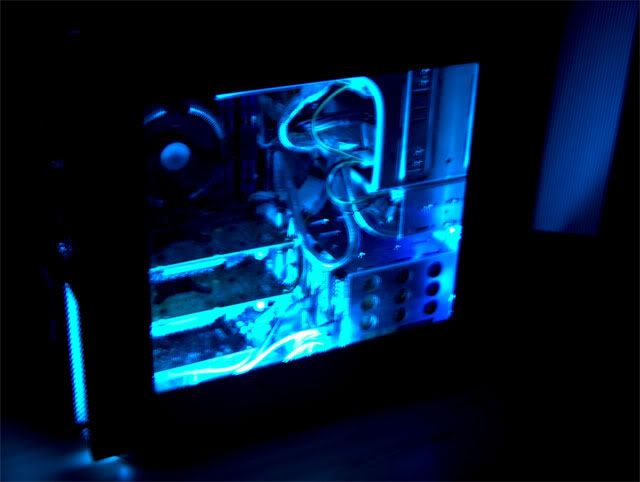
What an amazing setup. It looks good and I bet it flies! It doesn't deserve to be on the floor though. 
Mr. Miyagi said:What an amazing setup. It looks good and I bet it flies! It doesn't deserve to be on the floor though.
I agree that a rig of that magnitude does not deserve to be placed on the floor. Do you have a cat by chance Maestro? If you do, that comp is gonna get clogged with cat hair very easily as cat hair is insanely fine. The pantyhose fan filters would be a good thing for that rig if you have a cat around. It looks cool all lit up like that, but you need too clean up that cable mess man. Otherwise, it looks really good.
I'll be building an SLI rig sometime this summer. I can't wait for the DFI Lanparty SLI board to come out. That should be really quite nice. I'll have to sell my current rig though, but my parents will probably get it. I just hope I can get $850 out of my rig. I've got a Radeon 9500 Pro that I can put in place of the 9800 Pro and ebay the 9800 Pro. Just gotta get on with saving a good deal of money.
Anyhow, I bet you could build it for less, but for $567.00. How on earth could you do that? The proc + vid cards+ mobo is over 1,000 easy.
One of the video adapters free (6800 Ultra) free and case free. We have a mutual friend that had all the stuff for an SLI rig and parted it out to go overseas. Because i had done some construction work for him (on his former house) at no charge he gave me one of the 6800 ultras and his case. I do have some parts sitting around. I may just use the 6800 Ultra myself and use it with a NF4 mainboard. But i will admit i like ATI better (just a personal preference).
Oh okay, now I understand. Wierd he didn't want you to build it for that price but that Hypersonic PC is awesome.zone_86 said:One of the video adapters free (6800 Ultra) free and case free. We have a mutual friend that had all the stuff for an SLI rig and parted it out to go overseas. Because i had done some construction work for him (on his former house) at no charge he gave me one of the 6800 ultras and his case. I do have some parts sitting around. I may just use the 6800 Ultra myself and use it with a NF4 mainboard. But i will admit i like ATI better (just a personal preference).
Haha! Well, I was afraid of enclosing it in the compartment that the desk has for the computer because of heat issues and I am not sure how to place that system on my desk and still have room to do anything. I actually do some work there. It is not all play.Mr. Miyagi said:What an amazing setup. It looks good and I bet it flies! It doesn't deserve to be on the floor though.
Snobok, I do not have a cat but I do have a dog. I will keep your recommendation under consideration, but I am a clean freak so hopefully I won't let too much hair get in the system.
BTW, the latest issue of Maximum PC gives this system its Kick Ass award, a 9.
[Retaliation]
Limp Gawd
- Joined
- Dec 7, 2004
- Messages
- 505
this what i did...i have 2 cats..its not pretty..but it keeps it off the floorMaestro said:Haha! Well, I was afraid of enclosing it in the compartment that the desk has for the computer because of heat issues and I am not sure how to place that system on my desk and still have room to do anything. I actually do some work there. It is not all play.
Snobok, I do not have a cat but I do have a dog. I will keep your recommendation under consideration, but I am a clean freak so hopefully I won't let too much hair get in the system.
BTW, the latest issue of Maximum PC gives this system its Kick Ass award, a 9.

I got my SLI rig from Velocity Micro today. Maestro and I have very similar configs, except he has 2GB of RAM as opposed to my 1GB, and I have dual 74GB Raptor hard drives.
I haven't had a chance to do any gaming or anything yet. I'm still in the middle of transferring over my files from an external hard drive. I'm also downloading 3DMark03 and 05 to do a little benchmarking.
First impressions:
- I'm very pleased with the look of the case and the wiring of my machine. For some reason, my wiring looks quite a bit better than Maestro's.
- I too am pleasantly surprised at how quiet the machine is. After reading the CNet and Maximum PC reviews (which both claimed the machine is loud), I was quite worried. I'm glad to say that I don't find the machine loud at all. Perhaps the Ultra video cards are much louder than the 6800GTs.
- I was a little disappointed to see that no overclocking was done to the machine, though I paid extra for "Advanced tuning and overclocking." Perhaps they don't offer any overclocking on the SLI rigs, and that's understandable, but it shouldn't be an option in the configurator if they don't. I might inquire about this to see what their policy is.
- The only problem I seem to be having is some flickering video. I've got the rig connected to my Dell 2000FP 20.1" LCD via DVI. I had no clue which of the DVI ports to connect it to, so I chose the one in the top-left corner. Everything appears fine, but I'm seeing some flickering in the taskbar, and I've noticed it in a few dialogue boxes that have opened too. I'll have to see what happens with the games.
- The packaging was nicely done, and though the binder is not personalized and is kind of cheap, I'm pleased with the bundle that came with this rig. Far Cry, Battlefield 1942, and HL2 all came standard. I can't wait to try them all out.
- The hard drives are louder than I'm used to. You can really hear them when they're chewing on something, but this is not really a huge issue to me.
- I'm pretty amazed at how...well..."zippy" everything is. The machine boots up in no time, and if I right-click on the desktop or open a folder, it happens instantly. Way cool.
That's all for now. I'll be posting a fairly thorough review with pictures and benchmarks sometime very soon.
I haven't had a chance to do any gaming or anything yet. I'm still in the middle of transferring over my files from an external hard drive. I'm also downloading 3DMark03 and 05 to do a little benchmarking.
First impressions:
- I'm very pleased with the look of the case and the wiring of my machine. For some reason, my wiring looks quite a bit better than Maestro's.
- I too am pleasantly surprised at how quiet the machine is. After reading the CNet and Maximum PC reviews (which both claimed the machine is loud), I was quite worried. I'm glad to say that I don't find the machine loud at all. Perhaps the Ultra video cards are much louder than the 6800GTs.
- I was a little disappointed to see that no overclocking was done to the machine, though I paid extra for "Advanced tuning and overclocking." Perhaps they don't offer any overclocking on the SLI rigs, and that's understandable, but it shouldn't be an option in the configurator if they don't. I might inquire about this to see what their policy is.
- The only problem I seem to be having is some flickering video. I've got the rig connected to my Dell 2000FP 20.1" LCD via DVI. I had no clue which of the DVI ports to connect it to, so I chose the one in the top-left corner. Everything appears fine, but I'm seeing some flickering in the taskbar, and I've noticed it in a few dialogue boxes that have opened too. I'll have to see what happens with the games.
- The packaging was nicely done, and though the binder is not personalized and is kind of cheap, I'm pleased with the bundle that came with this rig. Far Cry, Battlefield 1942, and HL2 all came standard. I can't wait to try them all out.
- The hard drives are louder than I'm used to. You can really hear them when they're chewing on something, but this is not really a huge issue to me.
- I'm pretty amazed at how...well..."zippy" everything is. The machine boots up in no time, and if I right-click on the desktop or open a folder, it happens instantly. Way cool.
That's all for now. I'll be posting a fairly thorough review with pictures and benchmarks sometime very soon.
[Retaliation]
Limp Gawd
- Joined
- Dec 7, 2004
- Messages
- 505
lol..well...it is and it its..it looks worse then it is....i dont think i set my camera right befor i took the shot..it because of the modular psu..the cables glow under uv...so those are reflecting back at the camera lens..but tyMaestro said:I bet I could build a stand for it. I have the tools for it. It shouldn't be too hard. Thanks for the idea. BTW, that is one colorful rig.
earthscore
Gawd
- Joined
- Aug 7, 2004
- Messages
- 542
Snobok said:I agree that a rig of that magnitude does not deserve to be placed on the floor. Do you have a cat by chance Maestro? If you do, that comp is gonna get clogged with cat hair very easily as cat hair is insanely fine. The pantyhose fan filters would be a good thing for that rig if you have a cat around. It looks cool all lit up like that, but you need too clean up that cable mess man. Otherwise, it looks really good.
I'll be building an SLI rig sometime this summer. I can't wait for the DFI Lanparty SLI board to come out. That should be really quite nice. I'll have to sell my current rig though, but my parents will probably get it. I just hope I can get $850 out of my rig. I've got a Radeon 9500 Pro that I can put in place of the 9800 Pro and ebay the 9800 Pro. Just gotta get on with saving a good deal of money.
Heh, i guess i have a cruel mind. When i saw "Do you have a cat?" i had thought you meant put it on top of the cat, instead of the floor. i started laughing pretty hard until i read the next sentence
tjmaxwell said:I got my SLI rig from Velocity Micro today. Maestro and I have very similar configs, except he has 2GB of RAM as opposed to my 1GB, and I have dual 74GB Raptor hard drives.
I haven't had a chance to do any gaming or anything yet. I'm still in the middle of transferring over my files from an external hard drive. I'm also downloading 3DMark03 and 05 to do a little benchmarking.
First impressions:
- I'm very pleased with the look of the case and the wiring of my machine. For some reason, my wiring looks quite a bit better than Maestro's.
- I too am pleasantly surprised at how quiet the machine is. After reading the CNet and Maximum PC reviews (which both claimed the machine is loud), I was quite worried. I'm glad to say that I don't find the machine loud at all. Perhaps the Ultra video cards are much louder than the 6800GTs.
- I was a little disappointed to see that no overclocking was done to the machine, though I paid extra for "Advanced tuning and overclocking." Perhaps they don't offer any overclocking on the SLI rigs, and that's understandable, but it shouldn't be an option in the configurator if they don't. I might inquire about this to see what their policy is.
- The only problem I seem to be having is some flickering video. I've got the rig connected to my Dell 2000FP 20.1" LCD via DVI. I had no clue which of the DVI ports to connect it to, so I chose the one in the top-left corner. Everything appears fine, but I'm seeing some flickering in the taskbar, and I've noticed it in a few dialogue boxes that have opened too. I'll have to see what happens with the games.
- The packaging was nicely done, and though the binder is not personalized and is kind of cheap, I'm pleased with the bundle that came with this rig. Far Cry, Battlefield 1942, and HL2 all came standard. I can't wait to try them all out.
- The hard drives are louder than I'm used to. You can really hear them when they're chewing on something, but this is not really a huge issue to me.
- I'm pretty amazed at how...well..."zippy" everything is. The machine boots up in no time, and if I right-click on the desktop or open a folder, it happens instantly. Way cool.
That's all for now. I'll be posting a fairly thorough review with pictures and benchmarks sometime very soon.
Glad to hear everything came in good shape. I continue to be impressed as well. Sometimes I think my games aren't running in 1600X1200 because everything isso smooth. It's freaky. I'll try to run more benchmarks so we can compare. I hope you get that flickering issue worked out.
Edit: I didn't get Battlefield 1942 with my system but rather Doom 3. I wonder why.
I just ran 3DMark03 and scored 18629. A pretty solid score.
One thing I noticed is the screen was sort of jittery during the two CPU tests in 3DMark03. Almost like it was bouncing up and down really rapidly. I wonder why that is. The 3D tests looked perfect though.
The flickering issue isn't too big of a deal, I just notice it once in a while, and it doesn't seem to affect anything. Perhaps I should try plugging in my monitor into a different DVI port to see if that fixes it. I'm coming up with a few questions I'm going to ask tech support about. So far, so good though!
One thing I noticed is the screen was sort of jittery during the two CPU tests in 3DMark03. Almost like it was bouncing up and down really rapidly. I wonder why that is. The 3D tests looked perfect though.
The flickering issue isn't too big of a deal, I just notice it once in a while, and it doesn't seem to affect anything. Perhaps I should try plugging in my monitor into a different DVI port to see if that fixes it. I'm coming up with a few questions I'm going to ask tech support about. So far, so good though!
Here are my latest benchmarks. What surprised me was the HL2 scores. There was practically no difference between 1024 and 1600 resolutions. I guess this is where the SLI shows its strengths or weaknesses depending on where you look at it.
I also have the latest 3dMak05 and SiSoft05.

Here are the SiSoft scores


And the HL2 scores:
Resolution: 1024×768
Demo: HardwareOC - Coast
Detail: Maximum quality
Antialising mode: From System
Filtering mode: From System
Hardware DirectX level: DirectX 9
Heapsize: 64 MB - default
Score = 83.1 FPS
Resolution: 1600×1200
Demo: HardwareOC - Coast
Detail: Maximum quality
Antialising mode: From System
Filtering mode: From System
Hardware DirectX level: DirectX 9
Heapsize: 64 MB - default
Score = 83.2 FPS
I will try to have some Doom 3 and Far Cry later.
Edit: Sheesh! Sorry they turned out so big. I will try to resize.
Edit: Now they are too small. I will get right but it will have to wait until tomorrow. Sorry.
Edit: Far Cry Benchmarks; again no difference between 1024 and 1600 resolutions.
Resolution: 1600×1200
Ultra quality option, Direct3D renderer
Level: Pier, demo: 1.tmd
Pixel shader: default model
Antialising: 4×
Anisotrophic filtering: 4×
HDR: disabled
Geometry Instancing: disabled
Normal-maps compression: disabled
Score = 62.44 FPS (Run 1)
Score = 63.49 FPS (Run 2)
Average score = 62.96 FPS
Resolution: 1024×768
Ultra quality option, Direct3D renderer
Level: Pier, demo: 1.tmd
Pixel shader: default model
Antialising: 4×
Anisotrophic filtering: 4×
HDR: disabled
Geometry Instancing: disabled
Normal-maps compression: disabled
Score = 65.73 FPS (Run 1)
Score = 65.68 FPS (Run 2)
Average score = 65.70 FPS
I also have the latest 3dMak05 and SiSoft05.
Here are the SiSoft scores
And the HL2 scores:
Resolution: 1024×768
Demo: HardwareOC - Coast
Detail: Maximum quality
Antialising mode: From System
Filtering mode: From System
Hardware DirectX level: DirectX 9
Heapsize: 64 MB - default
Score = 83.1 FPS
Resolution: 1600×1200
Demo: HardwareOC - Coast
Detail: Maximum quality
Antialising mode: From System
Filtering mode: From System
Hardware DirectX level: DirectX 9
Heapsize: 64 MB - default
Score = 83.2 FPS
I will try to have some Doom 3 and Far Cry later.
Edit: Sheesh! Sorry they turned out so big. I will try to resize.
Edit: Now they are too small. I will get right but it will have to wait until tomorrow. Sorry.
Edit: Far Cry Benchmarks; again no difference between 1024 and 1600 resolutions.
Resolution: 1600×1200
Ultra quality option, Direct3D renderer
Level: Pier, demo: 1.tmd
Pixel shader: default model
Antialising: 4×
Anisotrophic filtering: 4×
HDR: disabled
Geometry Instancing: disabled
Normal-maps compression: disabled
Score = 62.44 FPS (Run 1)
Score = 63.49 FPS (Run 2)
Average score = 62.96 FPS
Resolution: 1024×768
Ultra quality option, Direct3D renderer
Level: Pier, demo: 1.tmd
Pixel shader: default model
Antialising: 4×
Anisotrophic filtering: 4×
HDR: disabled
Geometry Instancing: disabled
Normal-maps compression: disabled
Score = 65.73 FPS (Run 1)
Score = 65.68 FPS (Run 2)
Average score = 65.70 FPS
Maestro,
Have you checked the temperatures your processor has been running at? I read on one of VM's competitor's site that the Zalman cooler isn't sufficient to cool the FX-55. I downloaded the Asus Probe utility last night to check my temps, and they were near 70 degrees C without much load. This has really got me worried.
Have you checked the temperatures your processor has been running at? I read on one of VM's competitor's site that the Zalman cooler isn't sufficient to cool the FX-55. I downloaded the Asus Probe utility last night to check my temps, and they were near 70 degrees C without much load. This has really got me worried.
Well crap. No haven't checked the temps on the cpu just the gpu's. I will do that tonight. That Zalman sure looks like it should do the trick. It is bigger than even the stock FX-55 HSF. For what I paid for the fan, it sure as heck better cool that proc sufficiently. Again, I will check that out, but on one note, I wouldn't take the advice of a competitor to VM. We need some independent verification on the lack of cooling from this HSF.tjmaxwell said:Maestro,
Have you checked the temperatures your processor has been running at? I read on one of VM's competitor's site that the Zalman cooler isn't sufficient to cool the FX-55. I downloaded the Asus Probe utility last night to check my temps, and they were near 70 degrees C without much load. This has really got me worried.
Otherwise, how are enjoying the rig? Can't wait for your review.
Welcome!EnderW said:wow, how did I miss this thread?
and is that the Zalman 7700?
I think the rig is great so far, aside from these minor issues. I will admit that I'm now quite concerned about the temperatures. 69C is a very high temperature for full load much less idle. I've always wondered about Asus Probe though. Do you know of any other utilities out there that measure CPU temp?
Oh, and I wasn't given advice by a competitor. I read through the VoodooPC forums quite a bit and noticed someone there had reviewed their SLI rig. He posted some pics, and someone asked why Voodoo wasn't using the Zalman coolers anymore. The response from the Voodoo staff was because the Zalman cooler isn't sufficient to cool the FX-55 and the machines wouldn't pass the "Prime95" (or something like that) test when using the Zalman cooler.
Oh, and I wasn't given advice by a competitor. I read through the VoodooPC forums quite a bit and noticed someone there had reviewed their SLI rig. He posted some pics, and someone asked why Voodoo wasn't using the Zalman coolers anymore. The response from the Voodoo staff was because the Zalman cooler isn't sufficient to cool the FX-55 and the machines wouldn't pass the "Prime95" (or something like that) test when using the Zalman cooler.
Oh I see. Well, I would assume that VM wouldn't put it on if it would cause problems. Asus Probe does seem a bit sensitive. I'll check around for another temp monitoring utility and see what I come up with.tjmaxwell said:I think the rig is great so far, aside from these minor issues. I will admit that I'm now quite concerned about the temperatures. 69C is a very high temperature for full load much less idle. I've always wondered about Asus Probe though. Do you know of any other utilities out there that measure CPU temp?
Oh, and I wasn't given advice by a competitor. I read through the VoodooPC forums quite a bit and noticed someone there had reviewed their SLI rig. He posted some pics, and someone asked why Voodoo wasn't using the Zalman coolers anymore. The response from the Voodoo staff was because the Zalman cooler isn't sufficient to cool the FX-55 and the machines wouldn't pass the "Prime95" (or something like that) test when using the Zalman cooler.
tjmaxwell said:Velocity Micro doesn't say which specific fan they use, but I'm 99% sure it's the CNPS7000B-AlCu, this one.
Edit: Looking at the two on Newegg, they have the same appearance as far as I can tell, so it's possible they could be using the 7700.
CNPS7000A-AlCu = 92mm fan
CNPS7000B-AlCu = 92mm fan, improved design, slightly reduced weight
CNPS7700-AlCu = 120mm fan
looking at the pic again, I'm pretty sure it's a 7000, although not sure if it's an A or B since they are so similiar
tjmaxwell said:I think the rig is great so far, aside from these minor issues. I will admit that I'm now quite concerned about the temperatures. 69C is a very high temperature for full load much less idle. I've always wondered about Asus Probe though. Do you know of any other utilities out there that measure CPU temp?
Oh, and I wasn't given advice by a competitor. I read through the VoodooPC forums quite a bit and noticed someone there had reviewed their SLI rig. He posted some pics, and someone asked why Voodoo wasn't using the Zalman coolers anymore. The response from the Voodoo staff was because the Zalman cooler isn't sufficient to cool the FX-55 and the machines wouldn't pass the "Prime95" (or something like that) test when using the Zalman cooler.
69C is too hot, but Zalman coolers not being up to the task is a load of BS. Unless you're trying for some insane OC, the Zalman should work fine - it's one of the better coolers out.
Download MBM 5 and see what it reports.
Here is a link to the MBM5 http://mbm.livewiredev.com/
Also, there should be some good Arctic Silver 5 underneath the Zalman. I bet Asus Probe is just reporting erroneously. I am going to use MBM5 and see what I get tonight. Thanks.
Edit: I believe we have the 7000 as well, but I think the VM site said that it was a 80mm fan not 92.
Also, there should be some good Arctic Silver 5 underneath the Zalman. I bet Asus Probe is just reporting erroneously. I am going to use MBM5 and see what I get tonight. Thanks.
Edit: I believe we have the 7000 as well, but I think the VM site said that it was a 80mm fan not 92.
MBM5 didn't recognize my mobo so I just used Asus Probe. Here is what it said:

This was under basically no load on the cpu.
Asus Probe said that the threshold limit for the cpu was 87C! Perhaps the FX-55 can handle more heat. Dunno. I will further investigate.
This was under basically no load on the cpu.
Asus Probe said that the threshold limit for the cpu was 87C! Perhaps the FX-55 can handle more heat. Dunno. I will further investigate.
Well, I've been monitoring my temps tonight, and it does seem to be similar to yours, Maestro. Completely idle, it's around 52. In just doing normal web surfing, using my TV tuner to watch TV, and working with programs such as Dreamweaver, it jumps to around 58. I still think that's pretty high, but not too bad I guess compared to the 69 I saw last night. I wonder if the temp goes up a lot during gaming and has trouble coming back down afterwards.
this may have already been suggested, but I didn't want to read through all 6 pages
you might take the HSF off, clean everything off and apply a fresh layer of AS5 and then make sure the HSF in on correctly
I'm not familiar with FX-55 temps though, so those might be normal, but they seem high
you might take the HSF off, clean everything off and apply a fresh layer of AS5 and then make sure the HSF in on correctly
I'm not familiar with FX-55 temps though, so those might be normal, but they seem high
[Retaliation]
Limp Gawd
- Joined
- Dec 7, 2004
- Messages
- 505
if its any comfort to you two ppl who got the velocity rigs..i just spoke to a friend of mine who ownz 4 systems with cpu's like yours..and his response to me concering you idle temps are that its normal..those rigs run alot hotter..nice scores btw
Cool, appreciate that.[Retaliation] said:if its any comfort to you two ppl who got the velocity rigs..i just spoke to a friend of mine who ownz 4 systems with cpu's like yours..and his response to me concering you idle temps are that its normal..those rigs run alot hotter..nice scores btw
After a 30 minute gaming session, my temp goes up to about 69. I haven't seen it break 70 yet, but I went into the Motherboard's bios screen and saw somewhere in there that the threshold is set to 72. If that's the case, it wouldn't seem unlikely that the machine would either shut down or throttle down the clock speeds if it reaches that temperature. I'm still researching to see what some common temperatures are for this processor, but I haven't run into any problems yet in the short time I've had the machine.
Maestro, what temperatures do you see after intense gaming sessions? Have you had any sessions that lasted an hour or two? I'd be interested to compare our temps under heavy load.
Maestro, what temperatures do you see after intense gaming sessions? Have you had any sessions that lasted an hour or two? I'd be interested to compare our temps under heavy load.
[Retaliation]
Limp Gawd
- Joined
- Dec 7, 2004
- Messages
- 505
do those mb's have a thermal probe in the cpu socket..i have 2 msi k7n2 deltas...and one is a slightly different model..it has a temp probe in the cpu socket..and with the xp2600 it has in it it reads it at 40+c at idle(which made me go hmmm)i had that cpu in this mb(no temp probe) and it never saw 40c under any load for the entire time i ran it,im on a xp3200 now..and if it hit 110f under heavy load its far and few between..reading off the bottem of the cpu will be alot higher then they actually are
Retaliation, I'm not sure if they do or not.
Last night, I played HL2 for an hour or so straight and my temp was showing 75C. I didn't have any problems with the game, and when I exited, it quickly went back down to about 57C. Everyone I've talked to says this number is extremely high, but I addressed it with Velocity Micro and they said:
The processor temperature is high, but that is to be expected in a system with as many hight powered components as yours. A single 6800 is hot, 2 of them as well as a few 10000 RPM hard drives and other components will yield higher temperatures. I believe the FX-55 is rated to operate at up to 85-90C. If it gets hot enough it will sense that it has passed its threshold and shut the computer down to prevent damage.
I'm wondering if I should invest in a new heatsink/fan for this processor. I don't want it to burn up on me or something.
Last night, I played HL2 for an hour or so straight and my temp was showing 75C. I didn't have any problems with the game, and when I exited, it quickly went back down to about 57C. Everyone I've talked to says this number is extremely high, but I addressed it with Velocity Micro and they said:
The processor temperature is high, but that is to be expected in a system with as many hight powered components as yours. A single 6800 is hot, 2 of them as well as a few 10000 RPM hard drives and other components will yield higher temperatures. I believe the FX-55 is rated to operate at up to 85-90C. If it gets hot enough it will sense that it has passed its threshold and shut the computer down to prevent damage.
I'm wondering if I should invest in a new heatsink/fan for this processor. I don't want it to burn up on me or something.
[Retaliation]
Limp Gawd
- Joined
- Dec 7, 2004
- Messages
- 505
well..accoring to the person i spoke to..on the "dual systems" they get hot..if u can find some close up shots of your mb socket...that will show u if it has a temp probe..otherwise you will have to look for yourself...and its kind of a pain in the ass pulling the hsf and cpu out..as far as buring things up..as much as that rig cost you...i would hope its got a decent warrenty behind it
Yeah, it has a 3-year parts and labor warranty with 1-year of Onsite service. I'm very confident they would take care of me if there were problems. I suppose I should stop worrying about it unless I start having problems. It will be their responsibility if it fries.
My ABS Ultimate m6-sli rig (with only one geforce 6800 GT installed) w/ FX-55 idles at 41-43C, and hits 55C under heavy gaming load. I have a Thermaltake Venus 12 fan installed over the processor . I noticed your CPU fan speed was in the mid 2000's and thats eems low for that hot/fast of a processor. My fan can hit a peak of 5500-5800 rpms. While gaming, its gonna get hot and you'll need more air.
I use ASUS probe to monitor my temps.
I use ASUS probe to monitor my temps.