![[H]ard|Forum](/styles/hardforum/xenforo/logo_dark.png)
So I was gonna get an M17x(2820QM, 6990m, 16 GB RAM, 120 GB SSD/750 GB HDD) for about $3200 for moving around campus, and between 3 homes for schoolwork and work. However, I've decided instead to make my C2D laptop last another year, and get an AMAZING desktop with some of the money instead (and spend the rest upgrading it to Ivy Bridge and 28nm GPU's).
This will be the first desktop anyone in my immediate family has bought since my father's P4 (which he still uses), and my first ever time assembling my own computer.
1) What will you be doing with this PC? Gaming? Photoshop? Web browsing? etc
Coding for upper-level CS classes(which is surprisingly heavy on the computer)/work, plus some reasonably heavy gaming (Total War series/Battlefield 3 when it comes out). Also, storing my ever-expanding media library. (currently 3.5 TB)
2) What's your budget? Are tax and shipping included?
Price of this computer, 3 monitors I can run in 3240x1920, and upgrading this computer to Ivy Bridge and 28nm GPU's at tax time should be less than $3500. So figure somewhere between $1800-$2000 for the box. If you have to go over that though for better warranty or build quality, do so.
3) Where do you live?
I'm in Seattle until August 1st, and then moving back to Michigan. Just for returning purposes, I'd prefer buying stuff online, and having it shipped home to MI. Also, no 10% sales tax if I buy online.
4) What exact parts do you need for that budget? CPU, RAM, case, etc. The word "Everything" is not a valid answer. Please list out all the parts you'll need.
CPU, GPU(s), case with room for as many HDD's as possible, as many 2 TB HDD's as possible, PSU, RAM, Mobo, Bluray. 3 good 1080p monitors I can turn sideways, decent speakers, Anything else I'm NOT thinking of because I've never had a desktop before. Also, since the ethernet in the dorms is flaky (yay for old wiring), I need WIFI.
5) If reusing any parts, what parts will you be reusing? Please be especially specific about the power supply. List make and model.
I bought a 120 GB Intel 510 SSD to put in my M17x (when I was gonna buy an M17x), that's waiting for me back in MI. Also, at some point, I'll move the 2 2 TB drives full of my media library into this case (so lots of HDD bays is good)
6) Will you be overclocking?
As far as I dare for a first-timer build (likely on stock voltage).
7) What size monitor do you have and/or plan to have?
3 24" 1080p or better monitors rotated 90 degrees for coding awesomeness.
8) When do you plan on building/buying the PC?
School starts day after Labor Day. It needs to be built, tested and working by then.
9) What features do you need in a motherboard? RAID? Firewire? Crossfire or SLI support? USB 3.0? SATA 6Gb/s? etc.
USB 3.0. SATA 6Gb/s. SLI or Crossfire support depending on which one I go with. I'm leaning AMD just for Eyefinity. Ivy Bridge Compatibility. (As in, the company has stated for a fact that they will support Ivy Bridge on this mobo).
10) Do you already have a legit and reusable/transferable OS key/license? If so, what OS? Is it 32bit or 64bit?
I've got 10 copies of Win7 Professional (x86 and x64) left over from my MSFT internship. I'll also be dual-booting Linux (probably Ubuntu) for schoolwork purposes.
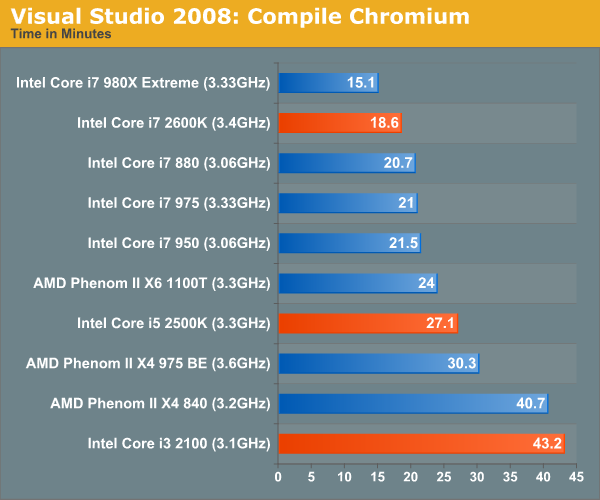
Just because the compile times were the one place where the 2600k blew away the 2500k, I'm going with a 2600k. ($315 on Newegg)
From another thread, this is the only mobo currently supporting Ivy Bridge: Asrock Z68 Professional $269.99
Other than that, I just don't know enough about desktop parts to know what I want for sure.
One last thing. If I can't at least double or preferably triple performance, I'll just get the M17x. I move around a lot and do most of my work down on campus, so I'd rather have the portability if that isn't the case.
This will be the first desktop anyone in my immediate family has bought since my father's P4 (which he still uses), and my first ever time assembling my own computer.
1) What will you be doing with this PC? Gaming? Photoshop? Web browsing? etc
Coding for upper-level CS classes(which is surprisingly heavy on the computer)/work, plus some reasonably heavy gaming (Total War series/Battlefield 3 when it comes out). Also, storing my ever-expanding media library. (currently 3.5 TB)
2) What's your budget? Are tax and shipping included?
Price of this computer, 3 monitors I can run in 3240x1920, and upgrading this computer to Ivy Bridge and 28nm GPU's at tax time should be less than $3500. So figure somewhere between $1800-$2000 for the box. If you have to go over that though for better warranty or build quality, do so.
3) Where do you live?
I'm in Seattle until August 1st, and then moving back to Michigan. Just for returning purposes, I'd prefer buying stuff online, and having it shipped home to MI. Also, no 10% sales tax if I buy online.
4) What exact parts do you need for that budget? CPU, RAM, case, etc. The word "Everything" is not a valid answer. Please list out all the parts you'll need.
CPU, GPU(s), case with room for as many HDD's as possible, as many 2 TB HDD's as possible, PSU, RAM, Mobo, Bluray. 3 good 1080p monitors I can turn sideways, decent speakers, Anything else I'm NOT thinking of because I've never had a desktop before. Also, since the ethernet in the dorms is flaky (yay for old wiring), I need WIFI.
5) If reusing any parts, what parts will you be reusing? Please be especially specific about the power supply. List make and model.
I bought a 120 GB Intel 510 SSD to put in my M17x (when I was gonna buy an M17x), that's waiting for me back in MI. Also, at some point, I'll move the 2 2 TB drives full of my media library into this case (so lots of HDD bays is good)
6) Will you be overclocking?
As far as I dare for a first-timer build (likely on stock voltage).
7) What size monitor do you have and/or plan to have?
3 24" 1080p or better monitors rotated 90 degrees for coding awesomeness.
8) When do you plan on building/buying the PC?
School starts day after Labor Day. It needs to be built, tested and working by then.
9) What features do you need in a motherboard? RAID? Firewire? Crossfire or SLI support? USB 3.0? SATA 6Gb/s? etc.
USB 3.0. SATA 6Gb/s. SLI or Crossfire support depending on which one I go with. I'm leaning AMD just for Eyefinity. Ivy Bridge Compatibility. (As in, the company has stated for a fact that they will support Ivy Bridge on this mobo).
10) Do you already have a legit and reusable/transferable OS key/license? If so, what OS? Is it 32bit or 64bit?
I've got 10 copies of Win7 Professional (x86 and x64) left over from my MSFT internship. I'll also be dual-booting Linux (probably Ubuntu) for schoolwork purposes.
Just because the compile times were the one place where the 2600k blew away the 2500k, I'm going with a 2600k. ($315 on Newegg)
From another thread, this is the only mobo currently supporting Ivy Bridge: Asrock Z68 Professional $269.99
Other than that, I just don't know enough about desktop parts to know what I want for sure.
One last thing. If I can't at least double or preferably triple performance, I'll just get the M17x. I move around a lot and do most of my work down on campus, so I'd rather have the portability if that isn't the case.