New build with problems (and pics)

rotteneggz

Limp Gawd
Joined
Apr 12, 2004
Messages
164
Hello all,
So after all the great suggestions from [H] members, i ordered all of my parts.
Took me the whole day to piece it together because unlike my other pc's, i wanted this one to look nice. So i took my sweet ass time routing the wires for better airflow.
After all is done and i hook up my computer and give it its first run, everything posts except there is nothing that shows up on my screen. I tried swapping the video card off my old pc but it still gives the same problem. Anything else i can try?

Specs:
Antec 900
Corsair HX520
Seagate Barracuda 7200.11 3.5IN 500GB
Patriot Extreme Performance 4GB
XFX GeForce 8800GTS 650MHZ 512MB
Intel Core 2 Quad Q6600
Gigabyte GA-P35-DS3L
Thermalright ULTIMA-90
Creative X-Fi gamer

Here are some pics:
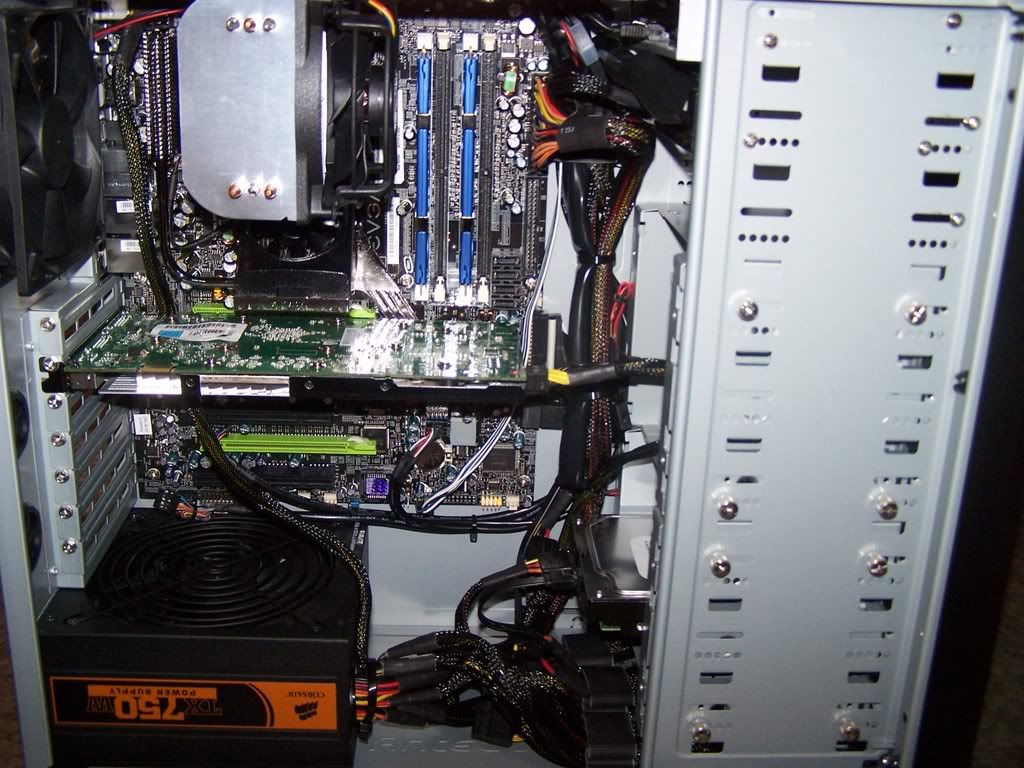
Rate my wiring job :D

newfrontdl4.jpg

newfront1fz2.jpg

newbackax4.jpg
 
This might sound like a stupid question, but it's always the first place I start. You used the standoff screws, right?
 
I am beginning to think this board is having some problems. I just built a rig with the same motherboard (DS3L) and Q6600 the other day and I had the same problems, I have also ready 3-4 other threads with people experiencing this same issue. What I did was take out the Q6600, put in my old E4400 then take that out and put in the Q6600 and it worked on the 3rd attempt. Other than that I have no idea what the deal with this board is. I think Gigabyte should be contacted about this issue.

Best of luck...
 
This might sound like a pain but reasemble your system outside of the case with the mobo lying on the mobo box. Start up the PC by jumping the two power pins with a screwdriver. If there is video, then something inside the case was shorting out the mobo.

Look for any loose screws, wires, or standoffs that shouldn't be there.

Hey thanks for the tip. I was about to take everything apart when i heard a loose screw. After takeing it out, everything booted up fine and works great. Thanks for the input.
Also, i'm having problems installing my xfi xtreme gamer soundcard. I disabled the onboard sound in the bios, and when i install the drivers for the xifi gamer, it says the setup couldn't detect a supported product on my system. I double checked the connected of the soundcard and it seems to be installed properly. What else can i try?
 
Did the system detect the card initially with a "new hardware found" prompt?
 
Yes. But when i check device manager, it doesnt show any hardware missing drivers or anything.
 
Alright, first just physically take the card out and boot back up so that the system no longer should detect the card, then boot back down again and install it (firm) and see if it's ok once in windows. If no go, uninstall the cards drivers this time and take the card out again, boot back up without the card, boot back down, install card again -- reload drivers again see if that works for you. If not do the same except clear the CMOS this time (be sure to set optimized defaults and set bios time again before you boot back into windows).

Be sure you have tried another PCI slot too before you do any of the above it might be that simple.
 
ummm.... i do believe that psu is in upside down.....or are my eyes just really screwed up right now??
 
It is :p See the Avadirect thread in computers and gadgets -- even AVADirect shipped out a PC the same way it happens. My advice would be to move the sound card up a slot for air-room for the PSU -- just be sure to flip the PSU over.
 
Yup, that was my rig. Same thing dude. I flipped it immediately. Guess it's more common that I thought.

Here is mine after I made the change:

100_1822.jpg
 
omg... i cant beleive i made such a stupid mistake. Whats up with the upside down logo?

Edit: K just finished inverting it. Thanks again for the info. And about the soundcard, i just removed the xifi and used onboard.. :eek:
 
Logo is upside down because the majority of case still have power supply up top, which you wouldn't have to invert.
 
Another problem is the wire bundle coming off the power supply is in a better location for hiding the wires with it flipped the wrong way.
 
Back
Top