• Some users have recently had their accounts hijacked. It seems that the now defunct EVGA forums might have compromised your password there and seems many are using the same PW here. We would suggest you UPDATE YOUR PASSWORD and TURN ON 2FA for your account here to further secure it. None of the compromised accounts had 2FA turned on.
    Once you have enabled 2FA, your account will be updated soon to show a badge, letting other members know that you use 2FA to protect your account. This should be beneficial for everyone that uses FSFT.

New build. Been a while.

big_aug

2[H]4U
Joined
Oct 13, 2006
Messages
2,189
1) What will you be doing with this PC? Gaming? Photoshop? Web browsing? etc

Gaming, browsing, movies, etc. I bought some parts already. I just wanted to get it up and running for Diablo III and then upgrade as I have the cash.

2) What's your budget? Are tax and shipping included?

Less than $500 for the rest of my stuff. I'd like to keep it under $1000 total for now if its possible with a good SLI/crossfire PSU and a good case.

3) Which country do you live in? If the U.S, please tell us the state and city if possible.
USA. New Jersey

4) What exact parts do you need for that budget? CPU, RAM, case, etc. The word "Everything" is not a valid answer. Please list out all the parts you'll need.

Case (I like having a window on the side panel. Size and noise are not concerns for me.)
HDDs (I think I'll start with a standard hard drive and add a SSD later)
Optical Drive
Power Supply (Plan on sli/crossfire in the future)
HSF


5) If reusing any parts, what parts will you be reusing? Please be especially specific about the power supply. List make and model.

I've already purchased these parts:
GTX 460 1GB $104
8GB G.Skill Ripjaw $43
i7 2600k $285
Asus P8Z68-V LGA 1155 Z68 ATX Intel Motherboard $95

6) Will you be overclocking?

Yes, eventually. I'd like to start with a good case for air overclocking and stick with the stock HSF for now. Suggestions still welcome though.

7) What size monitor do you have and/or plan to have?
I'll be using my 720p LCD TV to start. I plan on selling it and getting a used 30" monitor in the future.

8) When do you plan on building/buying the PC?
I'd like to buy parts over the next couple weeks.

9) What features do you need in a motherboard? RAID? Firewire? Crossfire or SLI support? USB 3.0? SATA 6Gb/s? eSATA? Onboard video? etc

Already have my motherboard.

10) Do you already have a legit and reusable/transferable OS key/license? If yes, what OS? Is it 32bit or 64bit?

Planned on getting Windows 7 64bit


Like I said, I just wanted to get it going. I wanted to go with a cheaper video card that will work with lower resolutions now, and then upgrade when the next gen comes out.

Biggest help I need is a case.
 
Last edited:
$60 - Cooler Master HAF 912 ATX mid-tower case (plus $5 ground shipping)
$28 - Cooler Master Hyper 212 Plus CPU cooler
$60 - Samsung Spinpoint F3 HD103SJ 1TB SATA 3Gb/s HDD
$65 - Samsung SH-B123L/RSBP BD-ROM/DVD burner combo SATA drive
$135 - Corsair TX850 V2 850 watt power supply
=====
$353 - Subtotal (not including taxes or rebates)

A few key things:
- There is a $10 discount promo code on the Samsung hard drive. It expires on Labor Day, September 5.
- The Samsung BD-ROM/DVD combo drive is a combination Blu-ray player (not burner) and CD/DVD burner. It also comes with some Blu-ray playback software (though it isn't the best in the world). If you don't really plan on watching any Blu-ray movies (I don't recommend trying to burn any Blu-ray discs -- not that you could with the drive I chose for you -- as they're very expensive compared to buying another hard drive for backups), you can grab a simple DVD burner for around $20.
- The Cooler Master HAF 912 has plenty of space and quite a few features for its price range. Two good alternatives are the Lian Li Lancool PC-K57 and the PC-K58.
- The Corsair TX850 V2 can handle two Radeon HD 6970 or GeForce GTX 570 cards.

As for the OS, all you really need is an OEM copy of Windows 7 Home Premium. It will run you about $100.

If you can spend a bit more, I recommend grabbing the SSD now:

$180 - Crucial M4 CT128M4SSD2CCA 2.5" 128GB SATA 6Gb/s SSD
 
Do you think I need 128GB on the SSD?

64GB would be enough for the operating system and such right?

Any other case recommendations? One with a window? While it is just aesthetic, and its not mandatory, it would be nice.

Freaking Newegg tax kills me. Never had to pay it when I was in Ohio
 
Do you live near a Micro Center? Are you close to B&H?

The Lian Li PC-K58 does come in a windowed version (PC-K58W).

64GB is enough space for the OS and a few key programs, and you could use the hard drive for games and other non-essential programs. If you to play most of your games from the SSD, however, I recommend the 128GB model.
 
Yea, I'm right by microcenter.

In fact, that's where I'm getting my Mobo and processor. I'm picking them up tomorrow on the combo deal.

I can get a lot of the same stuff on Amazon w/ prime for the same price or cheaper without tax.

Didn't even think to look there.
 
Last edited:
These come to $430 shipped on Amazon. Is the HAF 922 worth the extra $30? It looks nice. I'd come in at $959 without the SSD. I might try the classifieds for a week or so and see if I can score some used stuff on the cheap.


Cooler Master HAF ATX Mid Tower Case, RC-922M-KKN1-GP (Black)

Samsung Desktop Class Spinpoint F3 1 TB SATA 3.0 Gb-s 32 MB Cache 3.5-Inch Internal Bare-OEM Drives, HD103SJ

Corsair Enthusiast Series 850-Watt 80 Plus Bronze Certified Power Supply Compatible with Intel Core i3, i5, i7 and AMD platforms - CMPSU-850TXV2

Cooler Master Hyper 212 Plus 120mm Sleeve CPU Cooler, RR-B10-212P-G1

Lite-On LightScribe 24X SATA DVD+/-RW Dual Layer Drive IHAS424-98 - Retail (Black)

Windows 7 Home Premium SP1 64bit (Full) System Builder DVD 1 Pack
 
These come to $430 shipped on Amazon. Is the HAF 922 worth the extra $30? It looks nice. I'd come in at $959 without the SSD. I might try the classifieds for a week or so and see if I can score some used stuff on the cheap.

The HAF 922 is larger (in volume) and has more features than the HAF 912, but I can't tell you whether or not it's better for you. Your personal tastes play as much of a role in the decision making as the case's featureset does.

What are you looking to buy cheaper? You may want to check out the For Sale/For Trade forum here.
 
So my next dilemma is networking.

What will work better:

1) Adding a wireless adapter to my computer
2) Getting an access point to put in my room

I think I answered my own question... It's going to be wireless no matter what since I won't be able to plug into directly into the router, so I might as well just get a wifi card.

Any suggestions on which one?
 
So my next dilemma is networking.

What will work better:

1) Adding a wireless adapter to my computer
2) Getting an access point to put in my room

I think I answered my own question... It's going to be wireless no matter what since I won't be able to plug into directly into the router, so I might as well just get a wifi card.

Any suggestions on which one?

$28 - Asus PCE-N13 Wireless Adapter
 
Last edited:
As an Amazon Associate, HardForum may earn from qualifying purchases.
Take your pick.

$90 - Cooler Master CM690 II Advance ATX Case
$90 - Lian Li Lancool PC-K7B ATX Case
$100 - Lian Li PC-7B Plus II ATX Case
$100 - Cooler Master HAF 922 RC-922M-KKN1-GP ATX Case
$110 - NZXT Whisper WHI - 001BK ATX Full Tower Case
$110 - Lian Li PC-60FN ATX Case
$100 - Lian Li PC-7FN ATX Case
$120 - Velocity Micro GX2-W Silver Classic Aluminum Case with Side Window
$120 - Fractal Design Arc Mini Tower
$127 - Fractal Design Define R3 Black ATX Case
$140 - NZXT Phantom PHAN-001WT White Full Tower ATX Case
$140 - NZXT Phantom PHAN-001BK Black Full Tower ATX Case
$140 - Lian Li PC-9F ATX Case
$140 - Cooler Master HAF 932 RC-932-KKN1-GP ATX Case
$143 - NZXT Phantom PHAN-002OR Black Finish w/Orange Trim Full Tower ATX Case
$150 - Corsair Graphite Series 600T ATX Case
$160 - Silverstone RV02B-W ATX case
$178 - Silverstone RV02B-EW ATX case
$190 - Corsair Obsidian Series 650D ATX Case

As for the cooling solution, you was recommended correctly already. The Cooler Master Hyper 212+ @ $30.

DVD drive, search for the cheapest one on Newegg (with shipping)

Wifi, I recommended that earlier.
 
As an Amazon Associate, HardForum may earn from qualifying purchases.
So, the Cooler Master Hyper 212+ is the best HSF under $100 if I'm going to be overclocking?
 
So, the Cooler Master Hyper 212+ is the best HSF under $100 if I'm going to be overclocking?

Yes.

I have one on my i7 870. It brought my idle temps down ~20*C. My loaded temps are what the CPU used to idle at on the stock cooler. I've been running multiple F@H clients on my computer for the past 4 hours. Max temp got up to 59*C in a room that's ~25*C w/ a 67*C 470 GTX running at 100% as well.
 
Well you can waste the money if you want, but it's not going to be 50% better than the CM 212+ to account for it's higher price tag.
 
You're right in this case. I can always change it later anyway since its less than $30
 
Take a look at the Corsair 400R case if you're still undecided also. I'm looking to purchase one shortly, Newegg has it for $99 with a $5 MIR.
 
I ended up getting everything including monitor, mouse, and keyboard for about $1215.

Really happy with that considering I got some decent components. Good upgrade path with either another cheap GTX460 for SLI or a next gen card.

Thanks for all the input guys!
 
No problem. Show us some pictures of the complete build when it's done.
 
Finished the build last night. Thanks guys!

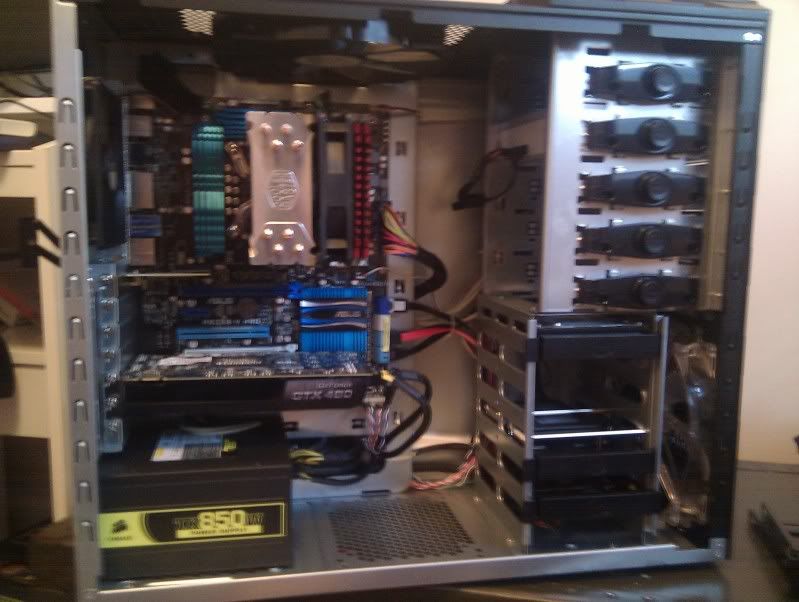
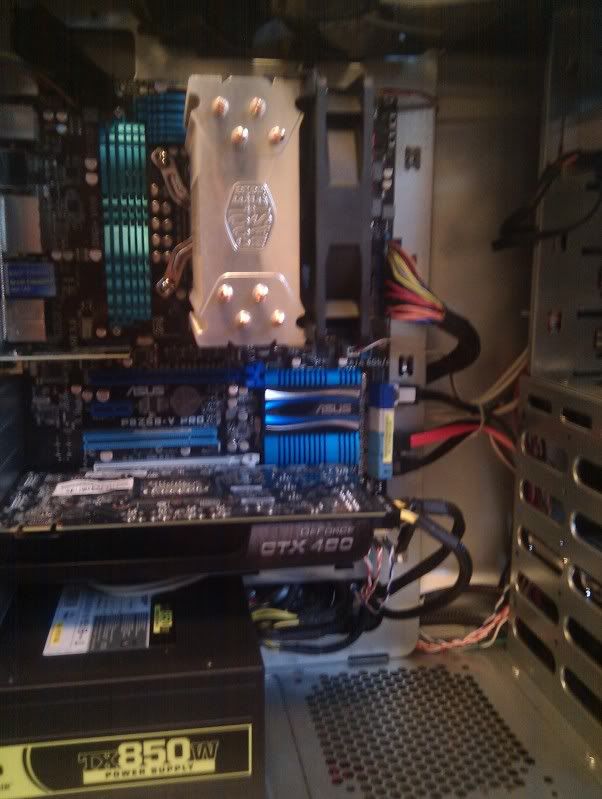
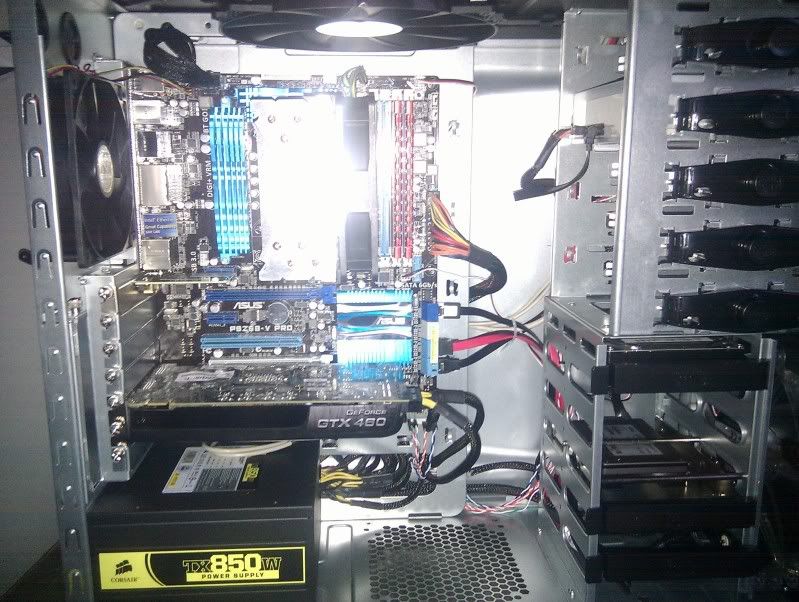
Here are some pics:

IMG_20110913_172847.jpg

IMG_20110913_172906.jpg

IMG_20110913_172807.jpg
 
I thought there would be more room in behind the motherboard for cables. It's a tight fit right now with the back panel on. I'm sure I could have organized them a little better. A modular power supply would make it so much easier.


Case was easy to work with overall though and it's easy to wire it up nice. I ordered an 8 pin power extension cable which is ideal for running it behind the board.


I need to figure out overclocking now. I messed around a little and got some BSODs. I want to do 4.5GHZ, but I'm getting conflicting messages on what is an acceptable Vcore. My stock Vcore is like 1.2, and I think it will be like 1.36 if I do 4.5. I guess I need to do some more reading and experimenting.

I'm running prime for a few hours just to make sure everything is stable at stock speeds.


The boot up is weird. Asus logo with press del to enter bios flashes multiple times. There are different screens. I don't think it's rebooting or anything. It takes about 30 seconds to boot up probably. Is that right with the Crucial M4?

With everything stock, my 3dMark11 score is only 3268. Does that seem right? Edit: Updated drivers and got almost 3600. That seems about right for all stock. Duh, the driver CD is like years old.
 
Last edited:
Back
Top