
what model you have ? what drives are those ? hard to read the model numbers...
![[H]ard|Forum](/styles/hardforum/xenforo/logo_dark.png)
Navigation
Install the app
How to install the app on iOS
Follow along with the video below to see how to install our site as a web app on your home screen.
Note: This feature may not be available in some browsers.
More options
-
Some users have recently had their accounts hijacked. It seems that the now defunct EVGA forums might have compromised your password there and seems many are using the same PW here. We would suggest you UPDATE YOUR PASSWORD and TURN ON 2FA for your account here to further secure it. None of the compromised accounts had 2FA turned on.
Once you have enabled 2FA, your account will be updated soon to show a badge, letting other members know that you use 2FA to protect your account. This should be beneficial for everyone that uses FSFT.
You are using an out of date browser. It may not display this or other websites correctly.
You should upgrade or use an alternative browser.
You should upgrade or use an alternative browser.
Network pics thread
- Thread starter BobSutan
- Start date

how about this visbits
I had to change out a storage shelf 2 sundays ago at 6am, plus the 2 hour drive to get there from home..
I'd say there were about 12-15 48U racks FULL of emc storage stuff
PLUS 4 of these storageTek Tape library's.
You beat me there! We have a compellent system coming in later this year with over 200 disk.. pretty excited to get some new storage in. The way EMC handles iscsi is a little different than what I'm use to... still warming up to the design.
You beat me there! We have a compellent system coming in later this year with over 200 disk.. pretty excited to get some new storage in. The way EMC handles iscsi is a little different than what I'm use to... still warming up to the design.
SHIT! reminds me i need to log into my dtt.dell.com and do my Compellent training
NOT ENOUGH TIME IN THE DAY GRR!!4 x ST32000542AS 2TB 5900 RPM Seagate
QNAP TS-419P
Faster drives won't help the Atom CPU do AES. Speeds went from 80MB/s to 30MB/s with encryption enabled. Security of the data is more important to me so I will take the speed hit.
Min'es not even a atom :0 its a single chip VIA i belive. No expandable memory, i did see that i can go up to 3tb drives tho
My cpu and nic activitie is pretty low. have a 2011 exchange ( SBS ) server running from it with a website and 2 db's and a rdp box i rdp into for stuff along with soon to be more vm's and the ts410u works awesome.
anybody runing fancy monitoring packages?
nagios? capsa?
spent my last 2 days wiresharking and tracking down equipment after a broadcast storm
Yes, but not either of those. I run and manage CA Spectrum Infrastructure Manager, CA Netqos Net Voyant,CA Netqos Reporter Analyzer and Ciscoworks LMS.
Do I have the most storage here? This is all I have pictures of at the moment; less than 1/10th of it, or so.
Possibly, but a lot of us can't or won't post pictures. (I did but removed them, not worth losing my job over. I believe one is still in this thread somewhere)
Sure -- it can get dicey.Possibly, but a lot of us can't or won't post pictures. (I did but removed them, not worth losing my job over. I believe one is still in this thread somewhere)
Wow! What's it for?I'd say there were about 12-15 48U racks FULL of emc storage stuff
Do I have the most storage here? This is all I have pictures of at the moment; less than 1/10th of it, or so.
No, if i was allowed to take pictures of the data center I would, but i'm not sure i'm allowed. i'll ask tho.
just think 12-15 48U racks FULL of hard drives
Wow! What's it for? How much storage total?just think 12-15 48U racks FULL of hard drives
Last edited:
Krazypoloc
Gawd
- Joined
- Jul 23, 2010
- Messages
- 759
I've been doing the exact same setup. Bought 2 GBIC of eBay for 5 bucks each. I too have to figure out a way to run them above ground outside to my garage.
Just run them in conduit...
Dash, was that in Carmel, IN by chance? That looks awful familiar...
Canada
- Joined
- Jun 13, 2002
- Messages
- 3,963
No picture because the VNX's aren't installed yet but
CX4-60 disks
AX4-24 disks
AX150-12 disks
VNX1-65 disks (15 ssd)
VNX2-55 disks (10 ssd)
Total disks, two locations- 216 disks
CX4-60 disks
AX4-24 disks
AX150-12 disks
VNX1-65 disks (15 ssd)
VNX2-55 disks (10 ssd)
Total disks, two locations- 216 disks
Dash, was that in Carmel, IN by chance? That looks awful familiar...
What datacenter in Carmel, IN? I live in the city and it doesnt seem like the data center type.
Just upgraded our Dell T710 servers (ESX Servers) with more Ram. Let's just say that 40GB of RAM is not enough when paired with Xeons X5680 monsters. Swapped from stock 4GBs sticks to 8GB Sticks, upgraded to 96GB.
Some pics of the T710 Guts without plastic shroud. The PCI-E card in there is an Intel Pro/1000MT Quad port NIC for who's interested to know.


Some pics of the T710 Guts without plastic shroud. The PCI-E card in there is an Intel Pro/1000MT Quad port NIC for who's interested to know.

- Joined
- Oct 11, 2002
- Messages
- 6,472
What datacenter in Carmel, IN? I live in the city and it doesnt seem like the data center type.
Cha Cha is there, so is NFrame. Those are two that I can think of off the top of my head.

- Joined
- Nov 16, 2005
- Messages
- 21,295
144 phones/devices later and here's my mid-day 3CX resource utilization.

This is actually running virtualized on XenServer 6.0 with one tick under the highest CPU priority and dedicated 8GB VM RAM assigned.
I wasn't sure on the RAM, which is why it has so much. I'll probably kick that back to 4GB. Or dynamic 3GB to 6GB or something.

This is actually running virtualized on XenServer 6.0 with one tick under the highest CPU priority and dedicated 8GB VM RAM assigned.
I wasn't sure on the RAM, which is why it has so much. I'll probably kick that back to 4GB. Or dynamic 3GB to 6GB or something.

- Joined
- Aug 3, 2004
- Messages
- 24,139
and here i though my 15T of storage across 3 x 4U's was alot..lol
Made a diagram of my current home network. I plan to eventually get an ASA and a GB switch for the production side but this is what I have now.

May I ask, what is the purpose of having two OSPF areas in this type of network?
May I ask, what is the purpose of having two OSPF areas in this type of network?
Prevent lab convergence from having any negative affects on production performance and increase future scalability of the lab.
The Spyder
2[H]4U
- Joined
- Jun 18, 2002
- Messages
- 2,628
I believe we have over 2000 discs deployed across our sites. That is if we were using all 3TB disk, I believe we have some older projects using 1, 1.5, and 2 TB discs. No clue honestly. I can't even begin to estimate the amount of ram, processing power, and storage we have.
Please get 2 more sticks so you run equally populated channels. I'm not sure how Dell works with that sort of configuration but it just looks wrong lol.Just upgraded our Dell T710 servers (ESX Servers) with more Ram. Let's just say that 40GB of RAM is not enough when paired with Xeons X5680 monsters. Swapped from stock 4GBs sticks to 8GB Sticks, upgraded to 96GB.
Some pics of the T710 Guts without plastic shroud. The PCI-E card in there is an Intel Pro/1000MT Quad port NIC for who's interested to know.
http://i333.photobucket.com/albums/m371/d33ns/t710-inside1.jpg
http://i333.photobucket.com/albums/m371/d33ns/t710-inside2.jpg
Please get 2 more sticks so you run equally populated channels. I'm not sure how Dell works with that sort of configuration but it just looks wrong lol.
? They are equally populated. The server probably wouldn't even boot if they weren't. It's easier to distinguish if you count the metal parts on the top of the RAM vs the actual slots.
? They are equally populated. The server probably wouldn't even boot if they weren't. It's easier to distinguish if you count the metal parts on the top of the RAM vs the actual slots.
I think he is referring to the banks of 3, it goes white black black x 3 per proc
it looks like he has ram in 3 whites and 3black ( per proc )
to make it = it would be 6 ram's per proc
I can confirm this later in the morning from the DTT manual, tho
PanzerKrieg13
Gawd
- Joined
- Jun 20, 2005
- Messages
- 982
Some updates to my PT Network, fixed the STP issues in the MH LAN. Also fully configured NAT and PAT. All internal rfc 1918 address are translated to a signal global address using overloading. Also some ports are forwarded for services like http,https, smtp, pop3 and dns. Configured a few ACL's to protect development traffic internally. The ISP1 site is operational and providing DNS and HTTP services to users via NAT port forwarding also. Still some work to do but I have covered about 50% of the ICND2 topics so far. I may go for the cert next week!
https://fbcdn-sphotos-a.akamaihd.ne...47268558155_541148154_8920464_485140478_n.jpg
Here is an example of my NAT/PAT config on the HQ router, please critique if you see any problems!
Code:...........
Hey, is there any way I could get the Packet Tracer file for this layout (and/or your previous/current layout)? I'd like to build on this example for an enterprise environment simulation project.
Thanks!
I think he is referring to the banks of 3, it goes white black black x 3 per proc
it looks like he has ram in 3 whites and 3black ( per proc )
to make it = it would be 6 ram's per proc
I can confirm this later in the morning from the DTT manual, tho
I followed the technical documents from Dell to add the RAM. I am currently running in Optimizer (or is it Optimized?) mode and it's how to do it. The only requirement in this mode is that both processors has to have the same Ram speed/type/amount in both the A and B banks.
I am currently using A1 to A8 and B1 to B8 banks (not shown in picture) of exact same ram so I am on par with the Dell document.
Prevent lab convergence from having any negative affects on production performance and increase future scalability of the lab.
But it's a home network. How many nodes would you need in each OSPF area before this actually became an issue?
Last edited:
"Optimized".I followed the technical documents from Dell to add the RAM. I am currently running in Optimizer (or is it Optimized?) mode
Thing is, there's A1-A9 slots, not just A1-A8. In channel 1 (A1, A4, A7), you've got three DIMMs. In channel 2 (A2, A5, A8) you've got two DIMMs. In channel 3 (A3, A6, A9) you've only got zero DIMMs. Fine to have zero modules in a channel if you don't need the capacity, but you've got two modules in Channel 2, and I think that's what people are objecting to.
I think he is referring to the banks of 3, it goes white black black x 3 per proc
it looks like he has ram in 3 whites and 3black ( per proc )
to make it = it would be 6 ram's per proc
I can confirm this later in the morning from the DTT manual, tho
Gotcha. After reading that Dell memory pdf and taking another look I see what you guys are talking about. I haven't done much with DDR3 in servers, mainly just DDR2.
Do I have the most storage here? This is all I have pictures of at the moment; less than 1/10th of it, or so.
Not even close
Heres a few pics of our finally completed switch over to the new Catalyst 4507R+E's
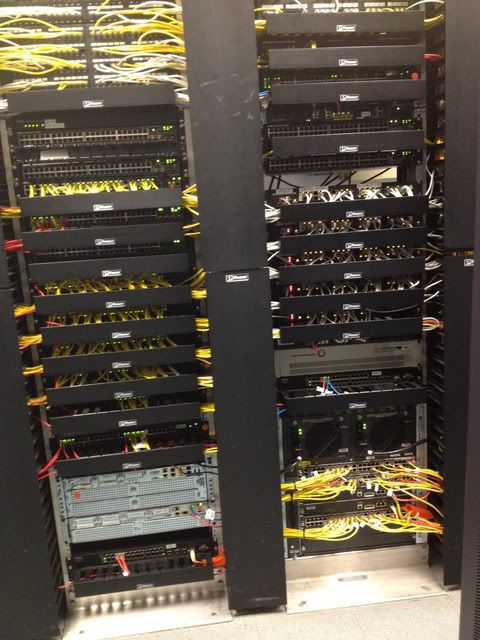

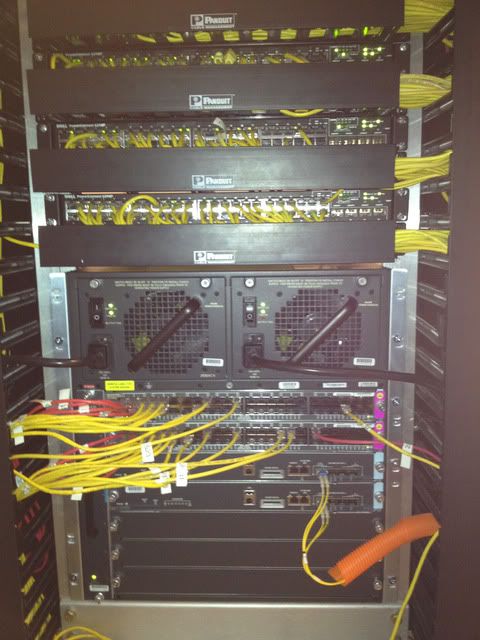
Cabling could be a little neater but its all in place and running great. One 4507 in each of our buildings linked by 10GB fiber.
Next up is to replace our access layer switches in our main data center with a full stack of PowerConnect 6248P's.
Cabling could be a little neater but its all in place and running great. One 4507 in each of our buildings linked by 10GB fiber.
Next up is to replace our access layer switches in our main data center with a full stack of PowerConnect 6248P's.
That's a serious rack!
By the way the 'twirl' thing is reversible, just use motion blur to remove serials
By the way the 'twirl' thing is reversible, just use motion blur to remove serials