• Some users have recently had their accounts hijacked. It seems that the now defunct EVGA forums might have compromised your password there and seems many are using the same PW here. We would suggest you UPDATE YOUR PASSWORD and TURN ON 2FA for your account here to further secure it. None of the compromised accounts had 2FA turned on.
    Once you have enabled 2FA, your account will be updated soon to show a badge, letting other members know that you use 2FA to protect your account. This should be beneficial for everyone that uses FSFT.

Need help with Server/NAS build

palmboy5

Limp Gawd
Joined
Oct 19, 2006
Messages
315
My current setup is:
Intel BOXD945GCLF2
1GB DDR2 RAM
Samsung 1TB 5400RPM SATA
Seagate 1TB 7200RPM SATA
Ubuntu 9.10 Server x64
… 0.1TB free lol.

My goal is to replace the two 1TB with three or more Green 2TB HDDs in RAID 6 with ZFS, but that would need a PCI RAID card and Linux apparently can’t legally support ZFS. So…

What’s a good RAID 6 card with at least 4 SATA ports? Cheap would be good too.

I’d love to have Linux but I guess not, what is the best alternative? Would there be drivers for the RAID card under that OS?

Thanks!
 
Just to clarify, is ZFS absolutely a requirement? Just wanted to make sure you were aware Linux software raid under mdadm allows for RAID6.

Also, if you're going to run any kind of RAID6, I wouldn't recommend it with a low number of drives (like 3).

If ZFS is required, you should consider OpenSolaris or FreeBSD but be sure to check the hardware compatibility first.
 
As I hear, ZFS is a very good and advanced file system and seems like the ideal future proofed choice. I remember threads of people having their RAID screw up and lose all their data, usually followed by a reply from someone claiming ZFS would have been able to deal with it. Exaggeration or not, I don't know. What I do know is, I want that.

I thought physical RAID was recommend over software RAID? Sure, I'd rather not spend on a RAID card, but my main goal is to prevent data loss and if physical RAID is better at that then I will go down that path. <EDIT>For example, if the OS dies and I have to reinstall it, what happens to the software RAID exactly?</EDIT>

Alright, RAID5 then.
 
For example, if the OS dies and I have to reinstall it, what happens to the software RAID exactly?

Depends on the OS and the software RAID implementation you're using. Linux MDADM RAID, for example, doesn't die with the OS. You can actually rebuild the RAID array using the same drives using another Linux OS install IIRC. The data will be safe/

I'm fairly sure that that PCI RAID cards that supports RAID 6 will be pretty old or pretty slow. Since FreeBSD ZFS and Linux MDADM RAID are both software RAID types-ish and the fact that the Intel mobo you have only has PCI, I recommend getting this card:
$100 - SuperMicro AOC-SAT2-MV8 PCI-X (PCI Compatible) 8 Port SATA Controller Card

Supports FreeBSD and Linux. You generally only need a true hardware RAID card if you're using Windows or need a ton of performance.
 
If you choose ZFS then you should focus on SATA ports functioning in AHCI mode. ZFS does not like Hardware RAID; it would nullify most of the benefits of ZFS. So instead look for AHCI-compliant SATA ports without latency issues.

For about 100 dollars you have a new motherboard with 6x onboard SATA/300 and PCI-express and a cheap low-power AMD CPU. Perhaps that's a better investment than PCI cards. Performance will be terrible; do not let the 133MB/s bandwidth limit fool you! RAIDZ (RAID5) will be very command intensive and with PCI accesses to different physical disks will have to wait for eachother; while RAID is designed to be a technique that involves multiple disks at the same time.

ZFS also does not run stable on 32-bit hardware and with fewer than 2GB of RAM. You need at least a 64-bit CPU and 2GB RAM and storage on the chipset or PCI-express, that would be 'check list' for ZFS. On 32-bit hardware or with too few RAM, ZFS may crash the whole system. The memory required depends on the ZFS array and most importantly, on the workload. With a single client accessing files it will less intensive than 100 network clients accessing data on the ZFS box. The latter needs much more memory.

ZFS is so memory hungry that if you built a 64GB RAM fileserver ZFS would be able to use most of that space. Generally i recommend 4GB, but know that by default this is too little RAM to enable prefetching effectively; that's why it's disabled by default with 4GB RAM or less. 8GB RAM would be a target for high-performance NAS. Since you appear to have lesser needs i would start with one stick of 2GB leading an upgrade to 4GB close at hand, and still allowing you to upgrade to 8GB (4x2GB) later.
 
Exaggeration or not, I don't know. What I do know is, I want that.

wanting something just because someone told you you want it is not a valid reason to choosing a file system to protect your precious data. its like voting for someone just because you like their name, or because they are a woman or a black guy. invalid reasons.

figure out why you want to use a file system before you decide on one.
 
Ok, never mind ZFS, I'll stick with Linux and ext4 then. <EDIT>What are usual ways mdadm can inform me of an issue such as a dead drive? The system will not have a monitor/keyboard/mouse.</EDIT>

sub.mesa, I chose the Atom 330 board so I could have a passively cooled (I changed the heatsink), low power, gigabit ethernet board. Going with AMD I don't think I can safely achieve a passively cooled CPU. However, very well. I have some spare hardware that I can use:
Gigabyte GA-MA69GM-S2H with Athlon 64 X2 4000+ or Athlon 64 X2 4800+ and 1GB DDR2 RAM.
I know the CPUs are overkill, but would that setup be ok?

So right now the choice is between a PCI RAID card with lower performance (although I care about reliability more) or the spare hardware that I have.

Oh also, the current PSU is a PC Power & Cooling 370W, which is totally fine for the current setup that usually draws 42W. Will it still be enough for three or more 2TB green drives?

ghost6303, sorry I wasn't clear. I want the ability stated, not ZFS in particular.
 
Last edited:
Early atom boards had an old chipset that consumes about 10 times as much as the CPU itself; making it consume more power than an AMD setup which was about 10 times faster.

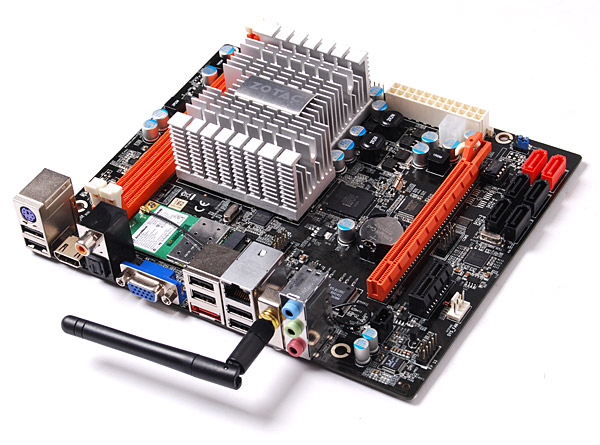
Modern atom boards have PCI-express and lots of SATA. Check this Zotac board:

NM10-DTX.jpg


Atom D510 (64-bit) + 6x SATA and low power consumption

However, you should be able to get about the same idle power consumption with a low-power Core i3 or AMD setup, by using PicoPSU power supply. That implies that you use 2,5" notebook drives; you can't use 3.5" desktop drives with the PicoPSU.

I recommend:
- to evaluate your options; what can you do with the hardware you already have?
- evaluate a new Atom/AMD/Corei3 build where the CPU is cooled passively
- evaluate which filesystem/RAID engine you want; perhaps read about ZFS?
- test out Nexenta, FreeNAS, my Mesa interface, Linux/OpenSolaris/FreeBSD setups?

I strongly oppose you buy something with PCI; it will be wasted money. Yes you can connect your disks, to older systems/platforms only, and be useless if you want performance or use with modern filesystems like ZFS. Avoid PCI at all costs! PCI is the root of many evil! :D


By the way, i passively cool my 65W quadcore chip. Since AMD also has 25W TDP chips, you should have no problems setting up a passively cooled solution, if Atom doesnt yield enough power or flexibility.
 
What are usual ways mdadm can inform me of an issue such as a dead drive? The system will not have a monitor/keyboard/mouse.

You can set up mdadm to email you with major problems like a drive failure.

You can also monitor the status of the array easily remotely using SSH if you are running headless. I use Putty in Windows to open a SSH session to my linux box.

The command to monitor your array(s) is then:
watch cat /proc/mdstat (assuming you are root, if not put a sudo in front of watch)

If you're going to consider mdadm Linux raid, I would recommend at least reading the man page for mdadm and checking out a few tutorials. I will try to answer any questions you have. As previously mentioned, assuming no data loss, it is very easy to recover a mdadm array on a completely new set of hardware if you have a motherboard or controller failure. This was one of the main reasons I decided early on against hardware raid. I didn't want to be locked into any particular hardware.

I also run an OpenSolaris box with ZFS raidz on it. While I love ZFS, I've found the online public support options for troubleshooting OpenSolaris issues to be pretty sparse compared to the Ubuntu linux community. YMMV. FreeBSD also remains a ZFS option, and I'm sure sub.mesa could help you there.
 
The vast majority of modern Atom boards still have PCI, and the few that do have PCI-Express are not very well reviewed and cost more. Also, as for modern Atom offerings on Newegg that have gigabit ethernet, the only good rated board is the Intel board. It still has just 2 SATA ports and PCI. In fact, by specs the modern Atom chipset (NM10) has 2 SATA ports. This makes the modern boards no closer to having "lots of" SATA then the 945 based boards were. Boards that have more than two ports did so by adding a cheap chip + some crap.
About the Zotac board that you posted an image of:
There are the 2 ports from the motherboard chipset. Then there is a JMB36X chip with 2 ports, one of which is used for eSATA plug, and the other is connected to a JMB324 port multiplier to get the 4 connectors. The JMB324 chip supports letting the system see the individual drives but is currently not supported in the BIOS, and it may or may not be fixable in the BIOS.

That Zotac board is actually the only modern Atom & gigabit ethernet board with a PCI-Express slot (on Newegg), and it already costs $120 AR. Add in the necessary PCI-Express SATA card, and this choice is just not practical.

I can't find any 25W TDP AMD CPUs in retail.. only eBay. The lowest TDP on Newegg is Sempron 140 45W. A possible combo is the Foxconn A74ML-K and AMD Sempron 140 for $81, but I don't think its worth $81 to replace my Gigabyte GA-MA69GM-S2H and Athlon 64 X2 4000+ 65W existing spare option?

The three Core i3 on Newegg already cost > $110 alone, at 73W TDP.

What temps do you get from your passively cooled 65W quadcore when fully loaded? I run SHA512 checksums on my data so it wont just be CnQ at 1GHz or w/e all the time. That Athlon 64 X2 4000+ was passively cooled the majority of the time as well, but thats just thanks to CnQ.

I need Samba so your Mesa interface isn't an option, sorry.

So, I am currently leaning towards Ubuntu 10.04 Server x64 with mdadm on the Gigabyte GA-MA69GM-S2H and Athlon 64 X2 4000+ pair.

As a secondary question, I want to install Ubuntu onto a flash drive as the OS drive, but how can I avoid the problem I got last time I tried it? It was never solved:
http://ubuntu-ky.ubuntuforums.org/showthread.php?p=7910702
Right now I just have a 4GB partition on the main 1TB drive for the OS, but for RAID that wouldn't be too good of an idea/wouldn't work.
 
The vast majority of modern Atom boards still have PCI. and the few that do have PCI-Express are not very well reviewed and cost more.
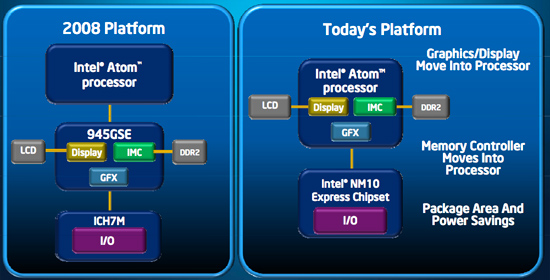
Because they use the newer NM-10 chipset and newer Atoms which have most part of the chipset integrated into the CPU. It's the next generation "Pine Trail" platform; only natural you would pay more for that. Here's a nice graph:

pinetrail.jpg

url: http://www.anandtech.com/show/2889

This list of Pinetrail motherboards may also interest you, though i think the Zotac board stands out in terms of features (certainly SATA ports):
http://www.linuxtech.net/features/intel_atom_pineview_motherboards_overview.html

the only good rated board is the Intel board. It still has just 2 SATA ports and PCI. In fact, by specs the modern Atom chipset (NM10) has 2 SATA ports. This makes the modern boards no closer to having "lots of" SATA then the 945 based boards were. Boards that have more than two ports did so by adding a cheap chip + some crap.
Not in the case of the Zotac board; this has an ION2-chipset hooked up to PCI-express on the NM-10 chipset. In essence it has two chipsets. The reason Intel held back PCI-express on Atom platform was just because nVidia and others could extend it too easily and run away with all the profit. Intel didn't want the Atom platform to support HD (which is possible with ION) because it would hit their more expensive CPUs where the big bucks are made. But since, it has eased its restrictions somewhat, if i recall correctly.

So yeah it's kind of a political/economical decision. If you need more SATA than the 6x SATA the Zotac board offers, then you ought to look at some AMD/Intel-based options or a true HBA like a SuperMicro USAS-L8i or Intel equivalent.

I can't find any 25W TDP AMD CPUs in retail.. only eBay.
It likely wants to sell its older stock first. The Sempron is way old; these chips are brand new and have 25W TDP rating and 'u' suffix in the product name:
http://www.fudzilla.com/processors/processors/25w-athlon-260u-shipping-in-europe
http://www.fudzilla.com/processors/processors/processors/athlon-ii-x2-270u-comes-in-q3-2010

What temps do you get from your passively cooled 65W quadcore when fully loaded?
55 deg and with casefans that is (just no CPU fan) - cpu has a huge heatsink with heatpipes; not suitable for a small case. If you want to cool passively do not go higher than 45W! And 25W TDP should be your target that's still easily cooled. Remember; TDP is about cooling since you don't want your system to crash when you run it at full power for prolonged period. But for power consumption estimates, TDP is pretty useless. Only if you would run your computer at maximum 'trust' during all its lifetime would it be a reasonable prediction of power consumption; and even then its off by a large margin. Therefore, TDP should only be used as a variable in cooling systems.

I need Samba so your Mesa interface isn't an option, sorry.
Should be working as of today; what would a NAS be without Samba/NFS support? :p
But this is not something you should be running right now; only to test if it would be a viable solution for you when a stable release is available (not before mid august 2010). And if you prefer linux with mdraid then use that! It wouldn't provide as good protection against corruption, however. But likely would be easier to setup and implement for you?

As a secondary question, I want to install Ubuntu onto a flash drive as the OS drive, but how can I avoid the problem I got last time I tried it? It was never solved:
http://ubuntu-ky.ubuntuforums.org/showthread.php?p=7910702
Right now I just have a 4GB partition on the main 1TB drive for the OS, but for RAID that wouldn't be too good of an idea/wouldn't work.
So your problem is samba writing logs to your flash-based OS disk, limiting your Samba transfer speeds over the network. The solution: disable the samba logs. log level = 0 should do the trick.

I should add that using flash for an OS disk is not a good idea; USB-pendirves and CF-drives do not have modern wear leveling techniques that SSDs have. It might break in a few months or years, depending on how much small writes you do to it. Large writes are not that bad. But a 512 byte (0.5KiB) write means the CompactFlash will read+erase+write 128KiB or even more (512K); that's becoming both slow and wears the compactflash excessively.
 
Because they use the newer NM-10 chipset and newer Atoms which have most part of the chipset integrated into the CPU. It's the next generation "Pine Trail" platform; only natural you would pay more for that.
No, at release it was the same price as its predecessor (my board), which is $80. I'm saying the PCI-Express ones cost more because they are still special, but their poor reviews make me question buying them.
Successor to my board: http://www.newegg.com/Product/Product.aspx?Item=N82E16813121399

Not in the case of the Zotac board; this has an ION2-chipset hooked up to PCI-express on the NM-10 chipset. In essence it has two chipsets. The reason Intel held back PCI-express on Atom platform was just because nVidia and others could extend it too easily and run away with all the profit. Intel didn't want the Atom platform to support HD (which is possible with ION) because it would hit their more expensive CPUs where the big bucks are made. But since, it has eased its restrictions somewhat, if i recall correctly.
The previous generation allowed nVidia to make ION based boards that completely replaced the Intel chipset. Now they have to keep the NM-10 chipset and add the ION separately, yet you say that the restrictions have been eased somewhat?? o_O

If you need more SATA than the 6x SATA the Zotac board offers, then you ought to look at some AMD/Intel-based options or a true HBA like a SuperMicro USAS-L8i or Intel equivalent.
Its not that I need more than 6 SATA ports, my problem with that Zotac board is that it uses a port replicator to get four of its ports out of one. I can only imagine how slow this can become, possibly even worse than an SATA card through PCI. There appear to be functionality issues with their design as well.

So your problem is samba writing logs to your flash-based OS disk, limiting your Samba transfer speeds over the network. The solution: disable the samba logs. log level = 0 should do the trick.
Hopefully that is all there is to it! I'll try it out within this weekend. Could you tell me where "log level" would be? <EDIT>Its not in /etc/samba/smb.conf... but there is max log size = 1000?</EDIT>

I should add that using flash for an OS disk is not a good idea; USB-pendirves and CF-drives do not have modern wear leveling techniques that SSDs have. It might break in a few months or years, depending on how much small writes you do to it. Large writes are not that bad. But a 512 byte (0.5KiB) write means the CompactFlash will read+erase+write 128KiB or even more (512K); that's becoming both slow and wears the compactflash excessively.
I'm aware of flash memory wearing, but I will stay naive until something bad actually happens. Three years ago I installed XP onto a 4GB cheap flash drive probably 30 times within a week, tweaking the USB drivers, trying to make it boot. That eventual success ran for a year before I retired the setup. I have confidence that flash drives will last long enough for my purposes. Ultimately, I don't want an additional mechanical device (hard drive) just for the OS, but SSDs are so expensive. Plenty of sub-$10 4GB flash drives available, and "free" ones lying around at home.
 
Last edited:
I can't find any 25W TDP AMD CPUs in retail.. only eBay. The lowest TDP on Newegg is Sempron 140 45W. A possible combo is the Foxconn A74ML-K and AMD Sempron 140 for $81, but I don't think its worth $81 to replace my Gigabyte GA-MA69GM-S2H and Athlon 64 X2 4000+ 65W existing spare option?
................

So, I am currently leaning towards Ubuntu 10.04 Server x64 with mdadm on the Gigabyte GA-MA69GM-S2H and Athlon 64 X2 4000+ pair.

Yeah, sounds good to me. That Sempron combo deal isn't worth $81. However I would not recommend a passive X2 4000+ at all unless you have a giant HSF.
 
Don't worry lol, I wasn't planning on doing something dangerous. I have a Cooler Master Hyper TX2 that was used with it for years, passively cooling it, only turning the fan on if the temperature hit 52C. This was in Windows with SpeedFan though, is there anything like Speedfan in Linux?
EDIT: Restate question: Is there anything GOOD like SpeedFan, in Linux? I only know of crappy ones.
 
Last edited:
No, at release it was the same price as its predecessor (my board), which is $80. I'm saying the PCI-Express ones cost more because they are still special, but their poor reviews make me question buying them.
Successor to my board: http://www.newegg.com/Product/Product.aspx?Item=N82E16813121399
That Intel board does not look appealing at all. Looking at the board it looks like its from pre-2000; no solid caps only old components etc.
The Zotac board is more expensive because it has two chipsets; the board you linked only has one. And it's made from older components too.

The previous generation allowed nVidia to make ION based boards that completely replaced the Intel chipset. Now they have to keep the NM-10 chipset and add the ION separately, yet you say that the restrictions have been eased somewhat?? o_O
Yes; before they could not attach their chipset to PCI-express. nVidia still has a license for the older FSB-architecture but they don't have a license for the new DMI-architecture. That means that nVidia CAN NOT/MAY NOT produce or sell a chipset that can replace NM-10. Instead, they hook up to the PCI-express of the NM-10 chipset.

That that is possible, is the result of Intel's easing restrictions on PCI-express; which was exactly to keep third parties like nVidia out of the door and not eat too much profit.

I.e. if Intel was as restrictive about Atom as it was back at the introduction, then nVidia could not use their ION2 chip at all anymore and Atom would be an intel-only thing. There are still restrictions, though. For example, the DVI/HDMI resolution is limited to 1366x768 resolution; any higher resolution is only supported on the analog output. This is all meant to frustrate third-parties into making a too powerful product based on the cheap Atom CPU; Intel wants those companies to use their more expensive CPUs/platform instead.

More about restrictions:
http://www.techeye.net/chips/intel-to-lift-netbook-restrictions

Its not that I need more than 6 SATA ports, my problem with that Zotac board is that it uses a port replicator to get four of its ports out of one. I can only imagine how slow this can become, possibly even worse than an SATA card through PCI.
Ah seems you're right. They did not use ION2-southbridge; only the northbridge parts. So the extra 4 SATA does not come from ION chipset but instead from JMicron port multiplier.

So either you would have to look for a PCI-express controller; or a different motherboard; likely based off AMD/Intel platform instead of Atom platform. Perhaps some future boards will allow Atom with plenty of SATA ports, though. Essentially, that's what you need, right?

Could you tell me where "log level" would be?
in the smb.conf file, try google:
http://www.samba.org/samba/docs/man/manpages-3/smb.conf.5.html#LOGLEVEL

You can also set the log file = <dir>/log.%m
where <dir> is a tmpfs filesystem; like /tmp/samba/log.%m. That would make sure it's not writing to CompactFlash instead but to RAM; after a reboot the logs will be gone.

I'm aware of flash memory wearing, but I will stay naive until something bad actually happens.
Alright suit yourself, just don't tell us you weren't warned. ;-)
 
Please don't mistake the difference between the two Zotac boards.
The one I'm talking about has no ION whatsoever:
http://www.newegg.com/Product/Product.aspx?Item=N82E16813500048
The actual ION-including combo costs even more and comes in a card form:
http://www.newegg.com/Product/Product.aspx?Item=N82E16813500055

In the samba manpage you linked, it says the default log level = 0 anyway, so... that can't help.

I have set log file = /tmp/samba/log.%m and max log size = 0 and rebooted. There is still lag when accessing the server. :\ I guess I'll use an old IDE HDD for the OS now.

BTW, something happened overnight after I started an 800GB copy to the 2TB (I only have one atm) on that "new" server..
http://www.mylilsite.net/images/computers/brisbane-1/ubuntuError1.jpg
uhhhh lol.
 
Likely a much different problem then writing log files. May be interrupt-related.

Did you already run a memtest86 on it to rule out hardware instability? My gut feeling tells me its something with interrupts though; it would explain your frequent 'lag' or 'hangs'. What kind of add-on card you have in your system?
 
I should add that using flash for an OS disk is not a good idea; USB-pendirves and CF-drives do not have modern wear leveling techniques that SSDs have. It might break in a few months or years, depending on how much small writes you do to it. Large writes are not that bad. But a 512 byte (0.5KiB) write means the CompactFlash will read+erase+write 128KiB or even more (512K); that's becoming both slow and wears the compactflash excessively.

They do make USB flashdrive specifically for this purpose and they are widely used but they are not cheap. 8GB drives are in the range of 80-100 and 16GB drive in the 150-200 range. They all use SLC instead of bad MLC that a lot of the USB drives use. I have a couple OpenFiler boxes setup with them and the network is the bottleneck, not the logging to flash.
 
Ah seems you're right. They did not use ION2-southbridge; only the northbridge parts. So the extra 4 SATA does not come from ION chipset but instead from JMicron port multiplier.

So either you would have to look for a PCI-express controller; or a different motherboard; likely based off AMD/Intel platform instead of Atom platform. Perhaps some future boards will allow Atom with plenty of SATA ports, though. Essentially, that's what you need, right?

Right now the best Atom board for a nas are the supermicro x7spe and x7spa boards, preferably with the HF option for remove management. Its amazing how useful the virtual media becomes once you have it.
 
I might regret not taking this deal:
http://www.newegg.com/Product/Product.aspx?Item=N82E16813500037
Currently a Shell Shocker at $89.99 AR.
I'm going to see if I don't like the noise of the current set up and buy something like this later on. Last generation Atom products should be going on sale more and more frequently anyway.

As an update, I got a second error doing the same copy procedure, this time saying something about ATA being bad (lol so technical!). So I checked and saw that the motherboard BIOS was at version F3, where F4 had "Fix: Some of 1000 GB (1TB) HDDs will be detected size error." That was from 2007 so 2TB weren't out yet and I'm going to bet there was more to their problem than "detected size". Updated to F6 and so far no errors with the same (and now even more) tests.

EDIT: Oh and memtest86 was all good for 4 passes and there are no add-on cards whatsoever.
 
Last edited:
So I've been avoiding WD20EARS because of reports of it being unreliable in RAID due to a lack of TLER, but that seems to only apply to hardware RAID anyway, should I go ahead and get that model now that my hardware RAID plan was ditched? Would it play well with the EADS model? Different cache sizes.
The Atom 330 is a dual core processor. http://www.mylilsite.net/images/atom330/sdcpu.jpg
 
Hm you're right, how could i overread that? I was checking out some other Atoms; but if its dualcore 1.6GHz then it appears not to differ much from D510; it likely doesn't have onboard graphics ("pinetrail" platform).

Still, that board looks nice. Just i do not like small fans; they break often or make alot of noice after some time. A passive system would be my preference.
 
Yea the N330 has the same CPU core as the D510 (minus 60mhz). It is just a GPU/ Northbridge connected via a FSB link all done on package.
 
I'm wondering about the partition alignment issue with the EARS drives when doing RAID with mdadm.

Do I still use gdisk to make a partition to /dev/md0? Thats the only way I can choose a starting block divisible by 8. But, when I do that and then format the partition, I get this warning.
Code:
mke2fs 1.41.11 (14-Mar-2010)
/dev/md0p1 alignment is offset by 32768 bytes.
This may result in very poor performance, (re)-partitioning suggested.
Ignore?

Will the different block size in the EADS drive cause issues here?

EDIT:
If I for w/e reason mix up the SATA ports, will the RAID get screwed up? mdadm setup didn't need me to enter the UUID's.

EDIT2:
I'm trying to recreate the RAID but it complains about the partitions being part of an array already. I have used gdisk to delete and recreate a partition on each disk multiple times, with and without rebooting before/after/in-between. I have also tried sudo apt-get remove mdadm and install again but that didn't help. How do I delete the existing RAID information? Thanks!
output:
Code:
vcn64ultra@Brisbane-1:/dev$ sudo mdadm --create --verbose /dev/md0 --level=5 --raid-devices=4 /dev/sda1 /dev/sdb1 /dev/sdc1 /dev/sdd1
mdadm: layout defaults to left-symmetric
mdadm: chunk size defaults to 64K
mdadm: Cannot open /dev/sda1: Device or resource busy
mdadm: /dev/sdc1 appears to be part of a raid array:
    level=raid5 devices=4 ctime=Wed Jul 28 21:28:53 2010
mdadm: /dev/sdd1 appears to contain an ext2fs file system
    size=1297140544K  mtime=Wed Jul 28 22:44:43 2010
mdadm: /dev/sdd1 appears to be part of a raid array:
    level=raid5 devices=4 ctime=Wed Jul 28 21:28:53 2010
mdadm: create aborted
vcn64ultra@Brisbane-1:/dev$
I don't know how to make /dev/sda1 NOT busy and I don't know why sdb1 isn't showing up.
 
Last edited:
If your mdadm is in /etc/mdadm.conf and you have not done so for the raid config
mdadm --detail --scan >> /etc/mdadm.conf

If you missed that part, you can also do
mdadm --assemble --scan
then
mdadm --detail --scan >> /etc/mdadm.conf

reboot. Double check and make sure OK.
mdadm -D /dev/md0

There could be two potential ways for filesystem
/dev/md0 --> entire virtual disk formated and used by EXT4 directly.
/dev/md0p1 --> build MFT, build partition 1, then format partition 1 with EXT4 filesystem

check which one is actually in use and enter the relevant information in /etc/fstab. Follow the existing entries as example. If this is not system disk, example the number portion put 2 2. Some use UUID but I use the direct /dev format.
 
If I for w/e reason mix up the SATA ports, will the RAID get screwed up? mdadm setup didn't need me to enter the UUID's.

/etc/mdadm.conf doesn't exist but /etc/mdadm/mdadm.conf does, so I'm editing the latter.
Comments removed, this is what's in the file that works at least for manual mounting and before any reboots.
Code:
DEVICE /dev/sda1 /dev/sdb1 /dev/sdc1 /dev/sdd1
ARRAY /dev/md0 UUID=f4c022ad:532bb2d7:60347b76:27fbd721
CREATE owner=vcn64ultra group=disk mode=0666 auto=yes
HOMEHOST <system>
Just FYI.
 
Can't you add your disks with something like /dev/by-UUID/89748923743892742937923 for example?

On FreeBSD you use geom_label to have disks available by /dev/label/<NAMEYOUCHOSE> and this is stored on the disks themselves so works across any recent FreeBSD install. Linux shouldn't be different in that regard.
 
None of the four drives ever show up in /dev/disk/by-uuid, even after repartitioning them with gdisk. I thought maybe mdadm was hiding them but they still didn't show up after removing mdadm and rebooting.
 
I went ahead and swapped some SATA connectors to see if mdadm was smart enough, and it was. Sweet.

Do I need to disabled TLER on the EADS, and how?:)
 
I bought 4GB RAM and am going to try FreeBSD with ZFS. Since ZFS is a "file system and software RAID," what does that mean in terms of creating a RAID5? Would I still be creating a software RAID and then formatting it with ZFS or just straight ZFS?
 
If you're going to try it, when you have no real data yet on your drives, you could also try my Mesa-0.1.4-LiveCD; it has everything setup up already and u could try it from the web-interface. All you need to do is download it, burn the .iso and boot it.

Install instructions here

To answer your question directly: ZFS has two main tools: zpool and zfs. You can think the zpool utility to be the 'raid' utility, and 'zfs' related to the filesystems instead. But creating a RAID-Z or RAID5 is as easy as:

zpool create tank raidz /dev/label/disk{1..4}

If you are going to use the EARS drives, be sure to format the disks so they don't have any partitions on them. My interface/livecd will format the disks properly without alignment issues; simply by not using partitions at all but instead geom labels. You pick a name for each disk, for example:
samsung2a
samsung2b
samsung2c
samsung2d

For your four Samsung 2TB disks; just a suggestion. Don't make the names too long though.
If you will be using my interface, all you need to do is:
- format disks in Disks page (click modify)
- create pool in Pools page (click create)
- create filesystems in Files page
- share filesystems with Samba
- open up Explorer (not IE) in your windows pc and enter \\<IP> in the address bar; this would show you all the shares you can map to a drive letter like X: or Z:
- now start reading and writing!

Remember; the LiveCD should ONLY be used for testing! It does not save anything upon reboot; though the data on ZFS will still be there ofcourse. But for example any configured Samba shares will be gone after reboot.
 
Ahhh stinkin' learning curve XD. <mental note>always add users to the "wheel" group</mental note>
How do you set geom_labels? All I get on Google are people either complaining about its log entries or.. nothing at all in terms of how to set a label for a drive.

This happened before, but one of my drives got messed up somehow and started appearing as a 1TB drive. Last time I fixed it by setting up MBR using linux fdisk and then back to GPT with linux gdisk. How would I do such a reset under FreeBSD?
 
first delete all partitions etc from a drive:
dd if=/dev/zero of=/dev/ada9 bs=1m count=1
(replace /dev/ada9 with the name of your device; do not use 's1' partition suffix; just the bare device)
(NOTE: you should consider this command to be a format for your HDD; consider it to erase all data on the disk)

put geom label on the disk:
glabel label samsung2a /dev/ada8
glabel label samsung2b /dev/ada9
..

then use zpool command:
zpool create tank raidz label/samsung2{a..b}

the {a..b} would just mean "label/samsung2a label/samsung2b" but saves on typing :)
 
This thing's own suggestion doesn't work.
Code:
brisbane-1# cd /dev/label
brisbane-1# ls
wd2tb1  wd2tb2  wd2tb3  wd2tb4
brisbane-1# zpool create tank raidz label/wd2tb1 label/wd2tb2 label/wd2tb3 label/wd2tb4
invalid vdev specification
use '-f' to override the following errors:
raidz contains devices of different sizes
brisbane-1# zpool create tank raidz label/wd2tb1 label/wd2tb2 label/wd2tb3 label/wd2tb4 -f
cannot open '-f': no such GEOM provider
must be a full path or shorthand device name
brisbane-1# zpool create tank -f raidz label/wd2tb1 label/wd2tb2 label/wd2tb3 label/wd2tb4
cannot open '-f': no such GEOM provider
must be a full path or shorthand device name
brisbane-1#

From the looks of the network setup, FreeBSD doesn't use DHCP to acquire an IP address on each boot. My impression is that it will use DHCP if instructed to during manual network setup but is otherwise statically set. Is this correct?
 
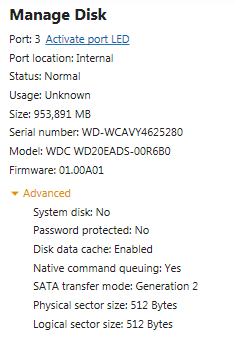
I keep recreating the partition table in ubuntu using gparted (msdos and gpt were tried) to make the "1TB" a 2TB drive again, but in FreeBSD that change doesn't seem to make a difference. It still sees one drive as a 1TB drive and won't let me create the zpool..
EDIT:
wtf, its 1TB in Windows 7 as well.
wd20eads1TB.png
 
Last edited:
This thing's own suggestion doesn't work.
Code:
brisbane-1# cd /dev/label
brisbane-1# ls
wd2tb1  wd2tb2  wd2tb3  wd2tb4
brisbane-1# zpool create tank raidz label/wd2tb1 label/wd2tb2 label/wd2tb3 label/wd2tb4
invalid vdev specification
use '-f' to override the following errors:
raidz contains devices of different sizes
brisbane-1# zpool create tank raidz label/wd2tb1 label/wd2tb2 label/wd2tb3 label/wd2tb4 -f
cannot open '-f': no such GEOM provider
must be a full path or shorthand device name
brisbane-1# zpool create tank -f raidz label/wd2tb1 label/wd2tb2 label/wd2tb3 label/wd2tb4
cannot open '-f': no such GEOM provider
must be a full path or shorthand device name
brisbane-1#

From the looks of the network setup, FreeBSD doesn't use DHCP to acquire an IP address on each boot. My impression is that it will use DHCP if instructed to during manual network setup but is otherwise statically set. Is this correct?

An exhaustive search of the freebsd.org forum might turn up
a thread which can answer the geom provider error via
similar commands which worked and tagged with
the [SOLVED] title prefix...
or even threads here with almost-similar commands.
(Not using zfs yet).
 
Back
Top