• Some users have recently had their accounts hijacked. It seems that the now defunct EVGA forums might have compromised your password there and seems many are using the same PW here. We would suggest you UPDATE YOUR PASSWORD and TURN ON 2FA for your account here to further secure it. None of the compromised accounts had 2FA turned on.
    Once you have enabled 2FA, your account will be updated soon to show a badge, letting other members know that you use 2FA to protect your account. This should be beneficial for everyone that uses FSFT.

Need Help Building Gaming SFF System

Emurikk

n00b
Joined
Nov 26, 2012
Messages
5
I have never built any SFF system so I am in the dark as to which parts I will need. Here goes.

1. What will you be doing with this PC?

Gaming at 2560x1600 resolution, ideally at max settings.

2. Will you be overclocking?

I could, but its not necessarily a must.

3. What's your budget? Are tax and shipping included in this budget? Is your budget flexible? Is cost a driving factor in component selection?

$1000 including shipping and taxes would be nice, though my budget is flexibile.

4. Where do you live? Do you have any big B&M (brick and mortar) computer chains nearby (e.g. Microcenter, Fry's, etc)?

I will be in Pittsburgh when I build this PC, so I do not think there are any big chains nearby. I have not lived there in a while so I may be wrong.

5. What exact parts do you need for that budget? CPU, RAM, case, etc. The word "Everything" is not a valid answer. Please list out all the parts you'll need.

Motherboard, case, cpu, ram, power supply, fans, video card, hard drive.

6. If reusing any parts, what parts will you be reusing? Please be especially specific about the power supply. For reused parts, list brands, model #s, and, if applicable, firmware revisions.

I have a 128gb SSD and Slim DVDRW from my laptop that I might want to reuse if possible. I will need a second hard drive if I use the 128gb, however. I also already have 2 30" monitors, keyboard/mouse, an internal 5.25" Bluray RW (if it will even fit inside the system, if it doesnt I can always connect it to an external enclosure).

7. What specific features do you need in a motherboard? RAID? Firewire? Crossfire or SLI support? USB 3.0? SATA 6Gb/s? etc. Which is more important, size of the system or having the particular feature? Make sure you indicate *required* vs. *wanted* for each feature you list.

USB 3.0 is required, SATA 6gb/s is probably required as anything to speed up load times is nice. SLI/Raid/Firewire/Crossfire are unimportant to me. The size of the system should be the primary concern.

8. What resolution output do you need? 1080p, 720p, DVD quality, etc for HTPC or list Vertical/horizontal resolution for non-HTPC SFF rigs. Do you need multiple monitor output?

2560x1600 is the resolution in which I will do everything. I will have a second 30" monitor as well.

9. Does this system need to fit into a particular space? Think entertainment center shelves, closet space, rackmount, etc.

No. It will rest on a desk.

10. How comfortable are you with custom case design/modification and electrical wiring? What tools do you have (Screwdrivers/Leatherman, Drill, Dremel, Metal snips, Soldering Iron, Bending Brake, CNC/Welding machines/Plasma cutter, etc...)?

I am not comfortable with this and do not have any tools other than a screwdriver.

11. How important is the noise/silence of this sytem? HTPCs typically want to be quiet while all-out SFF gaming rigs don't care.

It would be nice if it didnt sound like an airplane taking off, so any sort of soundproof padding would be useful, but I understand that it will not be quiet.

12. How mobile does this system need to be? Need a carrying handle or carrying straps? Is weight important (carry-on bag, etc)? Water cooling quick disconnects, etc?

Mobility will be nice, though I will only be moving it every few months or so. Carrying straps or a case would be awesome, especially if I was able to take it with me on a plane. Weight is relatively important, so if it is less than 20lbs that would be good.

13. Do you already have a legit and reusable/transferable OS key/license? If yes, what OS? Is it 32bit or 64bit? Remember that OEM copies of Win7 have issues with new motherboards

I will likely have to purchase a copy of Win7 Pro since my laptop never came with the installation CD. I do not want to switch to Win8 because I have heard bad things.
 
For that resolution, you're going to need a pretty kick ass card... GTX680? That's about half your budget alone...

Here's the minimum build I'd go with with that card:
Untitled2.jpg

EVGA GTX680 SC | i5 3570k | 8GB Samsung RAM | SIlverstone SG05-450 | Win 7 Pro | Gigabyte GA-Z77N WiFi = $1125 + shipping.

Uses the cheapest Z77 board and the best processor for an enthusiast build. The case is the smallest commonly available & comes with a nice PSU for a really good deal, but it only takes a slim drive and will be tight to work with. You'll have to use the stock cooler unless you want to bump your budget another $50+. That build does not include a HDD, as I'm not sure what size you're looking for. I'd ditch the Win 7 Pro and go with Home, unless you're using the features Pro enables.

I'm not sure how well laptop slim drives transfer to desktops, as I'd think the faceplate would be a different size & shape. You'll also need a slim SATA & power adapter when using any slim drive.
 
Last edited:
SFF=Small Form Factor, in case anyone else doesn't know what the abbreviation is.
 
Here's what I would change from 1911's build to save some cash, also 1911 didn't add cpu fan:

Shuttle Z77 Barebones with 3570k bundle (psu, cpu, mobo, case and cpu fan):
http://www.amazon.com/Shuttle-LGA1155-Gaming-Barebone-SZ77R5/dp/B007UZO3F6/ref=sr_1_1?ie=UTF8&qid=1353990484&sr=8-1&keywords=shuttle+z77... price is $349.98 which beats the combo 1911 has which added up to $479.97.

I have this gpu gtx 670 4GB:
http://www.amazon.com/EVGA-SuperClocked-Dual-Link-Graphics-04G-P4-2673-KR/dp/B007Z3HZLM/ref=sr_1_3?s=electronics&ie=UTF8&qid=1353990652&sr=1-3&keywords=evga+gtx+670, this one is $439.99 and has the VRAM needed for that resolution, in Skyrim with mods at max settings I'm clearing 3GB VRAM, @ 1080p it was a little less but I run at 2560x1440 on my Auria Microcenter IPS panel :D

If you wanted a 680 that will run that resolution you'd want to get the 4GB VRAM model which exceeds your budget, if you don't care about using AMD GPUs this one would help save some cash at $389.99 and has a $10 MIR, also it has 3GB VRAM at a faster bitrate than the NVidia card so that will help some as well albeit at less total VRAM.
http://www.newegg.com/Product/Product.aspx?Item=N82E16814161399

1911 ram recommendation is a great choice

NVIDIA GPU Set:
Shuttle Barebone: $349.98
GPU: $439.99
RAM: $34.99
Windows: $139.99
Total: $964.95

AMD GPU Set:
Shuttle Barebone: $349.98
GPU: $379.99 - includes MIR
RAM: $34.99
Windows: $139.99
Total: $904.95

1st set leaves some room for shipping, you can put your bluray drive in there easily and have enough room for your ssd and a second hdd. Second set would allow you to get a different CPU cooler perhaps a Antec 620 for $56.99 or even a 920 I think will fit in that Shuttle which is $77 right now with MIR.

I don't know what all CPU coolers can fit in the Shuttle so you'd have to search around - you may not even want to mess with it since the Shuttle CPU cooler runs very nice.

Games for me run great on this gpu and should work great, I play games like BF3 on max settings with vsync and rarely do I see dips below 50fps, occasionally I'll see 40fps but usually 50-60fps - Batman: Arkham Asylum behaves roughly the same, everything else has been a constant 60fps on max details.

Other games I play are SC2, CIV 5, SWTOR, WoW, Just Cause 2, Portal 2, BioShock 2, Deus Ex.

Here is a youtube review of the Shuttle barebones with a 7970 and a 2600k just to give you an idea of what it would look like, temps and fitment.
http://www.youtube.com/watch?v=Hzhmd1453Vo&feature=fvwrel
 
Last edited:
As an Amazon Associate, HardForum may earn from qualifying purchases.
Yeah, but I mentioned the bundle, the prices I gave didn't mention the cpu but he could choose whatever one he wants.
 
Well it appears as if I would have to stretch my budget a little in order to get the system I need. Would having a 680 video card with an i5 processor cause a bottleneck in performance? Would it be better to spend a little more on an i7 processor? Also will a small system like this be able to handle the heat from such high performance parts without some sort of additional cooling? I am willing to go upto $1500 if I need to in order to get something that is stable and will last at least 2 years for high res gaming at maximum settings.
 
For the 30" screens you'll want as much video ram as possible. I second the recommendation for a GTX 680 with 4GB.

The only other strong suggestion I'd make is mini-ITX model of the Silverstone Fortress Series. I'd recently become enamored with thise seies and it's case orientation. The imitation to a slim 5.25 slot loading optical kept me away far too long. It's a little bit more money, but quite good looking and easy to pack into a bag for portability.
Case - http://www.amazon.com/Silverstone-Aluminum-Tower-Computer-FT03B-MINI/dp/B0085S33XK/
Powersupply - http://www.amazon.com/Silverstone-ST45SF-watts-factor-supply/dp/B003H4QPDC
Liquid Cooler - http://www.amazon.com/Antec-Kuhler-H2O-620-Liquid/dp/B004LWYE4Q/ref=pd_sim_e_12

As to spending a little more to make things "better"... you could bump up to 16GB of RAM, but 8 is such a good deal and plenty for gaming unless you are running MMOs with multiple clients at a time. You can always bump to 16GB later.

Significant improvement in performance over what's already been suggested would take much more investment. Improvements to raw frame rates would take moving to a vid card with dual GPUs like the GTX 690 or moving to a dual GTX 680 vid cards. A Six Core i7-3930K (Socket 2011) setup is about the only way you'd see an easily noticeable CPU performance improvement over the i5 3570k and even then you'd only notice improvements under unique or very heavy multitasking situations. For a GTX690 setup with the i5-3470K you are looking at around $1600-$1800 and a Dual GTX680 4GB with i7-3930K will be $2250-$2500.

In both of those cases, you'll be dealing with quirks of a dual GPU system and the frequent driver tweaks. I recommend to most people to stick with the best single GPU they can buy. The premium you pay for dual GPU in motherboards, powersupplies, cooling, and the cards themselves is IMHO better spent simply upgrading to the fastest single GPU available every 1.5-2 years. Less outlay each time also gives you greater freedom to upgrading your whole system every 3-4 years.

...

On the OS. While I'm not exactly a raving fan of Win 8. It's taken very little effort to become comfortable with it. And with the current deals... it might make sense to save some $$ with windows 8 and use it on the hardware instead.
 
Last edited:
As an Amazon Associate, HardForum may earn from qualifying purchases.
If you have $1500, here's what I'd go with:

Case: Cooler Master Elite 120 $49.99

PSU: Seasonic M12II 620 Bronze $89.99

MB: ASRock Z77E ITX LGA 1155 $149.99

CPU: Intel Core I5 3570k $219.99

CPU Cooler: Antec 920 Liquid Cooler $77.99 (after MIR of $15.00)

RAM: Samsung Green 4GB Ram x 2 $37.98

GPU: EVGA GTX 680 4GB $499.99 (after MIR of $20.00)

OS: Win 7 Home Premium 64bit SP1 $99.99

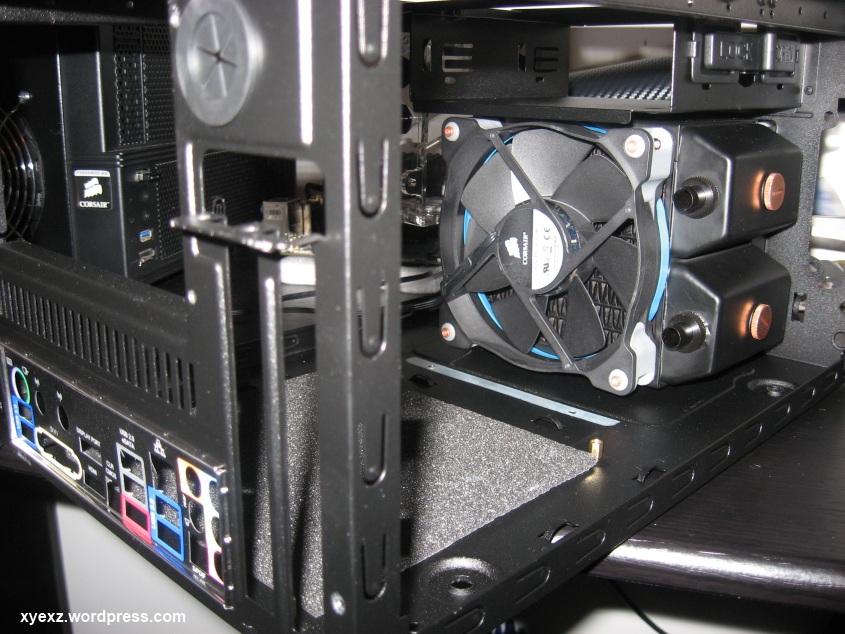
This system will run the resolution you require in a small space, installing the CPU cooler will be easy if you have a drill at home and drill out 5 rivets from the hdd bay. You can look at my build here with this case and it's custom water loop to see what I mean about the stock hdd bay.

The 920 liquid cooler will keep the 3570k at bay even OC'd and the blower style GPU will not affect internal temps, you could flip the PSU to suck hot air out (off of VRMs etc) if you thought you needed to but the case comes with a side fan that helps with this already if you leave it in.

The PSU leaves ample room for drives, you'll be able to fit in your bluray drive and the ssd can be Velcro taped anywhere in the case, even on top of the ODD.

The beauty of this build is the cost savings in the SFF case, it's really a great case that is awesome with CLCs and provides room to a full sized atx psu, graphics card and ample room for cable ties while maintaining a ODD bay all at a small footprint (I'm a big fan of this case if you can't tell :D).

The FT03 series either MicroATX or miniITX are great cases but they are expensive and while the RAVEN style cooling design helps some I didn't notice enough difference of temps between those series Silverstone cases and a regular horizontal designed case so I couldn't merit the cost of the FT03 mini when I built my mini-itx system, I did have the FT03-T MicroATX case and it looked great and was a fun build but still too big for my tastes - the CM Elite 120 Advanced case is just a perfect all around case imo for SFF.

Total: $1110.92 ~ shipping was estimated $25 from newegg to me.

This leaves you enough room for keyboard, mouse, other goodies for inside the pc or on the outside, you could go for a different video card (gtx 690) :D

If you did the GTX 690 that would push your price to $1,590.92 plus shipping, still a great deal.

Also on the subject of RAM, 8GB is all you'd need and definitely stick to a good quad core Intel right now, 3570k is perfect - Intel is going Haswell with it's "tock" sometime sooner rather than later and you don't want to invest huge amounts of cash in a socket that's going away (although any CPU you get right now unlocked Intel 3570k, 3770k etc. would last a long time).

Also Win 8 (non-pro) is $99.99, if you want Win 7 it's the same price for Home Premium 64bit SP1 so I see no reason to pick Win 8 as you'd just have to buy an app like Start8 for $5 to get start menu back and then do customizations etc... the only thing you'll have to worry about is DirectX future versions may be unsupported in Win 7.

So if you were worried about DirectX future compatibility and didn't mind spending $5 and a couple of minutes tweaking Win 8, then go for that OS. I'm using Start8 with Win 8 Pro upgrade and it's very pleasant and I feel I have the best of both worlds on my pc, to each their own though - I'm a Microsoft .NET developer so I had to upgrade anyways.

Edit:

From my build thread here is the room you can get for rads by removing the HDD bay:
img_1290.jpg


I was able to fit a 80mm thick rad in this case with push pull.

Edit Edit:

Just re-read OP, if you don't want to use tools nor have them, go with this case and pretty much the same build minus CM Elite 120 and the PSU:
Silverstone SG08 w/ 600w PSU $199.99

It adds $60 to your build but other than that you'd still be able to use the liquid cooler and fit what GPU you wanted in there; no room for your 5.25 though.

Edit Edit Edit:

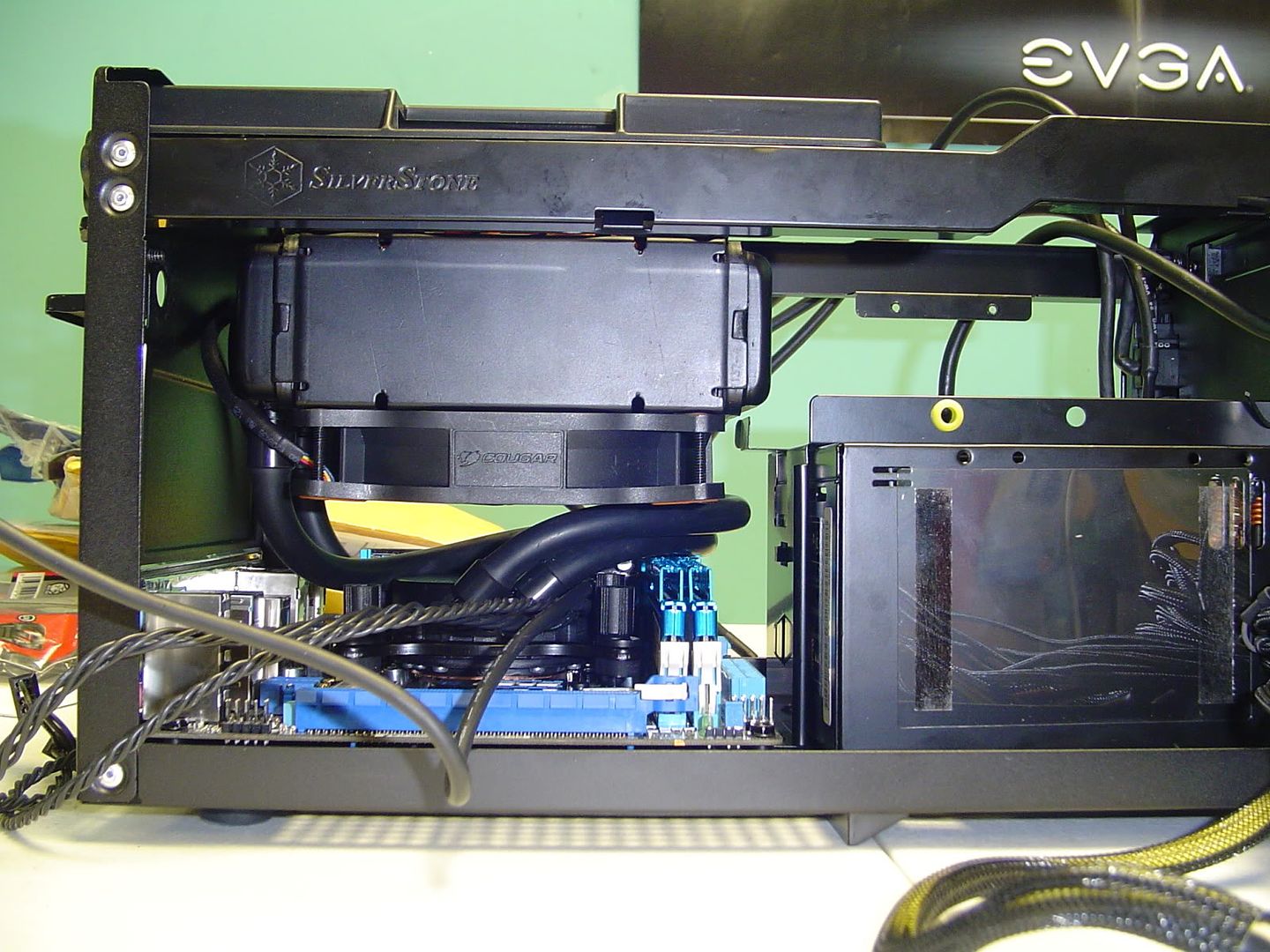
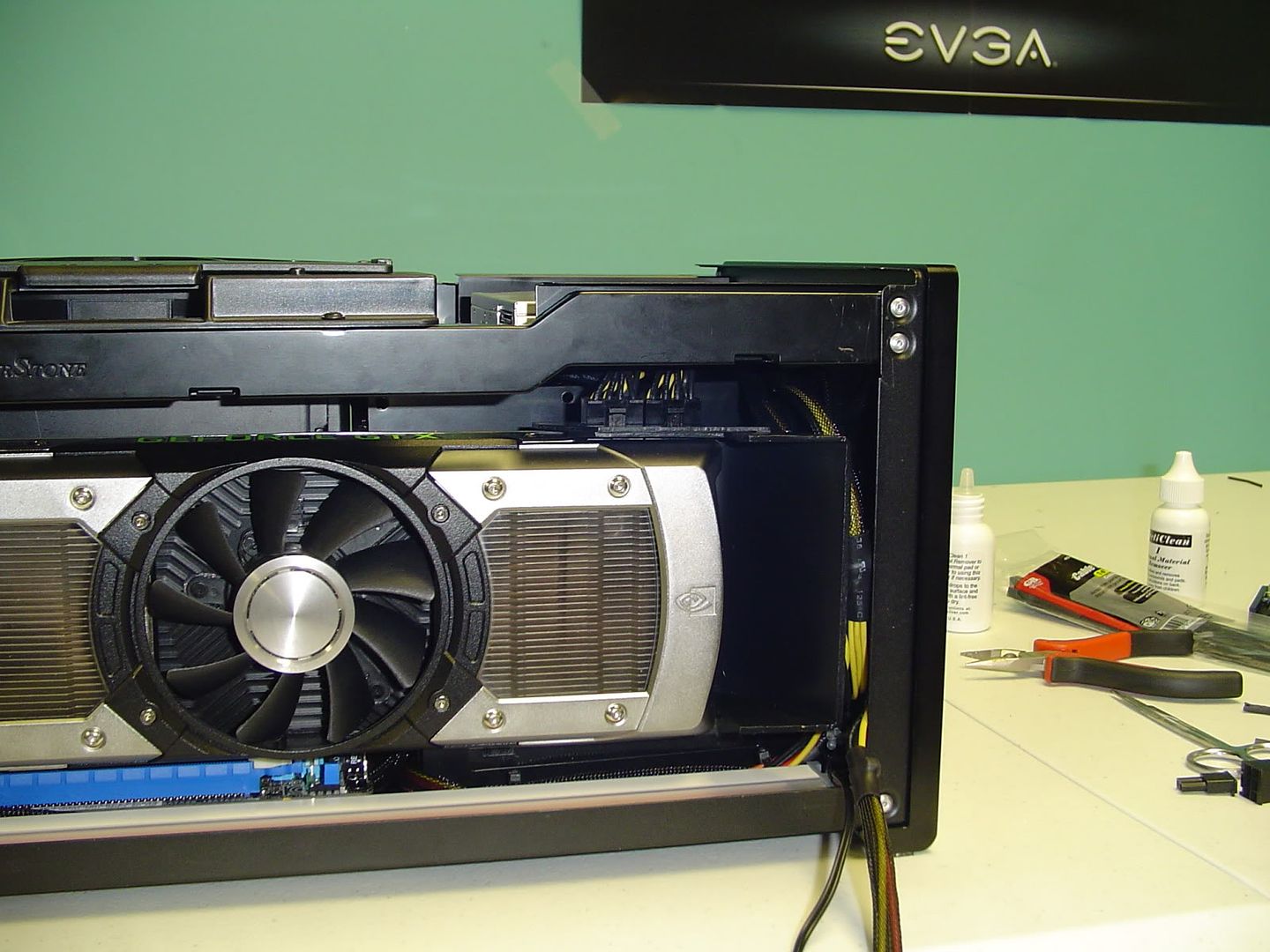
Here is a build thread I've been following for quite some time, has a SG08 with a GTX 690 and Antec 920 cooler, basically what I've recommended now that I think about it lol.

Pic of cooler fitment from the build thread:
DSC03066_zpsd34d12e0.jpg

DSC03120.jpg
 
Last edited:
Okay well I think im going to go with the following components:

Case/PSU: http://www.amazon.com/Silverstone-A...i-ITX+Desktop+Computer+Case+600W+Power+Supply

CPU: http://www.newegg.com/Product/Produ...-na-_-na&AID=10440897&PID=3891137&SID=rewrite

CPU Cooler: http://www.amazon.com/Antec-Kuhler-...54375307&sr=1-1&keywords=Antec+KUHLER+H2O+920

(I assume the rebate will still work if I buy from Amazon, as Newegg's price has gone up to $115).

GPU: http://www.newegg.com/Product/Produ...-na-_-na&AID=10440897&PID=3891137&SID=rewrite

OS: I will probably purchase Win8 Home from Fry's for $70 assuming that deal is still available online. Hopefully Win8 isnt a repeat of Vista/ME and the rest of the MS garbage that they tend to push out every other OS.

I would rather purchase an Asus MB than the ASRock unless there is a compelling reason to do so. I have always used Asus MBs and liked them, so if anybody could recommend something that would be wonderful.

As for the RAM, I will either purchase the Samsung green that xyexz suggested or I will get some Crucial RAM when I know which motherboard I will be using.

Also, could anybody suggest a slim bluray drive or dvdrw drive that would be compatible with this case? I have found a couple online, but am not sure if they would necessarily fit.

Thank you all so much for all the help :).
 
As an Amazon Associate, HardForum may earn from qualifying purchases.
I would rather purchase an Asus MB than the ASRock unless there is a compelling reason to do so. I have always used Asus MBs and liked them, so if anybody could recommend something that would be wonderful.

If going Asus, with the K-chip you want the P8Z77-i deluxe.
 
I would go with the ASRock because the extra $50 for the Asus can be spent elsewhere, or pocketed. I have yet to see overclocks limited by either of these boards - typically you hit a temperature limit before a motherboard limit even with these liquid coolers. This was different with Z68 because the older ASRock board had problems throttling the CPU, but the Z77 version seems super solid. I'm at 4.5GHz on mine with a 3570K, and I hit around 75ºC with a liquid cooler.

The Samsung RAM is the best stuff money can buy, as long as you need RAM in 4GB per stick sizes. Fancy heatspreaders don't make anything else better than this stuff. Being inexpensive is merely an added bonus.

Rebates are usually only for a particular vendor. Before purchasing, download the PDF and read the fine print.

Think of Win8 as Win7, but with a new user interface. Does that make it easier to wrap your head around? :p WinME was just Win98SE/98/95, but with a faulty implementation of System Restore (Microsoft's first try) that screwed with stuff. If you disabled System Restore, it was every bit as good as Win98SE. Well, except for the fact that you couldn't easily make it boot directly into a DOS prompt. That made the nerds upset. Vista is the same as Win7, except not as optimized and with a big brother UAC. Think of it as Crysis. "Will it run Crysis?" is still used on occasion. However, newer games built on the same game engine (Farcry 2?) ran better than Crysis. Crysis is Vista, and Farcry 2 is 7. Same thing, but with 2 years more worth of tweaking and optimizations.
 
Okay well it took me a few days to get the funds ready to buy this, but I have everything ready now and will be ordering today or tomorrow. I have realized that I need an internal CD drive in order to install Windows...does anybody know of a slim one that will fit in the SG08B case? Also, the price of the aforementioned watercooled system has gone up to $99, are there any other cheaper ones such as http://www.newegg.com/Product/Produ...-na-_-na&AID=10440897&PID=3891137&SID=rewrite which might be better now? I am unsure if this will fit inside the case.

In addition, will it be wise to get any 3rd party thermal paste for the CPU? I wish to keep temperatures as low as possible. Are there any limitations to hard drives in this size case? How many can it fit?
 
Last edited:
Okay well it took me a few days to get the funds ready to buy this, but I have everything ready now and will be ordering today or tomorrow. I have realized that I need an internal CD drive in order to install Windows...does anybody know of a slim one that will fit in the SG08B case? Also, the price of the aforementioned watercooled system has gone up to $99, are there any other cheaper ones such as http://www.newegg.com/Product/Produ...-na-_-na&AID=10440897&PID=3891137&SID=rewrite which might be better now? I am unsure if this will fit inside the case.

In addition, will it be wise to get any 3rd party thermal paste for the CPU? I wish to keep temperatures as low as possible. Are there any limitations to hard drives in this size case? How many can it fit?

The antec 920 is still worth the $99, it's still discounted as well, just not as much.

The 240 rads will not fit inside the SG08 without some serious modding, you're better off sticking with something known to fit unless you're wanting a learning experience :D

The paste that's on the Antec 920 and other similar CLCs is a very good paste that you will have no issues with.

Also for your motherboard choice, I strongly suggest you go with the ASRock ITX Z77 motherboard - it's been proven time and time again to have no less potential than the ASUS board, the only and I mean ONLY benefit of the ASUS itx board is the CPU socket placement - which you're not worried about as you're using CLC.

ASRock Z77 board is cheaper, has crazy fast post/boot times that smoke the asus board and it also has mSATA slot which is handy for making builds with less cables if you use that for your boot drive.

Again, strongly encourage the ASRock Z77 board - you won't be disappointed, trust me the extra phase daughterboard for the ASUS mobo doesn't gain you anything, read around on these forums and you'll see.
 
These are the final components I have decided upon...I would just like a final confirmation that they will work properly as I have chosen some parts from Amazon due to lower prices. It comes to about $1400 with an extra ~$35 or so as MIR. I chose a different video card with the same stats because of price, so I would like to confirm that it will fit inside the case, etc. I appreciate all the help you all have given and as soon as I get a green light I will order this today.

11771248.jpg

11771259.jpg
 
Back
Top