need advice on RAID 0

THRESHIN

2[H]4U
Joined
Sep 29, 2002
Messages
3,935
i'm looking only for speed, i back everything up with DVD's so having backups isn't a problem.

i'm wondering if i should go with RAID0 to get some more speed. i already have two 250GB drives in my system, so i figure why not?

ok here are my questions:

- one drive is seagate the other is WD, both same capacity and SATA2. is raid possible?

- any decent RAID add in cards available for my purposes? i don't need the best out there, but one to provide me with that speed would be great. unfortunately my mobo doesn't have RAID...long story:p

- any way to transfer my current file system without reinstalling everything? i was hoping to somehow copy over even just my install of windows 7.

BTW i'm running win7 64-bit if it matters. PCI-e slot card would be nice if it does anything for me. also, not keen on getting a SSD due to the price. thanks!
 
Yes you can use two different brand drives, though it is not recommended. You will limit your array to the following conditions: lowest capacity, lowest speed, lowest cache. Whatever those numbers are is what your array will use when it is built.

Chances are you will not be able to carry over your install. When you rebuild your array you will wipe all data from the drives. Also, you will need RAID controller drivers from the card you get in order for it to work properly.
 
right forgot about the drivers....


why is it not recommended to use two different brands?
 
right forgot about the drivers....


why is it not recommended to use two different brands?

It's not even recommended two use two different MODELS. Because the RAID0 will work optimally with two drives that perform exactly the same. In a RAID0 with two different models, one drive will always be waiting for the other as different models operate at slightly different speeds from each other. Anyone truly experienced with RAID0 will always tell you to match two equal models for the sake of reliability.

My Caviar Blues have been in RAID0 for a year with no complaints and they are doing read/write operations non-stop 24/7.
 
Last edited:
RAID0 is just splitting data between two channels (as opposed to calculating parity on every write), so RAID cards don't lead to as much improvement.

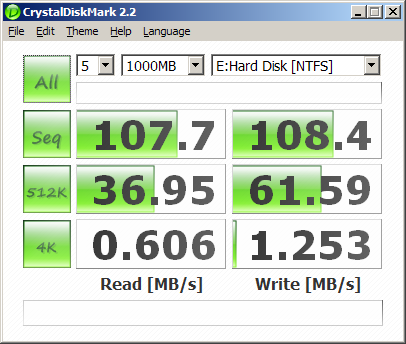
Remember that RAID0 won't help the latency of a HDD at all. Every time you need to load a new file, the drive still has to move the head over that part of the drive. For regular OS and app stuff, you probably won't notice a huge difference since most accesses are small and random. This is where HDDs have insanely low speeds.

Here's my WD6401AALS.
CDM_WD6401_1000MB.png


RAID0 helps the most where one HDD is maxed out, and adding a second drive in parallel can split the load. This means big sequential operations.

For comparision, here's my X25-M.
CDM_X25MG2_02HD_TRIM_1000MB.png


Because SSDs have no moving parts and almost no latency (.1ms vs. 10+ms on a HDD), "jumping all over" for random little chunks of data isn't crippled like with the physical parts of a HDD. For random 4K reads, the SSD is over 36x as fast as the HDD. Even if you were to get the ideal theoretical 2x increase from RAID0, the single SSD is still over 18x as fast.

SSDs make the OS feel snappier because all those little random accesses have much lower latency. RAID0 can greatly improve max transfer speeds, but it doesn't do hardly anything for a bunch of small random accesses.

It depends on exactly what "speed" you're trying to increase on your system, but I'm guessing you'll be doing quite a bit of work and adding a lot of complexity for very little real world improvement.
 
Raid - 0 with the old 250 seagate hd is just a bad idea all together , its a older 7200.10 itll be capped at 95 mb maximum ,
My advice: get a single WD BLACK 640 OR 1TB
 
i already have two 250GB drives in my system, so i figure why not?

Because of this....
you'll be doing quite a bit of work and adding a lot of complexity for very little real world improvement.
and this.....
Raid - 0 with the old 250 seagate hd is just a bad idea all together
and don't forget that RAID0 without a back-up is asking for trouble.


I don't want to discourage you from playing with RAID but be aware of all the possibilities.
 
thanks guys (especially InvisiBill!) for the thurough explanation. never thought in terms of drive latency to be honest. taking those things into consideration, its just not worth it. i just want to have a snappier OS feel and decreased load times. if RAID0 isn't going to do much without me buying new HDD's i'd rather wait out until i can afford a SSD and load my OS and main files onto it.

thanks guys!
 
RAID0 can greatly improve max transfer speeds, but it doesn't do hardly anything for a bunch of small random accesses.
You seem to imply RAID0 only increases sequential performance and not random I/O performance. RAID0 can accelerate both, it cannot lower the access time though.

Imagine a single disk being a single-lane highway; only one track for cars. Now if you add a second lane where cars can drive, that means twice as many cars could be able to drive on that highway; but the cars themselves still have their normal speed; they don't drive any faster just because there are more lanes.

So when using RAID0:
  • The access time / single-IO latency will be the same
  • The average latency of a stream of I/O will be lower (theoretically halved)
  • The Random IOps rate will be higher (theoretically twice)
  • The Sequential throughput will be higher (theoretically twice)

So access times are not all that important; access times hides the fact whether processing one I/O or two I/O's takes longer or not; it shouldn't with RAID0.

Because with sequential I/O the pattern is predictable, it allows the RAID controller to keep all disks busy and get very close to the theoretical maximum. With random I/O, however, there can be many things preventing a healthy performance increase:
  • A misalignment issue would mean you lose the opportunity to do parallel I/O; as both disks have to work on a single I/O request; you lose all random I/O benefits this way.
  • A queue depth of 1 (synthetic benchmarks; blocking I/O applications) is not enough; you need at least a queue depth of 2 to saturate both disks with commands.
  • The stripesize has to be a multiple of the maximum request size (MAXPHYS); ideally 128KiB is good assuming the filesystem is properly aligned. Any lower stripesize would cause the random I/O benefit to be lost.

You should be able to test this with IOmeter, and playing with the queue depth, and do extreme 512-byte random I/O; you should see an increase in IOps for the 2-disk RAID0 array of about 30-40%. A lot lower than the theoretical 100% increase; but that is because the requests are not perfectly spread over the two disks; sometimes two requests land on a single disk; causing single-disk performance until another I/O is queued.

RAID0 still has lots of potential, and i imagine it to be used more often now that SSDs are available. Regardless of RAID0, you need a backup if the volume contains any important files; you also need a backup if you're on a single disk not using RAID, you also need a backup when using RAID1/2/3/4/5/6/7. The only reason you might not strictly need a backup is with a filesystem that can do (incremental) snapshots; though a real backup would still protect against more dangers here.
 
SSDs are only like $80 now-a-days I would throw down for one of these, its all you need.

http://www.newegg.com/Product/Product.aspx?Item=N82E16820227393

I used to have a 4 disk RAID 0 as my program drive, its really not something that a single user can really take full advantage of as mesa says, and the access times do add up so it actually felt less snappy for most home use type performance.
 
30GB all you need? 30GB is what I'm using with a fresh Win 7 install and a handful of apps and only one game installed. The biggest things are COD4 and Office. 30GB is enough if you use very few apps and are planning on offloading all your games elsewhere. IMO, a 30GB drive just for Windows and a handful of apps is pointless.
 
Just put Win 7 alone on the 30GB its all the speed you really need for everyday performance, you get all the benefits of SSD and none of the drawbacks, windows prefetch will load common apps like your browser and office and all that in the background so even if they are on a separate "slow" 7200 rpm HD they will still load instantly since they are cached into RAM in the background.

The only really important stuff to have on the SSD are windows system files and shared directories (typically programs install shared libraries onto the windows folder itself) you have those sped up and you are golden.
 
Back
Top