• Some users have recently had their accounts hijacked. It seems that the now defunct EVGA forums might have compromised your password there and seems many are using the same PW here. We would suggest you UPDATE YOUR PASSWORD and TURN ON 2FA for your account here to further secure it. None of the compromised accounts had 2FA turned on.
    Once you have enabled 2FA, your account will be updated soon to show a badge, letting other members know that you use 2FA to protect your account. This should be beneficial for everyone that uses FSFT.

My first attempt at HDR

GhengisKhan

[H]F Junkie
2FA
Joined
May 16, 2005
Messages
8,514
Just thought I'd share this here and see if I could get some feedback.

Camera is a Nikon D3000 (so I had to adjust the exposures manually, but that's pretty easy)
Remember, I didn't take very much care in the subject matter, it's just some random house, this was more of a test of camera settings and my ability to create an HDR image before working on getting something really good.

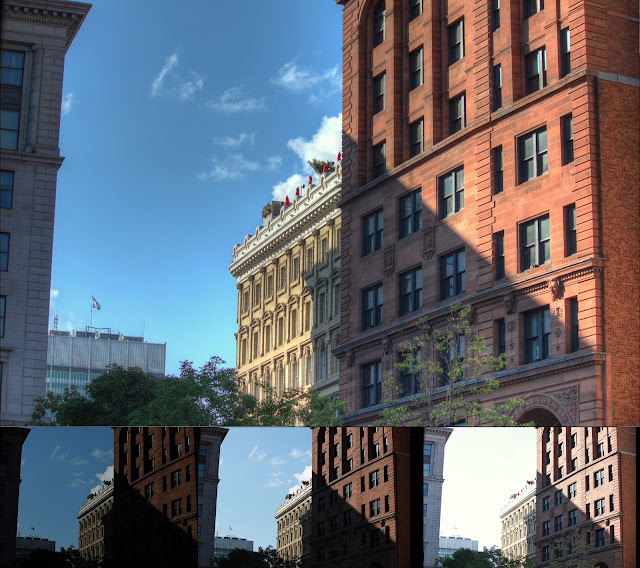
1st the 3 original images I'm working with. (all images reduced in size from 10Mp to make them more forum friendly).

hdrraw1.jpg

hdrraw2.jpg

hdrraw3.jpg


And, the final compiled HDR image... I don't think I did too bad.

hdrtest2.jpg
 
Honestly, this is a pretty low dynamic-range scene, so I don't see much point to tone mapping, other than the, "hey this looks different," angle.

The point of compressing the tonal range is to be able to display a scene that would otherwise be too bright in some areas and too dark in other areas to be accurately captured by a sensor and displayed in print or on screen. Sunsets and sunrises are good places to start, along with other very contrasty images.

Here's a sunset shot as an example, I don't have the source photos hosted anywhere, but in a normal exposure the sky would have been blown

 
Last edited:
I like the detail that was brought out in the clouds, but I don't think that shot was a great candidate for HDR processing. It feels like it was just really heavily tonemapped rather than being a true-HDR.

Where HDR really shines is in bright sunlight where you would normally have to choose between blowing out the sky in order to get details in the shadows, or properly exposing the sky and silhoutting everything else.

Here's an example of what I'm talking about. (shot in Montreal last summer):
IMG_0276_4_5_HDR_example.jpg
 
I know the main reasons for doing HDR shots, I just took those to practice the process involved in doing it. I know the subject matter sucked, but I liked the results (mainly the clouds). I'll be working on getting some better shots to work with in the future, just sharing my first attempt. :D
 
I know the main reasons for doing HDR shots, I just took those to practice the process involved in doing it. I know the subject matter sucked, but I liked the results (mainly the clouds). I'll be working on getting some better shots to work with in the future, just sharing my first attempt. :D

Looks like you did everything right to me, the sharpening is a little much (halos around the trees) but that is pretty normal in HDR processing. What program did you use?
 
I used Photoshop CS4's built in HDR processing. I need to get some shots with better subject matter for HDR, but with the weather around here, there really hasn't been any sunlight to speak of.
 
Were those the only two photos used in making the HDR?

Its a good go for a first run at it. The problem is the image is still too dark, loosing some of the details and gives it that "blown out look". With more images it might have turned out a little better.

Unless your going for a hybrid HDR (which I only try from a well balanced image) go for 3 shots minimum.

Good first try, the clouds are the most interesting part in the HDR since they have such detail.
 
It looks like ImageShack killed 1 of the 3 original images I had posted. The second image was more "blown out" (longer exposure) image.
 
Back
Top