Microsoft's Infrared Type-Hover-Swipe Keyboard

Cool stuff. Always like to see what these guys come up with in their research labs.

Oh and who cares what it looks like. Add cherry switches to it and I am a happy man.
 
Much better than trying to use a touch screen that's for sure.
 
Oh and who cares what it looks like. Add cherry switches to it and I am a happy man.

Well, I wasn't really thinking from an aesthetic standpoint, more from an "Apple Keyboards really suck to type on" standpoint.

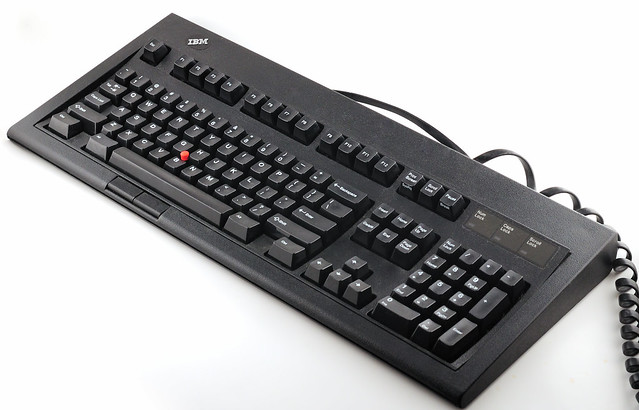
Nothing like this, the holy grail of typing:

5091177536_a2068d1217_z.jpg
 
Zarathustra[H];1040798284 said:
Well, I wasn't really thinking from an aesthetic standpoint, more from an "Apple Keyboards really suck to type on" standpoint.

Nothing like this, the holy grail of typing:

5091177536_a2068d1217_z.jpg

True.

I have one of those. Model M13. $3 at a thrift store. I almost cried.
 
I actually like the Apple keyboard for day to day activities (something about the shallow laptop depth). I don't type or game much on it though (if at all).
 
Zarathustra[H];1040798284 said:
Nothing like this, the holy grail of typing:

I still have a couple of these. I know many love them but honestly I don't think they are all that.
 
I do not want my desktop to function like a tablet.

Using gestures doesn't have anything to do with form factor. Well done gesturing can be very using on a keyboard replacing keyboard combinations with much faster and intuitive actions. Being able to simply wave a hand over the keyboard and switch between programs, not sure how that isn't all about increasing desktop productivity.
 
So, what's the difference between this and duct taping a Leap to your favorite mechanical keyboard?
 
True.

I have one of those. Model M13. $3 at a thrift store. I almost cried.

The pictured keyboard used to be my daily driver.

I have since replaced it with a Unicomp classic though.

The M13 black keys were pad printed with white lettering, rather than sublimated like the beige ones, so they wore off. Last time I wore them out, I ordered the last replacement set in existence, and it felt wrong to wear out those keys as well, so I cleaned it up and left it in "museum" condition, and now use the unicomp.

Still great to type on, but the build quality and solidity was much better with the real M's.
 
I just happy that other people hate apple keyboards as much as i do. Why is everything moving that direction?
 
So, what's the difference between this and duct taping a Leap to your favorite mechanical keyboard?

Saving the duct tape for something more useful. :p

Anyway, good bet this will be on laptops since most have the same style-like KB. Also see some HP laptops w/ leapmotion built in.
 
Cool, but ultimately useless. Another gimmick to try and sell expensive keyboards.
 
So I can get all the unintended movement and clicks I get on my laptop touchpad on my desktop without even having to move my hands off the keyboard.

Instead of trying to bring touch to the desktop, money is better spent renovating the W8 'desktop' up to snuff.
 
So I can get all the unintended movement and clicks I get on my laptop touchpad on my desktop without even having to move my hands off the keyboard.

Instead of trying to bring touch to the desktop, money is better spent renovating the W8 'desktop' up to snuff.

Not exactly sure what point you're trying to make here, most of what's in this demo would apply to Windows 7 as well. There were a couple of modern apps that were shown, but even there the gestures would work similarly, scrolling and zooming applies to many desktop apps.
 
I guess it is sorta "novel", but it still seems like that device sitting 4 inches to the right is more efficient by a factor of about 100
 
Not exactly sure what point you're trying to make here, most of what's in this demo would apply to Windows 7 as well. There were a couple of modern apps that were shown, but even there the gestures would work similarly, scrolling and zooming applies to many desktop apps.

Because this is obviously swipe friendly. Something the Mouse or touchpad don't do well, more so teh mouse. Touchpad you would expect to be better but in practice I haven't seen it. This is trying to give an altenative to the Mouse/Touchpad but targetted to the Metro UI. Microsoft was out of touch with desktop users thinking they'd all run out and replace their monitors plus pay a touch premium on top of it. The premium has come down (I suspect some behind the scenes MS subsidy going on there) but I have a 23" screen, its still high. In addition to the cost holding you hand up to a desktop screne has ergonomic issues if you do it past 10 minutes. So this is seeking a way to make Metro work on the desktop. Instead of toolin up the Desktop interface work better with a mouse (or work better in general, anyway).
 
Because this is obviously swipe friendly. Something the Mouse or touchpad don't do well, more so teh mouse. Touchpad you would expect to be better but in practice I haven't seen it. This is trying to give an altenative to the Mouse/Touchpad but targetted to the Metro UI. Microsoft was out of touch with desktop users thinking they'd all run out and replace their monitors plus pay a touch premium on top of it. The premium has come down (I suspect some behind the scenes MS subsidy going on there) but I have a 23" screen, its still high. In addition to the cost holding you hand up to a desktop screne has ergonomic issues if you do it past 10 minutes. So this is seeking a way to make Metro work on the desktop. Instead of toolin up the Desktop interface work better with a mouse (or work better in general, anyway).

Again, it's difficult to see how this only applies to the modern UI when it's obvious that these gestures are also very applicable to the desktop. Mac users swear by touchpad gestures, and with a good touchpad gestures can be useful with Windows on the desktop. Panning, scrolling, zooming, and task switching are extremely common actions on a desktop that could benefit from this kind of keyboard and have nothing to do with modern apps.

As for your last point, with the new Start Menu and windowed modern apps coming to Windows in the future, it's obvious that Microsoft is improving Windows 8.x and the modern UI to be better integrated and more familiar on the desktop. So the notion that this keyboard is some type of mitigation isn't consistent with what has been officially announced and is definitely coming where this keyboard is but a prototype perhaps never to see the light of day.
 
Back
Top
