• Some users have recently had their accounts hijacked. It seems that the now defunct EVGA forums might have compromised your password there and seems many are using the same PW here. We would suggest you UPDATE YOUR PASSWORD and TURN ON 2FA for your account here to further secure it. None of the compromised accounts had 2FA turned on.
    Once you have enabled 2FA, your account will be updated soon to show a badge, letting other members know that you use 2FA to protect your account. This should be beneficial for everyone that uses FSFT.

Memory chips messing with computer booting!

MoreDents

Limp Gawd
Joined
Mar 9, 2008
Messages
294
I was building a new system from scratch and when I put my 2 gigs (2 sticks) of Crucial RAM in, the computer wouldn't boot. (one stick was in DIMM1 and the other in DIMM2) :(

I then took out the second stick (so now just one stick is in DIMM1) and everything booted fine :)

But I really want to put my 2nd memory stick in so I put that in DIMM3 and nothing booted!

What's the reason here? Should I try one in DIMM1 and the other in DIMM4?

My mobo manual tells me NOTHING about this


This is what I have

Crucial Ballistix 2GB (2 x 1GB) 240-Pin DDR2 SDRAM DDR2 800 (PC2 6400) Dual Channel Kit Desktop Memory
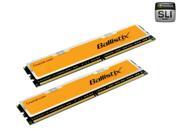
20-146-565-05.jpg


on a

Foxconn A690GM2MA-8KRS2H AM2 AMD 690G Micro ATX AMD Motherboard - Retail
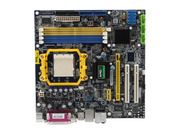
13-186-114-04.jpg


Thanks
 
Other users said:

Read your motherboard instruction manual it will tell you what slots you need to put them in.

My motherboard is setup so that you put one ram card into DIMM1 and one in DIMM3 or one in DIMM 2 or one in DIMM4.

Check the manual just to make sure though.

But my manual doesn't say anything...

You probably need to raise the RAM voltage. Boot with one stick, change your vDIMM (RAM voltage) to whatever value your RAM needs, save, power down, install other stick, and power back on.

I don't know where to go to change the RAM voltage
 
you have a set of defective ballistix, seems to happen alot but usually with the higher binned 1000's/1066's and up, same thing happened with mine, got to the point where it would only boot with a stick of ddr2-400 256mb test stick. so i rma'd
 
Dang, that sucks...I'm figuring the stick I have inserted right now is fine right? Though when I "right click" on My Computer, it says there's only 896MB of RAM (not the 1 gig) That's over 100 megs cut out!

Can I just send 1 stick back? I'm flying back for college in 2 days and this computer I just built is for my mom. I can't take both sticks back with me to return because then the computer won't work...
 
does he system have on board video? and or tv card? alot of times thats where the lil bit of memory disapears to.

about sending one back idk, i doubt it. usually if its bought in pairs irs returned in pairs. also depends on where it was bought. few times ive heard the manufacturer send a replacement out and you dont have to send the dead ones back. but thats rare
 
Back
Top