• Some users have recently had their accounts hijacked. It seems that the now defunct EVGA forums might have compromised your password there and seems many are using the same PW here. We would suggest you UPDATE YOUR PASSWORD and TURN ON 2FA for your account here to further secure it. None of the compromised accounts had 2FA turned on.
    Once you have enabled 2FA, your account will be updated soon to show a badge, letting other members know that you use 2FA to protect your account. This should be beneficial for everyone that uses FSFT.

Building new system...I have newbie questions! :P

MoreDents

Limp Gawd
Joined
Mar 9, 2008
Messages
294
Hello :)

This is my first build and I am desperate...I plugged everything in and connected my monitor (with both VGA and DVI cables)

I press the power button and the fans spin, the optical drive works but nothing shows up on the monitor.

The monitor isn't even recognizing the computer is on! :eek:

Here are some background info setup:

(NOTE: My mobo came with a really minimal manual. It's just a huge diagram of the mobo and step by step for the BIOS)

QUESTION #1:
I have this odd little "thing" that came with my mobo. One end is this round cylinder, which I believe has a battery inside. The other end has 4 holes. The 2 wires connecting the ends are black and red.

What is this for and where do I connect it?


QUESTION #2:

I have NOTHING connected to the:
  • CD_IN Connector
  • TV OUT Connector
  • COM1 Connector
  • ChassisIntruderConnector
  • IrDA Connector

Is that ok?

QUESTION #3:
Do I need to connect this cable (the smaller one) to anything? (I don't have a floppy drive)
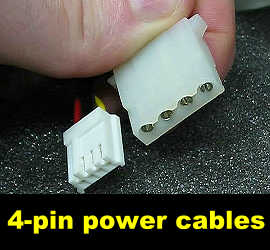
4pinS.jpg


QUESTION #4:
I don't have an audio cable for my optical drive. Is that ok?


Help would be greatly appreciated as I'm building this for my mom and am leaving back for college really soon

:)
 
I don't understand what you are referring to on Question 1. As far as power connections on the board, the +12v 4 pin CPU power connector you plug in and the 24 pin ATX power connector. Question 2, you don't have to worry about those. The CD_IN Connector maybe. Question 3, you do not need to use that 4 pin female connector. Disregard that.
 
Question #1: Might be the speaker...

Question #2: Don't need anything connected to those unless if you need to...

Question #3: Nope.. unless if you have a funky sound card by Asus (I believe?), otherwise if you don't have a floppy, no need for it

Question #4: Yeah, that's perfectly fine...

As to the video... don't plug both VGA and DVI into the monitor, just use DVI... I don't know why it wouldn't be displaying video... somebody else will answer that.
 
1) Can you provide a picture of it? Could be the temperature gauge?
2) That is Ok
3) Do you have a floppy drive? If not, don't worry about the smaller cable. If so, that smaller cable is suppose to connect to the floppy drive
4) That is ok

As for your video problem:
Take your motherboard outside of the case and leave it on the motherboard box. You can still start up the PC by connecting the two power pins with a screwdriver. If video shows up, then something inside the case was shorting the motherboard. Maybe a loose screw or mobo stand.
 
Thanks for all the replies

Here's a photo I just took for question 1

GOOD.jpg

The other side of the round end has a little hole in the center and a plus sign
I also have no clue what that metal thing next to it does. It also came with the mobo

I'll try taking the mobo out. See what happens
 
My mobo also came with 4 of these round plastic grey things... (far left)
round.jpg


I had no idea what they did but they slid into place on the computer case and 2 corners of my mobo is resting on it (because it didnt have spacers for those corners on my case)
Could THIS be shorting out my mobo?
 
The "round plastic grey things" are the bottom feet of the case. They're for keeping the case off the ground. As for the speaker, check the manual to your motherboard. It will have an illustration of where you can input the speaker/buzzer at.
 
tiraides - oh ok. Placing them on the bottom looks right. It's odd because they also have perfect spots on the inside of the case...


I forgot to mention this earlier but when I power on my computer, it DOES NOT even beep or buzz. (I found out there's already a buzzer installed on my mobo)

I took the mobo out of its case (what Danny Bui said) and turned it on again and I still have the same problem

Though...when I flipped the mobo over, I saw that one of the soldered "legs" was completely bent over and touching the mobo. I used a tweezer to fix it but it left a really tiny white scuff on the mobo...would this be the root of my problem? :confused:
 
UPDATE: I took all the RAM out and this time when I powered up, the computer just beeeeped and beeeeped. Long scary beeps...

The monitor still couldn't pick up the computer :(
 
OK! It seems all of this could've been avoided if I just took ONE memory stick out. (I had 2 sticks of 1 gig Crucial RAM) I took one out and it works fine now

Why is this? Should the other stick go into DIMM3 instead of DIMM2? (the first one is in DIMM1)

The sticks are DDR2 and the mobo accepts DDR2's
 
OK! It seems all of this could've been avoided if I just took ONE memory stick out. (I had 2 sticks of 1 gig Crucial RAM) I took one out and it works fine now

Why is this? Should the other stick go into DIMM3 instead of DIMM2? (the first one is in DIMM1)

The sticks are DDR2 and the mobo accepts DDR2's

Read your motherboard instruction manual it will tell you what slots you need to put them in.

My motherboard is setup so that you put one ram card into DIMM1 and one in DIMM3 or one in DIMM 2 or one in DIMM4.

Check the manual just to make sure though.
 
Crucial sticks? Which ones? You probably need to raise the RAM voltage. Boot with one stick, change your vDIMM (RAM voltage) to whatever value your RAM needs, save, power down, install other stick, and power back on.
 
Back
Top