• Some users have recently had their accounts hijacked. It seems that the now defunct EVGA forums might have compromised your password there and seems many are using the same PW here. We would suggest you UPDATE YOUR PASSWORD and TURN ON 2FA for your account here to further secure it. None of the compromised accounts had 2FA turned on.
    Once you have enabled 2FA, your account will be updated soon to show a badge, letting other members know that you use 2FA to protect your account. This should be beneficial for everyone that uses FSFT.

Logical CPU representation on Core i7?

Zarathustra[H]

Extremely [H]
2FA
Joined
Oct 29, 2000
Messages
42,401
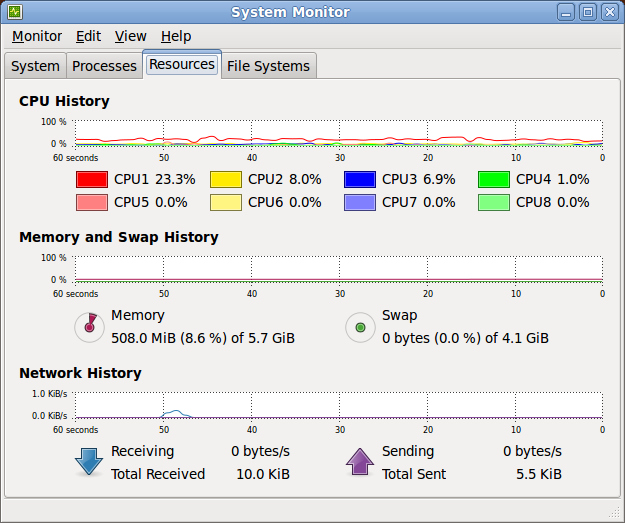
So this is what my system resource monitor shows me on my new core i7:
3702488800_41b04d1f33_o.jpg


Does anyone know how the logical CPU's are oriented on the cores?

Are CPU1 and CPU2 the same core, or are CPU1 and CPU5 the same core?

Is the operating system hyperthreading aware so that it knows to first select a different core for running multiple tasks, before it selects two logical CPU's on the same core?

How do you add up cpu utilization with hyperthreading?

HT seems rather simple at first, but it quickly becomes rather complex...

Thanks for your thoughts!
 
Is the operating system hyperthreading aware so that it knows to first select a different core for running multiple tasks, before it selects two logical CPU's on the same core?
The idea behind Hyperthreading is making as much possible use of the CPU by allowing the scheduling of threads on idle parts of the execution engine of each core. I'm not sure of the details of how Linux handles Hyperthreading, but I know Windows thread scheduling algorithms are aware enough to select an idle physical core over an idle virtual core (on another core that's already in use). I'll gamble to say this is how it's implemented in Linux as well.
 
Last edited:
How software reports your threads depends both on the software and how the bios assigns your threads.

If you run RealTemp and go into the Settings window it will show you a number called APIC ID. Typically this will show 01234567 with a hyper threaded Core i7. This shows that thread 0 and thread 1 are running on CPU 0, thread 2 and thread 3 are on CPU 1, thread 4 and thread 5 are on CPU 2 and thread 6 and thread 7 are on CPU 3.

If the APIC ID is not in the typical numeric order then anything is possible. Even the Windows Task Manager will be screwed up and you won't be able to look at it and know which core the individual thread data is coming from.

I thought this was kind of stupid so I made sure that RealTemp gets this right and reports the core temperature from the correct core. From left to right it is core 0, core 1, core 2 and core 3 and no matter what the bios does, it will keep the data correctly ordered.

This seemed to be a bigger problem with Core 2 Quad processors. My Q6600 started out as APIC ID 0123 but one day I think I flashed the bios and all of a sudden the APIC ID changed to 0213. All software started reporting the center two cores swapped. I noticed this because core 2 typically reported significantly cooler than the rest of them and all of a sudden core 1 was reporting as the coldest core. It was very confusing because all software was in agreement. Three months later, for no apparent reason, APIC ID switched back to 0123. I have seen screen shots where the 123 can come in any order. Some bios versions will do the same thing to Core i7 CPUs. When this happens, I don't think any OS is smart enough to assign tasks correctly.

Core Temp does not compensate for changes in APIC ID and I found that neither does the Task Manager.

With the software in your screen shot there are no guarantees but it is likely that CPU 1 and CPU 2 are coming from the first core, etc, etc. Run RealTemp to make sure that your APIC ID is in order.
 
Back
Top