Lightning strike = USB-c to DisplayPort doesn't work

echter

Weaksauce
Joined
Feb 10, 2016
Messages
83
It's pretty simple, very close bolt of lightning flashed the lights/power and immediately one of my two monitors went dark. At first I thought it was damaged, but after switching the cables, each monitor works individually, but only if connected by DisplayPort to DisplayPort. USB-C to DisplayPort does not work with either monitor. The connector at the monitor end does get hot though.

My question is whether it's just the cable or if the USB-C port on the motherboard is damaged. I don't have an extra adapter cable to test, so I thought I'd ask before ordering a new one. Does the warm/hot plug reveal anything? This is the PC I put together about 3 months ago: It's been running great otherwise. Still using the onboard video, so the outputs I can use are 1 DisplayPort and 1 USB-C. Both monitors accept a DisplayPort.
 
^ Yeah, weird, but it can be the electronics on either end. Could have gotten all weirded out and need power cycling (plus discharging of caps), then the cable (weird, but they do die/weaken from nearby bolts sometimes; most likely culprit because it's like 1 copper hair per wire) or the port (least likely, they are designed to handle static discharge, which is high voltage).
 
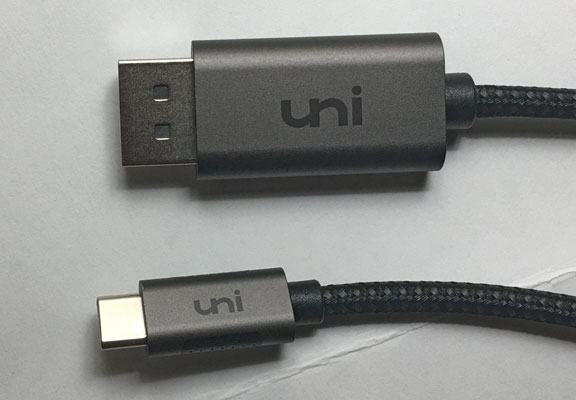
No, that's not me lol. Thankfully no headphones on at the time. I did the power down/PSU test, but no difference. I've tried "detect" in the Windows Display settings and it doesn't find anything, so it looks like I'll be ordering a new cable. I HOPE that's all it is. Good to know the port is better designed to handle it than the cable. It does seem weird that enough rogue electricity could flow through a PC and only damage that specific thing. The current cable is a Uni. Don't know if it's reputable or not. The plug to the monitor did get very warm again within 1 minute.

Edit: Now looking through cable options has me wondering if the cable was even optimal in the first place. I read things like, "...the C port is DisplayPort 1.4, it's just a cable, no conversion." And, "Native USB-C video is DisplayPort, there is no conversion happening in USB-C to DisplayPort adapters." If the latter is true, why is there so much heat dissipation at the plug? And is the version of USB-C and DisplayPort important here? The mobo manual says it's "USB4 USB Type-C" Then there's the ads themselves which say things like "For MacBook Pro, Air, iPad" I thought the interface type was enough to ensure compatibility.
 
Last edited:
Test the cable with another device that can output via it USB C port, phone, tablet, another pc or laptop?
Just read your Tuesday post.....
What cable are you using? Pics?
 
Throw away all your hardware, call an electrician, and get insurance and/or legal involved.

Tell me how I know.
 
It's a Uni. Don't have anything else to test with. The ends don't have any visible burned areas and didn't smell different afterward.

cable.jpg


As for throwing away all my hardware, hiring electricians and lawyers.... sounds like a principled grand adventure, but a lot more expense and time than trying to isolate problem and fix when constrained by money and time.
 
It's a Uni. Don't have anything else to test with. The ends don't have any visible burned areas and didn't smell different afterward.

View attachment 745082

As for throwing away all my hardware, hiring electricians and lawyers.... sounds like a principled grand adventure, but a lot more expense and time than trying to isolate problem and fix when constrained by money and time.
Well that sucks, guest you're stuck trying a new cable 1st, hopefully it was just that. Have your tried connecting a phone or tablet 1st just incase they might be able to display out, or can you borrow one? Maybe go to a library and ask nicely if you could test it out on one of their displays.
You have a 2x HDMI, 2x DP 3050? How many displays you have needing a USB C to DP cable, 3+?

I'm trying to find the one I bought off of AliExpress......
https://www.aliexpress.us/item/3256...st_main.4.184618029suzYb&gatewayAdapt=glo2usa

Still using the onboard video, so the outputs I can use are 1 DisplayPort and 1 USB-C. Both monitors accept a DisplayPort.
You have a 2x HDMI, 2x DP 3050? How many displays you have needing a USB C to DP cable, 3+?

I would test the USB C port with a data cable to your phone, maybe see if the whole port is fucked. Not sure how far the DP video travels to reach the port.
 
I never got the 3050. Just using the igpu at the moment, so I'm limited to a DP out and a USB-C out. My phone requires lightning. At this point I've pretty much decided to order a new cable - probably tonight. Thanks for the link. I can get them on ebay a little faster though. Since the uni originally worked, I'll probably get another one of those. If it's not the cable, I guess it's time to go for the GPU.
 
I never got the 3050. Just using the igpu at the moment, so I'm limited to a DP out and a USB-C out. My phone requires lightning. At this point I've pretty much decided to order a new cable - probably tonight. Thanks for the link. I can get them on ebay a little faster though. Since the uni originally worked, I'll probably get another one of those. If it's not the cable, I guess it's time to go for the GPU.
Hopefully it's the cable.
If you're not on a surge or good UPS, time to get one. Try to get protection for your network provider also. I had 3 56k modems spiked decades ago, $50 a pop.......
 
Hopefully it's the cable.
If you're not on a surge or good UPS, time to get one. Try to get protection for your network provider also. I had 3 56k modems spiked decades ago, $50 a pop.......
Ordered another Uni cable tonight. I do use a surge protector, and who knows, maybe it did its job, partially. Everything else about the computer seems fine.
 
It's not. Get it taken care of now through insurance and warranties while you still can.
How do you know it's not. I don't know that. What insurance? Homeowners? From the hassles I've seen recently from neighbors trying to make claims on very obvious things and mysteriously jacked up premiums afterward, I just don't see how this fully functioning PC warrants that. Then there's our own history with this particular insurance co. and other reasons I'd rather not have them looking for reasons to complicate coverage or premiums. How does a warranty even work with a component that's working fine? Then there's the idea of undoing all the effort I've spent on putting this together in the first place. Maybe all that together is nothing for someone who constantly builds PCs and swaps/returns components, but it seems like mountain of time and potential problems for me.
 
but it seems like mountain of time and potential problems for me.

Problems you don't know you may already have. When my office got struck by lightning ever piece of kit that didn't die instantly died an early death, and even my peripherals would fry other computers when I replaced them.
 
How do you know it's not. I don't know that. What insurance? Homeowners? From the hassles I've seen recently from neighbors trying to make claims on very obvious things and mysteriously jacked up premiums afterward, I just don't see how this fully functioning PC warrants that. Then there's our own history with this particular insurance co. and other reasons I'd rather not have them looking for reasons to complicate coverage or premiums. How does a warranty even work with a component that's working fine? Then there's the idea of undoing all the effort I've spent on putting this together in the first place. Maybe all that together is nothing for someone who constantly builds PCs and swaps/returns components, but it seems like mountain of time and potential problems for me.
Have you tested the data functions of that port?
 
Have you tested the data functions of that port?
How do I do that without another device and cable that connects with USB-C? As I mentioned, I ordered another USB to DisplayPort adapter last night, so as soon as I get it, I should have an answer to the port vs cable question.
 
How do I do that without another device and cable that connects with USB-C? As I mentioned, I ordered another USB to DisplayPort adapter last night, so as soon as I get it, I should have an answer to the port vs cable question.
OK, I thought you only had no other device that has video out through USB C.
So nothing else else with USB C, or a double ended USB C cable?
 
*sad face*
OK now even sadder. I just got the new cable and tested. It doesn't work, so it seems the USB-C port is damaged. One difference is that this time the plug into the monitor is not getting hot. I guess the next move is to get the Gigabyte 3050. It has 2 DisplayPort ports and I don't see anything for that price that's any better.
 
OK now even sadder. I just got the new cable and tested. It doesn't work, so it seems the USB-C port is damaged. One difference is that this time the plug into the monitor is not getting hot. I guess the next move is to get the Gigabyte 3050. It has 2 DisplayPort ports and I don't see anything for that price that's any better.
I would buy a USB 3 device to see how fucked the port is.
 
I would buy a USB 3 device to see how fucked the port is.
I'm not sure how it would benefit me though because I already know it doesn't work for the only reason I need it. Adding a video card is about the same price, but a lot easier than replacing the motherboard, and I was originally going to get the GPU anyway.
 
Got my 3050 today. Installed and connected with 2 DisplayPort cables. Everything looked great on both monitors at first. But when I try playing video with MPC-HC it shows a mostly black screen. You can see vague dim bits of video, but the brightness is down about 95%. Video plays normally with VLC and in a browser. Nothing seems wrong except for MPC-HC. All video formats/resolutions behave the same way. I've installed the latest Nvidia driver (32.0.15.6094) on Gigabyte's download page and it shows up in Device Manager.

HWiNFO64 shows the GPU, but never using more than 14 watts and never shows the fans spinning. Just from a few searches, everyone seems to suggest choosing Enhanced Video Renderer in MPC, but I've already been using that. Never had problems with video & MPC on any computer I've ever had. At this point I'm not sure what to do. MPC-HC is by far my player of choice. I'm happy to have the 2nd monitor functioning again, but with a new video card I'd really like to be able to ..... play video.

-------------------

EDIT:
I think the MPC-HC problem is solved. Despite almost all the online advice being update Nvidia drivers and tweak MPC settings, that didn't work. Apparently MPC-HC needs to be installed fresh with default settings if going from iGPU to GPU. The first re-install did not work, but I thought I'd try the remove settings option on uninstall. That worked and everything is playing fine now. A side benefit is that I did get a newer diver by installing the Nvidia app. Not sure if that's needed anymore though.
 
Last edited:
Back
Top