I'm a bit confused, after reading this thread, it seems everyone is praising the IPS of the LG monitor. I originally planned to buy this until I saw another thread asking about the LG in terms of gaming, and everyone said to avoid it. Is the monitor good for gaming?
![[H]ard|Forum](/styles/hardforum/xenforo/logo_dark.png)
Navigation
Install the app
How to install the app on iOS
Follow along with the video below to see how to install our site as a web app on your home screen.
Note: This feature may not be available in some browsers.
More options
You are using an out of date browser. It may not display this or other websites correctly.
You should upgrade or use an alternative browser.
You should upgrade or use an alternative browser.
LG IPS236V
- Thread starter jcdang
- Start date
The LG IPS226 is definitely playable and that's most likely because according to digitalversus it seems to be as fast as the DellU22/23/24. It's smaller but that makes everything look sharper too which is good for gaming.
Edit : there's also someone on this forum who has both the 236 and 226 and says the 226 is better in every way (including the response time etc)
Edit : there's also someone on this forum who has both the 236 and 226 and says the 226 is better in every way (including the response time etc)
Last edited:
I'm a bit confused, after reading this thread, it seems everyone is praising the IPS of the LG monitor. I originally planned to buy this until I saw another thread asking about the LG in terms of gaming, and everyone said to avoid it. Is the monitor good for gaming?
I'm kinda in the same boat. I do a lot of gaming. Not so much FPS, but a good mix of everything. Still not sure...I find researching/shopping for displays to be difficult because a lot of it is so opinion based. What might look great to one person could look like ass to someone else.
GodBlessTexas
n00b
- Joined
- Mar 25, 2011
- Messages
- 5
I'm kinda in the same boat. I do a lot of gaming. Not so much FPS, but a good mix of everything. Still not sure...I find researching/shopping for displays to be difficult because a lot of it is so opinion based. What might look great to one person could look like ass to someone else.
I picked up both the IPS236 and the IPS226. Though it's slightly smaller than the IPS236, I found the IPS226 to fit my needs better and I couldn't justify spending $40 more for 1" diagonal of extra screen on the IPS236. The IPS226 is a beautiful display, and it handles gaming just fine. I've played WoW, Starcraft II, and Portal 2 since I picked it up, and I've not noticed anything that would make me want to take it back. I'm buying 2 more to finish my Eyefinity setup for my office.
Last edited:
I've gamed plenty with my IPS236, and I didn't notice any issues with it. I have not played FPS though. I have played MMO's and Defense Grid. And it didn't seem any better or worse than any TN panel I've owned, but then again. I may be a display noob.
Edit- I have played Left for Dead on it, and didn't notice much input lag, but I don't like the game much and didn't really look for lag. But if there was lag, I didn't really notice it effecting my gameplay.
Edit- I have played Left for Dead on it, and didn't notice much input lag, but I don't like the game much and didn't really look for lag. But if there was lag, I didn't really notice it effecting my gameplay.

Cov
Gawd
- Joined
- Dec 3, 2007
- Messages
- 917
Even if a hundred people posted their positive experiences with the IPS236V or IPS236V, there'll always be some hardcore Dell fans who don't get tired preaching in every thread possible, that any other monitor than Dell must be a complete crap piece of shit. But if you google the words "dell" and"customer services" in combination with either of the words "crap", "shit", "bad" or complaints, you'll be very surprised.
LG panels are used in DELL, NEC, HP, Asus, EIZO e Hanzo, but all this brands is product better monitor than original LG !
The panel is 1 thing, the elettronic is another, LG product his monitor following a price / quality policy, because is not competitive with his competitors in top quality sector.
it can buil panel ( with extreme coating without reason ) but is not very good to build the back-elettronic.
LG monitor always have horrible default setting, limited OSD menù and service menù, and it like to use granular coating everytimes.
Dell use LG panel ok, but have optimal preset setting, no backlight bleeding, much complete OSD menù, and a better guaranty.
The same thing is similar for the other brands.
LG now is considered a good productor because it's the one for IPS panel because haven't any competitors, is a monopoly.
But when Samsung sell the new S-PLS panel monitor SA850 and SA650, the LG return to be ridicolous.
( PLS is the answer to IPS by Samsung with ligh AG coating ).
The panel is 1 thing, the elettronic is another, LG product his monitor following a price / quality policy, because is not competitive with his competitors in top quality sector.
it can buil panel ( with extreme coating without reason ) but is not very good to build the back-elettronic.
LG monitor always have horrible default setting, limited OSD menù and service menù, and it like to use granular coating everytimes.
Dell use LG panel ok, but have optimal preset setting, no backlight bleeding, much complete OSD menù, and a better guaranty.
The same thing is similar for the other brands.
LG now is considered a good productor because it's the one for IPS panel because haven't any competitors, is a monopoly.
But when Samsung sell the new S-PLS panel monitor SA850 and SA650, the LG return to be ridicolous.
( PLS is the answer to IPS by Samsung with ligh AG coating ).
Does the lg ips236v use the same panel as the lg ips231?
yes it's exact the same.
F3 revision but without overdrive.
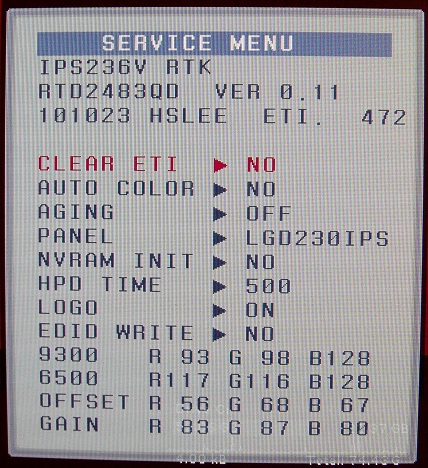
I just got me one of this and here's the Service Menu I got from my monitor:
Manufacturing Date: April 2011
Dead Pixels: NONE
Backlit bleeding: From my point of view, absolutely none that I can see of
Blurry Fonts? Not at all! I 'm using IE9 and I'm one coming from a Samsung 2343BWX with a 2048 x 1152 resolution (I really miss that LCD)

I have a small issue with the unit though, the shop I got this from erred in placing the warranty sticker in one of the mounting holes of the stand body So mounting this on my desk and removing the stand body, I'm risking of voiding my warranty!
http://db.tt/lRJGgYU
Can some one plese share their color settings... Thanks!
EDIT: Here's how to get the Service Menu
Since I was doing it in the dark I was not aware I was pressing the wrong button. <------ AWKWARD
Instead of pressing the Menu Button, press the SMART+.
1. Power off the monitor.
2. While pressing the SMART+ button, put your finger on the power button and keep it pressed. The monitor will power up.
3. Quickly press the Menu+ button again, the monitor should power cyle.
4. You can now release your fingers.
5. When the monitor is fully up, press the Menu+ button again to show the service menu.
6. Turn off the monitor to release the Service Menu.
Note: Be careful when pressing the Menu/Menu+ button while Service Menu is up. It changes the settings from the default.
Kudos to the shop where I purchased this monitor. They replaced it with a brand new one, without the warranty sticker stuck in the mounting hole
So far, so good
Here's the new one's Service Menu:

Manufacturing Date: April 2011
Dead Pixels: NONE
Backlit bleeding: This new one has no noticeable backlit bleeding, again I'm a happy man
Note: These pics are only taken by my lowly phone cam.
Manufacturing Date: April 2011
Dead Pixels: NONE
Backlit bleeding: From my point of view, absolutely none that I can see of
Blurry Fonts? Not at all! I 'm using IE9 and I'm one coming from a Samsung 2343BWX with a 2048 x 1152 resolution (I really miss that LCD)
I have a small issue with the unit though, the shop I got this from erred in placing the warranty sticker in one of the mounting holes of the stand body
So mounting this on my desk and removing the stand body, I'm risking of voiding my warranty!http://db.tt/lRJGgYU
Can some one plese share their color settings... Thanks!
EDIT: Here's how to get the Service Menu
Since I was doing it in the dark I was not aware I was pressing the wrong button. <------ AWKWARD
Instead of pressing the Menu Button, press the SMART+.
1. Power off the monitor.
2. While pressing the SMART+ button, put your finger on the power button and keep it pressed. The monitor will power up.
3. Quickly press the Menu+ button again, the monitor should power cyle.
4. You can now release your fingers.
5. When the monitor is fully up, press the Menu+ button again to show the service menu.
6. Turn off the monitor to release the Service Menu.
Note: Be careful when pressing the Menu/Menu+ button while Service Menu is up. It changes the settings from the default.
Kudos to the shop where I purchased this monitor. They replaced it with a brand new one, without the warranty sticker stuck in the mounting hole
So far, so good
Here's the new one's Service Menu:
Manufacturing Date: April 2011
Dead Pixels: NONE
Backlit bleeding: This new one has no noticeable backlit bleeding, again I'm a happy man
Note: These pics are only taken by my lowly phone cam.
Last edited:
Cov
Gawd
- Joined
- Dec 3, 2007
- Messages
- 917
Translated .. ► Prad Review - LG IPS 236V
Since I was doing it in the dark I was not aware I was pressing the wrong button...
Here's the correct way to show up the Service Menu in this monitor:
Instead of pressing the Menu Button, press the SMART+.
1. Power off the monitor.
2. While pressing the SMART+ button, put your finger on the power button and keep it pressed. The monitor will power up.
3. Quickly press the Menu+ button again, the monitor should power cyle.
4. You can now release your fingers.
5. When the monitor is fully up, press the Menu+ button again to show the service menu.
6. Turn off the monitor to release the Service Menu.
Note: Be careful when pressing the Menu/Menu+ button while Service Menu is up. It changes the settings from the default.
Here's the correct way to show up the Service Menu in this monitor:
Instead of pressing the Menu Button, press the SMART+.
1. Power off the monitor.
2. While pressing the SMART+ button, put your finger on the power button and keep it pressed. The monitor will power up.
3. Quickly press the Menu+ button again, the monitor should power cyle.
4. You can now release your fingers.
5. When the monitor is fully up, press the Menu+ button again to show the service menu.
6. Turn off the monitor to release the Service Menu.
Note: Be careful when pressing the Menu/Menu+ button while Service Menu is up. It changes the settings from the default.
Last edited:
Hi all
Would this monitor be a good buy for R1 500? ( rand, I life in South-Africa ) it would cost about $150 if $1 is R10 ( That`s what I use to compare prices) , but its actually $1 = R7 ($215) . That`s what I pay for PC parts in SA! We get ripped off.
I guess $150 is a good price then? Is it then worth the money?
Would this monitor be a good buy for R1 500? ( rand, I life in South-Africa ) it would cost about $150 if $1 is R10 ( That`s what I use to compare prices) , but its actually $1 = R7 ($215) . That`s what I pay for PC parts in SA! We get ripped off.
I guess $150 is a good price then? Is it then worth the money?
Cov
Gawd
- Joined
- Dec 3, 2007
- Messages
- 917
Thanks Toink
Anyway, I bought two of them and paid inkl. delivery and 20.- Euro cashback from LG 180.- Euro for each.
Converted into SA Rand = 1781.- ZAR
Converted into GB Pound = 155.- GBP
Coverted into US Dollar = 257.- USD
Converted into AUD = 240.- AUD
I have the feeling, that happens all over the world, specially in UK and Canada.We get ripped off.
Anyway, I bought two of them and paid inkl. delivery and 20.- Euro cashback from LG 180.- Euro for each.
Converted into SA Rand = 1781.- ZAR
Converted into GB Pound = 155.- GBP
Coverted into US Dollar = 257.- USD
Converted into AUD = 240.- AUD
Yeah Wow that's interesting. So far my price is very good. It was on a premier launch special!
They say the price was R1 900 but that's about 190$ and that's not much. I think some LG products in SA is quite good priced. I'm not sure about the other countries.
They say the price was R1 900 but that's about 190$ and that's not much. I think some LG products in SA is quite good priced. I'm not sure about the other countries.
Cov
Gawd
- Joined
- Dec 3, 2007
- Messages
- 917
Change the setting for gamma from 2.2 to 2.0 for better color tone.Tested. There's on dead or faulty pixels.
By the way, are you going to exchange it because of the dead pixel?
Here are some sources to test LCD screens:
Lagom
CT'screen
Eizo Monitor Test
Interactive monitor test
dead pixel test
do I have a dead pixel?
Did bought the monitor for R1 499 or about 150$! didn't find any problems like dead or faulty pixels. didn't noticed any backlight bleeding. the colours do look good. this was the first time that I've seen this type of screen! my price was a winner, so if the response time is slower the price will make up for it!
didn't find any problems like dead or faulty pixels. didn't noticed any backlight bleeding. the colours do look good. this was the first time that I've seen this type of screen! my price was a winner, so if the response time is slower the price will make up for it!
Cov
Gawd
- Joined
- Dec 3, 2007
- Messages
- 917
Do you mean the response time of the monitor or of the owner of the monitor?... if the response time is slower - the price will make up for it.

Monitor of coarse! I don't think that if I decided to change the monitor I'll get another one. I have not seen that monitor on any retailers website in SA and www.pricecheck.co.za doesn't show it.
Edit: pricecheck found retailers.
Edit: pricecheck found retailers.
Last edited:
Just picked up a LG IPS236V yesterday. Overall pretty good color, but I did notice one thing. It seems like there's quite a bit of "pink hue" whenever black is displayed on the corners of the screen. I read a couple places that this is partly because of the LED back lighting and should be expected.
Anyone else see quite a bit of pink in the corners when displaying black? or do I actually have a defective screen?
*I can add a picture later when I get off work
Anyone else see quite a bit of pink in the corners when displaying black? or do I actually have a defective screen?
*I can add a picture later when I get off work
Cov
Gawd
- Joined
- Dec 3, 2007
- Messages
- 917
I have checked the LCD thread, but this subject was not touched.
Can you calibrate out pink/green IPS tint?
No, you can't
Is there any 24" IPS monitors out there that don't have the pink tint issue
No, there isn't
Can you calibrate out pink/green IPS tint?
No, you can't
Is there any 24" IPS monitors out there that don't have the pink tint issue
No, there isn't
Steps to show the Service Menu is now corrected. sorry for the confusion
Cov
Gawd
- Joined
- Dec 3, 2007
- Messages
- 917


hey guys, i bought this monitor 3 days ago and so far its been a bad purchase at least for me as i only play games.
Colors and the detail quality of images are great, better than what i was used to see on TN panels.
But the bad part for me(while gaming) is that there is a very noticeable ghosting when moving fast, even even doing slow 360degrees moves, the monitors screen feel slow like if i had low FPS (capped at 60fps all the time so that's not the issue).
Is this a normal behavior on IPS panels?
thanks
Colors and the detail quality of images are great, better than what i was used to see on TN panels.
But the bad part for me(while gaming) is that there is a very noticeable ghosting when moving fast, even even doing slow 360degrees moves, the monitors screen feel slow like if i had low FPS (capped at 60fps all the time so that's not the issue).
Is this a normal behavior on IPS panels?
thanks
Last edited:

hey guys, i bought this monitor 3 days ago and so far its been a bad purchase at least for me as i only play games.
Colors and the detail quality of images are great, better than what i was used to see on TN panels.
But the bad part for me(while gaming) is that there is a very noticeable ghosting when moving fast, even even doing slow 360degrees moves the monitor feel slow like if i had low FPS (capped at 60fps all the time so that's not the issue).
Is this a normal behavior on IPS panels?
thanks
For gaming, get the IPS226, run it at 76.5hz, profit.
For gaming, get the IPS226, run it at 76.5hz, profit.
sadly i didn't find that much of info when i was looking to buy it. Gonna have to look for another options.
PRAD.de IPS236V Review
PRAD.de IPS231P Review
Measured response on the LG/Asus 2011 e-ips models is 30ms vs 17ms on the Dell U2311H.
PRAD said:Subjective assessment
An input lag is not noticed in subjective tests. Much stronger is the streaking on the panel. This is even after some period of acclimatization still quite substantial. In a way, you get used to it after a while, but is likely to be for most players an unsatisfactory result. Just smear strong and rapid movements make the goals inaccurate.
In films can also be perceived slight streaking in some circumstances. Nevertheless, you can use the IPS236V for movies.
PRAD.de IPS231P Review
Measured response on the LG/Asus 2011 e-ips models is 30ms vs 17ms on the Dell U2311H.
Last edited: