• Some users have recently had their accounts hijacked. It seems that the now defunct EVGA forums might have compromised your password there and seems many are using the same PW here. We would suggest you UPDATE YOUR PASSWORD and TURN ON 2FA for your account here to further secure it. None of the compromised accounts had 2FA turned on.
    Once you have enabled 2FA, your account will be updated soon to show a badge, letting other members know that you use 2FA to protect your account. This should be beneficial for everyone that uses FSFT.

L5640 O/C single processor

gkanakis

[H]ard|Gawd
Joined
Oct 11, 2004
Messages
1,167
048-1.jpg

047.jpg


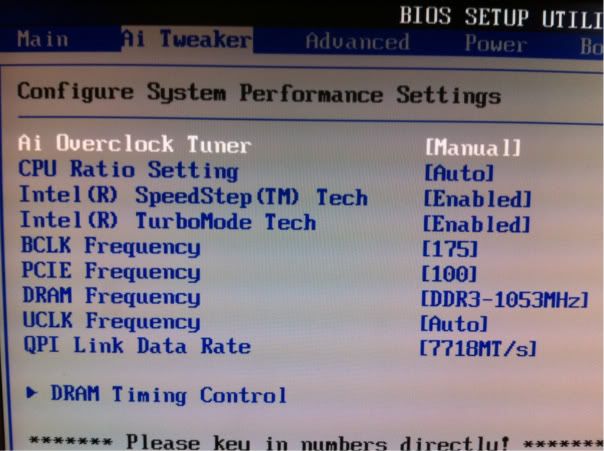
So from the top:

Ai Overclock Tuner = [Manual]
CPU Ratio Setting = [Auto] can't change
SpeedStep = ?
TurboMode = [Enabled]
BCLK = Need to get to 200
PCIE = [100]
Dram = ? My ram is 1333MHz.
UCLK = ?
QPI Link = ?

VPU Voltage = I have it at 1.325v
Everything else on the list I have no clue!
 
UCLK should be either 16x or 3200, depending on what they actually want. Put QPI Link on the slowest setting. Dram time should be something like 2:6 or somewhere around 1333 if it is a frequency instead of a ratio. I have speedstep enabled, which should let you adjust CPU ratio (I think that is right.) You should have a Vtt and an IOH voltage somewhere that you may have to adjust.

Once you can adjust your CPU ratio, drop it to the lowest setting (12x), drop the Dram setting to the lowest setting, and start pushing up the bclk. The Vtt voltage is the only thing you should have to adjust. You should be able to hit 210 - 220. Then , set your dram ration to 2:6 and back your bclk down under 200. Ease it back up with the memory at full speed and make sure it can run at the 200+ bclk setting. Then, back the bclk back down under 200 and set your CPU ratio to the max. Here is where you will probably need more CPU voltage as you push the bclk back up over 200.
 
Go ahead and turn off speedstep and turbo for now while you are trying to find a stable OC. They are just going to introduce fluctuations.
 
Go ahead and turn off speedstep and turbo for now while you are trying to find a stable OC. They are just going to introduce fluctuations.

I think he needs it to adjust the CPU ratio...that sounds familiar on my Biostar.
 
Asus guys, chime in please. I think that CPU PLL is Vtt - If you have a hardware monitor, it should be around 1.1 - 1.2 on Auto. QPI/Dram core should be memory voltage (1.65V there abouts.) Leave everything else at Auto for now and tell us what CPU voltage is actually reading. I'd guess around 1.3 as you approach 200 bclk. If it goes higher than that on Auto, you will need to manually set it.

It might be that you need speedstep off to adjust CPU ratio...that may be what i was remembering. You should be able to knock the DRAM freq. down one notch. UCLK should be 2x memory. QPI Link Data Rate should be at the lowest setting you have initially.
 
049.jpg


Your explanation is exactly what I would do on a eVGA board!

I can't find the Vtt setting.

These three photos are all the setting available.

Here is a fourth that is in the CPU Configuation:

050.jpg
 
I agree with Nitro here, turn of speedstep and turbo if you're shooting for a solid OC.

Thanks for posting the screens too, Gives me something to look forward to when mine arrives. :)
 
I agree with Nitro here, turn of speedstep and turbo if you're shooting for a solid OC.

Thanks for posting the screens too, Gives me something to look forward to when mine arrives. :)

Only turn off turbo if you get an 18x multiplier option with speedstep off. What is the current reading from CPU PLL?
 
CPU PLL is not Vtt. Range is wrong.

Here are the allowable ranges for these settings:
CPU Voltage : .8v - 2.1v
CPU PLL Core Voltage: 1.8v - 2.5v
QPI/DRAM Core Voltage: 1.2v - 1.9v
IOH Voltage: 1.1v - 1.7v
IOH PCIE Voltage: 1.5v - 2.76v
ICH Voltage: 1.1v - 1.4v
ICH PCIE Voltage: 1.5v - 1.8v


Gives me something to look forward to when mine arrives. :)

I hope my headaches pay off for you! :D
At least be up and running in no time!
 
On my Asus P6T Deluxe there is both a CPU Voltage and CPU PLL Voltage so they are definitely not the same.

Here is something I found on Google that pertains to PLL voltage:

Simplest explanation I can think of is that adjusting the PLL voltages for the CPU, IOH, or the QPI helps clean up the frequencies and stop them from oscillating too much out of spec. If you see the CPUz core speed tab under 100% load jumping up and down in frequencies fairly quickly, even if it is by 2-6 mhz, it would be a good idea to raise the CPU PLL voltage up a notch or 2 until you see the core speed stay very even and constant under load. Be careful as too much increase in PLL voltage can actually do more harm than good and cause instability.

QPI/DRAM Core Voltage is NOT your memory voltage. The wording is misleading but it's actually the North Bridge voltage.
 
Then where is Vcore? We really need Vcore, Vtt, and memory voltage. Odd naming convention here.
 
... We really need Vcore, Vtt, and memory voltage. Odd naming convention here.

Yes Asus has an odd way of naming things I totally agree.

Vcore = CPU Voltage
Vtt = QPI/Dram Voltage
Memory = DRAM Bus Voltage
 
Yes Asus has an odd way of naming things I totally agree.

Vcore = CPU Voltage
Vtt = QPI/Dram Voltage
Memory = DRAM Bus Voltage

Sweet thanks for the info!!

Tomorrow a L5640 goes into my fully watercooled system!
Which has an eVGA motherboard. Should go much easier!

055.jpg


Yes it just sits there and folds! Only cable is a power cable! :D:D

057.jpg
 
No data cable? You using *wireless* :eek:

I have never had a problem!

My friend told me as long as you turn off the "Power save mode" in the USB device, it will never power down.

Folding there for over three months.
 
I have never had a problem!

My friend told me as long as you turn off the "Power save mode" in the USB device, it will never power down.

Folding there for over three months.


yep your friend is correct as long as the power save mode is disabled it will stay connected 24/7 and have 0 issues.. wireless is the way to go in my opinion with a farm setup unless you have a crap load of systems all in one spot then use a switch attached to a wireless repeater bridge..
 
Well I'm at about 3.5GHz on the L5640.

The L5640 is just getting started on a -bigadv.

Here is the L5640 at 3.5GHz (HardOCP -bigadv) vs i7 930 at 4GHz (Kids Computer -bigadv)

EDIT: Looks like the L5640 is pulling 30:06 TPF
 
Last edited:
30:06 TPF on 2686 WU @ 3.5GHz ?? wow .. 4 minutes faster than 930@4Ghz ...:eek:
 
30:06 TPF on 2686 WU @ 3.5GHz ?? wow .. 4 minutes faster than 930@4Ghz ...:eek:

And probably using 50W less power....gk, do you have a kill-o-watt you could throw on that thing to see what it draws, with and without the GPU client running? I think we will all be pleasantly surprised.
 
Here's a quick rundown of my OC on my Gigabyte UD5, as well as I can remember

vcore 1.38125V
CPU PLL 1.96V
QPI 1.375V
IOH 1.3V
ICH 1.2V
BCLK 200
DRAM 1066 (1600mhz)
QPI Link speed x36 (7.2ghz)
Uncore 14x (2800mhz)

So far so good at 3.6ghz, after about 5 minutes total spent overclocking. Planning to push farther as soon as I can.
 
Well I'm at about 3.5GHz on the L5640.

The L5640 is just getting started on a -bigadv.

Here is the L5640 at 3.5GHz (HardOCP -bigadv) vs i7 930 at 4GHz (Kids Computer -bigadv)

EDIT: Looks like the L5640 is pulling 30:06 TPF

what memory speed are both your i7's running? any background apps running? both of your i7 rigs should be faster than they are. my 920@4.0 191X21 1540 mem 7-7-7-20-72-1t runs the same time frams as your Hex. doing the math my i7 with a total of 16,000 ghz your hex with 21,000 ghz should do a 2686 around 23:00 fram times.
 
Last edited:
what memory speed are both your i7's running? any background apps running? both of your i7 rigs should be faster than they are. my 920@4.0 191X21 1540 mem 7-7-7-20-72-1t runs the same time frams as your Hex. doing the math my i7 with a total of 16,000 ghz your hex with 21,000 ghz should do a 2686 around 23:00 fram times.

I will get the settings here shortly.


And probably using 50W less power....gk, do you have a kill-o-watt you could throw on that thing to see what it draws, with and without the GPU client running? I think we will all be pleasantly surprised.

I do.


Forgot, the Kids computer has one GTX 260 and the [H]ard computer has a GTX295.
 
gkanakis let me know if my guess on the points was right. specially if i was wrong!
 
I have mine at 3.8GHz running LinX.... Times are a bit slow because I have memory turned all the way down. I'll do another 20 pass with overclocked RAM after :D
48476393.png


I'll post setting when I reboot.
 
flyz please post your settings when you get a chance. Seeing as how we have the same mobo.....
 
CPU Ratio 18x
QPI Ratio x36
Uncore Auto
BCLK 211
CPU Vcore 1.30v
QPI/VTT Voltage 1.32v
IOH Core Auto
CPU PLL 1.88v
QPI PLL 1.2v

Oh and I'm trying to OC my memory but I'm getting 4GB usable. FFFFFFFFFF
 
Here's a quick rundown of my OC on my Gigabyte UD5, as well as I can remember

vcore 1.38125V
CPU PLL 1.96V
QPI 1.375V
IOH 1.3V
ICH 1.2V
BCLK 200
DRAM 1066 (1600mhz)
QPI Link speed x36 (7.2ghz)
Uncore 14x (2800mhz)

So far so good at 3.6ghz, after about 5 minutes total spent overclocking. Planning to push farther as soon as I can.

CPU Ratio 18x
QPI Ratio x36
Uncore Auto
BCLK 211
CPU Vcore 1.30v
QPI/VTT Voltage 1.32v
IOH Core Auto
CPU PLL 1.88v
QPI PLL 1.2v

Oh and I'm trying to OC my memory but I'm getting 4GB usable. FFFFFFFFFF
regardless, that might be the best OC we have on the team so far.

(you are on the team, right? :))

Looks like your voltage settings are lower than mine. Mine are probably horribly unoptimized, I spent a total of 5 minutes overclocking mine. Maybe you could bump a few volts to get your RAM in line.
 
Yea I'm on the team, though I've been gaming quite a bit the past 3 days...

Solved the memory thing, bumped the QPI/VTT Volts to 1.34v and DRAM to 1.68v. Off to do another 20 pass.
 
That looks good...I figured we would have more of these in the 3.8 GHz range in single proc boards. I just hope one fo us yahoos figures out how to do it on an SR-2. 2 x 3.8 GHz hex cores should yield 120K+ ppd.
 
Memory controller just refuses to overclock... hmm

If I ran my memory at 633 speeds, will that affect my TPF much?
 
many people have reported that bigadv performance is dependent upon memory speed.
 
Back
Top