Installing a Core i7 (lga2011)

Red Squirrel

[H]F Junkie
Joined
Nov 29, 2009
Messages
9,223
I have not built a computer in a while and one thing I've noticed is that everything changed, instructions are completely useless, and I'm actually having a hard time figuring out how to do this properly.

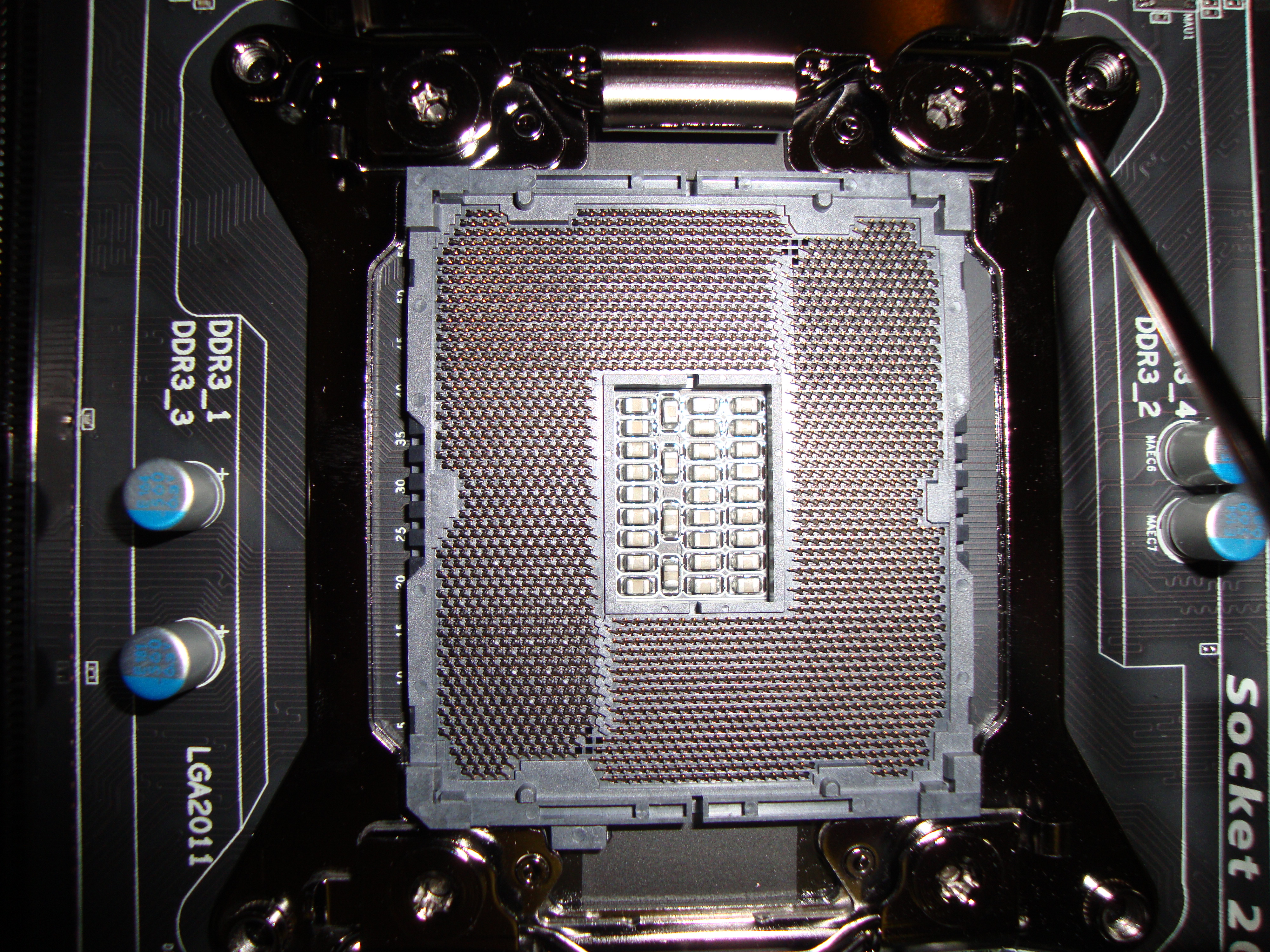
From what I gather there's two levers and the metal plate that goes on top of the cpu. So I align the cpu (only goes in one way) and then put the plate down. The issue I'm having is putting down the first lever. It almost feels/sounds like I'm crushing something. It's not a pretty sound. Is this normal? Or should it be easy to do? I can't see how else it would go as the cpu wont fit the other way so I know I have that part right. I'm just scared I'm missing something here.

Actually this is exactly my motherboard, what a coincidence. It's exactly what I'm doing, but when I go to put that first lever down, I really have to force it, which I'm scared to do as I don't think that's right.

http://www.youtube.com/watch?v=UB__WxpPKd8
 
Levers can be very firm but it is concerning that you hear crunching. When you flip the plate down on the CPU how resistant is it to lying flat? It sounds like there is some obstruction or the CPU isn't installed in the correct direction if abnormal sound is being created. Do you notice any chips from the plastic socket protective cover that you removed. Maybe a small piece of trash is present. You could flip the motherboard upside down to try to dislodge whatever is present if you do not see anything obvious.

edit: Also if your motherboard is not already secured in the motherboard tray it could be something under the board making noise when you apply pressure from above.
 
Last edited:
The loading force on these ILMs is pretty large. If you have the CPU installed in the socket in correct way, you're probably hearing the metal of the camber arm rubbing against the ILM body as you close, in the hinge or somewhere.
 
Yeah, I was afraid of that too when I was installing my cousin's LGA 1155 system. The lever arms do take quite a bit of force to get down.
 
Yeah I don't see anything, and the cpu is right in, it cannot move sideways.

Also are the pins suppose to be bent in an angle? Does not seem right...

 
Yes, the socket pins are bent over at an angle.
If one looks out of alignment with the ones around it, you may have a bent pin. I don't see one in the pic but its tough to tell.
 
Pins look ok and the length of shadows from each is consistent. When you re-seat the chip again nudge the base of the lever arm toward the end of the fulcrum so that it is more square with the plate. You could also put the plastic cover back into the socket and test the arms then to see if it is the arms making noise.
 
Ok it's in. I will hope that sound was normal. Now on to the heat sink... they don't make these things easy anymore. Time to start going through the 11 page manual. Yes, 11 pages just to install a heat sink lol
 
Turns out the heat sink is not too bad, all that stuff was for different sockets.

Only thing is, how do I know if I screwed it in enough? It feels tight, but I can still turn. Do I keep going until I see no more thread? I don't want to crush the cpu either.
 
You aren't going to crush the CPU, that's what the IHS (gray thing on top) is for.
 
Just make sure you aren't going to town on one screw at a time. Turn one a little bit then go onto another, so that its like your dropping the HSF down level.
 
Just make sure you aren't going to town on one screw at a time. Turn one a little bit then go onto another, so that its like your dropping the HSF down level.

Yep that's what I did, so guess I'm good. I did not tighten them all the way, but it feels pretty tight, so that should be good I'm thinking. First thing I do when I turn it on is check the temps in bios to ensure they're ok. :p
 
It's alive, it's alive!

Is 41C a normal temp for the i7 on idle? Keep in mind the case is open and it's hot in this room, it's like +25. Had to close the door or the cat would be all over everything. :p
 
It's alive, it's alive!

Is 41C a normal temp for the i7 on idle? Keep in mind the case is open and it's hot in this room, it's like +25. Had to close the door or the cat would be all over everything. :p

Mine with an H80 and near room temp ambient in the case is about 36 with MX-4 paste. So that seems ok. What is it at load. Mine climbs to about 58C.
 
Only installing windows now but after sitting for an hour it stayed at 41, so I'm pretty happy with that if it's considered normal. I'm also thinking I should have re-spread the paste after playing around with the heat sink but hopefully it will be ok. Ended up removing it and turning it around as I could only put 3 ram sticks and I really wanted to put 3.

I also run F@H so we'll see how it goes once I install that. :p I think F@H can use GPUs now too. I will have to play with that once my 1000w psu comes in.
 
Back
Top