• Some users have recently had their accounts hijacked. It seems that the now defunct EVGA forums might have compromised your password there and seems many are using the same PW here. We would suggest you UPDATE YOUR PASSWORD and TURN ON 2FA for your account here to further secure it. None of the compromised accounts had 2FA turned on.
    Once you have enabled 2FA, your account will be updated soon to show a badge, letting other members know that you use 2FA to protect your account. This should be beneficial for everyone that uses FSFT.

Input Lag - A Discussion

Battle_Rattle

Limp Gawd
Joined
Nov 6, 2005
Messages
327
To my surprise (this being the most active forum on Displays on the net) there is no dedicated discussion of the dreaded "input lag." Yet you hear about it in many threads.

"Only go with TN Panels"
"40ms difference will get you killed"
"No way humans can even notice"
"I game fine on XXX which has 50ms input lag"

Mainly what I'm looking for is for first hand data and/or impressions across individual games across one system, with - Two different monitors.

I was a bit worried about my new monitor having Input Lag, so I have done some cursory testing comparing my old monitor vs my new monitor, both now sitting on my desk.

<Taken from my post in another thread>

So... My old primary gaming monitor is a Gateway 21inch 2185w. Many a night I have thrown up 20-8 etc. kill counts on COD4 and the like. I'm not saying im some leet gamer, just that I have had some regular success while playing (no, not camping lol.)

Ideally I need to get my hands on a CRT and try the following technique but it is a great personal comparison to compare my old monitor to my new one.

Using the following program http://tft.vanity.dk/ I cloned my monitor output to each monitor (see your Nvidia control panel if you do not know what I am talking about) and set them both up on DVI connections. Then I took pictures at a shutter speed of 2000 to determine which monitor was rendering the clock count more quickly.

Here are the results across 10 points (Taken from Canon A570 at 2000 shutter speed)

275t 2185w
:531 :563
:266 :281
:313 :324
:188 :219
:078 :110
:563 :610
:344 :375
:703 :735
:063 :094
:485 :500

Clearly the 275t is rendering the clock count more quickly. (EDIT: Actually it seems the 275t is slower, see post 11) 27ms faster on average.

Some non-binding conclusions - I do not think Input lag matters, or people adjust, or there are more significant factors while playing....

I'll continue to look for a CRT to get more accurate numbers, but I do not think this finding can be completely discarded. please discuss...

Chime in with anything and everything
 
Um... isn't the Gateway rendering the clock faster?

If the 275t shows 531 and the 2185w shows 563 then the Samsung is behind, and therefore slower.
 
samsungs, (as much as i like them as a display company) are notorious for input lag, as are ALL lcd's
 
This should be a very interesting discussion if people actually take the time to run that program.

This weekend I will put up the results between my two monitors, Gateway FHD2400 and Viewsonic VX2025WM.
 
It's MUCH HARDER to notice input lag if you use a 400dpi piece of junk ms mouse.

If you use a 1600 or higher dps mouse and switch back and forth between 2 monitors you can easily tell a difference between a 15ms and a 30ms input lag monitor in terms of mouse friskiness.
 
Um... isn't the Gateway rendering the clock faster?

If the 275t shows 531 and the 2185w shows 563 then the Samsung is behind, and therefore slower.

Am I interpreting the results wrong? I thought this to mean that the 275t (31ms) was rendering the clock timer sooner than the 2185w (63ms)... I think thats what it means

This weekend I will put up the results between my two monitors, Gateway FHD2400 and Viewsonic VX2025WM.

Do it.... Shutter speed is important though... We all need to do this against CRT's though, thats the real test.
 
It sounds like overall you're pretty pleased with your new monitor, so I wouldn't get too worked up about the lag. PRAD tested 2 frames lag for the 275T at native res, 3 frames if the internal scaler is used: http://www.prad.de/en/monitore/review/2007/review-samsung-275t-part9.html#Responsiveness I think that's a pretty credible result and would explain the 50ms some tests have noted.

Your own results are a bit suspect until you test more thoroughly: which OS are you using? which driver? have you swapped the DVI connectors? Have you reversed the monitors selected as primary/secondary in the Nvidia control panel? My own testing revealed that you can end up with a discrepancy of 30-40ms due to drivers & config. Googling the 2185w also reveals a YouTube clip of some signficant lag on that monitor (without putting a stopwatch on it.) It's quite possible that you are really used to lag of around 2-3 frames & just don't notice it. Given that it's not causing you any problems playing any of your games you obviously don't need to worry about it and are instinctively compensating enough. As soon as you start playing something where anticipation is much more difficult and/or available reaction time is less you could start to find the game is more difficult with lag compared to CRT. Something like Streetfighter or a soccer game possibly.


Input lag certainly isn't an imaginary problem and it really does matter, quite a lot in some circumstances. I spent a lot of time talking to various suppliers of some really high end broadcast monitor equipment, I also got access to some product design engineers notes that highlighted the lag issue due to numerous customer requests for a solution. As an example: some sports broadcasters have had to either stick with CRT or adjust the camera locations within the stadium so that the camera operator has enough time to react. Even if the game or application doesn't demand zero latency, some users are still very sensitive to it. If lag is annoying for anyone it's insulting to say that the're blowing the issue out of proportion. I don't find it even remotely suprising that some people strongly perceive even tiny amounts of lag as it's a really artifical thing, if your body & mind is conditioned to expect an instant reaction any disruption may feel unnatural.

Personally I can tolerate 1-2 frames lag, I can tell it's there but it is possible to adapt. That's playing offline single player using a Razer Copperhead set at 2000dpi. If asked for a recommendation I'd still always point to the displays with 1 frame or less lag as the preferred option for gaming, but suggest that 2 frames lag may be an acceptable compomise provided the user isn't too sensitive. 2 frames / 33ms is the upper limit of what I would recommend as I think that's actually in the range that would be considered fast for HDTVs (plenty of Sony's & Samsung's etc measure in the 45-50ms range)
 
All LCD screens have input lag, and for the life of me, a lot of users here seem to be ignorant of that fact despite being gamers for the most part. The ones who don't care about input lag are the photo editing people, but I see few and far between at times...

Considering all the timing games out there ie Guitar Hero, DDR, Beatmania, you'd think people would be sensitive, but GH has a WIDE forgiveness range for timing. DDR somewhat is forgiving, but it let's you know just how off you are. Beatmania is relentless. Guitar Freaks the jap version and original of GH would DECIMATE all you GH players as it is unrelenting in the precision of it's timing. Fighting games like Marvel vs Capcom series, and Street Fighter 3 are nearly unplayable on most HDTV's, mine is barely able to play it, but it's still off.

For PC users, think of it this way, if your ping is 30 ms, it takes 15 ms for your computer to send a message to the server and recieve a response back. Add in the low LG 20ms and now you are playing with a delay of 50ms. As far as twitch games like UT3, that's a major disadvantage. I'm tempted to switch back to my old 19 inch CRT just to waste all the players on LCD's playing with artificial lag... I know my aim's slightly hampered. On a CRT, I can follow a player with the mg in Q3 and alter your jump trajectory. Can't do that on a LCD.

The only real way to test is vs a CRT, ALL LCD's have some varying degree of input lag, the LG 24 inch, the BenQ 24 inch and the Dell 24 inch have shown to be be some of the fastest screens on the market when it comes to input lag. The LG (which I currently use), is on average 20ms. I've seen my sharp LCD come in under 10ms on HDMI and component in and into the 20's range sometimes.

This user has tested the aforementioned screens. I've personally used a BenQ and LG and found them very close, but the LG wins overall for me for PC use.

http://www.bexox.com/showdown.htm

Here's a link to my testing of the Sharp 37 GP1U screen.

http://www.hardforum.com/showthread.php?t=1249445
 
I've just recently switched from a CRT to the Westy L2410NM, which has ~2frames (~32ms) input lag.

I can tell if I have my CRT cloned and switch both screens from black-to-white or vice versa. I can tell if I _really_ look for it. I can't really tell while gaming or general usage, unless I specifically look.

I think it all boils down to this:
1. Lower input lag is better.
2. People vary in sensitivity to input-lag.
3. There are trade-offs to be made, and which end result is most desirous is variable depending on the individual or individuals who will be using the monitor.

I felt that the better color and viewing angles of an MVA justified the input lag. In a couple months of usage, I have not been shown wrong. This is not a universal case, and everyone should go out and make this decision for themselves. Oh, and I couldn't afford a low-input-lag amazing-color IPS. If I could've, well, yeah.
 
Am I interpreting the results wrong? I thought this to mean that the 275t (31ms) was rendering the clock timer sooner than the 2185w (63ms)... I think thats what it means

That's not what it means. The program you're testing with is simply a timer counting up. If the timer is at 650 milliseconds, then it sends 650 to the display. If the monitor has a response time of 15 ms then it will be showing 635 on the screen at the time 650 is being sent from the computer. You will not see 650 displayed on the screen for 15 more milliseconds.

So the monitor showing the higher number is closer to the actual time on the timer, and therefore faster.

If you still need proof, look at this link that Slade posted: http://www.bexox.com/showdown.htm

You'll notice that his CRT is at a higher number than his LCD.
 
The fact that the Gateway is faster makes sense because it is a much smaller panel, and smaller panels are generally faster.
 
Input lag is THE reason i decided to stick with CRT's, i guess i am one of the types who is really sensitive to it. I have tried many different LCD's and could feel the lag differences on all of them.

The Samsung 226bw was the closest to being acceptable but i still couldn't live with it. I wasn't bothered much when playing shooters (i only play SP anyway) but when playing my favorite game (nhl08 on 360) i found my success was very hampered by it.

That game requires some serious precision and reaction time. I could hardly even line up a successful bodycheck when using an LCD, yet on a CRT i can plaster guys all over the ice with ease. Theres just no comparison at all.
 
samsungs, (as much as i like them as a display company) are notorious for input lag, as are ALL lcd's

apple IPS panels do not have input lag. their mice do (Toastyxp relates) though. My planar 26" has less lag by half or less than a 24" LG which is known for its least lag for gaming. It is imperceptible and almost non existent.

couple that with my g5 mouse for nearing 0ms lag.
 
apple IPS panels do not have input lag. their mice do (Toastyxp relates) though. My planar 26" has less lag by half or less than a 24" LG which is known for its least lag for gaming. It is imperceptible and almost non existent.

couple that with my g5 mouse for nearing 0ms lag.

So you're saying that somehow apple has managed to eliminate a flaw that plagues every single other LCD? Including TN panels which have been proven to have the least amount of lag?

And you think having a high DPI mouse actually brings down the ms delay of a monitor? All a mouse like that does is bring you closer to the ms delay limit of the monitor, it isn't going to magically reduce it below that.

In other words if your monitor has a delay of 30ms for example then that 30ms delay is ALWAYS going to be there. Regardless of how good your mouse is..
 
Apple didn't eliminate lag, they didn't bother to implement any of the new technology that causes lag.
Cinema displays can't be adjusted on their own, they rely on the computer output... (once coupled with a apple only connection, ADC)
the designers seem to have chosen the cheapest and easiest option for the display electronics,
it makes them inferior to the likes of NECs in graphics but it reduces lag to a minimum.
(same with the other ips 30''ers without scaler, no calculation, minimal lag)
 
Toompra said:
The Samsung 226bw was the closest to being acceptable but i still couldn't live with it.
If you were bothered by the Samsung 226BW, then something else is wrong because the Samsung 226BW has no significant lag other than the response time, and yes, the Apple displays have no significant lag either. When people talk about lag being a problem, they're talking about monitors with 30+ ms of lag.

A high-DPI mouse has no effect on lag, but the Logitech G5 has a 500 Hz sample rate, which reduces mouse lag over a standard 125 Hz mouse. Many mice can handle higher sample rates with software hacks though. The point is to reduce lag in all possible areas, not just the monitor.
 
If you were bothered by the Samsung 226BW, then something else is wrong because the Samsung 226BW has no significant lag other than the response time,


Toompra seemed to be using it with a xbox 360 running the game at a resolution non native to the monitor, so there will be scaling (and maybe analog digital conversion) by the unit usually adding at least one frame of lag.
I'm guessing but if shooters seemed to be fine, they were probably connected to the PC with ether native res or graphics card scaling, the 226BW doesn't lag in this case.
 
If you were bothered by the Samsung 226BW, then something else is wrong because the Samsung 226BW has no significant lag other than the response time, and yes, the Apple displays have no significant lag either. When people talk about lag being a problem, they're talking about monitors with 30+ ms of lag.

I know what you are saying, i've also tried a BenQ FP241WZ which has about 30ms lag so i am well aware of the difference, i couldn't stand that one at all.

At first i didn't think there was any perceivable lag with the 226BW, i thought it felt pretty good. But after playing nhl08 for a few days i started to wonder why i wasn't timing the bodychecks very well, i seemed to be passing, scoring and pokechecking fine but i just wasn't able to line up and time the hits consistently. I just couldn't get a feel for it.

So for the heck of it i hooked my 360 back up to the TV and immediatly noticed that the controls felt much tighter and i was able to pull off everything quicker and more accurately than i could with the 226BW. I then tested thoroughly back and forth between each of the displays to make sure i wasn't dreaming it all up and came to realize that i was indeed correct, the CRT was a lot better, no doubt about it.

I also tried other fast TN panels to make sure i didn't get a dud and found the lag was even worse on those. I even bought an HDMI to DVI cable to make sure my 360 VGA cable wasn't introducing lag that shouldn't be there. No difference.
 
Toompra seemed to be using it with a xbox 360 running the game at a resolution non native to the monitor, so there will be scaling (and maybe analog digital conversion) by the unit usually adding at least one frame of lag.
I'm guessing but if shooters seemed to be fine, they were probably connected to the PC with ether native res or graphics card scaling, the 226BW doesn't lag in this case.

Hmm yes that may very well be what was causing it. I sold the 226BW to my father so i'll have to borrow it again to be sure i don't notice any lag in PC games. If thats the case i may buy another one to use strictly for that purpose.
 
I heard the secondary display will always lag behind the primary display.

That's not the case! I refer you to post 7 & 8 of my Hazro HZ26W thread: http://www.hardforum.com/showthread.php?t=1247829 I tested under XP & found it to be pretty consistent. Vista was a different story, the primary/secondary setting in the NV control panel did make a difference: when the LCD was secondary the apparent effect was to reduce the time between the LCD & CRT

Do it.... Shutter speed is important though... We all need to do this against CRT's though, thats the real test.

It's not critical to have the shutter at 1/1000s (thanks ToastyX) To be sure I tested a variety of CRT refresh rates in clone mode under XP: 60Hz, 70Hz, 72Hz, 75Hz, 85Hz, 100Hz ,144Hz, with a variety of shutter speeds: 1/125s, 1/250s, 1/500s & 1/1000s. Results are the same, but if the shutter time is longer you see more blurred clocks on the LCD side as the camera more frequently records the transition between numbers.

The fact that the Gateway is faster makes sense because it is a much smaller panel, and smaller panels are generally faster.

Panel size seems to be unimportant. The 30" S-IPS is one of the lowest lag panels & the Dell & HP 30" record lag of under 12ms. It's the lack of additional scaling & image processing that makes the difference, something the 2560x1600 displays have shared in common with the small budget displays

apple IPS panels do not have input lag. their mice do (Toastyxp relates) though. My planar 26" has less lag by half or less than a 24" LG which is known for its least lag for gaming. It is imperceptible and almost non existent.

Would you or anyone else with the PX2611W be able to do the clone mode test against CRT under Windows XP?

The method ToastyX used was a little different:
http://www.hardforum.com/showpost.php?p=1031254426&postcount=235
http://www.hardforum.com/showpost.php?p=1031259394&postcount=254
 
I'm going to have to call bull on the apple display not having input lag. I've played around with some apple screens and still noticed it seemed off compared to a CRT.

Input lag has a lot to do with post processing on HDTV's, unfortunately, on most LCD Monitors, such dynamic post processing can be disabled and bypassed. The so called gamer's panel's the IPS is NOT immune from input lag. It is considered the gamer's panel due to it's fast response time to eliminate ghosting, which in recent years has been cut into by the other panel types' overdrive technology. The LG screen is as budget as it can get when you see the component input. There's no processing on it whatsoever, but it still lags.

Panel size is irrelevant, I've seen 17 inch screens lag just as much.

Show me an apple LCD lined up against a CRT with pics showing no lag and I'll spring for an apple display.
 
Panel size seems to be unimportant. The 30" S-IPS is one of the lowest lag panels & the Dell & HP 30" record lag of under 12ms.

You MIGHT be right, but I'm still not sure yet. That stated 12ms lag time is not that low considering most smaller monitors state 2-6ms.
 
Panel size is irrelevant, I've seen 17 inch screens lag just as much.

You also MIGHT be right, but I never said that all smaller panels are faster than all larger ones. I suspect a 17" piece of crap panel would be slower than a 30" nice as hell panel.

But if you had a 17" and 30" with the exact same quality panel, I bet the 17" would be faster, simply because it has way less pixels to change.
 
You MIGHT be right, but I'm still not sure yet. That stated 12ms lag time is not that low considering most smaller monitors state 2-6ms.

I probably should've written that as "the 30" is one of the lowest lag S-IPS panels" but yes, the 20"-22" TN are the fastest of all if lag is the only consideration. I would still take the S-IPS as a preferred choice for the all round ability (black level being the key weakness)

There are a handful of extremely expensive 24" broadcast monitors that also claim "circuit delay" around 3ms or less, but I'm not sure of the panel types in those.
 
I've just made the switch to LCD after 17 or so years of CRT. My computer being about 5 years old is basically at the limits for playing 1080P smoothly. I was able to play 1080P and 720P without any audio or video problems on my CRT through ATI file player. The switch to LCD has caused my CPU to max on 1080P where I get audio video dropouts, but plays perfectly on 720P that puts the CPU in the 60-70% range.

My point being I am right at the break point system wise so notice the LCD taxes my system more than the CRT did. My bet would be any test between LCD and CRT is going to show CRT faster because apparently it's using less system resources.

BTW....my monitor (Sam 215TW) was bashed more than perhaps any other about input lag. Comments like mouse not moving at the same time you moved your hand etc. That is not the case for me, mouse moves instantly and as fast and as it can be moved. I'm using a 5yr old Logitech cordless optical M-RR63 with Windows drivers dated 2001. I never installed the Logitech software.

Some of the 30" are using and require Dual Link cords which might make them faster in use.
 
How do you not feel the lag on the 215TW, especially with a wireless mouse? Seriously, I don't understand it. That's at least 60-70 ms of mouse lag, which would drive me nuts.

The Samsung 215TW along with the 244T, 245T, and 214T have more lag than any other LCD monitor out there. Several people have verified this. If you don't notice it, fine, but don't act like it's not a real problem. It's not like people are making this stuff up. I've tried dozens of LCD monitors, and none of them lag as badly as those monitors.
 
I believe I understand why I've never noticed input lag on any system, desktop or laptop, I've owned/used since 2002. I've been using LCDs (monitors/laptop screens) exclusively for 5 years. The worst thing I could do now would be to play any hi-end game on a CRT. In this case, ignorance is most truly bliss. :p
 
How do you not feel the lag on the 215TW, especially with a wireless mouse?

Simple answer, because in my case it is not there.


Edit:
I can see multiple images in between the end boundaries when moving the mouse as fast as possible back and forth, but the outer boundaries are at their edges instantly. The images the eye picks up are likely my system not being able to draw them faster or image perception/retention in the brain. I can't blame the monitor because it is the same affect on my CRT as well. I am also sensitive to that type of thing and if it was perceptible it would bother me. I cannot comment on this in terms of games though, I don't play them. I am quite aware of the instincts however, I used to road race for real at places like Daytona, Watkins Glen, Mid-Ohio and every major track in the eastern U.S. Same basic skills involved.

A few additional comments I noticed while shopping in local stores. Many of the computer/monitor combinations I tried in stores the mouse moved horribly slow. Most of those were corded. Without knowing how they were set up however, I can't blame the monitor over mouse setup or the computer, there are too many variables. One really weird thing I noticed on a new Gateway FHD2400 system combo. I absolutely could not control the mouse and could not hit the target, it would over shoot and move at speeds that seemed inconsistent with hand movement like it was overly sensitive and the speed was not adjusted correctly. Can I blame the monitor? Probably not, it was likely just how that combination was set up, or lack of.

There are more posts from owners throughout various forums who are saying the input lag is not a problem for them than there are from those that say it is a problem. The norm is people never post anything unless they are unhappy, considering that, it would pretty much appear the vast majority of people do not have a problem with input lag.

Not trying to convince anyone, just my thoughts on the matter. If you don't like LCD's, throw them out the window, just let me know when and where :D


All I'm going to add to this because I really don't care that much, if it was a problem I would be the first to bitch about it. For me in normal computing it is not.
 
Simple answer, because in my case it is not there.


Edit:
I can see multiple images in between the end boundaries when moving the mouse as fast as possible back and forth, but the outer boundaries are at their edges instantly. The images the eye picks up are likely my system not being able to draw them faster or image perception/retention in the brain. I can't blame the monitor because it is the same affect on my CRT as well. I am also sensitive to that type of thing and if it was perceptible it would bother me. I cannot comment on this in terms of games though, I don't play them. I am quite aware of the instincts and perceptions to look for, I used to road race for real at places like Daytona, Watkins Glen, Mid-Ohio and every major track in the eastern U.S. Same basic skills involved.

A few additional comments I noticed while shopping in local stores. Many of the computer/monitor combinations I tried in stores the mouse moved horribly slow. Most of those were corded. Without knowing how they were set up however, I can't blame the monitor over mouse setup or the computer, there are too many variables. One really weird thing I noticed on a new Gateway FHD2400 system combo. I absolutely could not control the mouse and could not hit the target, it would over shoot and move at speeds that seemed inconsistent with hand movement like it was overly sensitive and the speed was not adjusted correctly. Can I blame the monitor? Probably not, it was likely however how that combination was set up.

All I'm going to add to this because I really don't care that much, if it was a problem I would be the first to bitch about it. For me in normal computing it is not.

Why do we keep talking about mouses (I refuse to say mice when talking about computer equipment) here lol? Mouses have nothing to do with how the actual monitor performs. Your "overshoot" on the FHD2400 is simply because that computer had mouse acceleration set higher than what you're use to, nothing to do with the monitor.
 
For the people who don't notice any input lag (even on monitors that are known to have pretty gross input lag) would you mind posting your results of this test here?

http://getyourwebsitehere.com/jswb/rttest01.html

Instead of turning this into an e-peen comparison if you can test a CRT right next to your LCD and post the difference in scores that would be ideal. 15-20 samples would be good as I don't think 5 samples is enough.

This seems like a decent real world test for reaction time, and it's not rigged at all. Simply hit the button and then hit it again when the light turns green (there's no logic to think of).
 
Your own results are a bit suspect until you test more thoroughly: which OS are you using? which driver? have you swapped the DVI connectors? Have you reversed the monitors selected as primary/secondary in the Nvidia control panel? My own testing revealed that you can end up with a discrepancy of 30-40ms due to drivers & config. Googling the 2185w also reveals a YouTube clip of some signficant lag on that monitor (without putting a stopwatch on it.)

I use Windows XP ...have tried two drivers so far and the yield the same results... I'll get to the other stuff later.

That 2185 clip... I have seen that. I would consider that one defective.

That's not what it means. The program you're testing with is simply a timer counting up. If the timer is at 650 milliseconds, then it sends 650 to the display. If the monitor has a response time of 15 ms then it will be showing 635 on the screen at the time 650 is being sent from the computer. You will not see 650 displayed on the screen for 15 more milliseconds.


Dude.... Thank you... I totally had that reversed


It's not critical to have the shutter at 1/1000s (thanks ToastyX) To be sure I tested a variety of CRT refresh rates in clone mode under XP: 60Hz, 70Hz, 72Hz, 75Hz, 85Hz, 100Hz ,144Hz, with a variety of shutter speeds: 1/125s, 1/250s, 1/500s & 1/1000s. Results are the same...

Yep I can confirm now...


Ok... I'm going to see if this all really matters to me during twitch gaming
 
I would love the day I can purchase a decent HDTV with 0ms input lag...

As far as screens go, if I could find an Iiyama 24 inch screen here in Canada for a good price, I'd buy it on the spot.
 
I believe I understand why I've never noticed input lag on any system, desktop or laptop, I've owned/used since 2002. I've been using LCDs (monitors/laptop screens) exclusively for 5 years. The worst thing I could do now would be to play any hi-end game on a CRT. In this case, ignorance is most truly bliss. :p

I love you :D

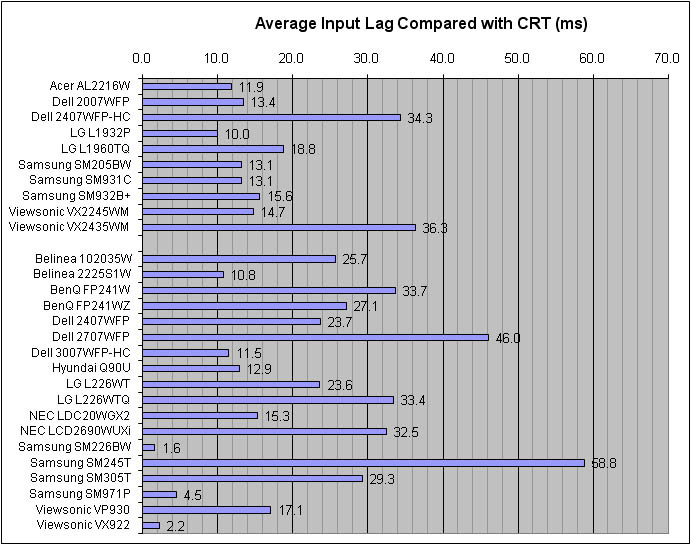
input_lag_comparison_2.jpg

dammit some people actually complained about the 226BW lag :eek:
Others complained from the response time and the color quality, I myself complained about the viewing angles! Now how can I buy the damn thing?!
btw&#8230; so what exactly are my S-IPS choices now (between 21-24)?
 
aha, firus I was just about to link that picture.

I'm one of the picky people that would complain over 1 frame(16.66ms) of input lag but folks theres no way to can notice input lag on a 226BW or a VX922 level monitor.
 
aha, firus I was just about to link that picture.

I'm one of the picky people that would complain over 1 frame(16.66ms) of input lag but folks theres no way to can notice input lag on a 226BW or a VX922 level monitor.

Unless you hook it up to an xbox 360..
 
Back
Top