• Some users have recently had their accounts hijacked. It seems that the now defunct EVGA forums might have compromised your password there and seems many are using the same PW here. We would suggest you UPDATE YOUR PASSWORD and TURN ON 2FA for your account here to further secure it. None of the compromised accounts had 2FA turned on.
    Once you have enabled 2FA, your account will be updated soon to show a badge, letting other members know that you use 2FA to protect your account. This should be beneficial for everyone that uses FSFT.

HTML Popup Formatting

JC724

Weaksauce
Joined
Jan 20, 2016
Messages
118
So I have popup I created for a button.

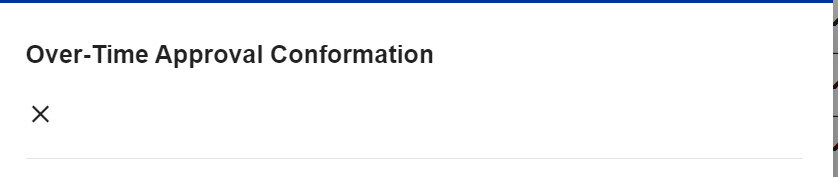
I want to have the text "xXyY" and a X closing symbol right on the side of it. Both at the top of the pop up box with a horizontal line under it.

I was able to put a horizontal line under it and the "xXyY" and X above it but I can't get them side by side.
 
I am not quite following. Do you have your HTML snippet or a screen shot?
 
HTML snippet or it's guesswork for us.

I take it you are trying to get a singular horizontal line under both the text and the X symbol?

If that's the case, then don't use the underscore (<u>) formatting. You'll need to use something like a line break (<hr>).

If you use something like bootstrap, you can create a 2x2 grid and then stick the <hr> in the bottom row container and have it span both columns. This would allow the line to span under both elements even in a variable text width scenario.
 
Sorry, I didn't think about that. This is a screenshot. I am trying to figure out how to get the X on the same line is the "Over Time...." and on the right hand side of it.

I am still learning HTML/CSS. PopUp_NotFormatted.png
 
Is the X supposed to be clickable and some function works after clicking it? Where is is coming from?
Have you looked at w3schools?

If it's just for show: <p>Over-Time Approval Confirmation &#10060;</p> or a <h> tag like so: <h3>Over-Time Approval Confirmation &#10060;</h3>
 
Good ol' float left/float right on divs should work.

ex:

HTML:
<div style="border: 1px solid black;width:300px;height:100px;">
    <div style="float: left;padding: 5px;">Over-time approval confirmation</div>
    <div style="float:right;border:3px solid red;padding:5px;">x</div>
</div>
 
Is the X supposed to be clickable and some function works after clicking it? Where is is coming from?
Have you looked at w3schools?

If it's just for show: <p>Over-Time Approval Confirmation &#10060;</p> or a <h> tag like so: <h3>Over-Time Approval Confirmation &#10060;</h3>
It is click able but for me I don't have to control the functionality behind it. I am just working the UI for visuals
 
Good ol' float left/float right on divs should work.

ex:

HTML:
<div style="border: 1px solid black;width:300px;height:100px;">
    <div style="float: left;padding: 5px;">Over-time approval confirmation</div>
    <div style="float:right;border:3px solid red;padding:5px;">x</div>
</div>
ok I will try this
 
Doesn't necessarily answer the question, but jquery ui is a good framework to start with. To get a dialog box it's as simple as
Code:
...
<div id='dialog'>
text of dialog box
</div>
...

Then call it with your jquery:
Code:
$('#dialog').dialog();

Check it out: https://jqueryui.com/dialog/
 
Back
Top